
Using dwell time and visit data to segment venue guests
This guide shows marketing directors and CRM managers how to build behavioural segments from dwell time and visit frequency data captured through guest WiFi. It covers the full workflow from WiFi login to automated campaign, with worked examples from hospitality and retail. The differentiator is clear: your list builds itself from verified, first-party data - no guesswork, no third-party lists.
Why this matters for your venue
Sending the same email to a first-time diner and a weekly regular damages your engagement and revenue. When you rely on generic email tools to build segments, you make assumptions based on open rates and purchase history. When you use guest WiFi login data, you build segments based on actual physical presence.
Capturing first-party data at the point of login means your list builds itself. Most importantly, it captures dwell time and visit frequency - signals that no third-party data provider can give you. You know exactly who stayed for 10 minutes and who stayed for three hours. You know who visits every Tuesday and who has not returned for six weeks. This data allows you to send campaigns that drive return visits, improve opt-in rates, and increase revenue per send.
The cost of not doing this is clear. A lapsed regular who visited every week for three months and then suddenly disappeared is lost lifetime value. Without visit data, you cannot identify them. Without dwell time data, you cannot tell if their last visit was a satisfying two-hour meal or a frustrated 12-minute exit. Generic email tools like Mailchimp or Klaviyo send campaigns, but they do not build lists from real-world behaviour. This is the gap that Purple Engage fills.
The Approach
Behaviour-based segmentation for physical venues operates on two axes: how long guests stay, and how often they return.
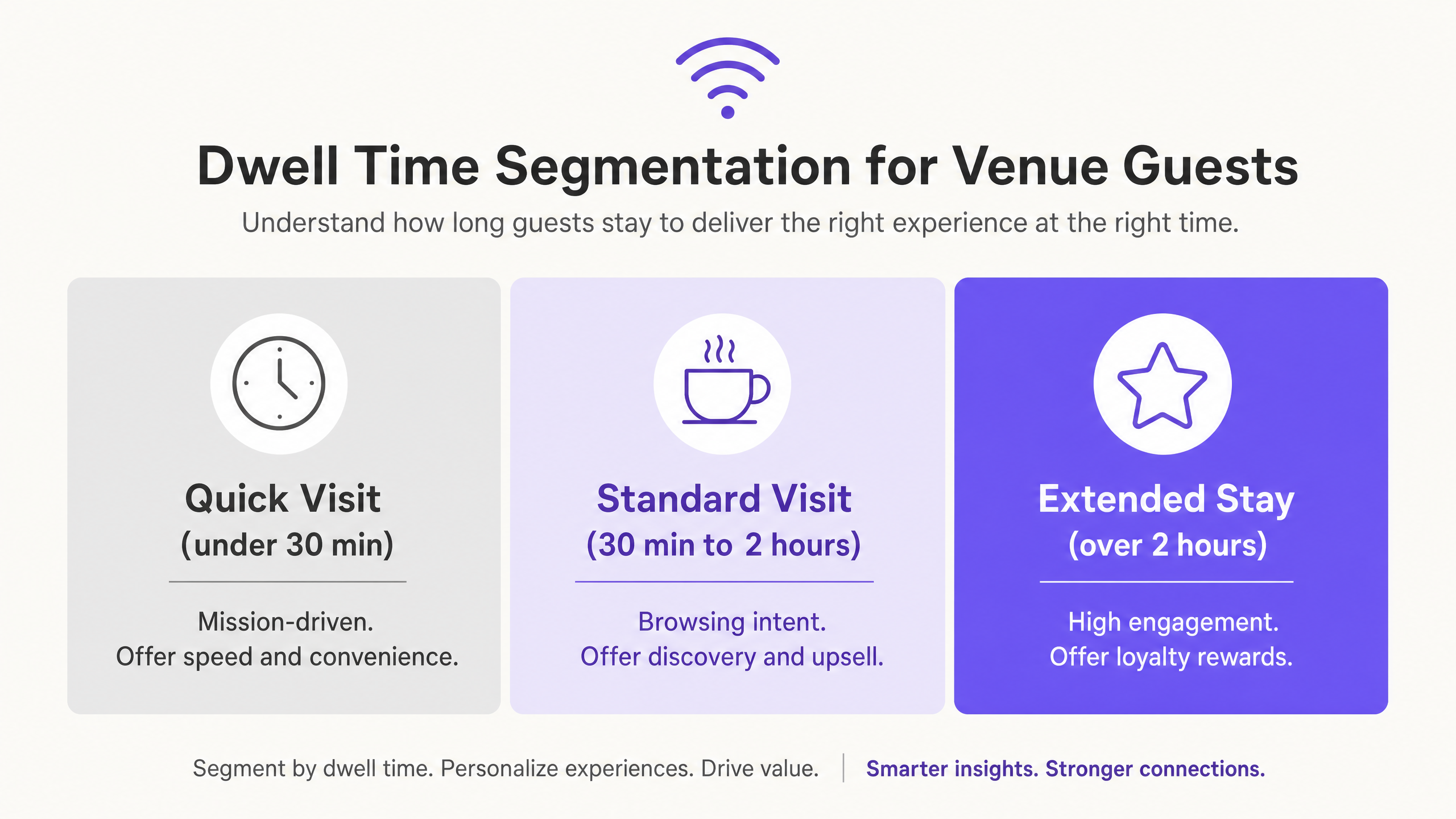
Dwell time is an indicator of intent. A guest who stays for 15 minutes is mission-driven. They came for a specific reason, completed it, and left. A guest who stays for two hours is in a completely different mindset - relaxed, open to discovery, and likely to spend more. These two guests require entirely different messaging.
Visit frequency tells you about loyalty. A guest who visits three times a week is a true regular. Your job is to reward that loyalty and recognise them. A guest who visited once six months ago and never returned is a lost opportunity. Your job is to win them back before they forget you exist.
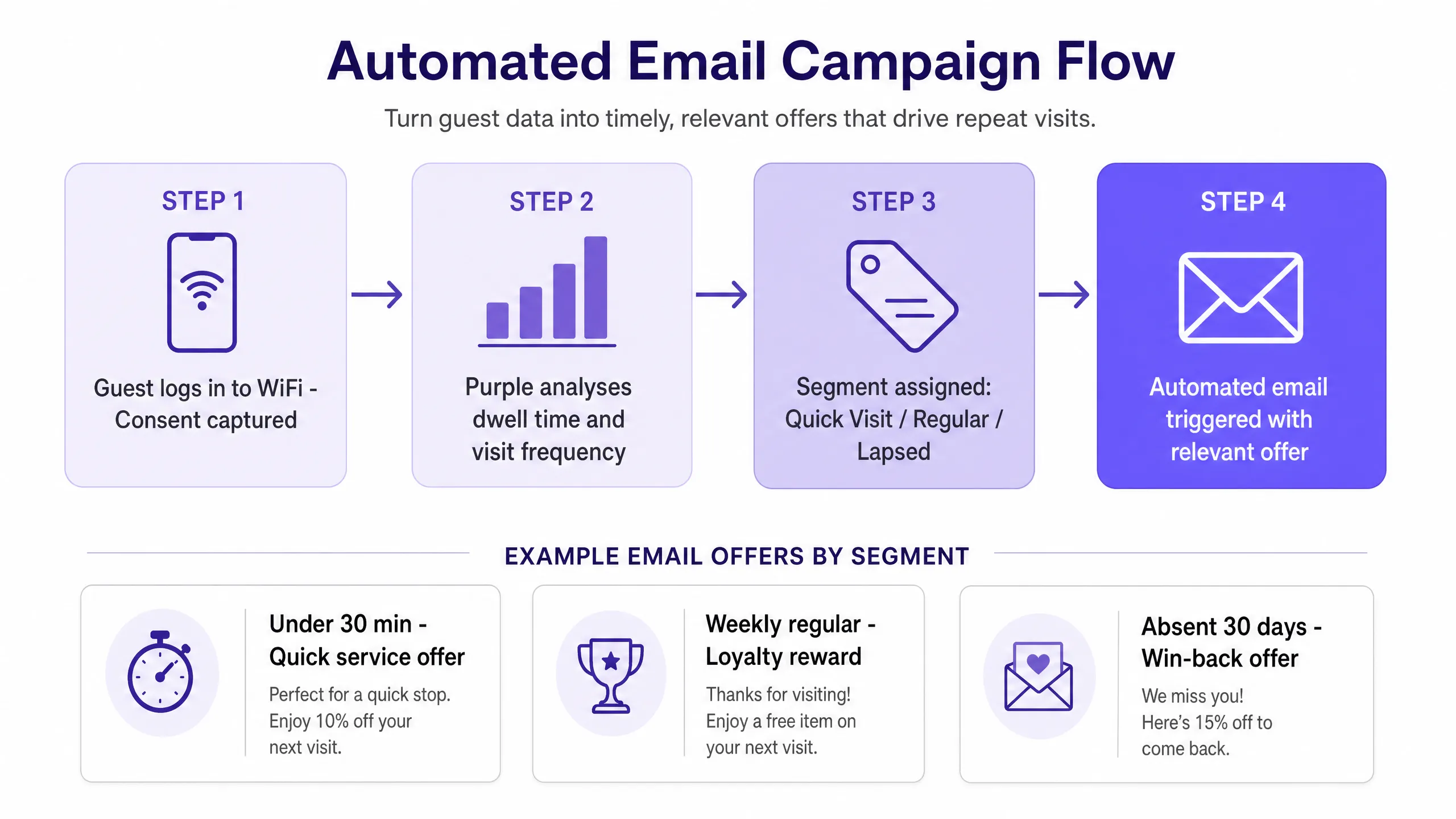
Purple captures these metrics automatically. When a guest logs into your WiFi, they provide explicit consent - fully compliant with GDPR. Purple records the login time, logout time (or last-seen time), and the device's MAC address. This builds a dwell time record for every visit and a visit history for every returning guest. No surveys, no loyalty card sign-ups, no manual data entry.
The result is a verified, first-party dataset reflecting real-world behaviour. Purple runs in over 80,000+ active venues and recorded 440 million logins in 2024 (Purple internal data, 2024). That scale means this segmentation methodology is highly proven across hospitality, retail, travel, and events.
How to do this with your guest WiFi
Purple works as a cloud overlay on your existing hardware. You do not need to replace your access points. Purple integrates with Cisco Meraki, HPE Aruba, Ruckus, Juniper Mist, Ubiquiti UniFi, Cambium, Extreme, and Fortinet.
The setup process takes place in four steps.
Step 1: Connect your hardware. Route your guest network traffic through Purple. With supported hardware, this typically takes less than an hour.
Step 2: Design your Captive Portal. This is the login screen your guests see when they connect. The value exchange must be clear. "Log in with your email to get early access to exclusive offers and events" outperforms "Log in to access WiFi" in terms of opt-in rate. Test two versions and track the difference over 30 days.
Step 3: Define your baseline segments. Start with five: First-time visitor (one visit, no return within seven days). Regular visitor (three or more visits within 30 days). Lapsed visitor (visited at least twice previously, no visit in 30 days). Short dwell (less than 30 minutes). Long dwell (more than two hours).
Step 4: Create your automated campaigns. Assign one campaign to each segment. Set the trigger condition, send delay, and offer. Review and optimise after 30 days.
Purple Engage, our CRM and email marketing platform built for physical venues, handles the segment logic, trigger conditions, and sending process. You only manage the creative and the offer.
What to send and when to send it
Timing and relevance dictate whether a campaign brings guests back or ends up in the bin. The table below pairs each segment with the right message and timing.
| Segment | Trigger | Message | Goal |
|---|---|---|---|
| First-time visitor | 24 hours after first visit | Welcome email giving a reason to return - a discount, event, or loyalty programme invitation | Second visit |
| Regular visitor | Monthly | Loyalty reward - free item, early access, or tier upgrade | Reinforce habit |
| Lapsed visitor | 30 days from last visit | Win-back offer with a clear deadline | Re-establish habit |
| Short dwell (under 30 mins) | 48 hours after visit | Quick-service promotion - takeaway offer, pickup, or speed-focused incentive | Increase visit frequency |
| Long dwell (over 2 hours) | 72 hours after visit | Experience-based offer - special event invitation, loyalty tier upgrade, or premium upsell | Increase spend per visit |
For specific copy templates and subject line guidance, see our guide on what to email guests after their first visit.
One rule applies to all segments: do not send more than one automated campaign per guest per week. Frequency caps prevent fatigue and protect your sender reputation.
Measuring what works
Do not evaluate success by open rates. Measure it by return visits and revenue.
When a guest returns after receiving an email, Purple tracks it. This is the true measure of campaign effectiveness. If you send a 'win-back' offer to a lapsed regular and their MAC address appears at your venue within 48 hours, the campaign succeeded. If you send a loyalty reward to long-dwell guests and the average spend in that segment increases, the campaign succeeded.
Track three metrics for each segment campaign.
Return visit rate: The percentage of recipients who visit the venue within seven days of receiving the email. This is your primary success metric.
Revenue per send: The total revenue generated from campaign recipients in the seven days following the email send, divided by the number of emails sent. This links the campaign directly to the bottom line.
Segment lifetime value: The average spend per visit multiplied by the average visit frequency for guests in each segment. You will notice that long-dwell guests have a higher lifetime value. This justifies a higher offer value for that segment.
Review these three metrics monthly. If a campaign's return visit rate drops below your baseline, change the offer. If revenue per send is stagnant, test a different send time or subject line.
Where to start
This is a sequential checklist. Complete each step before moving to the next.
- Connect your hardware (Cisco Meraki, HPE Aruba, or other supported access points) to Purple.
- Design a Captive Portal with a clear value exchange. A/B test two versions.
- Define your five baseline segments in Purple Engage: First-time, Regular, Lapsed, Short Dwell, Long Dwell.
- Set up an automated campaign for each segment. Start simple - one email, one offer, one trigger.
- After 30 days, review the return visit rate and revenue per send for each campaign.
- Optimise the lowest-performing campaign first. Change only one variable at a time.
- Once all five campaigns are performing above baseline, add a sixth segment based on what the data shows.
The list builds itself. Segments update automatically. Your job is to write the right offer, for the right guest, at the right time.