
Email deliverability basics for venue marketers
Why email deliverability matters for your venue
Your marketing list is only valuable if your emails actually reach your customers. When you send a campaign, internet service providers (such as Gmail, Outlook, and Yahoo) evaluate your sender reputation to decide whether to place your email in the inbox, file it in the spam folder, or block it entirely. A poor sender reputation means lost revenue, wasted effort, and missed opportunities to turn first-time visitors into regulars.
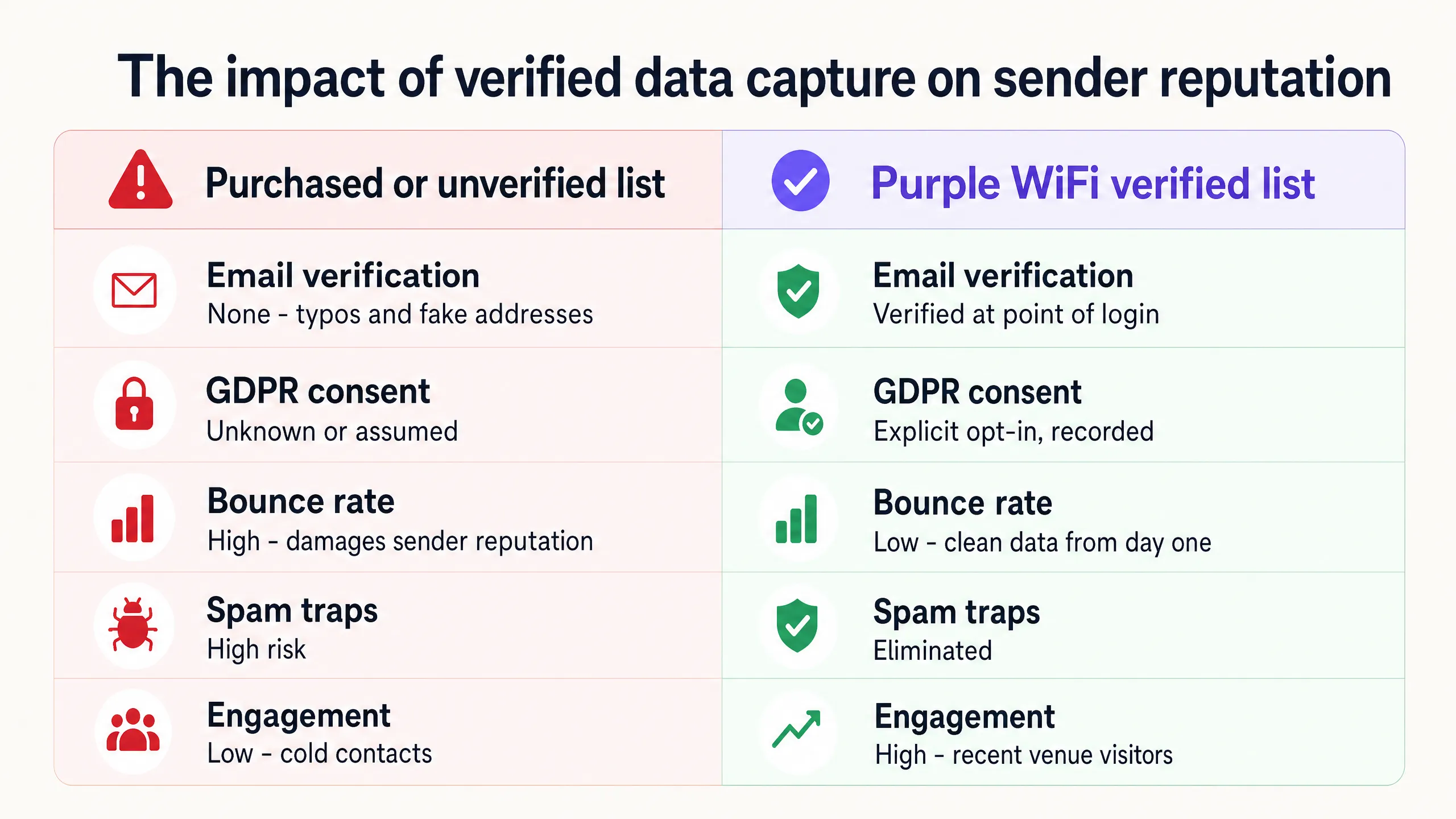
Most venue marketers damage their reputation without realizing it, every time they hit send. Unverified lists, assumed consent, and stale data all lead to high bounce rates and low engagement - the two key signals ISPs use to identify untrustworthy senders. Once your reputation is damaged, it takes months to rebuild.
Generic email tools such as Mailchimp, Klaviyo, and HubSpot are excellent at sending campaigns. But they do not build the list - they rely on you to supply the data. If that data is unverified or unconsented, the problem exists before you send your first email. A clean list that is verified and consented at the point of capture protects your sender reputation from day one.
The solution: verified data with an active opt-in
The foundation of email deliverability is a clean list of highly engaged contacts. For a physical venue, that means capturing data while the customer is on site. When a customer logs in to your WiFi, they are making an active choice to connect. That moment is the ideal opportunity to capture verified first-party data with explicit consent under CCPA/CPRA.
By tying the email address to a real venue visit, you ensure your contacts are genuine and willing to engage. This eliminates the risk of spam traps and drives your hard bounce rate down to near zero. You also capture visit-frequency data, allowing you to segment the list and send highly relevant campaigns to the right people at the right time.
The four fundamentals you need to get right are:
1. List quality - capture only verified, consented addresses. 2. Authentication - configure SPF, DKIM, and DMARC on your sending domain. 3. Engagement - segment by behavior and send relevant content. 4. List hygiene - regularly remove bounces and inactive contacts.
How to achieve it with your guest WiFi
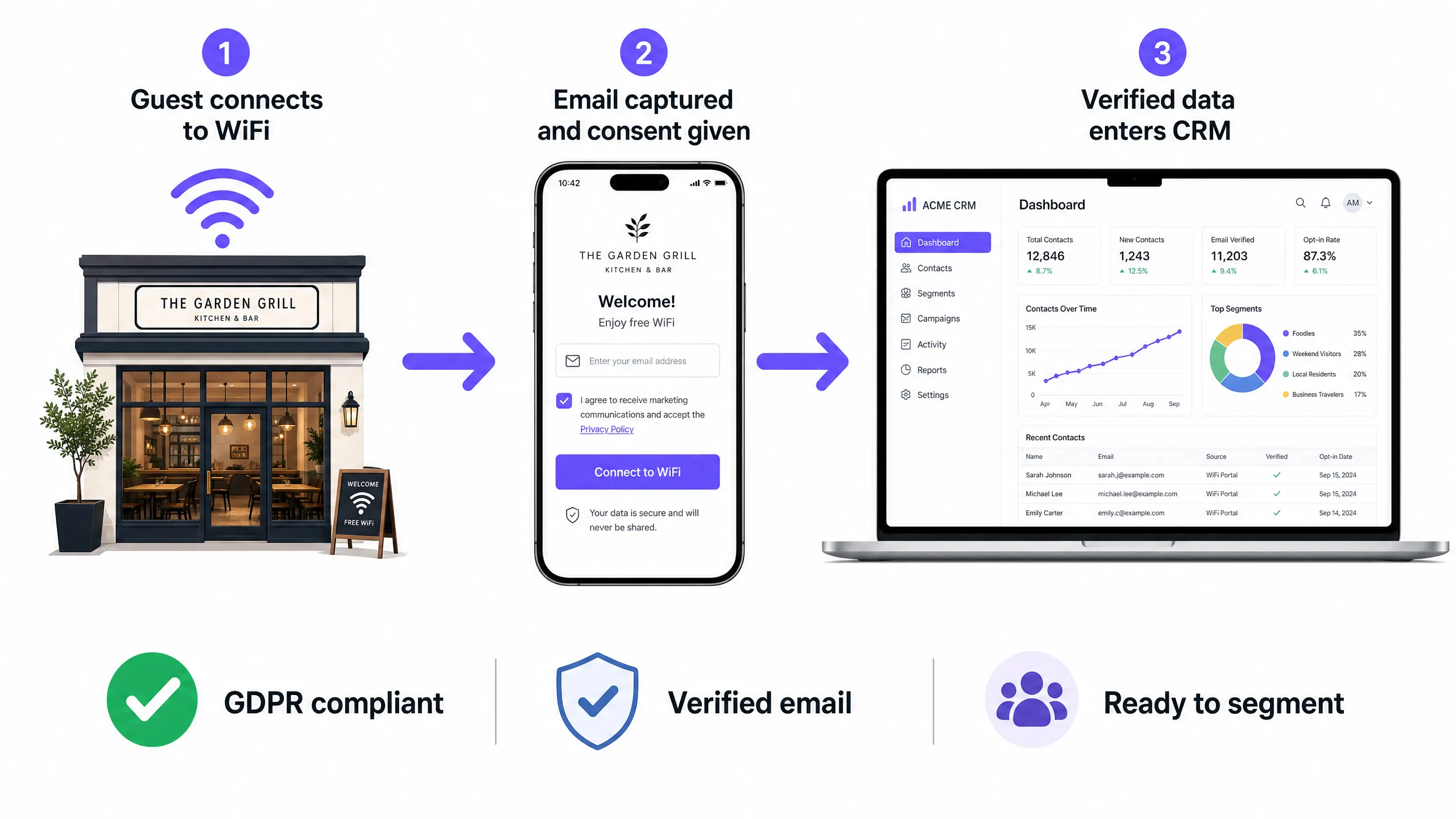
Purple Engage automates the list-building process. When a customer connects to your Guest WiFi, they authenticate through a captive portal. The portal captures their email address and asks them to actively opt in to marketing messages. Because Purple validates email addresses during the login process, you build a list of valid, engaged contacts from the day you go live.
This works with Cisco Meraki, HPE Aruba, Ruckus, Juniper Mist, Ubiquiti UniFi, Cambium, Extreme and Fortinet hardware - so you can get started without replacing your existing network. The verified data flows directly into the Purple Engage CRM, creating a unified profile for each customer that includes visit history, frequency and recency.
Purple is ISO 27001 certified, GDPR and CCPA compliant, and maintains 99.999% uptime across more than 80,000 active venues worldwide. Every opt-in is timestamped and recorded, giving you an auditable consent trail to demonstrate compliance if you ever need to.
Authentication: the three records you must have
Even with a clean list, your emails may never reach the inbox if your sending domain is not properly authenticated. These three DNS records protect your reputation:
| Record | What it does | What happens without it |
|---|---|---|
| SPF | Declares which IP addresses may send email on your behalf | Emails look suspicious; more likely to be filed as spam |
| DKIM | Adds a cryptographic signature proving the email has not been tampered with | Receiving servers cannot verify the sender |
| DMARC | Combines SPF and DKIM and tells servers what to do when checks fail | No protection against domain spoofing; no reporting mechanism |
If you use Purple Engage as your sending platform, authentication is configured for you. If you send from your own domain through a third-party tool, have your IT team or email service provider verify that all three records are in place before your next campaign.
What to send, and when
Sending relevant content to highly engaged segments improves deliverability. Sending the same generic offer to your entire list is the fastest way to damage your engagement metrics and your reputation.
Use the visit data Purple captures to create behavior-based segments:
- Active customers (visited within the last 30 days): loyalty rewards, exclusive previews, event invitations.
- Occasional customers (visited within the last 90 days): seasonal offers, new menu launches, personalized recommendations.
- Lapsed customers (no visit for more than 90 days): targeted re-engagement offers with a clear reason to return.
Trigger automations based on behavior, not a fixed schedule. A welcome email sent within 24 hours of a first visit dramatically outperforms a weekly newsletter sent to everyone. A re-engagement campaign triggered on day 45 reaches lapsed customers at exactly the right moment.
For more on building behavior-based segments from visit data, see our RFM segmentation guide for restaurants and hospitality.
Measuring results
Do not rely entirely on open rates. Privacy features in Apple Mail and other clients mean open rate is no longer fit for purpose as a primary metric. Instead, measure business outcomes: repeat visits and revenue per send.
Track how many customers return to your venue within 14 days of receiving a campaign. Monitor click-through rate to gauge engagement. Keep a close eye on your bounce rate (keep it below 2%) and your spam complaint rate (which should stay below 0.1%). A high return-visit rate shows that your emails are reaching the inbox and driving real-world action.
| Metric | Target threshold | Why it matters |
|---|---|---|
| Bounce rate | Below 2% | Above 2%, sender reputation starts to suffer |
| Spam complaint rate | Below 0.1% | Above 0.1% triggers ISP-level penalties |
| Click-through rate | Above 2% | Sends an engagement signal to ISPs |
| Return-visit rate (14 days) | Benchmark against your baseline | The real business outcome |
Where to start
- Audit your current list-capture methods and remove any unverified or unconsented sources.
- Configure your Purple captive portal to collect email addresses with explicit opt-in consent.
- Verify that SPF, DKIM and DMARC records are configured on your sending domain.
- Segment your existing list by visit recency and remove hard bounces immediately.
- Set up an automated welcome campaign triggered within 24 hours of a first visit.
- Create a lapsed-customer re-engagement segment for contacts who have not visited in 90 days.
- Review your metrics monthly - bounce rate, complaint rate, click-through rate and return-visit rate.