
Event and seasonal promotion emails for venues
This guide details how venues can use first-party WiFi data to execute highly targeted event and seasonal email marketing campaigns. It covers the strategy of planning sends for quiet periods, segmenting lists based on visit behavior, and measuring the revenue impact of your campaigns.
Why this matters for your venue
Here's the uncomfortable truth about most venue email marketing: the list is either tiny, or it's full of people who never actually visited. You bought it, scraped it, or collected it through a competition entry form three years ago. When you send a Valentine's Day dinner invite to that list, you get a 2% open rate and a handful of bookings. You could have done better with a sandwich board outside.
The venues that win at event email marketing have one thing in common: a verified, first-party list built from real guest visits. Every person on that list connected to your WiFi, entered their email address, and consciously opted in to hear from you. That is a CCPA/CPRA-compliant, consent-based list that reflects your actual audience.
Purple's guest WiFi platform collected 440 million logins in 2024 alone, across 80,000 live venues. The data point that matters for you is this: when guests log in through a Captive Portal, they are making a conscious choice to share their details. That is what we call a conscious-choice opt-in. It is not a scraped email. It is not a purchased list. It is a real person who was physically in your venue.
In event email marketing, that distinction is everything. A list built from WiFi logins converts at a fundamentally different rate to a cold or semi-warm list, because every recipient has already demonstrated they like your venue enough to visit.
The quality of your list determines the ceiling of your campaign performance. And the best way to build that list, consistently and automatically, is through your guest WiFi.
The approach
Most venues approach seasonal email marketing the same way. Christmas is coming, so they send a Christmas email. Valentine's Day is coming, so they send a Valentine's email. Mother's Day, Easter, summer - all the obvious moments get a send.
Most venues treat seasonal email marketing in exactly the same way. Christmas is coming, so they send a Christmas email. Valentine's Day is coming, so they send a Valentine's email. Mother's Day, Easter, summer - every obvious moment gets a send.
The problem isn't that those sends are wrong. The problem is that they only target the obvious peaks. The venues that get the biggest revenue uplift from email are the ones that also plan sends for the quiet periods. January. The post-Easter lull. The mid-summer dip. The weeks between school holidays and the summer break.
Think of it this way: your busiest nights don't need email marketing. They need capacity management. Email marketing earns its keep on a rainy Tuesday in February, or a dead Monday in September.
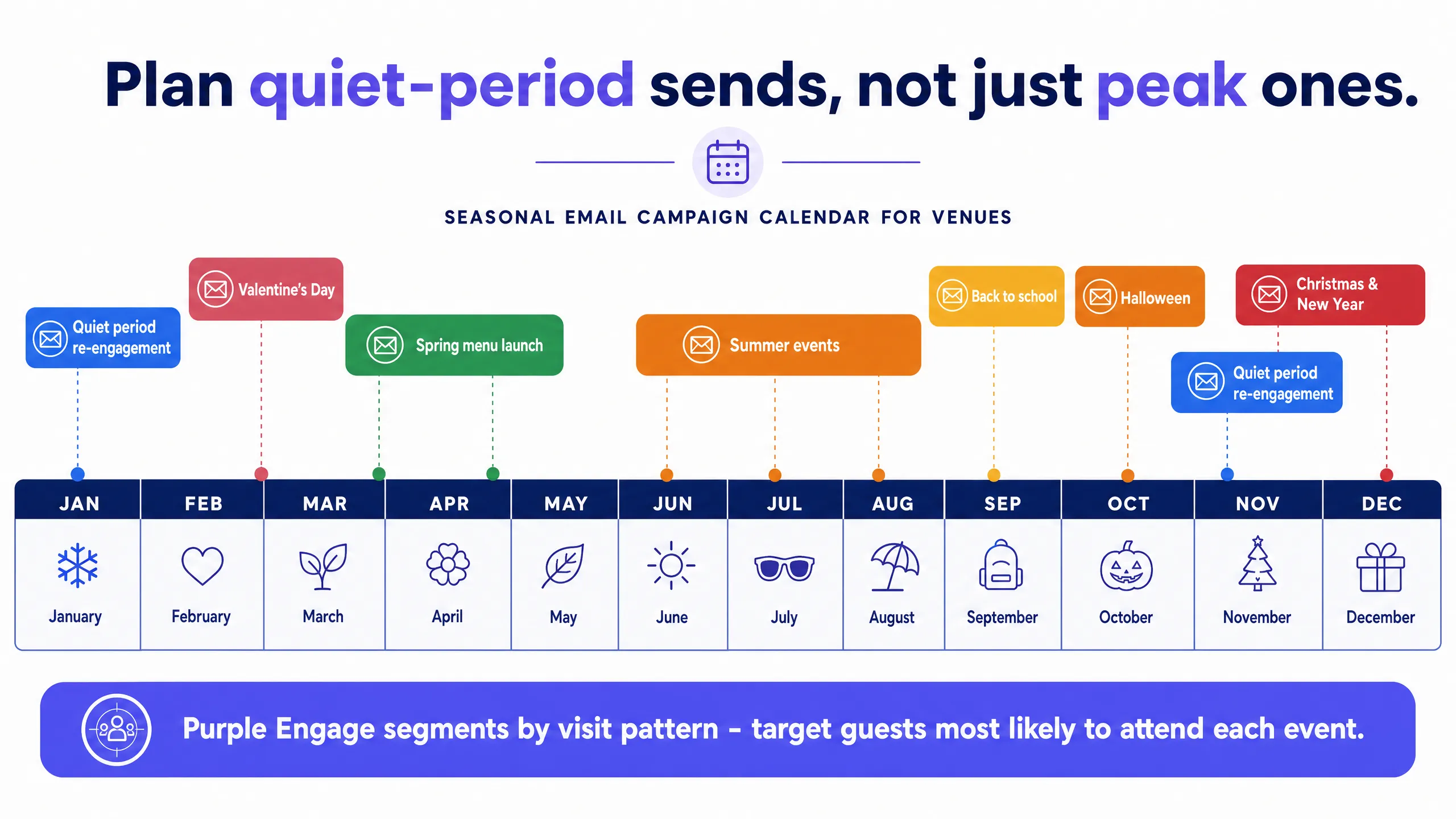
The approach has two parts.
Part one is the obvious seasonal calendar. Map out your twelve months. Identify every event and seasonal moment relevant to your venue type. For a restaurant, that's Valentine's Day, Mother's Day, Father's Day, Easter Sunday, Christmas, New Year's Eve. For a bar, add the Super Bowl, the opening weekend of the NFL season, Halloween. For a hotel, add holiday weekends, local events, school breaks. Build your send calendar around those moments and plan your emails four to six weeks in advance.
Part two is the quiet-period calendar. Look at your foot traffic data for the past twelve months. Identify your three or four quietest periods. Now build specific campaigns targeting those windows. A midweek table-for-two offer in January. A bring-a-friend lunch promotion for the post-Easter lull. A summer afternoon tea push for the dead week in August when your regulars are on vacation.
Quiet-period sends are where you'll see the highest incremental revenue per email sent, because you're not competing with full rooms or full tables. You have spare capacity to fill, and a targeted email to the right segment of your guest list is the most cost-effective way to fill it.
How to do this with your guest WiFi
This is where the mechanics come together.
When a guest connects to your WiFi, Purple captures their email address and logs the visit - the date, the time, and the frequency. Over time, you build a profile of every guest: how often they visit, when they last came in, what time of day they tend to arrive, and whether they're new or returning.
Purple Engage uses that visit data to segment your list automatically. You don't need to tag guests manually or import spreadsheets. The segments build themselves from the WiFi login data.
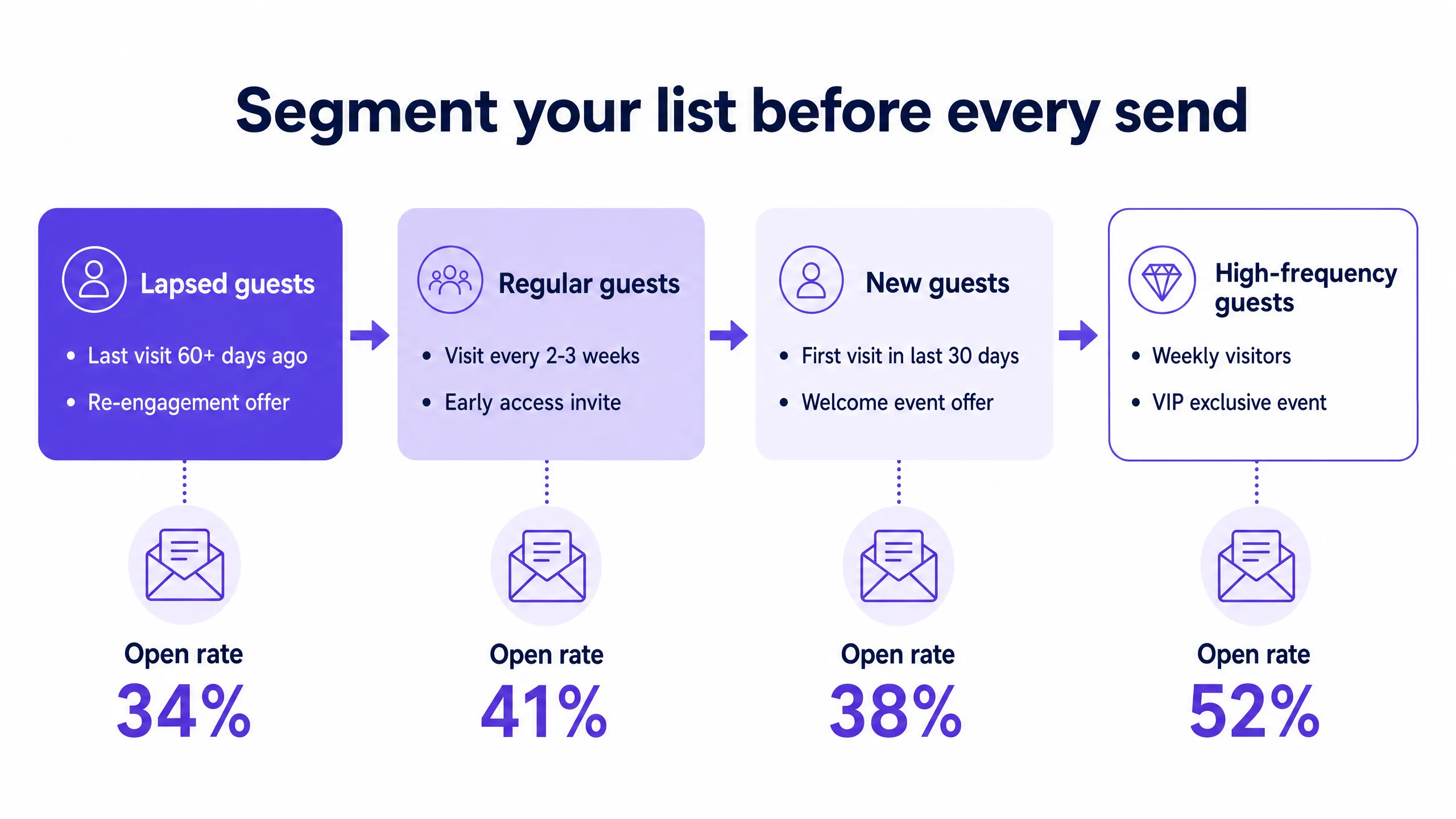
The segments that matter most for event email marketing are as follows.
First, lapsed guests. These are people who visited in the past six months but haven't been back for 60 days or more. They know you, they liked you enough to visit, but something broke the habit. A targeted event invitation - specific and compelling - is often all it takes to bring them back. This segment typically delivers your highest ROI per send, because re-engaging a lapsed guest costs far less than acquiring a new one.
Second, regulars. These are your weekly or biweekly visitors. They're your most loyal audience. For events, they deserve priority treatment. Send them the invitation before everyone else. Give them first pick of the best tables or the limited tickets. They'll feel valued, and they'll turn up.
Third, new guests. Anyone who visited for the first time in the past 30 days. They're still forming their opinion of you. A well-timed event invitation within their first month can convert a one-time visitor into a regular. Keep the offer low-commitment - a free welcome drink at your next event, or a discounted early-bird ticket.
Fourth, high-frequency guests. These are your most valuable guests by lifetime value. They visit multiple times a week. For this segment, consider VIP experiences. An exclusive tasting evening, a behind-the-scenes event. Something that rewards their loyalty with access they can't get anywhere else.
Purple Engage lets you build these segments in minutes and schedule sends against your event calendar. The platform handles CCPA/CPRA consent records automatically, because consent was captured at the WiFi login stage. You're not retrofitting compliance onto a cold list, it's built in from the start.
What to send, and when
Let's get specific about the emails themselves.
For a seasonal peak event (Valentine's Day dinner, for example), your send sequence looks like this.
Four weeks out: a priority booking email to your regulars and high-frequency guests. Subject line along the lines of "Your Valentine's table - before bookings open". This creates genuine scarcity and rewards loyalty.
Two weeks out: the main send to your full opted-in list. This is your broadest-reach send. Include the offer, the menu, the booking link, and a clear deadline.
One week out: a reminder to anyone who opened the first email but didn't book. This is the highest-converting send in your sequence, because you're targeting people who have already shown interest.
Three days out: a final push targeted specifically at lapsed guests. Position it as a "last chance" message. Keep it short. One image, one offer, one button.
For a quiet-period campaign (a midweek January lunch offer, for example), the sequence is simpler.
Ten days out: one email to lapsed guests and new guests. The offer needs to be specific and time-bound. "20% off lunch, Monday to Thursday, this January only" beats "great value this winter".
Five days out: a reminder to non-openers of the first email. Change the subject line. The content can be identical.
That's it. Two sends. Clean, targeted, measurable.
The core principle running through all of this is relevance. A guest who comes in for dinner every Friday night doesn't need a Tuesday lunchtime offer. Purple Engage lets you filter by visit day and time, so you can match the offer to the behavior.
Measuring success
Open rates tell you whether the subject line worked. Click rates tell you whether the offer was compelling. But neither tells you whether the campaign actually drove foot traffic. The metric that matters is return visits within 14 days of the send. Purple Engage tracks this by matching post-campaign WiFi logins against the segment you sent to. That's the number you report to your general manager or your board.
Sending the same email to your entire list will always underperform a targeted send to the right segment. The extra five minutes it takes to set up the segment pays for itself many times over in open rates, click rates and bookings.
Where to start
Here are your next steps.
- Audit your current email list. How was it built? Is every contact a verified, consented, genuine visitor? If not, that's the first thing to fix.
- Map your quiet periods for the next twelve months. Identify three windows where you have capacity to fill, and plan a targeted campaign for each one.
- Build your four core segments in Purple Engage: lapsed guests, regulars, new guests and high-frequency guests. Those four segments cover the vast majority of event email use cases.
- Plan your next event send sequence using the four-touch model for peaks and the two-touch model for quiet periods.
- Measure return visits, not just open rates. That's the number that tells you whether the campaign worked.
For more, you can read our guide: The best email marketing software for restaurants, compared.