
WiFi marketing for retail: turn foot traffic into a customer list
This guide explains how retail venues can use their existing guest WiFi to capture first-party data and build a GDPR-compliant customer list. It covers the business case, the technical setup, and practical strategies for using this data to drive repeat visits and revenue.
Why this matters for your venue
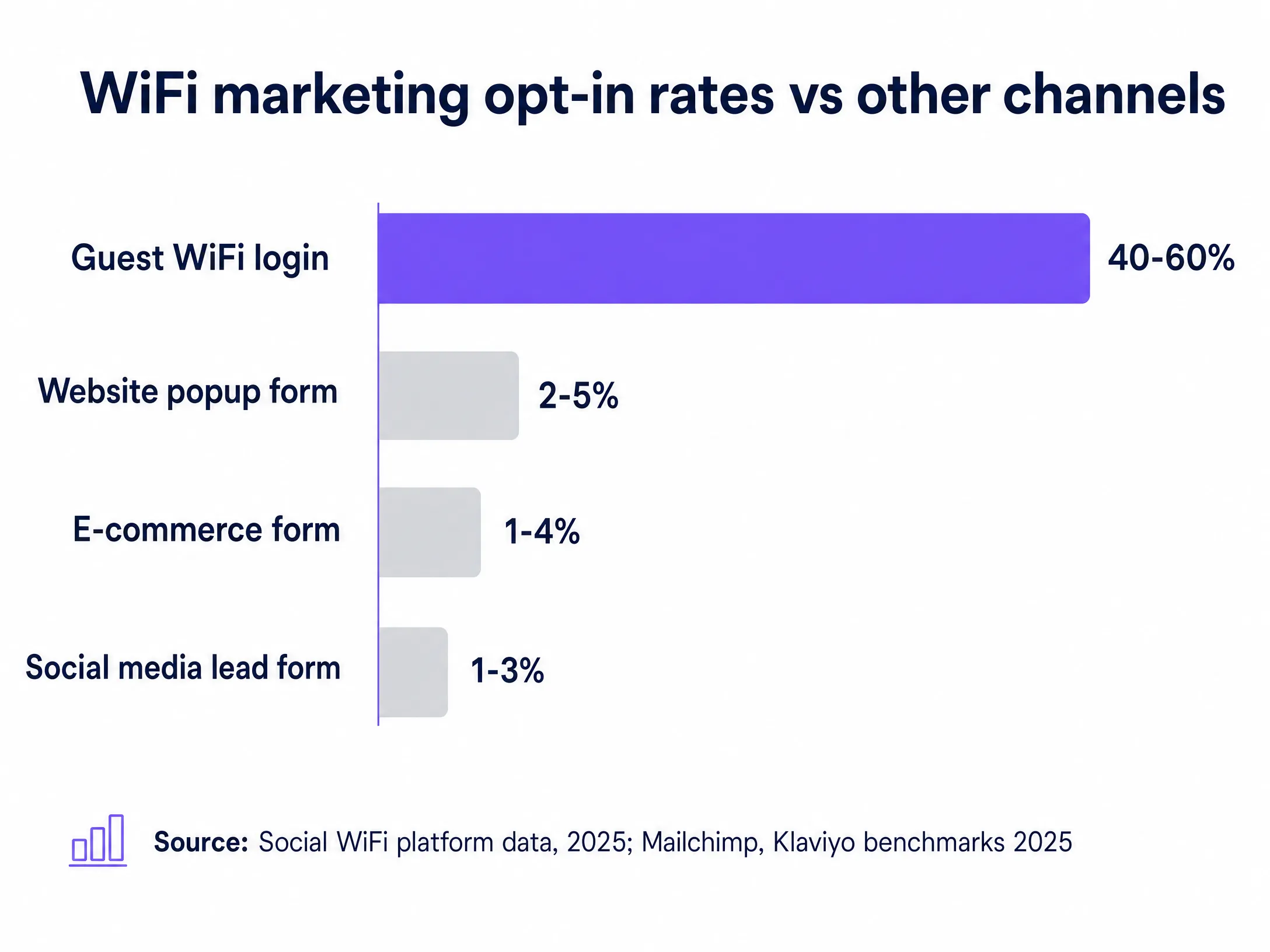
You get footfall. Shoppers come in, browse, buy, and leave. If you do not capture their details, you have no way to reach them again. The average retail website popup converts at between 2% and 5%. That means 95 out of every 100 people who visit your website leave without giving you their contact details. In your physical store, the situation is often worse. You might have a loyalty scheme, but sign-up rates at the till are low. Staff forget to ask. Shoppers are in a hurry.
Meanwhile, your guest WiFi is sitting there, switched on, doing nothing except giving people internet access. This is a missed opportunity. WiFi marketing delivers opt-in rates of 40% to 60%. That is 8 to 12 times higher than a website popup. The reason is simple. There is a clear value exchange. The shopper wants the WiFi. You want their email address and marketing consent. Both parties get what they need, in about 30 seconds, at the exact moment the shopper is in your store.
The approach
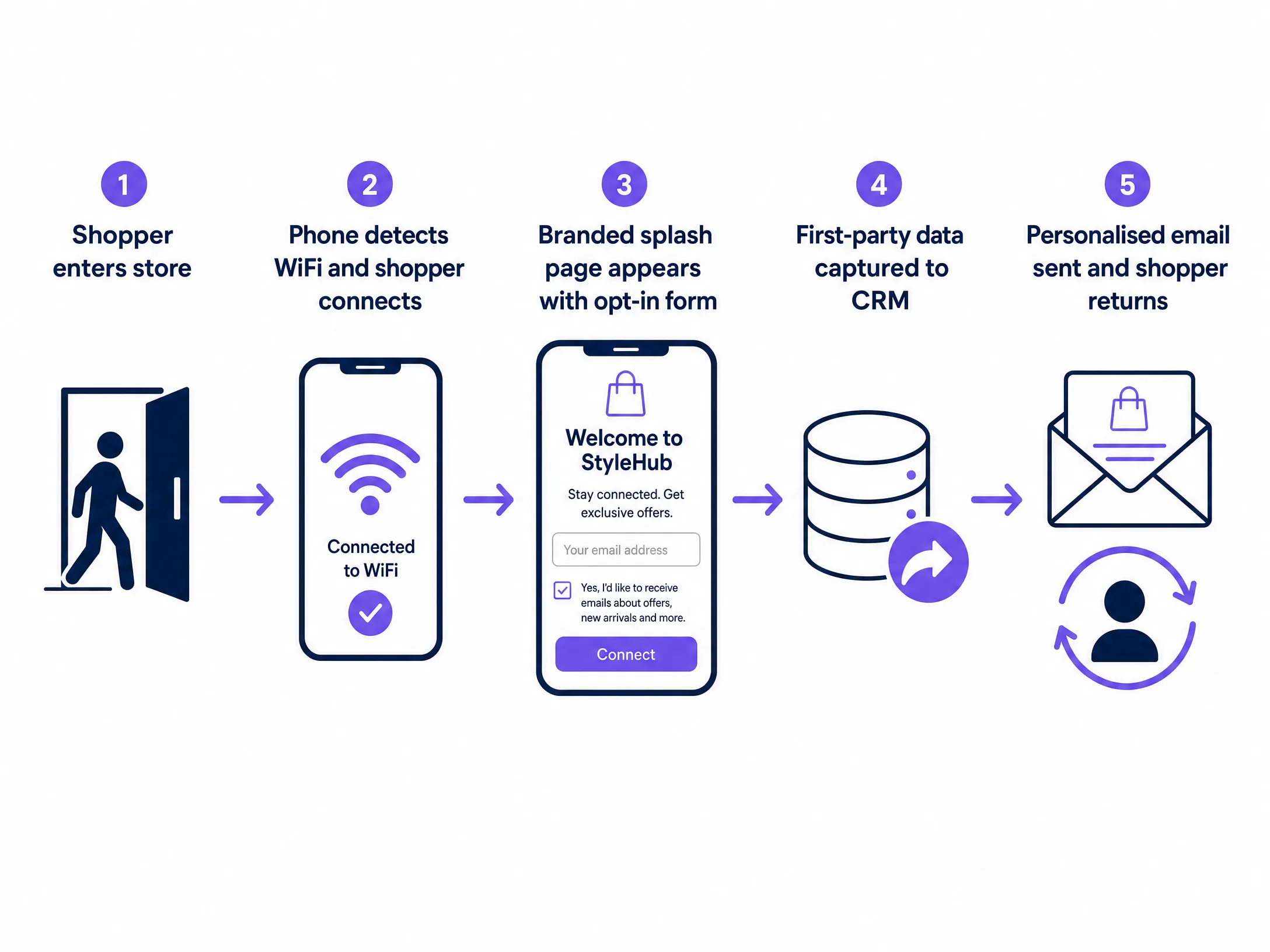
The mechanism is a captive portal. When a shopper connects to your guest WiFi, instead of going straight online, they land on a branded page. That page presents your store branding, a short form asking for their name and email address, and a clear, unticked marketing consent checkbox. The shopper ticks the box, hits connect, and gets their WiFi. You get a verified, consented contact record that flows directly into your CRM.
This is where the distinction between a WiFi marketing platform and a generic email tool matters. Mailchimp is excellent at sending campaigns. Klaviyo is excellent at segmentation and automation. HubSpot is excellent at CRM. But none of them build your list from physical footfall. They all assume you already have the contacts. With Purple Engage, the list builds itself. Every time a shopper connects to your Guest WiFi, a new record is created or an existing record is updated with a new visit.
How to do it with your guest WiFi
Because the consent is captured at the captive portal with a timestamp, an opt-in source, and a record of exactly what the shopper agreed to, it is fully compliant with GDPR. Under GDPR, consent for direct marketing must be freely given, specific, informed, and unambiguous. A clearly worded, unticked checkbox on a branded splash page meets all four criteria. You own the data. Purple acts as the data processor. You remain the data controller.
Consider Harrods. They used Purple's guest WiFi to drive over 4,400 sign-ups through WiFi alone. Those were verified shoppers who had physically walked into the store and chosen to opt in. McDonald's Belgium used Purple to collect over 2.5 million unique visitor records across their estate. That scale of first-party data collection is simply not achievable through website forms or social media lead ads.
What to send, and when
Purple Engage integrates with over 400 connectors, including Salesforce, HubSpot, Mailchimp, and Microsoft Dynamics 365. The moment a shopper opts in, their record flows into your existing CRM automatically.
Once you have the data, you need to use it. The most common mistake is treating the WiFi opt-in list like a broadcast channel. Sending the same email to every contact, every week, regardless of their behaviour, will ruin your deliverability. You must segment. Once you have three to six months of data, you can segment by visit frequency. A first-time visitor gets a welcome offer. A regular gets early access to new arrivals. A lapsed shopper gets a win-back campaign. Set up a welcome email to fire automatically when a new contact is created. That welcome email should arrive within minutes of the shopper connecting. They are still in your store. That is the highest-intent moment you will ever have with that contact.
Measuring what works
Purple tracks WiFi sign-ins before and after campaigns and correlates them with repeat visit frequency and dwell time. Campaign-level reporting in Purple Hub shows open rate, click rate, and uplift in footfall attributed to each email or SMS send, giving you a direct line from WiFi data to revenue impact.
Where to start
- Audit your existing hardware. Purple works as a cloud overlay on top of access points from Cisco Meraki, HPE Aruba, Ruckus, Juniper Mist, Ubiquiti UniFi, Cambium, Extreme, and Fortinet.
- Design your splash page. Keep it simple. Your brand, a short value proposition, a name and email field, and a clear consent checkbox.
- Connect your CRM. Map the fields from the splash page form to your CRM contact record.
- Set up a welcome email. Fire it automatically when a new contact is created.
For more on this topic, read Email marketing for restaurants: a practical guide and How to build an email list from your WiFi (without buying one).