
Grow a first-party email list without discounting your margin
This guide shows how physical venues can build a high-quality, GDPR-compliant email list using guest WiFi, eliminating the need for margin-eroding discounts. It explains the mechanics of first-party data capture at the point of visit, compares opt-in rates across channels, and provides a practical framework for deploying Purple Engage to turn every WiFi login into a verified, conscious-choice opt-in.
Why this matters for your venue
Building an email list usually means sacrificing margin. Most venues trade a 10% discount or a free starter for an email address, which trains guests to wait for a coupon before visiting. That erodes profit on your most loyal customers and attracts people who only want the initial reward and use throwaway email addresses.
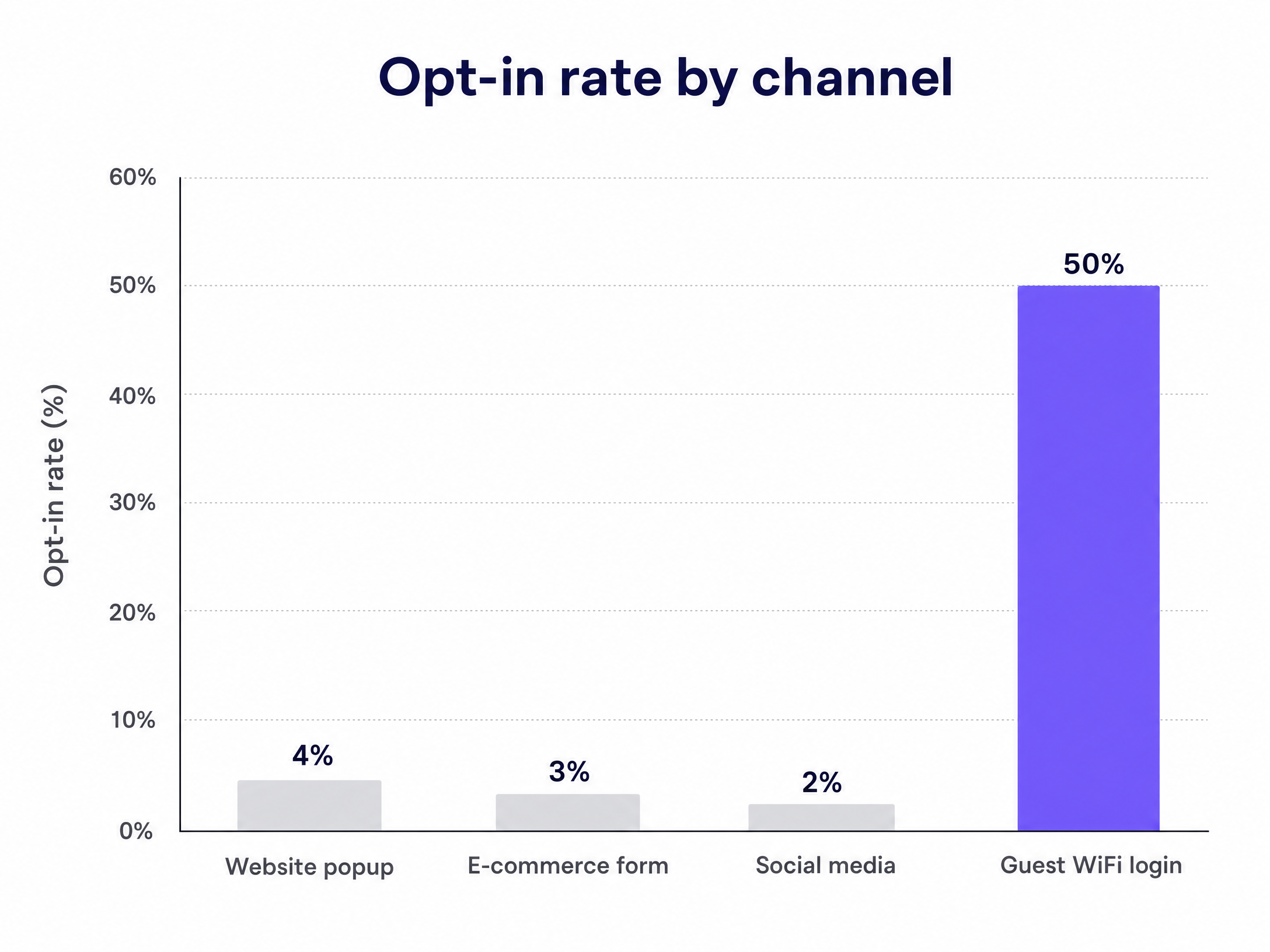
First-party data capture through Guest WiFi changes this. You trade internet access for a verified, voluntary opt-in. The guest gets what they need in the moment, and you build a database of conscious-choice subscribers without giving away margin. Based on Purple's data across more than 80,000 live venues, Guest WiFi logins deliver opt-in rates of up to 50%, while website popups average just 2% to 5% (Purple, 2024).
A list built this way reflects your actual footfall. When you use Purple Engage, the list builds itself automatically around the clock, capturing the people who are already inside your venue. Generic tools like Mailchimp, Klaviyo and HubSpot send the campaigns, but they do not build the list.
The approach
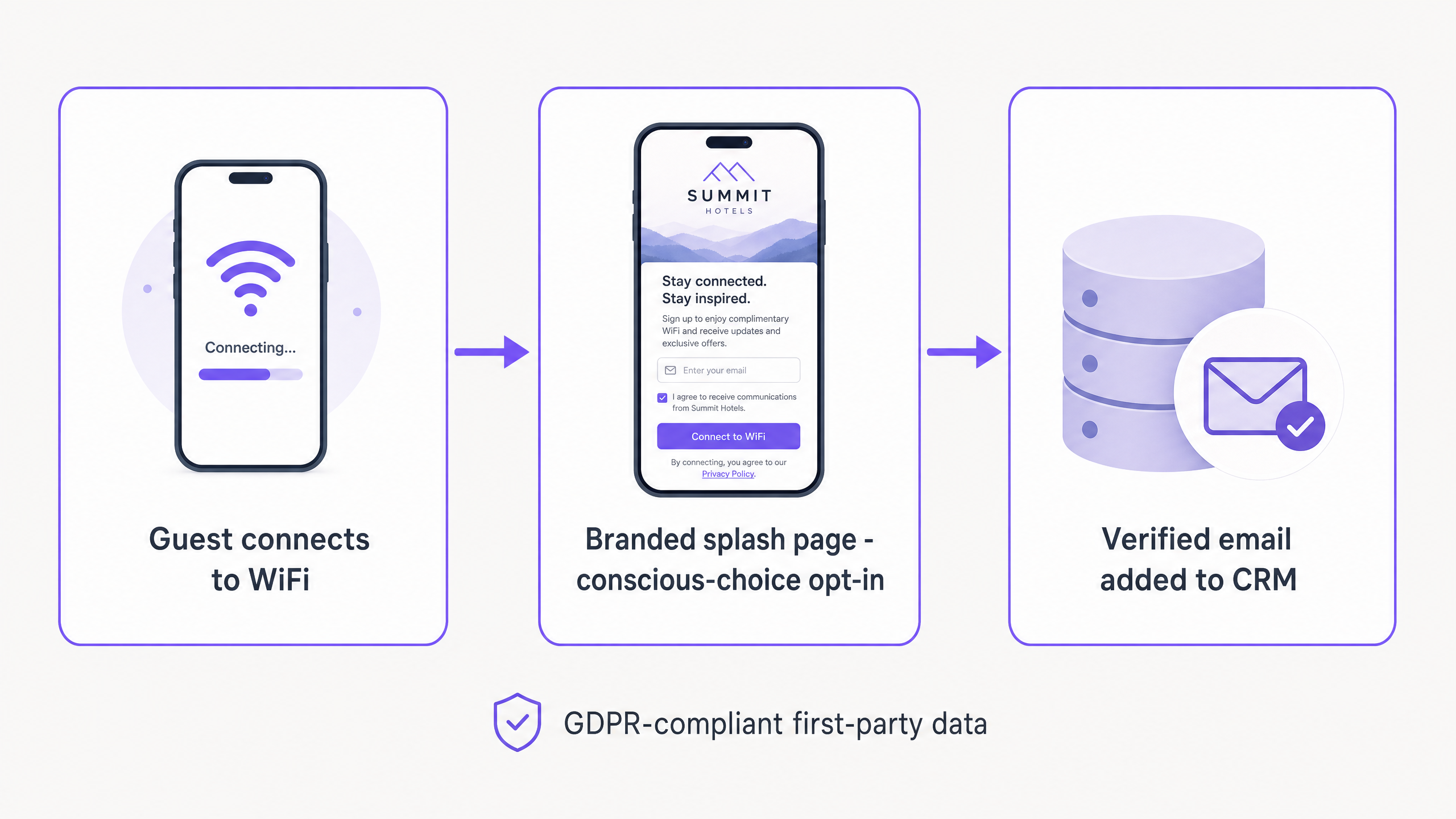
The mechanism is the captive portal - a branded web page that guests must interact with before accessing your WiFi network. A guest connects to your Guest WiFi SSID, is redirected to a login page, and authenticates with their email address or a social account. That authentication verifies identity, reduces bounce rates, and captures a first-party data profile in a single step.
The key difference between this and discount-based sign-ups is motivation. A guest on a captive portal wants internet access. They are already in your venue, already engaging with your brand. The WiFi is the value exchange. You do not need to sweeten the deal with money off the bill.
Pizza Express used this integration to capture 3.7 million unique users in their CRM within two years (Purple, 2024). Harrods achieved a 57x return on investment from their Guest WiFi programme by using the same conscious-choice opt-in model to promote their loyalty scheme (Purple, 2024).
For more on how this applies specifically to retail environments, see Turning retail footfall into an email list.
How to do this with your Guest WiFi
Purple operates as a hardware-agnostic cloud overlay, integrating with Cisco Meraki, HPE Aruba, Ruckus, Juniper Mist, Ubiquiti UniFi, Cambium, Extreme and Fortinet. You can deploy it without replacing your existing hardware.
Step 1 - Configure the network. Set up a dedicated Guest WiFi SSID, isolated from your corporate network. This is standard practice and keeps your business systems separated from public traffic.
Step 2 - Design the splash page. Build a branded login portal. Keep the design clean and the data requirements minimal. Ask for a first name and an email address. Do not ask for a date of birth or a street address at this stage.
Step 3 - Set up the consent terms. Present your privacy policy clearly and use an unchecked checkbox to capture marketing consent. The guest must actively tick it. This is a GDPR requirement and the definition of a conscious-choice opt-in. Purple is fully GDPR, CCPA and ISO 27001 compliant.
Step 4 - Connect your CRM. Integrate Purple Engage with your existing CRM or marketing automation platform to sync new profiles automatically. Purple's average cost per lead across its network is £0.28 (Purple, 2024), and email verification at the point of capture improves database accuracy by 83% (Purple, 2024).
Step 5 - Activate and monitor. Once live, the system runs silently. During the first month, track opt-in rate, list growth and email verification rate weekly.
What to send, and when
The value of a Guest WiFi list lies in the context it provides. You know when a guest is inside your venue and when they leave. Use that to automate your communications.
| Trigger | When to send | Email content | Goal |
|---|---|---|---|
| First WiFi login | 30 minutes after login | Welcome email highlighting venue specialities or events | Build the relationship |
| Network disconnect | 2 hours after leaving | Review request (Google, TripAdvisor) | Capture social proof |
| No visit within 30 days | Day 30 of no visit | Re-engagement email | Win back lapsed guests |
| Repeat visit (5th+) | 1 hour after login | Loyalty programme invitation | Increase customer lifetime value |
The welcome email is the most important send. It sets the tone for the relationship. Do not include a discount. Highlight something distinctive about your venue - a signature dish, an upcoming event, or a new menu. You are building a relationship based on experience, not price.
The re-engagement email is the only scenario where a targeted offer makes sense. You are trying to win back a guest who has already lapsed. Even then, lead with the experience. For long-term list health, "we have launched a new menu" performs better than "here is 10% off".
Measuring success
Open rates and click rates only tell part of the story. For a physical venue, the real measure of email marketing is return visit rate and revenue per send.
Because Purple tracks devices when they re-enter the venue, you can measure the offline impact of online campaigns. If you send an email promoting a Tuesday-night event to 5,000 subscribers, Purple Engage can tell you exactly how many of those recipients walked through your door on Tuesday evening. Mailchimp, Klaviyo and HubSpot cannot do this on their own.
Track these four metrics:
- Opt-in rate - the percentage of WiFi logins that produce a marketing opt-in. Target: 40% or above.
- List growth rate - new verified emails added per week. Benchmark against your weekly footfall.
- Revenue per send - total revenue attributable to a campaign divided by the number of emails sent.
- Return visit rate - the percentage of guests who physically return within 14 days of receiving an email.
After 90 days, compare the lifetime value of WiFi-acquired guests against guests acquired through discount codes. The WiFi cohort consistently shows higher long-term value because their relationship with your brand is not predicated on price.
Where to start
- Audit your hardware. Confirm your access points are on the supported list (Cisco Meraki, HPE Aruba, Ruckus, Juniper Mist, Ubiquiti UniFi, Cambium, Extreme, Fortinet).
- Review your current splash page. Is it branded? Is the consent checkbox unchecked by default? Does it ask for more than two fields?
- Plan your automations. Draft the welcome email and the review request before going live.
- Set your baseline. Record your current opt-in rate, list size and weekly footfall so you can measure the impact.
- Launch and monitor. Deploy the new splash page and track opt-in rate, list growth and return visit rate weekly for the first 30 days.