
Attributing return visits to your email campaigns
This guide explains how physical venues can attribute return visits directly to their email marketing campaigns - the metric that generic tools like Mailchimp and Klaviyo cannot provide. It covers how Purple Engage uses Guest WiFi logins to capture verified, first-party data and then closes the loop by detecting when those same devices return to the venue after a campaign send. Marketing directors and CRM managers will find a complete implementation approach, real-world worked examples, and a clear framework for calculating revenue per send from footfall.
Why this matters for your venue
Sending an email is easy. Knowing whether it worked is hard. Generic email tools tell you who opened a message and who clicked a link. They cannot tell you who walked back through your doors. For a physical venue, an open rate is a vanity metric. A return visit is revenue.
If you cannot measure footfall attribution, you cannot prove the return on investment of your email marketing. You are left guessing whether a busy Friday was the result of your Wednesday campaign, a sunny afternoon, or a soccer match down the road. That ambiguity costs you budget, credibility with your board, and the ability to improve your campaigns over time.
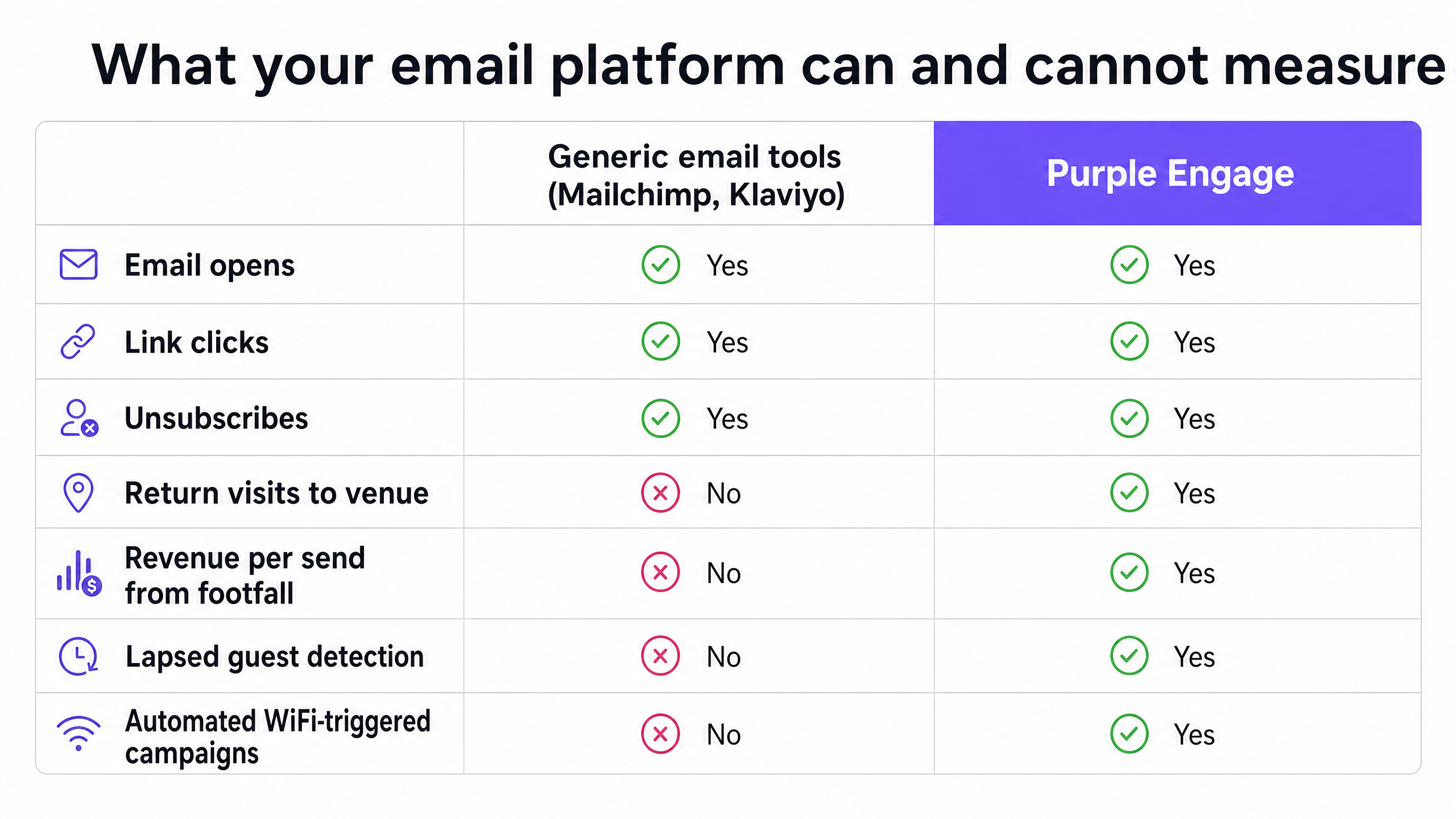
The problem is structural. Tools like Mailchimp, Klaviyo, and HubSpot were built for digital-first businesses. They track what happens in the inbox and on the website. They were not designed to see your front door. Purple Engage was. We connect the digital send to the physical visit, using the same infrastructure your guests already use to get online.
The approach
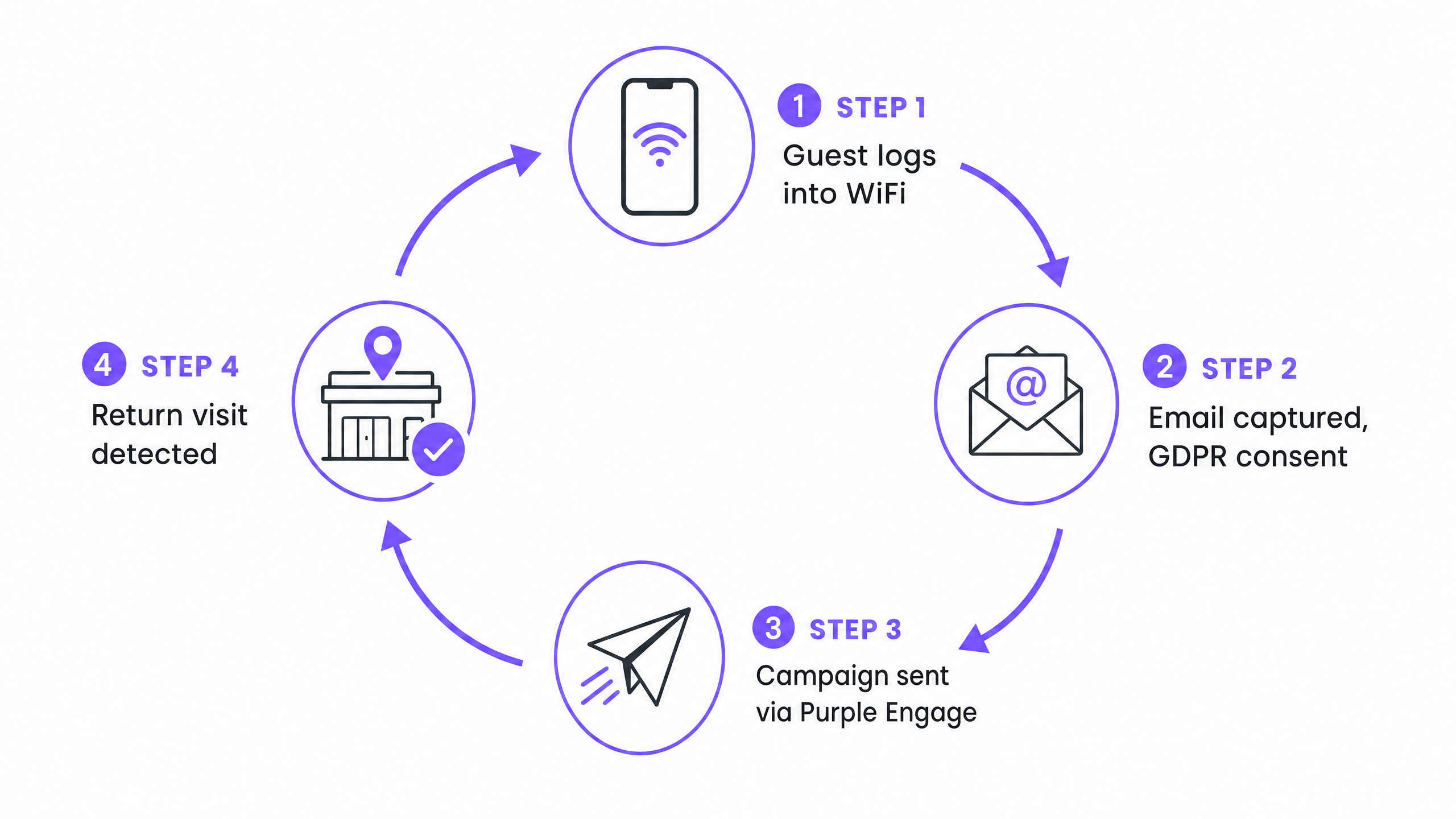
The method relies on a single, continuous thread: the device MAC address. When a guest logs into your Guest WiFi, Purple captures their email address and links it to their device identifier. This is a conscious-choice, first-party opt-in, collected in full compliance with CCPA/CPRA. The guest sees a branded captive portal, enters their email, and explicitly checks a consent checkbox. No dark patterns, no pre-checked boxes.
When you send a campaign through Purple Engage, the system knows exactly who received it. When that same device returns to your venue - even if the guest keeps their cell phone in their pocket - the device probes the network looking for known access points. Purple detects that probe, matches the MAC address to the campaign recipient, and attributes the physical visit to the send. The loop is closed.
This is the core differentiator. Mailchimp can tell you who opened the email. Purple can tell you who came back.
How to do it with your guest WiFi
The foundation is a properly configured Guest WiFi network with a captive portal that captures consent. Without this, you have no list, no attribution, and no proof. Here is how to set it up correctly.
Step 1 - Configure the captive portal. Your splash page must require an email address or social login. The CCPA/CPRA consent checkbox must be unticked by default and must clearly state that data will be used for marketing communications. Purple's portal builder handles this natively, with compliant consent language built in.
Step 2 - Let the list build itself. As guests visit your venue and use the WiFi, Purple Engage automatically adds verified, on-premise contacts to your database. Unlike a purchased list or a sign-up form on your website, every contact in this list has physically been in your venue. Purple has collected 440 million logins across 80,000+ live venues in 2024 (Purple internal data), which gives you a sense of the scale this approach operates at.
Step 3 - Segment before you send. Do not broadcast to your entire list. Use visit recency and frequency to create targeted segments. Guests who visited once six months ago need a different message from guests who visit every week. For a detailed segmentation framework, see our guide on Segmenting guests by visit frequency: how to reward your best customers.
Step 4 - Send the campaign. Build your email in Purple Engage and target your chosen segment. The system records the send timestamp and the list of recipients.
Step 5 - Track the return. Purple monitors device probes across your access points. When a recipient's device is detected within your attribution window, the visit is logged and attributed to the campaign. You see the return visit count in your campaign report alongside the standard open and click metrics.
What to send, and when
Timing and relevance drive return visits. A generic newsletter sent to your full list every month will generate some opens and almost no attributable footfall. You need automated, behavior-triggered campaigns. These three consistently perform across hospitality, retail, and leisure venues.
The welcome email. Send a thank you message 24 hours after a guest's first visit. Acknowledge that they were there. Include a specific incentive for their next visit - a discount, a complimentary item, or a priority booking link. This is the highest-engagement email you will ever send, because the experience is fresh and the relationship is new.
The win-back campaign. Automate an email to trigger when a guest has not been detected at your venue for 60 days. Keep the message direct: you haven't seen them in a while, here is a reason to come back. This is where footfall attribution earns its keep - you can see exactly how many lapsed guests the campaign reactivated, and calculate the revenue that reactivation generated.
The birthday reward. Collect dates of birth on your captive portal and automate a birthday offer. Redemption rates on birthday emails are consistently higher than broadcast campaigns because they feel personal rather than promotional.
For venues running multiple locations, all three automations work at scale. Purple Engage applies the same logic across every site in your estate, attributing return visits to the specific location the guest returns to.
Measuring what works
With Purple Engage, your primary campaign metric shifts from open rate to return visits. Your campaign report shows the number of recipients, the number who opened, the number who clicked, and - crucially - the number who physically returned to your venue within the attribution window you defined.
This allows you to calculate revenue per send. If a campaign drove 50 return visits and your average spend per head is $20, that campaign generated $1,000 in attributable revenue. Divide that by the number of emails sent and you have a revenue-per-send figure that your finance director will understand immediately.
| Metric | What it measures | Who cares |
|---|---|---|
| Open rate | Email was viewed | Email marketing team |
| Click-through rate | Link in email was clicked | Email marketing team |
| Return visits | Guest physically came back | Marketing director, finance |
| Revenue per send | Revenue attributable to the campaign | CEO, finance director |
| Lifetime value uplift | Long-term spend change in attributed guests | CRM director |
Track your natural return visit rate before you run your first attributed campaign. This is your baseline - the percentage of guests who return within your attribution window without any email prompt. Your campaigns need to beat this figure to demonstrate genuine incremental impact.
Where to start
- Audit your current Guest WiFi captive portal. Confirm it captures email addresses and records explicit CCPA/CPRA consent.
- Check your existing email platform. If it is Mailchimp, Klaviyo, or a similar generic tool, identify what return visit data you are currently missing.
- Set up Purple Engage and connect it to your WiFi infrastructure. Purple works with Cisco Meraki, HPE Aruba, Ruckus, Juniper Mist, Ubiquiti UniFi, Cambium, Extreme, and Fortinet.
- Define your attribution window. Fourteen days is the right starting point for most venues.
- Set your baseline return visit rate before sending your first campaign.
- Build and send a welcome email automation. Review the return visit data after 30 days.
- Use those results to make the case for expanding your campaign program.
```of_course} <_eof_>