
Measuring email ROI for physical venues: beyond open rates
Most venue marketers track opens and clicks, but these metrics fail to show whether an email campaign actually drove footfall. This guide explains how to use Guest WiFi data to close the attribution loop - connecting email sends to physical return visits, revenue per send, and customer lifetime value. It is written for marketing directors and CRM managers who need to prove email marketing ROI to leadership.

Why this matters for your venue
If you run marketing for a physical venue, you face a measurement gap that e-commerce brands do not. When an online retailer sends an email, they track the click straight through to the checkout. When you send an email to promote a new menu, a seasonal sale, or a weekend event, you see the open rate and the click rate. You do not see if that person actually walked through your doors on Saturday.
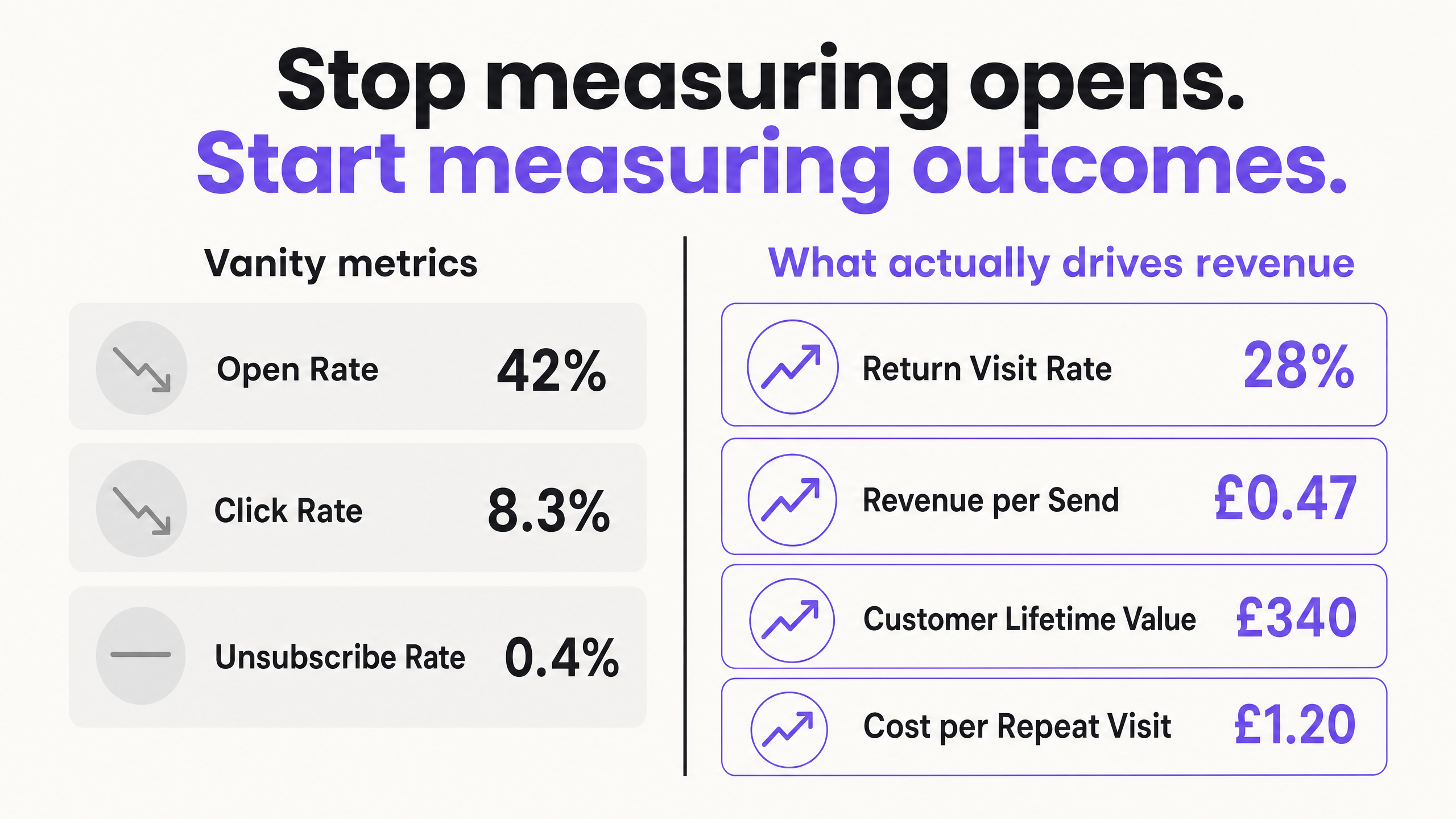
This measurement gap forces venue marketers to rely on vanity metrics. You report a 42% open rate to your leadership team. They ask how many people visited the venue and how much revenue the campaign generated. Without closed-loop attribution, you cannot answer them.
This is where standard email tools fall short for physical spaces. Platforms like Mailchimp or Klaviyo send the campaign, but they cannot verify whether the recipient visited your location. To prove the ROI of your email marketing, you need to connect your digital communications to physical footfall - and you do that by tying your email list to your venue's Guest WiFi network.
The approach
To measure true ROI, you must shift your focus from engagement metrics to outcome metrics. You need to track three specific numbers: Return Visit Rate, Revenue per Send, and Customer Lifetime Value.
First, you need a verified, conscious-choice list of first-party data. You build this list when guests log into your Guest WiFi. They authenticate, accept your terms, and opt into marketing in compliance with GDPR. This creates a clean, verified database of people who have definitively visited your venue - not a rented list, not a scraped list. People who were physically present and made a conscious choice to hear from you.
Second, you send targeted campaigns to this list based on their actual behavior. You know when they last visited, which location they prefer, and how long they stayed.
Third, you measure the result when they return. Because their device is associated with their profile, your network recognizes them the moment they walk back in. You do not need them to click a link, scan a QR code, or redeem a voucher. The network logs the return visit automatically. This is closed-loop attribution.
How to do it with your guest WiFi
Purple Engage makes this process automatic. We sit as a cloud overlay on top of your existing hardware. Whether you use Cisco Meraki, HPE Aruba, Ruckus, Juniper Mist, Ubiquiti UniFi, Cambium, Extreme, or Fortinet, the process is the same.
When a guest connects to your WiFi, they hit a captive portal. They log in using their email address or a social profile. Purple captures this data and stores it in a centralized CRM. This is your first-party data asset - built automatically, every day, by every guest who connects.
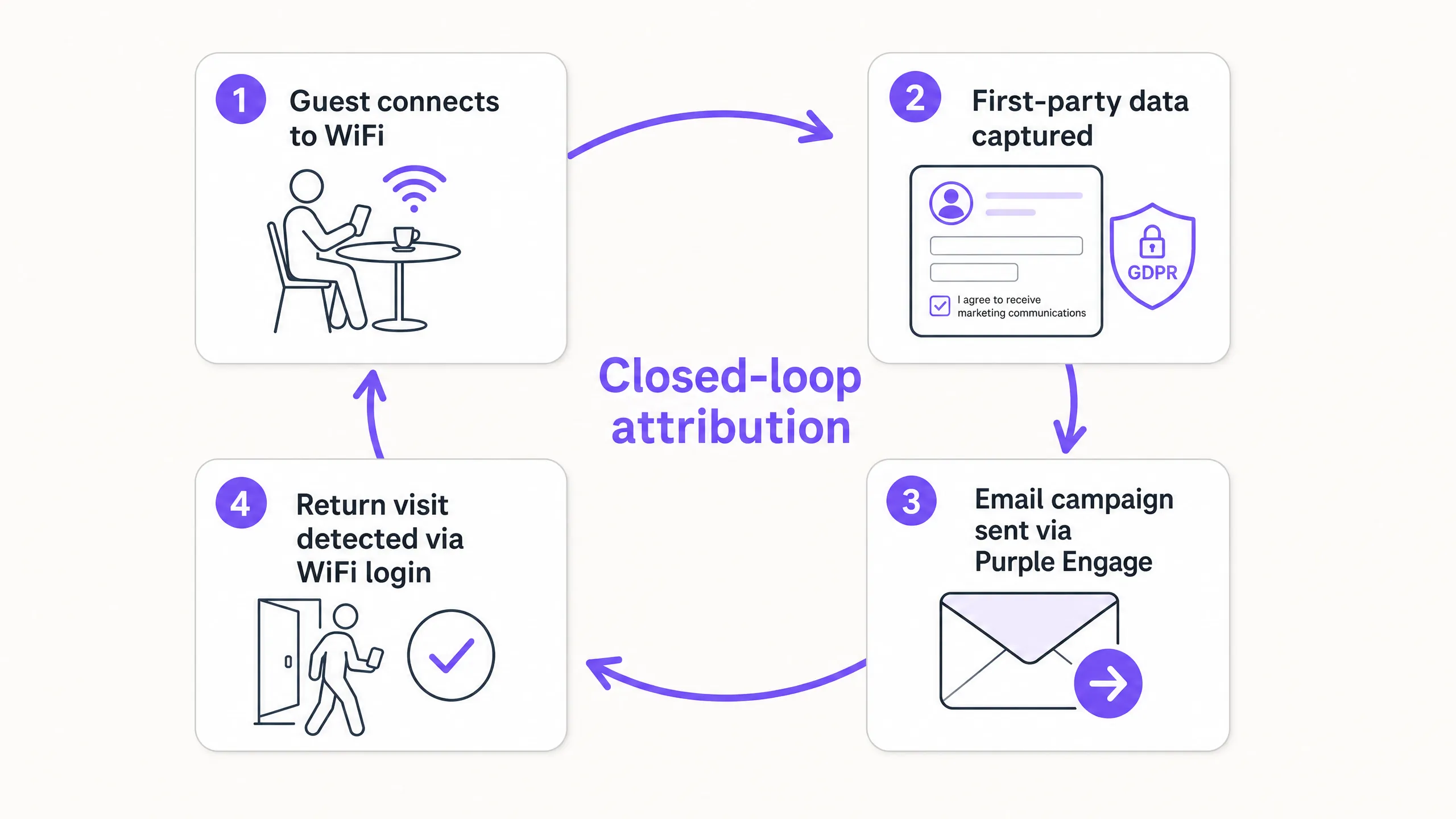
You build your email campaigns directly within Purple Engage. You segment your audience based on demographics, visit frequency, or dwell time. For example, you can isolate guests who visited three times last month but have not returned in 30 days. You send them a targeted offer. When they return, the network logs it. Purple attributes that physical visit back to the specific campaign you sent.
This is what separates Purple from generic email tools. Mailchimp sends the email. Purple sends the email and then tells you who walked back through the door.
What to send, and when
To drive return visits, you must send relevant content at the right time. Batch-and-blast newsletters yield low returns. Automated, behavior-triggered emails drive measurable footfall.
Set up automated campaigns based on the visitor lifecycle. Send a 'Welcome' email two hours after a first-time guest leaves your venue. Send a 'We miss you' offer when a regular guest has not visited in 60 days. Send a birthday promotion two weeks before their birth date.
For ad-hoc campaigns, segment your list by location. If you operate 50 pubs, do not send a promotion for a London event to your Manchester guests. Filter your list by the guests' primary venue and send highly targeted, location-specific offers. For a deeper look at how to build these segments, read our Email segmentation for venues: a practical guide.
| Trigger | Audience | Timing | Goal |
|---|---|---|---|
| First visit | New guests | 2 hours after leaving | Drive second visit |
| Lapsed guest | No visit in 60 days | Day 60 | Re-engage |
| Birthday | Guests with DOB on file | 14 days before birthday | Drive celebration visit |
| Post-event | Attendees at a specific event | 24 hours after event | Capture feedback and repeat booking |
| Seasonal | Full list, segmented by location | 2 weeks before key dates | Drive seasonal footfall |
Measuring what works
Once your campaigns are running, you must measure the outcomes that impact the bottom line.
Return Visit Rate is the percentage of email recipients who physically return to your venue within a specific attribution window - typically 14 or 30 days. This is your new primary metric. A campaign with a 22% return visit rate drove more value than one with a 45% open rate and no measurable footfall.
Revenue per Send is calculated by multiplying your return visits by your average transaction value, then dividing by the total number of emails sent. If you send 10,000 emails, generate 500 return visits, and your average spend is $20, your campaign generated $10,000. Your revenue per send is $1.00. That is a number you can take to the board.
Customer Lifetime Value (CLV) tracks how email engagement affects long-term spend. Guests who engage with your WiFi and email campaigns visit more frequently and spend more over their lifetime than anonymous foot traffic. Measuring CLV by cohort - WiFi-opted-in guests versus walk-in guests - quantifies the long-term value of your data capture program.
| Metric | What it measures | How to calculate |
|---|---|---|
| Return Visit Rate | Footfall driven by email | (Return visits / Emails sent) x 100 |
| Revenue per Send | Financial return per email | (Return visits x Avg transaction) / Emails sent |
| Cost per Return Visit | Efficiency of spend | Campaign cost / Return visits |
| Customer Lifetime Value | Long-term guest value | Avg visit frequency x Avg spend x Avg tenure |
Where to start
- Review your current email metrics. Identify the gap between digital engagement (opens) and physical outcomes (visits).
- Audit your Guest WiFi setup. Ensure you capture first-party data and secure GDPR-compliant marketing opt-ins.
- Integrate your data. Connect your Guest WiFi data to your email marketing platform, or consolidate both within Purple Engage.
- Build your first automated trigger. Start with a 'We miss you' campaign targeting guests who have not visited in 30 days.
- Establish your baseline. Measure the return visit rate of that first campaign to set a benchmark for future performance.