
গেস্ট WiFi ইমেল ক্যাপচার: এটি কীভাবে কাজ করে এবং কী আশা করা যায়
গেস্ট WiFi ইমেল ক্যাপচার প্রতিটি WiFi লগইনকে আপনার নিজস্ব ডেটাবেসে একটি যাচাইকৃত, GDPR-সম্মত কন্ট্যাক্টে রূপান্তরিত করে। এই নির্দেশিকাটি ব্যাখ্যা করে যে কীভাবে captive portal মেকানিজম কাজ করে, কীভাবে এটি আপনার ভেন্যুর জন্য কনফিগার করতে হয় এবং কীভাবে Purple Engage সেই ফার্স্ট-পার্টি ডেটা ব্যবহার করে বারবার ভিজিট এবং পরিমাপযোগ্য রাজস্ব বৃদ্ধি করে। এটি মার্কেটিং ডিরেক্টর এবং CRM ম্যানেজারদের লক্ষ্য করে তৈরি করা হয়েছে যারা থার্ড-পার্টি ডেটার ওপর নির্ভর করা বন্ধ করতে চান এবং এমন একটি তালিকা তৈরি করতে চান যা প্রতিটি গেস্টের আগমনের সাথে সাথে বৃদ্ধি পায়।
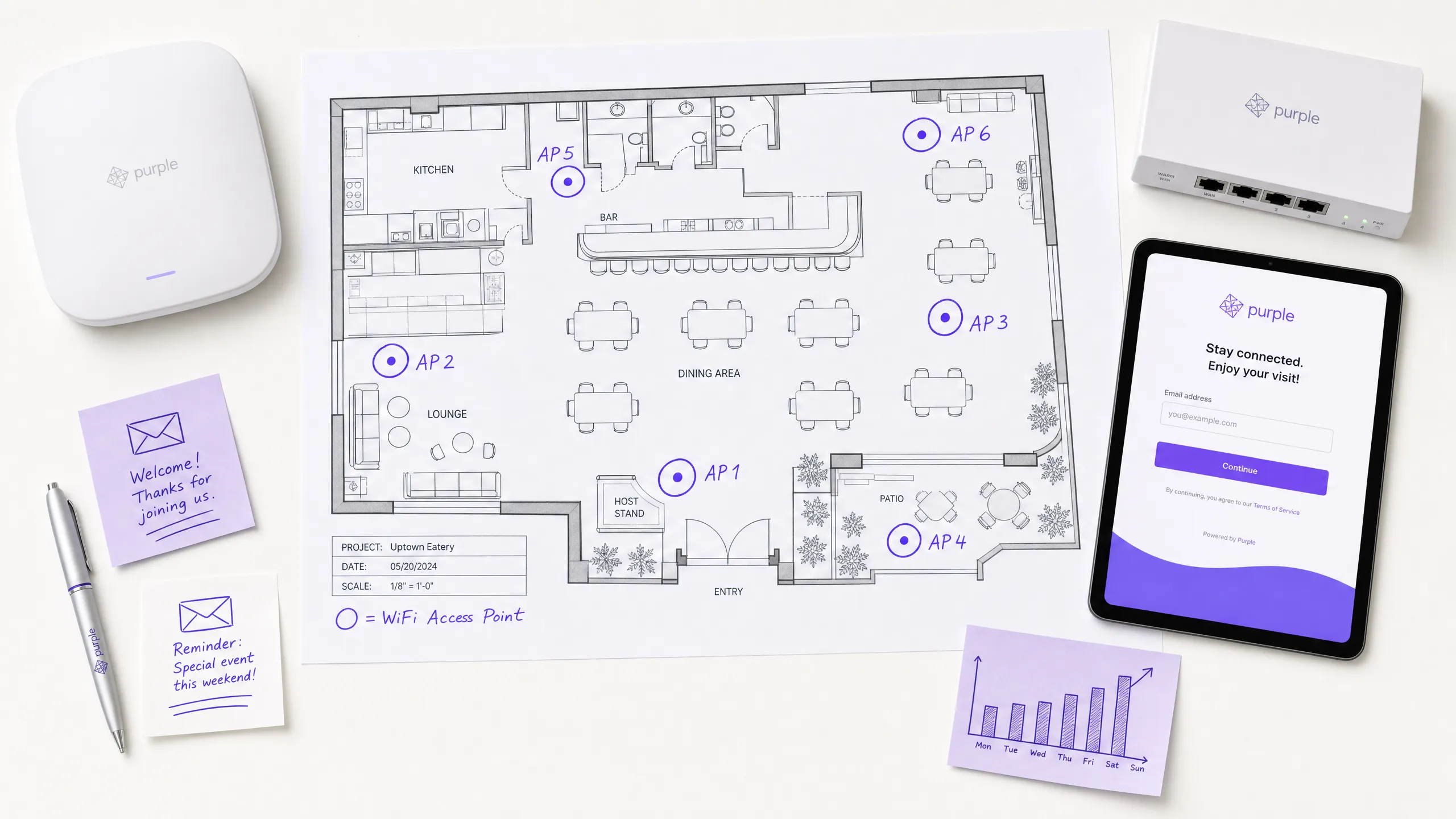
আপনার ভেন্যুর জন্য এটি কেন গুরুত্বপূর্ণ
প্রতিদিন অতিথিরা আপনার রেস্তোরাঁ, হোটেল বা দোকানে আসেন, আপনার WiFi-এ কানেক্ট করেন এবং আপনি তারা কে তা না জেনেই চলে যান। আপনি কোনো থার্ড-পার্টি প্ল্যাটফর্মকে তাদের খুঁজে বের করার জন্য অর্থ প্রদান না করা পর্যন্ত তাদের কাছে আবার পৌঁছানোর কোনো উপায় থাকে না। Facebook, Google এবং প্রোগ্রামেটিক বিজ্ঞাপন নেটওয়ার্কগুলি ইতিমধ্যে যারা আপনার কাছে আসার সিদ্ধান্ত নিয়েছেন তাদের সাথে পুনরায় যোগাযোগ করার জন্য আপনার কাছ থেকে চার্জ নেয়। এটি একটি লয়্যালটি কৌশল পরিচালনা করার জন্য একটি ব্যয়বহুল উপায়, এবং থার্ড-পার্টি কুকিজ বন্ধ হয়ে যাওয়ার সাথে সাথে এটি আরও ব্যয়বহুল হয়ে উঠছে।
গেস্ট WiFi ইমেল ক্যাপচার সেই ফাঁকটি পূরণ করে। এটি একটি মূল্যের বিনিময়ে ইন্টারনেট অ্যাক্সেস প্রদান করে: একটি যাচাইকৃত ইমেল ঠিকানা এবং অতিথির পছন্দের ক্ষেত্রে মার্কেটিং সম্মতির বিনিময়ে বিনামূল্যে কানেক্টিভিটি। এর ফলাফল হলো একটি ফার্স্ট-পার্টি ডেটাবেস যা আপনি ইতিমধ্যে যে ফুড ট্রাফিক জেনারেট করছেন তা থেকে স্বয়ংক্রিয়ভাবে তৈরি হয়। Purple Engage ব্যবহারকারী ভেন্যুগুলি সাধারণত ৩০% থেকে ৫০% অপ্ট-ইন হার দেখতে পায় (Purple অভ্যন্তরীণ ডেটা, ২০২৪), যা প্রতি মাসে প্রতিটি লোকেশন থেকে হাজার হাজার যাচাইকৃত কন্ট্যাক্ট জেনারেট করে। সেই কন্ট্যাক্টগুলি স্বয়ংক্রিয় ক্যাম্পেইনগুলিকে ত্বরান্বিত করে যা বারবার ভিজিট বাড়ায়, প্রতি প্রেরণে রাজস্ব বৃদ্ধি করে এবং এটি প্রমাণ করার জন্য আপনাকে ক্লোজড-লুপ অ্যাট্রিবিউশন দেয়।
আপনি যদি ক্যাম্পেইন পাঠানোর জন্য বর্তমানে Mailchimp, Klaviyo, অথবা HubSpot ব্যবহার করেন, তবে সেই টুলগুলি পাঠানোর কাজে চমৎকার। তারা তালিকা তৈরি করে না। Guest WiFi হলো সেই মেকানিজম যা এটি পূরণ করে।
পদ্ধতি
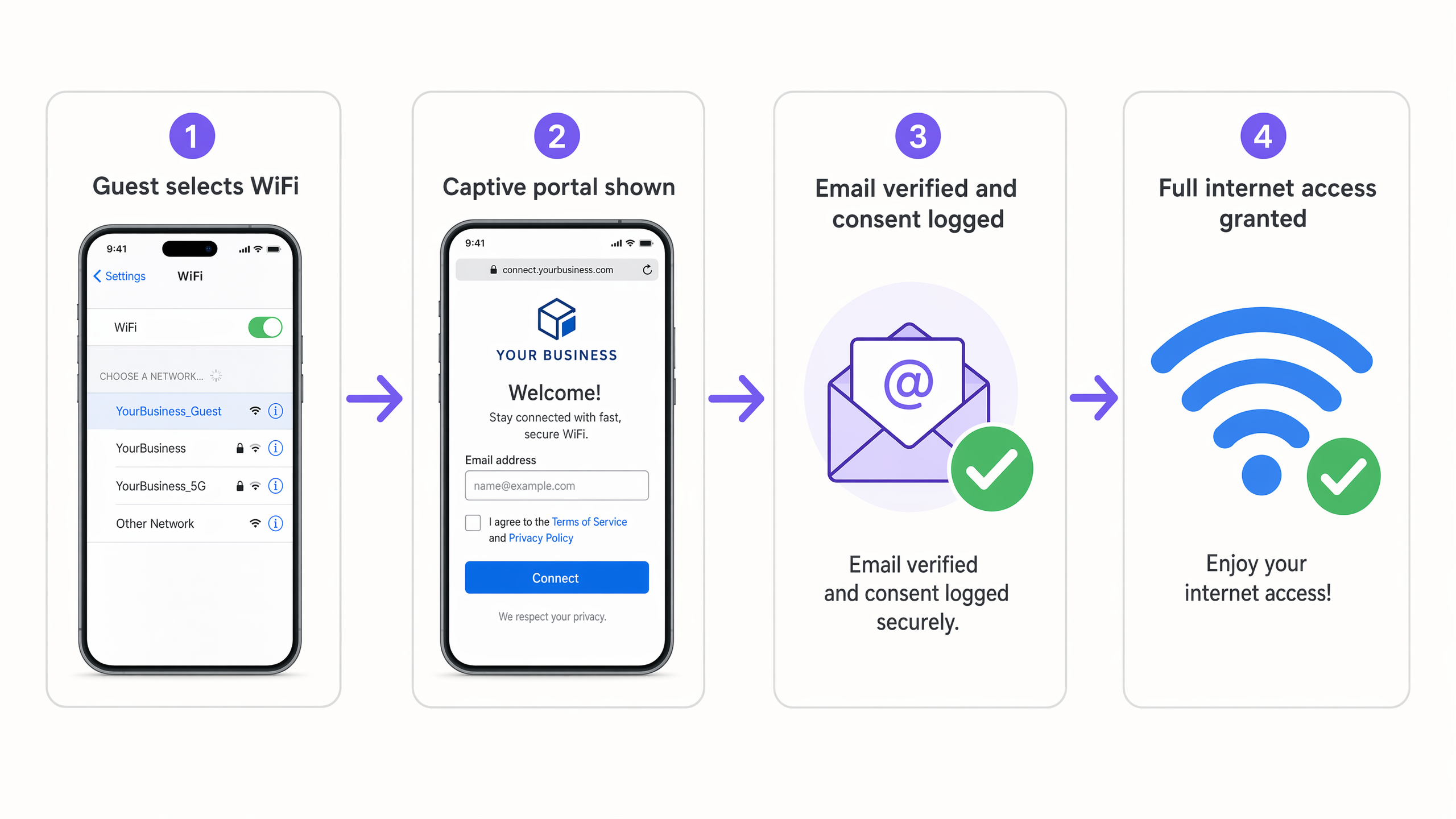
গেস্ট WiFi ইমেল ক্যাপচারের পিছনের মূল মেকানিজম হলো একটি Captive Portal - একটি ওয়েব পেজ যা ডিভাইসের ইন্টারনেট কানেকশনকে ইন্টারসেপ্ট করে এবং অ্যাক্সেস দেওয়ার আগে একটি অ্যাকশন নেওয়ার প্রয়োজন হয়। যখন একজন অতিথি আপনার WiFi নেটওয়ার্কটি সিলেক্ট করেন, তখন অ্যাক্সেস পয়েন্টটি তাদের ডিভাইসটিকে একটি ব্র্যান্ডেড স্প্ল্যাশ পেজে রিডাইরেক্ট করে। সেই স্প্ল্যাশ পেজেই ডেটা ক্যাপচার এবং সম্মতির লগিং ঘটে।
একটি ওয়েবসাইট সাইন-আপ ফর্মের সাথে এর মূল পার্থক্য হলো ভলিউম এবং ভেরিফিকেশন। একটি ওয়েবসাইট ফর্ম এমন লোকেদের ক্যাপচার করে যারা ইতিমধ্যে একটি সাবস্ক্রিপশন খোঁজার জন্য যথেষ্ট আগ্রহী। একটি Captive Portal আপনার নেটওয়ার্কে কানেক্ট করা প্রতিটি অতিথিকে ক্যাপচার করে - যার মধ্যে এমন ব্যক্তিরাও রয়েছে যারা কখনোই আপনার ওয়েবসাইট খুঁজে পেত না। এবং যেহেতু কানেকশন সম্পন্ন করতে ইমেল ঠিকানার প্রয়োজন হয়, তাই ডেটার গুণমান স্বাভাবিকভাবেই একটি স্বেচ্ছামূলক ফর্মের চেয়ে বেশি হয়।
এই ফ্লো-টির চারটি ধাপ রয়েছে। অতিথি আপনার WiFi নেটওয়ার্ক সিলেক্ট করেন। হার্ডওয়্যার তাদের Purple-হোস্টেড স্প্ল্যাশ পেজে রিডাইরেক্ট করে। তারা তাদের ইমেল ঠিকানা প্রবেশ করায় এবং ঐচ্ছিকভাবে মার্কেটিং সম্মতির চেকবক্সটি চেক করে। Purple প্রোফাইল এবং সম্মতির ডেটা লগ করে, তারপর RADIUS-এর মাধ্যমে ডিভাইসটিকে অথোরাইজড করে সম্পূর্ণ ইন্টারনেট অ্যাক্সেস প্রদান করে। দেয়।UK এবং EU-তে এই প্রক্রিয়ার জন্য GDPR হল গভর্নিং ফ্রেমওয়ার্ক। এর জন্য মার্কেটিং সম্মতি অবাধে দেওয়া, নির্দিষ্ট, সুনিশ্চিত এবং দ্ব্যর্থহীন হওয়া প্রয়োজন। তার মানে হল সম্মতির চেকবক্সটি ডিফল্টরূপে আনচেক করা থাকতে হবে, মার্কেটিং-এর উদ্দেশ্যটি এর পাশে স্পষ্টভাবে উল্লেখ করতে হবে এবং ইন্টারনেট অ্যাক্সেসের শর্তাবলীর সাথে সম্মতি একত্রিত করা যাবে না। Purple প্রতিটি অপ্ট-ইনের জন্য টাইমস্ট্যাম্প, প্রদর্শিত সঠিক শব্দবিন্যাস এবং IP অ্যাড্রেস রেকর্ড করে স্বয়ংক্রিয়ভাবে সম্মতি লগিং পরিচালনা করে।
আপনার গেস্ট WiFi-এর সাহায্যে এটি কীভাবে করবেন
গেস্ট WiFi ইমেল ক্যাপচার বাস্তবায়নের জন্য চারটি কনফিগারেশন ধাপের প্রয়োজন।
ধাপ ১ - SSID কনফিগার করুন। আপনার অ্যাক্সেস পয়েন্টগুলিতে একটি ওপেন SSID সেট আপ করুন। MAC-ভিত্তিক প্রমাণীকরণ সক্ষম করুন এবং একটি ওয়াল্ড গার্ডেন কনফিগার করুন যা প্রমাণীকরণ সম্পন্ন হওয়ার আগে শুধুমাত্র Purple পোর্টাল এবং যেকোনো সোশ্যাল লগইন প্রদানকারী (যেমন Google Workspace বা Microsoft Entra ID) ট্রাফিকের অনুমতি দেয়। Purple সরাসরি Cisco Meraki, HPE Aruba, Ruckus, Juniper Mist, Ubiquiti UniFi, Cambium, Extreme এবং Fortinet-এর সাথে কাজ করে।
ধাপ ২ - স্প্ল্যাশ পেজ ডিজাইন করুন। ব্র্যান্ডেড captive portal তৈরি করতে Purple-এর ড্র্যাগ-অ্যান্ড-ড্রপ এডিটর ব্যবহার করুন। এটিকে পরিষ্কার রাখুন: আপনার লোগো, একটি ভ্যালু প্রপোজিশন যা বিনিময়ের ব্যাখ্যা দেয় এবং লগইন ফর্ম। ভ্যালু প্রপোজিশন হল আপনার অপ্ট-ইন হারের একমাত্র সবচেয়ে বড় চালিকাশক্তি। "আমাদের WiFi-এ কানেক্ট করুন" কোনো ভ্যালু প্রপোজিশন নয়। "ফ্রি WiFi এবং আপনার পরবর্তী ভিজিটে ১৫% ছাড়ের জন্য কানেক্ট করুন" হল একটি সঠিক ভ্যালু প্রপোজিশন।
ধাপ ৩ - সম্মতির নিয়ম সেট করুন। ফর্মে কোন ডেটা ফিল্ডগুলি প্রদর্শিত হবে তা কনফিগার করুন। ইমেল হল ন্যূনতম প্রয়োজনীয়তা। ফার্স্ট নেম ব্যক্তিগতকরণের সুবিধা দেয়। জন্মতারিখ জন্মদিনের ক্যাম্পেইন সক্ষম করে। প্রতিটি অতিরিক্ত ফিল্ড ফর্ম পূরণের হার কমিয়ে দেয়, তাই শুধুমাত্র যা ব্যবহার করবেন তা জিজ্ঞাসা করুন। মার্কেটিং সম্মতির চেকবক্সটি ঐচ্ছিক, স্পষ্টভাবে লেবেলযুক্ত এবং আনচেক করা থাকতে হবে। Purple স্বয়ংক্রিয়ভাবে GDPR-সম্মত সম্মতির টেক্সট তৈরি করে।
ধাপ ৪ - ইমেল ভেরিফিকেশন সক্ষম করুন। ফর্ম জমা দেওয়ার সাথে সাথে সীমাবদ্ধ অ্যাক্সেস (উদাহরণস্বরূপ, কম গতিতে পাঁচ মিনিট) মঞ্জুর করতে এবং তারপরে জমা দেওয়া ঠিকানায় একটি ভেরিফিকেশন লিঙ্ক পাঠাতে Purple কনফিগার করুন। গেস্ট লিঙ্কটিতে ক্লিক করার পরেই কেবল সম্পূর্ণ অ্যাক্সেস মঞ্জুর করা হয়। এটি ভুয়া ইমেল এন্ট্রি দূর করে এবং আপনার প্রেরকের সুনাম পরিচ্ছন্ন রাখে।
পোর্টালটি লাইভ হয়ে গেলে, Purple তাদের MAC অ্যাড্রেস দ্বারা প্রমাণিত ডিভাইসগুলিকে মনে রাখে। আপনি ৩৬৫ দিন পর্যন্ত একটি পুনঃপ্রমাণীকরণ উইন্ডো সেট করতে পারেন, যার অর্থ ফেরত আসা গেস্টরা পোর্টালটি পুনরায় না দেখেই স্বয়ংক্রিয়ভাবে সংযুক্ত হন। এটি আপনার অ্যানালিটিক্সে তাদের ফেরত আসার ভিজিট লগ করার সাথে সাথে বিশ্বস্ত গেস্টদের অভিজ্ঞতাকে সুরক্ষিত রাখে।
কী পাঠাবেন এবং কখন পাঠাবেন
ডেটাবেসটি শুধুমাত্র সেই ক্যাম্পেইনগুলির মতোই মূল্যবান যা আপনি এর বিপরীতে চালান। Purple Engage আপনার যাচাইকৃত পরিচিতি তালিকাকে একটি অটোমেশন ইঞ্জিনের সাথে সংযুক্ত করে যা কেবল ইমেল ইন্টারঅ্যাকশন নয়, বরং বাস্তব জগতের ভেন্যু আচরণের উপর ভিত্তি করে মেসেজ ট্রিগার করে।
অধিকাংশ ভেন্যুর জন্য তিনটি অটোমেশন সর্বোচ্চ রিটার্ন প্রদান করে।
The Welcome Email অতিথির প্রথম লগইন করার ১৫ মিনিট পর ট্রিগার হয়। এটি ব্র্যান্ডের সাথে পরিচয় করিয়ে দেয়, স্প্ল্যাশ পেজে দেওয়া যেকোনো প্রতিশ্রুতি পূরণ করে এবং ভবিষ্যতের যোগাযোগের জন্য প্রত্যাশা তৈরি করে। কানেকশনের ১৫ মিনিট পর এটি পাঠানোর অর্থ হলো অতিথি সম্ভবত এখনও আপনার ভেন্যুতে আছেন বা মাত্রই বের হয়েছেন - আপনার ব্র্যান্ডটি তাদের মনে সতেজ থাকে। এটি বেশিরভাগ ভেন্যু প্রোগ্রামে সর্বোচ্চ পারফর্ম করা ইমেল, যার ওপেন রেট ক্রমাগত ৫০% এর উপরে থাকে (Purple অভ্যন্তরীণ ডেটা, ২০২৪)।
The Birthday Campaign-এর জন্য স্প্ল্যাশ পেজে জন্মদিনের তারিখের ফিল্ড থাকা প্রয়োজন। জন্মদিনের সাত দিন আগে একটি পার্সোনালাইজড অফার - যেমন একটি কমপ্লিমেন্টারি আইটেম, ডিসকাউন্ট বা লয়ালটি পয়েন্ট ক্রেডিট সহ ইমেলটি ট্রিগার করুন। এই অগ্রিম সময়টি অতিথিকে একটি ভ্রমণের পরিকল্পনা করার সুযোগ দেয়, ঠিক জন্মদিনের দিনে বার্তা পাঠানোর চেয়ে এটি বেশি কার্যকর কারণ সেই দিনের পরিকল্পনা সাধারণত আগেই করা থাকে।
The Lapsed Visitor Flow তখন ট্রিগার হয় যখন একটি নির্দিষ্ট সময় - সাধারণত ৬০ থেকে ৯০ দিনের মধ্যে ভেন্যুতে কোনো ডিভাইস দেখা যায় না। বার্তাটি তাদের অনুপস্থিতি স্বীকার করে এবং ফিরে আসার জন্য একটি অফার প্রদান করে। যেহেতু ট্রিগারটি ইমেলের নিষ্ক্রিয়তার পরিবর্তে শারীরিক উপস্থিতির ডেটার উপর ভিত্তি করে কাজ করে, তাই এটি এমন অতিথিদের কাছে পৌঁছায় যারা হয়তো এখনও আপনার ইমেল খুলছেন কিন্তু কেবল ভেন্যুতে আসা বন্ধ করে দিয়েছেন।
কীভাবে আপনার তালিকা সেগমেন্ট করবেন এবং আপনার সবচেয়ে নিয়মিত অতিথিদের পুরস্কৃত করবেন সে সম্পর্কে আরও জানতে, Segmenting guests by visit frequency: how to reward your best customers দেখুন।
কী কাজ করছে তা পরিমাপ করা
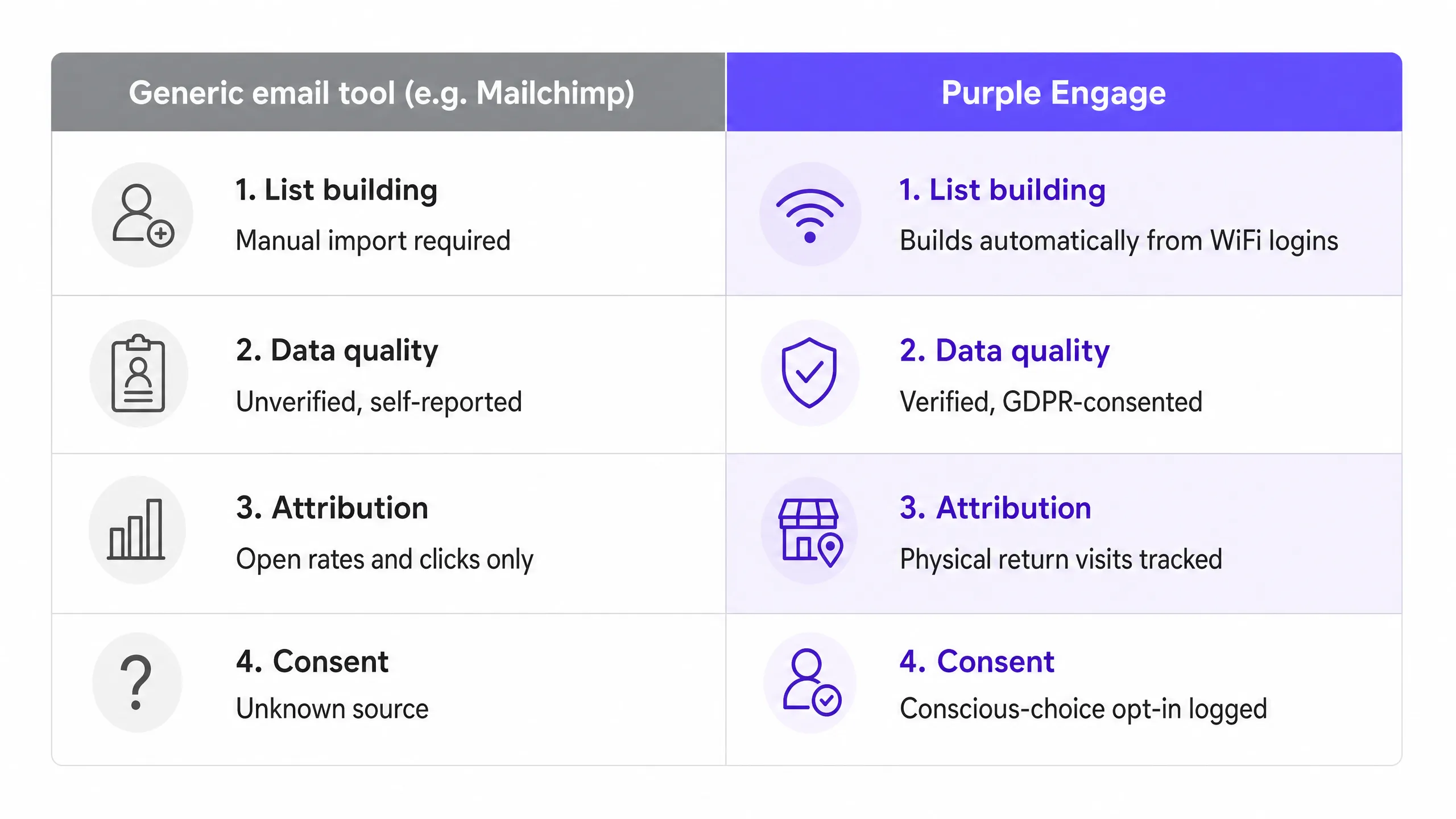
সাধারণ ইমেল প্ল্যাটফর্মগুলি ওপেন রেট, ক্লিক-থ্রু রেট এবং আনসাবস্ক্রাইব দ্বারা সাফল্য পরিমাপ করে। এগুলো দরকারী হাইজিন মেট্রিক্স, কিন্তু এগুলো আপনাকে বলে না যে আপনার মার্কেটিং রাজস্ব বৃদ্ধি করছে কিনা। একজন অতিথি আপনার পাঠানো প্রতিটি ইমেল খুলতে পারেন এবং কখনোই আপনার ভেন্যুতে আর পা নাও রাখতে পারেন।
যখন আপনার ইমেল তালিকা WiFi লগইন থেকে তৈরি হয়, তখন আপনি একটি ভিন্ন পরিমাপের স্তর পান। Purple প্রতিটি যাচাইকৃত ইমেলের সাথে যুক্ত MAC অ্যাড্রেস ট্র্যাক করে। যখন কোনো ক্যাম্পেইন প্রাপক ভেন্যুতে ফিরে আসেন এবং নেটওয়ার্কের সাথে কানেক্ট করেন, তখন Purple সেই ইভেন্টটি লগ করে এবং এটিকে ক্যাম্পেইনের সাথে লিঙ্ক করে। এটি আপনাকে ক্লোজড-লুপ অ্যাট্রিবিউশন দেয়: একটি নির্দিষ্ট ক্যাম্পেইনের জন্য, একটি নির্দিষ্ট সময়ের মধ্যে কতজন প্রাপক শারীরিকভাবে ভেন্যুতে ফিরে এসেছেন তা দেখার ক্ষমতা।
ভেন্যু অপারেটরদের জন্য যে মেট্রিকগুলো গুরুত্বপূর্ণ তা হলো রেভিনিউ পার সেন্ড (একটি ক্যাম্পেইনের মাধ্যমে অর্জিত মোট রাজস্বকে প্রেরিত ইমেলের সংখ্যা দিয়ে ভাগ করে প্রাপ্ত মান), রিটার্ন ভিজিট রেট (ক্যাম্পেইন প্রাপকদের শতকরা হার যারা ৩০ দিনের মধ্যে ভেন্যুতে এসেছেন) এবং লিস্ট গ্রোথ রেট (প্রতি সপ্তাহে, প্রতি লোকেশনে নতুন যাচাইকৃত অপ্ট-ইন)। Purple তার রিপোর্টিং ড্যাশবোর্ডে এই তিনটিই প্রদর্শন করে।
এই পদ্ধতিটি আপনাকে ক্লিকের পরিবর্তে বাস্তব ফুট ট্রাফিকের বিপরীতে অফারগুলির A/B পরীক্ষা করার সুযোগ দেয়। আপনি সমান সেগমেন্টে একটি ক্যাম্পেইনের দুটি সংস্করণ পাঠাতে পারেন এবং পরিমাপ করতে পারেন কোনটি বেশি শারীরিক ভিজিট তৈরি করেছে - এটি এমন একটি অ্যাট্রিবিউশন লেভেল যা কোনো সাধারণ ইমেল টুল আলাদা লয়ালটি বা POS ইন্টিগ্রেশন ছাড়া প্রদান করতে পারে না।
কোথায় শুরু করবেন
শূন্য থেকে একটি লাইভ, GDPR-সম্মত গেস্ট WiFi ইমেল ক্যাপচার প্রোগ্রাম শুরু করার জন্য ন্যূনতম ধাপগুলো নিচের চেকলিস্টে দেওয়া হলো।
১. আপনার হার্ডওয়্যার অডিট করুন। আপনার অ্যাক্সেস পয়েন্টগুলো (Cisco Meraki, HPE Aruba, Ruckus, Juniper Mist, Ubiquiti UniFi, Cambium, Extreme বা Fortinet) এক্সটার্নাল Captive Portal এবং RADIUS অথেনটিকেশন সমর্থন করে কিনা তা নিশ্চিত করুন। আপনি যদি নিশ্চিত না হন, তবে Purple-এর অনবোর্ডিং টিম সামঞ্জস্যতা নিশ্চিত করতে পারে। ২. আপনার ডেটার প্রয়োজনীয়তা নির্ধারণ করুন। স্প্ল্যাশ পেজে কোন ক্ষেত্রগুলো অন্তর্ভুক্ত করবেন তা ঠিক করুন। ইমেল এবং প্রথম নাম দিয়ে শুরু করুন। আপনি যদি জন্মদিনের ক্যাম্পেইন চালাতে চান তবেই কেবল জন্মতারিখ যোগ করুন। ৩. ভ্যালু প্রপোজিশন খসড়া করুন। মার্কেটিং সম্মতি চেকবক্সের পাশে যে প্রণোদনাটি প্রদর্শিত হবে তা লিখুন। দুটি সংস্করণ পরীক্ষা করুন: একটি ডিসকাউন্ট অফার এবং একটি লয়্যালটি পয়েন্ট অফার। যেটির অপ্ট-ইন হার বেশি হবে সেটিই বেছে নিন। ৪. স্বয়ংক্রিয় ফ্লো তৈরি করুন। পোর্টাল লাইভ হওয়ার আগে Purple Engage-এ ওয়েলকাম ইমেল এবং ল্যাপসড ভিজিটর ক্যাম্পেইন সেট আপ করুন। চালু করার পর পর্যন্ত অপেক্ষা করবেন না - তাহলে আপনি প্রথম ধাপে আসা যোগাযোগগুলো মিস করবেন। ৫. একটি একক টেস্ট ভেন্যুতে চালু করুন। ৪৮ ঘণ্টার জন্য অপ্ট-ইন হার এবং ইমেল ভেরিফিকেশন সম্পন্ন হওয়ার হার পর্যবেক্ষণ করুন। অপ্ট-ইন হার ২৫% এর নিচে হলে ভ্যালু প্রপোজিশন সমন্বয় করুন। আপনি সন্তুষ্ট হলে, সমস্ত লোকেশন জুড়ে এটি ব্যবহার শুরু করুন।