
ভেন্যুগুলোর জন্য স্বয়ংক্রিয় রিভিউ-অনুরোধ ইমেল
আপনার Google রেটিং বাড়ানোর জন্য ভেরিফাইড অতিথি WiFi ডেটা ব্যবহার করে কীভাবে স্বয়ংক্রিয় রিভিউ-অনুরোধ ইমেল তৈরি করবেন তা এই গাইডে ব্যাখ্যা করা হয়েছে। ফুট ট্রাফিককে ফাইভ-স্টার রিভিউর একটি ধারাবাহিক প্রবাহে রূপান্তর করার জন্য প্রয়োজনীয় সঠিক সময়, শব্দচয়ন এবং আর্কিটেকচার এতে আলোচনা করা হয়েছে।
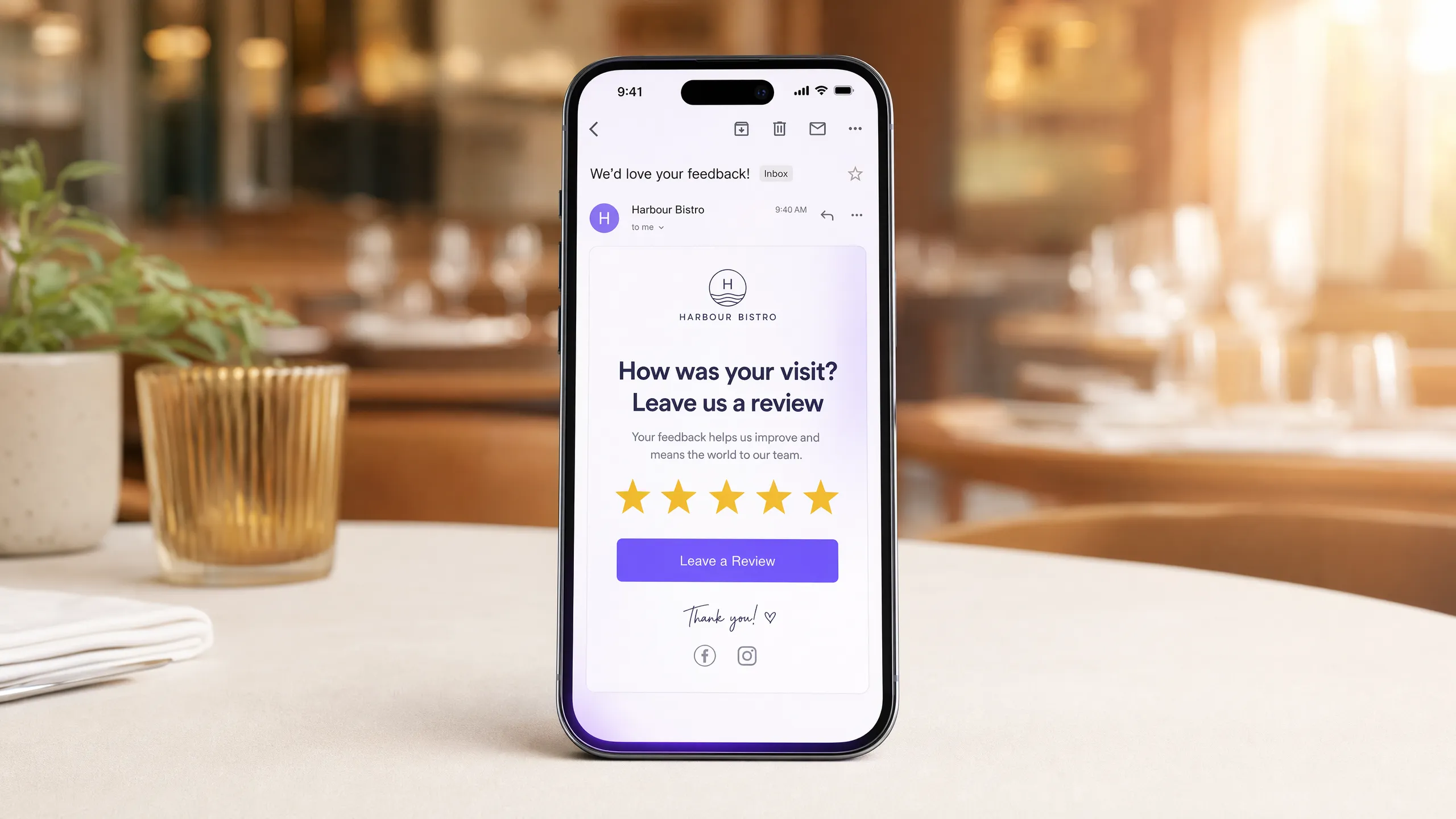
এটি কেন আপনার ভেন্যুর জন্য গুরুত্বপূর্ণ
আপনার Google রেটিংয়ে এক-স্টার উন্নতি হওয়া মানে ৫% থেকে ৯% রাজস্ব বৃদ্ধি পাওয়া। বেশিরভাগ ভেন্যু যে সমস্যার মুখোমুখি হয় তা হলো, তাদের অতিথিদের অভিজ্ঞতা খারাপ ছিল তা নয়, বরং যেসব অতিথির অভিজ্ঞতা দারুণ ছিল তারা বাড়ি ফিরে গিয়ে রিভিউ দেওয়ার কথা ভুলে গেছেন। বিপরীতভাবে, যেসব অতিথির অভিজ্ঞতা হতাশাজনক ছিল তারা ৩০ সেকেন্ডের মধ্যে একটি রিভিউ সাইট খুঁজে বের করে ফেলবেন।
এই অসমতা আপনার অর্থ লোকসান করায়। সঠিক সময় নির্ধারণ এবং সুনির্দিষ্ট শব্দচয়ন সহ একটি স্বয়ংক্রিয় রিভিউ-অনুরোধের ইমেল হলো এর সবচেয়ে সরাসরি সমাধান। আপনি যখন এটি সঠিকভাবে করেন, তখন আপনার সন্তুষ্ট অতিথিদের ইতিবাচক মনোভাব ম্লান হওয়ার আগেই আপনি তা কাজে লাগাতে পারেন, যা আপনার সামগ্রিক রেটিং এবং সেই সাথে আপনার রাজস্ব বৃদ্ধি করে।
পদ্ধতি
বেশিরভাগ সাধারণ ইমেল টুল এতে ব্যর্থ হয় কারণ তারা আসলে জানে না যে গতকাল কারা আপনার ভেন্যু পরিদর্শন করেছিলেন। তারা এমন লোকেদের স্ট্যাটিক তালিকার ওপর কাজ করে যারা হয়তো কোনো অনলাইন নিউজলেটারের জন্য সাইন আপ করেছেন কিন্তু কখনোই ভেন্যুতে পা রাখেননি।
Purple Engage ভিন্নভাবে কাজ করে। যখন একজন অতিথি আপনার গেস্ট WiFi-এ সংযোগ করেন, তখন তারা একটি ব্র্যান্ডেড স্প্ল্যাশ পেজের মাধ্যমে লগ ইন করেন। সেই লগইনটি একটি সচেতন সিদ্ধান্ত। তারা তাদের ইমেল ঠিকানা লিখেন, আপনার ডেটা পলিসি দেখেন এবং অপ্ট ইন করেন। GDPR-এর অধীনে, এটি যাচাইকৃত, ফার্স্ট-পার্টি ডেটা। Purple একটি একক অ্যাকশনের মাধ্যমে পরিদর্শনের সময়, ভেন্যুর অবস্থান এবং যোগাযোগের বিবরণ সংগ্রহ করে।
তাই আপনি যখন Purple Engage-এ একটি রিভিউ-অনুরোধের অটোমেশন তৈরি করেন, তখন আপনি এটি এমন লোকেদের কাছে পাঠান যারা শারীরিকভাবে আপনার ভেন্যুতে উপস্থিত ছিলেন, যা গত ২৪ ঘণ্টার মধ্যে একটি WiFi সেশন দ্বারা নিশ্চিত করা হয়েছে। এই কারণেই সাধারণ মার্কেটিং ইমেলের ক্ষেত্রে যেখানে ইন্ডাস্ট্রির গড় ওপেন রেট প্রায় ২১%, সেখানে Purple-এর মাধ্যমে পাঠানো রিভিউ-অনুরোধের ইমেলগুলির ওপেন রেট প্রায় ৩৮% (Purple ডেটা)।
আপনার গেস্ট WiFi-এর মাধ্যমে এটি কীভাবে করবেন
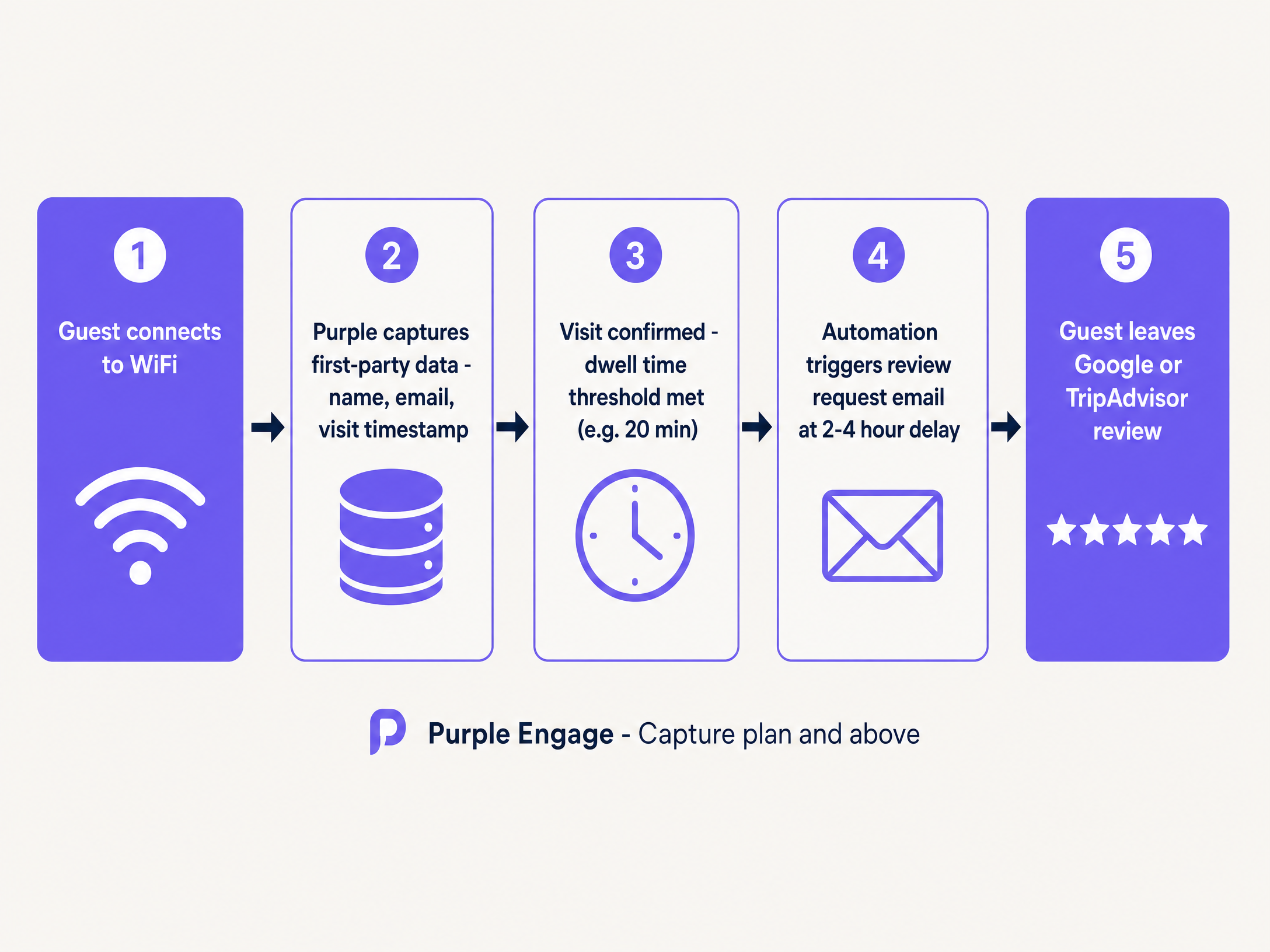
এর আর্কিটেকচার অত্যন্ত সহজ। আপনার এমন একটি সিস্টেম প্রয়োজন যা পরিদর্শন রেকর্ড করবে, ডুয়েলিং টাইম বা অবস্থানের সময়কাল যাচাই করবে এবং ইমেলটি ট্রিগার করবে।
১. The Capture (সংগ্রহ): অতিথি আপনার রেস্তোরাঁ, হোটেল বা খুচরা দোকানে প্রবেশ করেন এবং গেস্ট WiFi-এর সাথে সংযুক্ত হন। ২. The Verification (যাচাইকরণ): তারা একটি Captive Portal-এর মাধ্যমে অথেন্টিকেট করেন। এখানেই আপনি GDPR-সম্মত সম্মতি গ্রহণ করেন। ৩. The Filter (ফিল্টার): আপনি একটি ডুয়েলিং টাইমের সীমা নির্ধারণ করেন। তারা যদি ১৫ মিনিটের কম সময় সংযুক্ত থাকেন, তবে সম্ভবত তারা কেবল পাশ দিয়ে যাচ্ছিলেন। তারা যদি ৪৫ মিনিট থাকেন, তবে তারা একজন প্রকৃত অতিথি। ৪. The Trigger (ট্রিগার): সেশনটি শেষ হওয়ার সাথে সাথেই অটোমেশন টাইমার শুরু হয়ে যায়।
প্রাথমিক ডেটা সংগ্রহ করার জন্য এর একটি Guest WiFi প্রোডাক্টের প্রয়োজন হয়, যা অটোমেশন চালানোর জন্য সরাসরি Purple Engage-এ প্রেরণ করা হয়।
কী পাঠাবেন এবং কখন পাঠাবেন
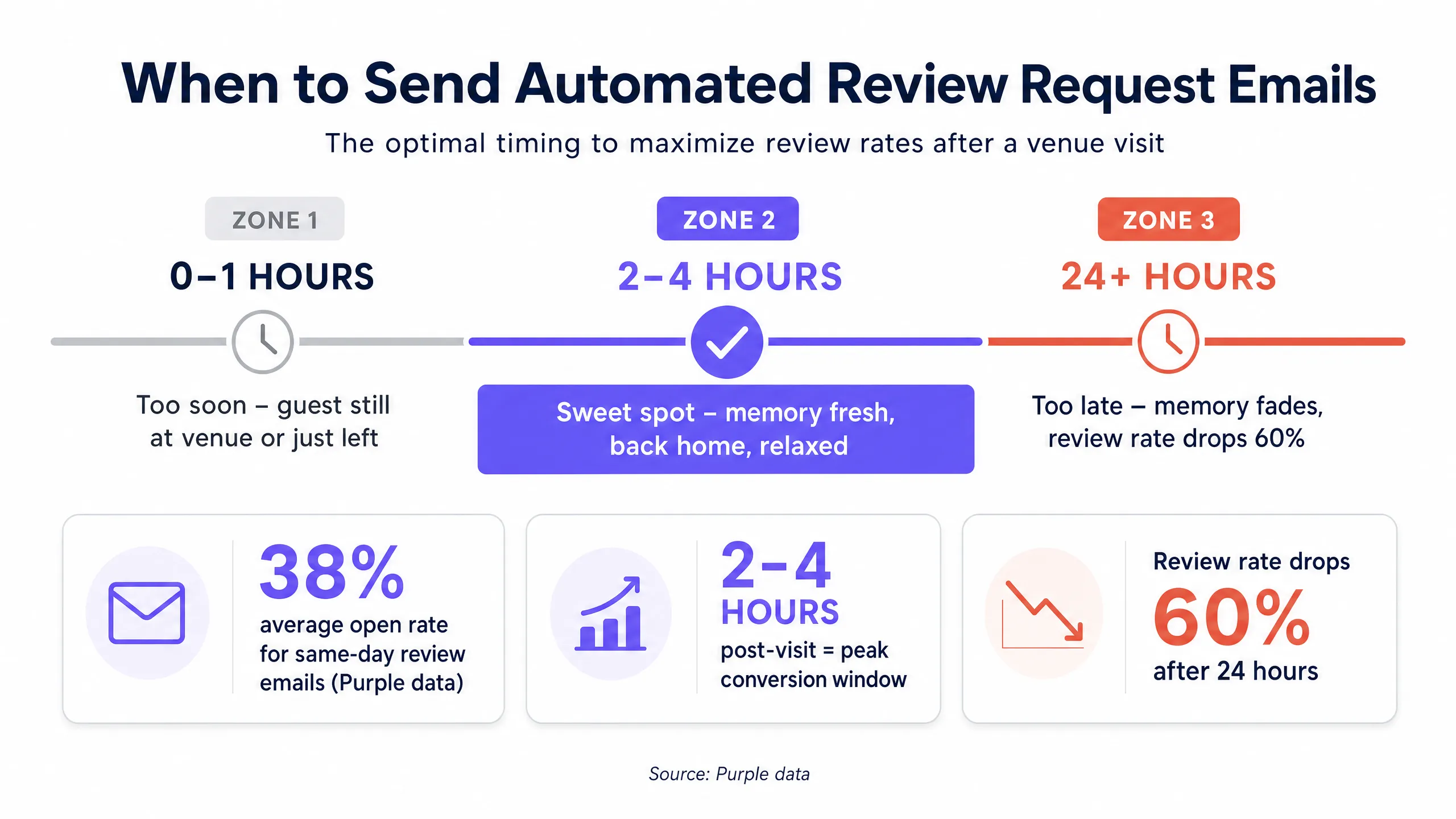
সময়ই সবকিছু। প্রথম এক ঘণ্টার মধ্যে একটি ইমেল পাঠালে তা অতিথির কাছে এমন সময়ে পৌঁছানোর ঝুঁকি থাকে যখন তারা এখনও বাড়ি ফিরছেন বা ভেন্যুতে আছেন। এটি অনধিকার প্রবেশ বলে মনে হতে পারে। পরের দিন সকালে পাঠালে, স্মৃতির ঘোর কেটে যায়।
পরিদর্শনের দুই থেকে চার ঘণ্টা পর হলো উপযুক্ত সময়। একটি চমৎকার খাবার, একটি চমৎকার হোটেলে থাকা বা একটি সন্তোষজনক কেনাকাটার আবেগপূর্ণ অনুভূতি শেষ হওয়ার ঠিক পরের ঘণ্টাগুলোতে তুঙ্গে থাকে।
শব্দ চয়ন
এটি সংক্ষিপ্ত, ব্যক্তিগত এবং একটি মাত্র অনুরোধের ওপর ফোকাস রাখুন।
বিষয় লাইনে ব্র্যান্ডের পরিবর্তে পরিদর্শনের কথা উল্লেখ করা উচিত। "মঙ্গলবার আপনার পরিদর্শনের অভিজ্ঞতা কেমন ছিল?" এর কার্যকারিতা "আমরা আপনার ফিডব্যাক জানতে আগ্রহী!" এর চেয়ে অনেক ভালো কারণ এটি দেখায় যে ইমেলটি বিশেষভাবে তাদের অভিজ্ঞতার বিষয়ে। Purple এর মার্জ ট্যাগগুলো স্বয়ংক্রিয়ভাবে পরিদর্শনের তারিখ যুক্ত করে দেয়।
বডি টেক্সট সর্বোচ্চ তিনটি বাক্য হওয়া উচিত:
মঙ্গলবার আসার জন্য ধন্যবাদ। আশা করি আপনার ভালো লেগেছে। আপনার কাছে যদি দুই মিনিট সময় থাকে, তবে একটি Google রিভিউ আমাদের জন্য অনেক বড় বিষয় হবে - লিঙ্কটি এখানে দেওয়া হলো।
কোনো ডিসকাউন্ট অফার অন্তর্ভুক্ত করবেন না। কোনো সমীক্ষা অন্তর্ভুক্ত করবেন না। আপনার ব্র্যান্ডের মূল্যবোধ সম্পর্কে তিনটি অনুচ্ছেদ লিখবেন না। কল টু অ্যাকশন সরাসরি আপনার Google Business Profile রিভিউ পেজে নিয়ে যাবে। ইমেল এবং রিভিউ বক্সের মধ্যে ক্লিকের সংখ্যা যত কম হবে, কনভার্সন রেট তত বেশি হবে।
কী কাজ করছে তা পরিমাপ করা
শুধুমাত্র ওপেন রেট পরিমাপ করবেন না। ক্যাম্পেইনটিকে রিটার্নিং গেস্ট এবং রেভিনিউয়ের সাথে লিঙ্ক করুন।
সাপ্তাহিক ভিত্তিতে আপনার প্রকৃত Google রিভিউয়ের সংখ্যা পর্যবেক্ষণ করুন। যদি আপনার ওপেন রেট ২৫% এর নিচে হয়, তবে অন্য বিষয় লাইন পরীক্ষা করুন। যদি আপনার ক্লিক রেট ১০% এর নিচে হয়, তবে ইমেলের বডি আরও সহজ করুন। সবচেয়ে বড় কথা, যারা রিভিউ দিচ্ছেন এবং যারা দিচ্ছেন না, তাদের লাইফটাইম ভ্যালুর তুলনা ট্র্যাক করুন। যে অতিথি জনসমক্ষে আপনার ভেন্যুর হয়ে কথা বলেন, তার ফিরে আসার সম্ভাবনা উল্লেখযোগ্যভাবে বেশি থাকে।
কোথা থেকে শুরু করবেন
আপনার ডিপ্লয়মেন্ট চেকলিস্ট এখানে দেওয়া হলো:
- নিশ্চিত করুন যে আপনার WiFi লগইন স্পষ্ট অপ্ট-ইন সম্মতি সহ ইমেল অ্যাড্রেস সংগ্রহ করছে।
- ভুলবশত হওয়া কানেকশনগুলো ফিল্টার করতে সর্বনিম্ন ১৫ থেকে ২০ মিনিটের ডুয়েল-টাইম ফিল্টার সেট করুন।
- Purple Engage-এ অটোমেশন তৈরি করুন: WiFi সেশন শেষ হওয়ার পর দুই ঘণ্টার বিলম্ব সহ এটি ট্রিগার হবে।
- অডিয়েন্স ফিল্টার সেট করুন: প্রথম ভিজিট, অথবা নিশ্চিত করুন যে শেষ রিভিউ অনুরোধটি ৯০ দিনের বেশি পুরনো।
- পরিদর্শনের তারিখ উল্লেখ করে একটি বিষয় লাইন লিখুন এবং সরাসরি আপনার Google রিভিউ পেজে লিঙ্ক করুন।
আপনি যদি বর্তমানে এই ডেটা কীভাবে সংগ্রহ করবেন তা সিদ্ধান্ত নেওয়ার প্রক্রিয়ায় থাকেন, তবে নেটওয়ার্ক লেয়ার কেন আরও ভালো ভেরিফিকেশন প্রদান করে তা বুঝতে আমাদের গ্রাহকের ইমেল সংগ্রহের জন্য QR কোড বনাম WiFi লগইন নির্দেশিকাটি পড়ুন।