
Mailchimp für Hotels: Wo die Plattform bei Veranstaltungsorten an ihre Grenzen stößt
Dieser Leitfaden erklärt, warum generische E-Mail-Tools wie Mailchimp für Hotels unzureichend sind, da sie Posteingangs-Kennzahlen statt physischer Rückkehrbesuche messen. Er beschreibt im Detail, wie Betreiber von Veranstaltungsorten Purple Engage nutzen können, um GDPR-konforme Listen mit First-Party-Daten direkt über Gäste-WiFi-Logins zu erstellen und so Marketingkampagnen mit tatsächlichen Besucherzahlen und Umsätzen zu verknüpfen.
Warum das für Ihren Veranstaltungsort wichtig ist
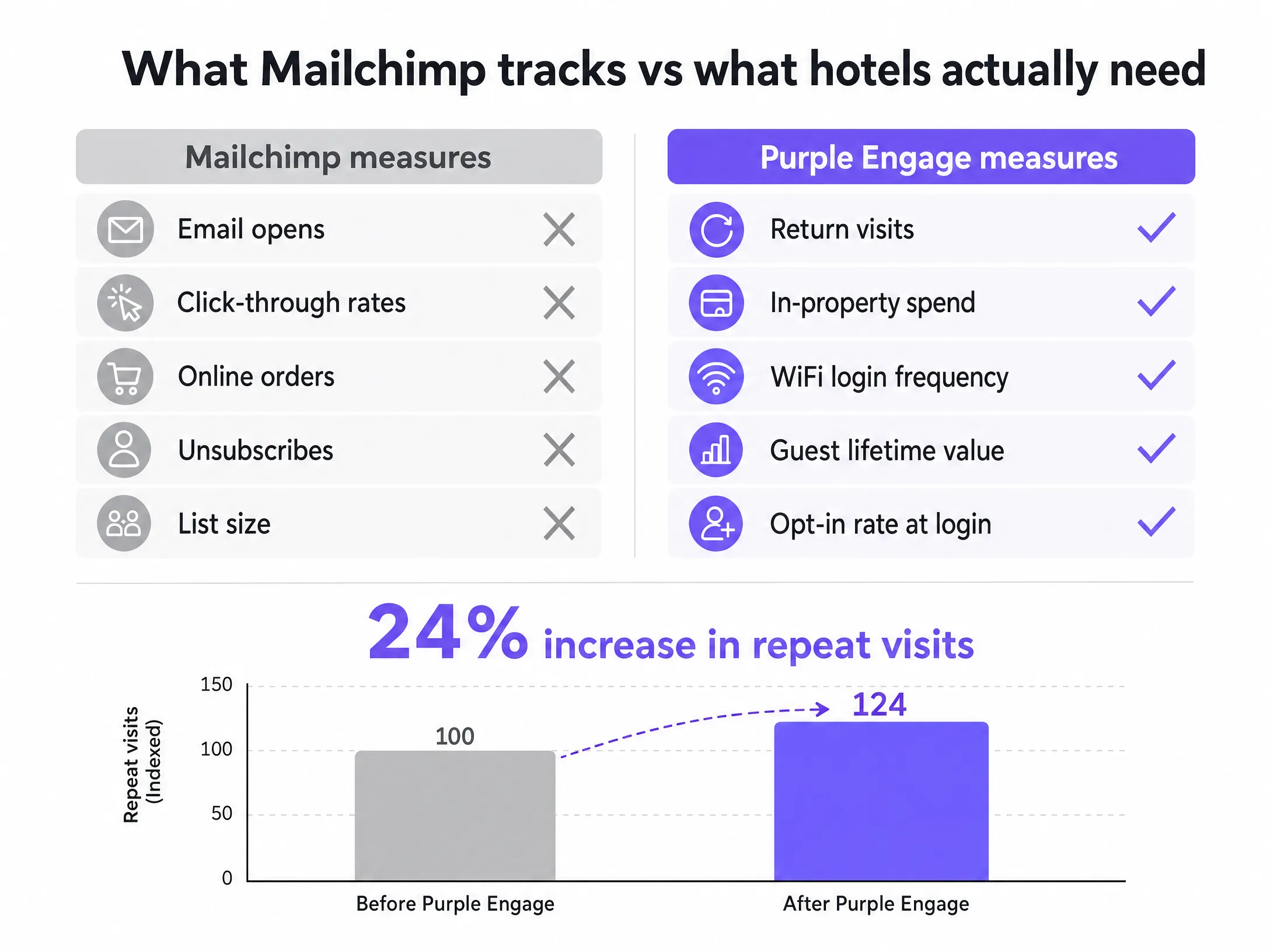
Wenn Sie das Marketing für ein Hotel leiten, kennen Sie das Kernproblem generischer E-Mail-Tools bereits. Sie senden eine Kampagne, prüfen die Öffnungsraten und versuchen zu erraten, ob tatsächlich jemand einen erneuten Aufenthalt gebucht hat. Mailchimp wurde für den E-Commerce entwickelt. Es misst E-Mail-Öffnungen, Link-Klicks und Bestellungen im Online-Warenkorb. Es misst jedoch weder die Besucherzahlen vor Ort, noch erneute Aufenthalte oder die Ausgaben in der Unterkunft.
Für a Hotel sind die Kosten dieser Diskrepanz hoch. Sie verlassen sich auf Daten aus dem Property Management System, die oft unvollständig sind, da Gäste, die über Online-Reisebüros buchen, ihre direkte E-Mail-Adresse nicht weitergeben. Sie verbringen Zeit mit der Formatierung von CSV-Dateien für den Upload in Mailchimp, nur um generische Newsletter an eine Liste zu senden, in der die Hälfte Ihrer tatsächlichen Gäste fehlt. Sie messen den Erfolg daran, ob eine E-Mail geöffnet wurde, und nicht daran, ob der Gast Ihre Tür erneut durchschritten hat. Dieser Ansatz lässt Umsatz liegen. Purple Engage löst dieses Problem, indem es den Gast beim WiFi-Login erfasst und Kampagnen mit tatsächlichen erneuten Besuchen verknüpft.
Der Ansatz
Der grundlegende Unterschied zwischen Mailchimp und einer für Veranstaltungsorte optimierten Plattform liegt darin, wie die Liste erstellt wird. Mailchimp erwartet, dass Sie die Liste auf die Plattform hochladen. Purple Engage erstellt die Liste für Sie – unter Nutzung der physischen Infrastruktur, die Sie bereits besitzen.
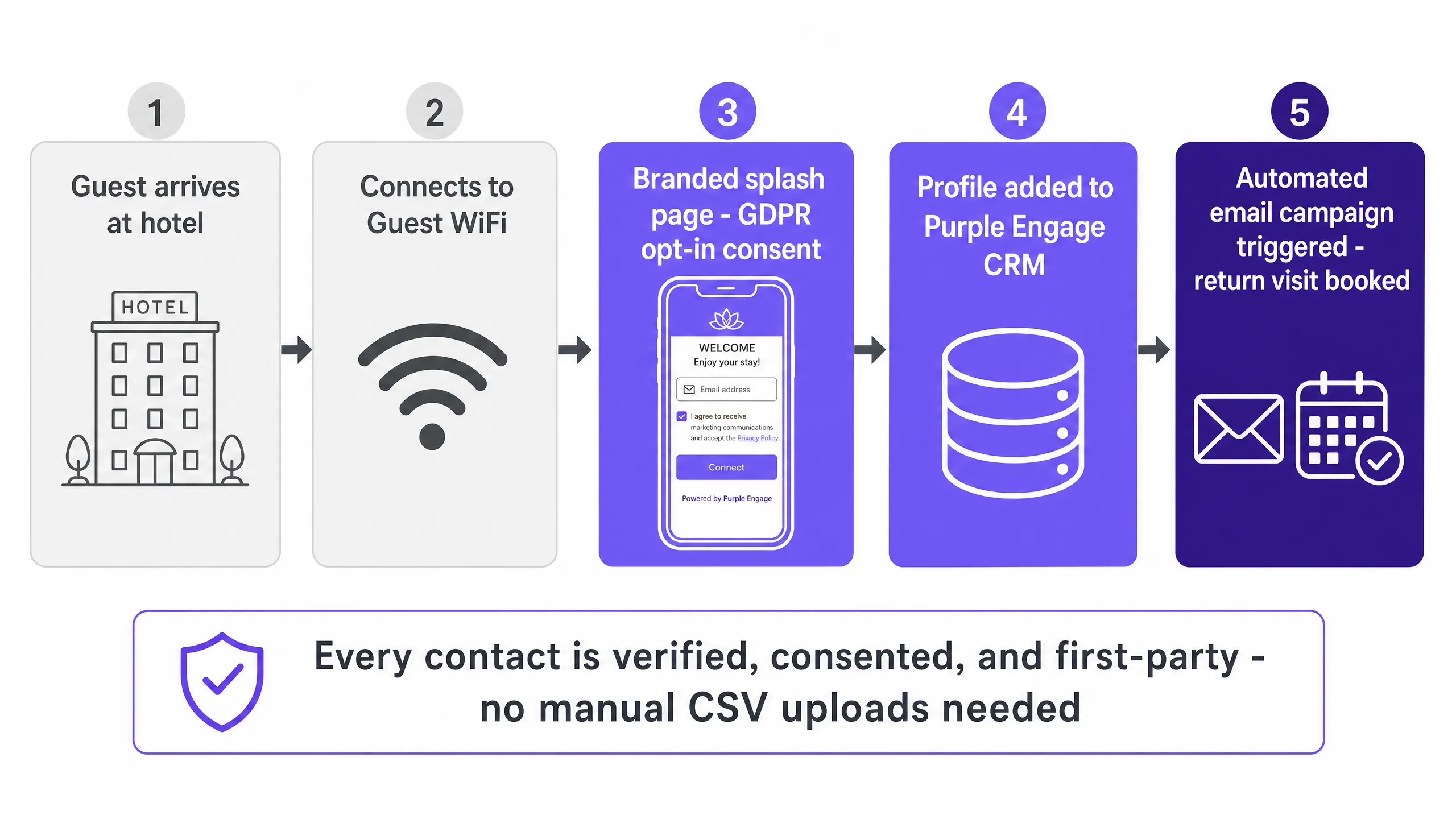
Wenn ein Gast in Ihrer Unterkunft ankommt, verbindet er sich mit dem Gäste-WiFi. Er landet auf einer gebrandeten Splash-Page, gibt seine E-Mail-Adresse ein und setzt ein Häkchen, um dem Erhalt von Marketing-Kommunikation zuzustimmen. Dies ist ein Conscious-Choice-Opt-in. Der Gast ist physisch anwesend und trifft eine bewusste Entscheidung. Die Daten fließen direkt in das Purple Engage CRM. Es gibt keinen manuellen Upload. Jeder Kontakt ist verifiziert, mit Einwilligung versehen und besteht aus First-Party-Daten.
Dieser Mechanismus löst das Problem der GDPR-Compliance, das Hotels plagt, die auf OTA-Buchungen angewiesen sind. Sie besitzen die direkte Beziehung und verfügen über den Einwilligungsnachweis, um dies zu belegen. Ab diesem Moment verfolgt die Plattform das physische Verhalten des Gasts. Sie protokolliert die Besuchshäufigkeit, die Verweildauer und die Rückkehrmuster.
So setzen Sie es mit Ihrem Gäste-WiFi um
Die Umsetzung dieses Ansatzes erfordert die Verknüpfung Ihrer Marketingstrategie mit Ihrem physischen Netzwerk. Purple Engage fungiert als Cloud-Overlay. Es lässt sich in Cisco Meraki, HPE Aruba, Ruckus, Juniper Mist, Ubiquiti UniFi, Cambium, Extreme und Fortinet integrieren. Sie müssen Ihre Hardware nicht austauschen.
Der Prozess beginnt mit der Splash-Page. Das Design muss übersichtlich und das Formular kurz sein. Fragen Sie nach der E-Mail-Adresse und stellen Sie das Opt-in-Kontrollkästchen bereit. Sobald sich der Gast authentifiziert, wird sein Profil im CRM erstellt oder aktualisiert. Die Plattform erfasst dann die MAC-Adresse seines Geräts, anonymisiert sie zum Schutz der Privatsphäre, nutzt sie jedoch zur Protokollierung nachfolgender Besuche.
Wenn Sie ein Segment in Purple Engage erstellen, tun Sie dies auf Basis von Standortdaten. Sie filtern Gäste heraus, die in den letzten sechs Monaten dreimal zu Besuch waren. Sie segmentieren Gäste, die während der Sommersaison übernachtet haben. Sie identifizieren Gäste, die seit einem Jahr nicht mehr zurückgekehrt sind. Mailchimp kann dies nicht leisten, da es nur weiß, wer eine E-Mail geöffnet hat. Purple Engage weiß, wer tatsächlich zurückgekehrt ist.
Was Sie senden sollten und wann
Das Timing entscheidet über Conversion oder Abmeldung. Da Purple Engage die physische Präsenz erfasst, können Sie Kampagnen basierend auf dem tatsächlichen Verhalten vor Ort auslösen.
Das Zeitfenster nach dem Aufenthalt ist entscheidend. Untersuchungen zeigen, dass E-Mails nach dem Aufenthalt, die innerhalb von 48 Stunden nach dem Checkout gesendet werden, eine Öffnungsrate von 52 % erzielen, verglichen mit 18 % bei generischen Hotel-Newslettern. Dies ist der Moment, um nach einer Bewertung zu fragen, einen Anreiz für eine direkte erneute Buchung zu bieten oder Ihr Treueprogramm vorzustellen.
Automatisieren Sie Ihre Rückgewinnungskampagnen. Richten Sie einen Trigger für Gäste ein, die sich seit 180 Tagen nicht mehr im WiFi angemeldet haben. Senden Sie ihnen ein gezieltes Angebot. Automatisieren Sie Ihre Treueprämien. Wenn sich ein Gast zu seinem fünften Besuch anmeldet, lösen Sie eine E-Mail aus, die ein Gratisgetränk an der Bar oder einen Spa-Rabatt anbietet. Diese Kampagnen laufen geräuschlos im Hintergrund und steigern den Umsatz ohne manuelles Eingreifen.
Messen, was funktioniert
Die entscheidende Kennzahl ist der erneute Besuch. Mailchimp misst den Kampagnenerfolg anhand von Öffnungs- und Klickraten. Purple Engage misst den Erfolg daran, ob der Gast an den Standort zurückgekehrt ist.
Die Plattform verfolgt die Korrelation zwischen dem E-Mail-Versand und dem anschließenden WiFi-Login. Sie sehen genau, wie viele Gäste die Rückgewinnungskampagne erhalten haben und danach Ihre Türen durchschritten haben. Dies ist der Beleg, den Sie für Ihre Eigentümer benötigen. Sie berichten nicht mehr über Posteingangs-Kennzahlen, sondern über Besucherzahlen und direkten Umsatz. Daten von Purple zeigen eine Steigerung der wiederholten Besuche um 24 % an Standorten, die diesen Ansatz nutzen.
Wo Sie anfangen sollten
- Überprüfen Sie Ihre aktuelle Mailchimp-Liste, um festzustellen, wie viele Kontakte eine ausdrückliche, GDPR-konforme Einwilligung für Hotelmarketing erteilt haben.
- Gleichen Sie Ihre vorhandene WiFi-Hardware mit der Kompatibilitätsliste ab (Cisco Meraki, HPE Aruba, Ruckus usw.).
- Entwerfen Sie eine gebrandete Splash-Page, die eine einfache E-Mail-Erfassung und ein klares Opt-in-Kontrollkästchen in den Vordergrund stellt.
- Richten Sie Ihre erste automatisierte Post-Stay-Kampagne ein, die 48 Stunden nach dem letzten WiFi-Login des Gasts ausgelöst wird.
- Definieren Sie Ihr Rückgewinnungssegment basierend auf Gästen, die in den letzten sechs Monaten nicht zu Besuch waren.
Weitere Informationen zur Erfassung von First-Party-Daten finden Sie in unserem Leitfaden zu Gäste-WiFi. Um den vollen Funktionsumfang des Produkts kennenzulernen, besuchen Sie die Produktübersicht. Eine Anleitung zur Präsentation dieser Kennzahlen finden Sie unter Marketing-ROI gegenüber Standorteigentümern mit WiFi-Daten nachweisen.