
Collect customer emails in a restaurant without sign-up forms
Why this is important for your venue
The hardest part of venue marketing is not sending emails - it is collecting the email address in the first place. When a guest comes to your restaurant, they are a physical visitor. Unless they book in advance, you have no way of contacting them after they leave. This is a big problem. If you serve 300 customers a week and your database grows by 10 contacts a week, you are leaving 290 potential repeat guests uncontacted every week. In a year, that is over 15,000 missed opportunities to drive repeat visits.
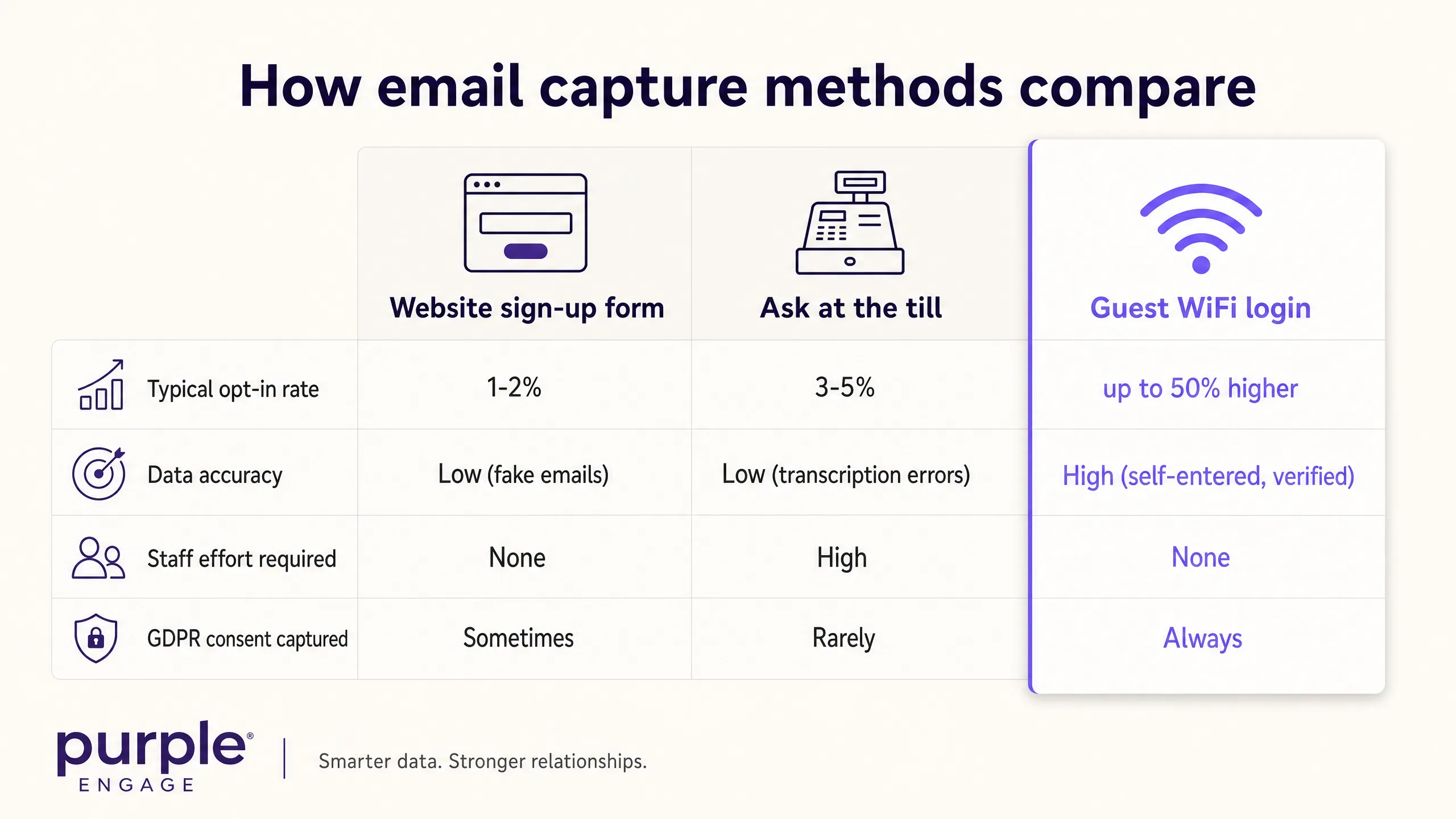
The methods most operators rely on are not working. Website sign-up forms convert at 1-2% of visitors. Asking for emails at the till slows down service, puts staff in an awkward position, and often results in fake or misspelt addresses. Table tents with QR codes are largely ignored. This results in a marketing database that is only a fraction of your actual footfall, growing at a pace that will never match your ambitions.
The good news is that the solution is already in your venue. Your guest WiFi is the most effective restaurant email collection tool, and most operators are not using it.
The method
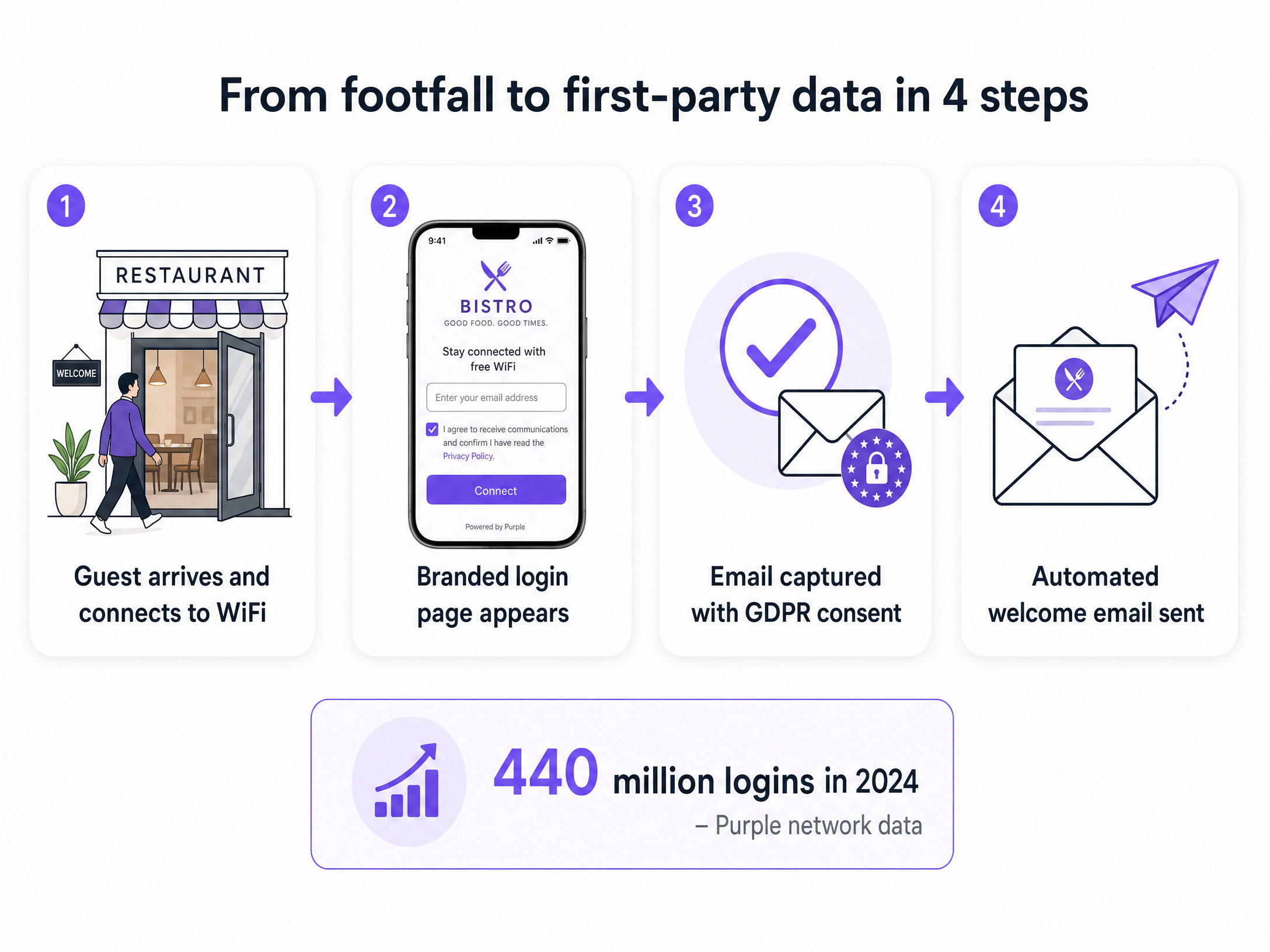
The core process is a Captive Portal - a branded login screen that appears when a guest selects your venue's WiFi network. Instead of connecting automatically, the guest is presented with your logo, a welcome message, and a simple form. They enter their email address, tick the marketing consent box, and they are online. The entire process takes about 15 seconds.
This method works because it is a transparent value exchange. The guest wants WiFi. You want their contact details. Both sides get what they want, and the transaction is self-service. Guests enter their own email address on their own device, meaning the data is accurate. Purple Engage validates the email format before granting access, so you are not collecting mistyped or placeholder addresses.
The key difference between this and every other method is intent. A diner connecting to your WiFi is actively engaged with your venue at that moment. They are present, they are comfortable, and they are willing to share a real email address for a tangible benefit. This is the definition of active-choice opt-in, and it is why venues using Guest WiFi for email collection see opt-in rates nearly 50% higher than traditional channels (Purple network data, 2024).
In 2024, the Purple network generated 440 million logins across 80,000+ venues globally (Purple internal data). This volume is no coincidence. It reflects the fact that guests, when offered a clear and immediate benefit, will share their details.
How to do this with your guest WiFi
Purple Engage works as a cloud overlay on top of your existing WiFi hardware. There is no need to replace your routers or access points. Purple is hardware-agnostic and integrates with Cisco Meraki, HPE Aruba, Ruckus, Juniper Mist, Ubiquiti UniFi, Cambium, Extreme, and Fortinet.
The setup process follows five steps.
Step 1 - Connect your hardware. Point your venue's access points to Purple's RADIUS servers. RADIUS (Remote Authentication Dial-In User Service) is a protocol that manages authentication - a system that checks whether a guest has completed the login before granting internet access. Purple's onboarding team will guide you through this configuration regardless of the hardware you use.
Step 2 - Design your Captive Portal. In the Purple Engage dashboard, create a branded login page. Keep it simple: your logo, a short welcome message, an email field, and a consent checkbox. Completion rates are higher when the page is clean and loads quickly.
Step 3 - Set your login methods. Offer email login, social login (Google or Facebook), or both. Social login is faster for the guest and still collects a verified email address linked to a real account.
Step 4 - Configure GDPR compliance. Under GDPR, the marketing opt-in checkbox must be unticked by default. The guest must make an active choice to receive marketing communications. A pre-ticked box is invalid and exposes you to regulatory risk. Purple Engage enforces this correctly out of the box.
Step 5 - Test the flow. Connect to your own WiFi, complete the login, and confirm that the contact appears in your Purple Engage dashboard. Send yourself a test campaign to verify the automation is live.
Once configured, the system runs without staff involvement. Every guest who connects and completes the login adds themselves to your marketing database. The list builds itself.
What to send and when to send it
Collecting emails is the first step. The second step is using them to drive repeat visits. Purple Engage triggers automated campaigns based on visitor behaviour rather than a manual calendar.
The Welcome Email is the most important campaign you will set up. Send it 24 hours after a guest's first visit. Thank them, mention the visit, and offer a small incentive for their next visit - a free coffee, 10% off their next bill, or a complimentary starter. The open rate for this email is higher than any other campaign because the guest has just been to your venue. You are top of mind.
The We Miss You campaign targets guests who have not visited for 30 days. Keep it short and personal. Acknowledge the gap and offer a time-limited reason to return. Urgency improves conversion.
The Birthday Reward requires collecting the date of birth on the login form. An automated birthday email with a personalised offer drives strong conversions and builds genuine customer loyalty. Guests feel valued.
The Feedback Request is sent two hours after a guest disconnects from your WiFi. This is the perfect window - the experience is still fresh and the guest is more likely to leave a review. Include a direct link to your Google or TripAdvisor page. This single campaign can significantly improve your online ratings.
For more advanced segmentation strategies, read our guide: Segmenting guests by visit frequency: how to reward your best customers.
Measuring what works
Basic email tools like Mailchimp report on opens and clicks. Purple Engage reports on return visits and revenue. This is the closed-loop attribution that proves the effectiveness of your marketing spend.
Because Purple tracks when a device returns to the venue, you can link physical visits to specific campaigns. If you send a We Miss You email to 1,000 guests and 50 return within 7 days, you know that campaign generated 50 covers. Multiply that by your average spend per head, and you have the exact revenue generated from a single email. This figure justifies your investment and guides every future decision.
Track these metrics in Purple Engage:
| Metric | What it tells you |
|---|---|
| Opt-in rate | How effective your Captive Portal design is |
| Database growth rate | Whether your footfall is converting into contacts |
| Campaign return visit rate | Whether your emails are driving physical visits |
| Revenue per send | The direct commercial value of each campaign |
| Re-engagement rate | How many inactive guests are returning |
Where to start
- Identify your WiFi hardware vendor (Cisco Meraki, HPE Aruba, Ruckus, Juniper Mist, Ubiquiti UniFi, Cambium, Extreme, or Fortinet).
- Connect your hardware to Purple Engage through the onboarding process.
- Design a branded Captive Portal - logo, welcome message, email field, consent checkbox.
- Verify your GDPR compliance settings: opt-in must be unticked by default.
- Activate an automated campaign - start with the Welcome Email.
- Review your opt-in rate after two weeks and adjust the portal design if it is below 30%.