
Segmenting guests by visit frequency: how to reward your best customers
This guide explains how to segment physical venue guests based on visit frequency using WiFi login data. It covers the strategy, implementation, and measurement of automated campaigns for first-timers, regulars, and lapsed guests to drive repeat visits and revenue.
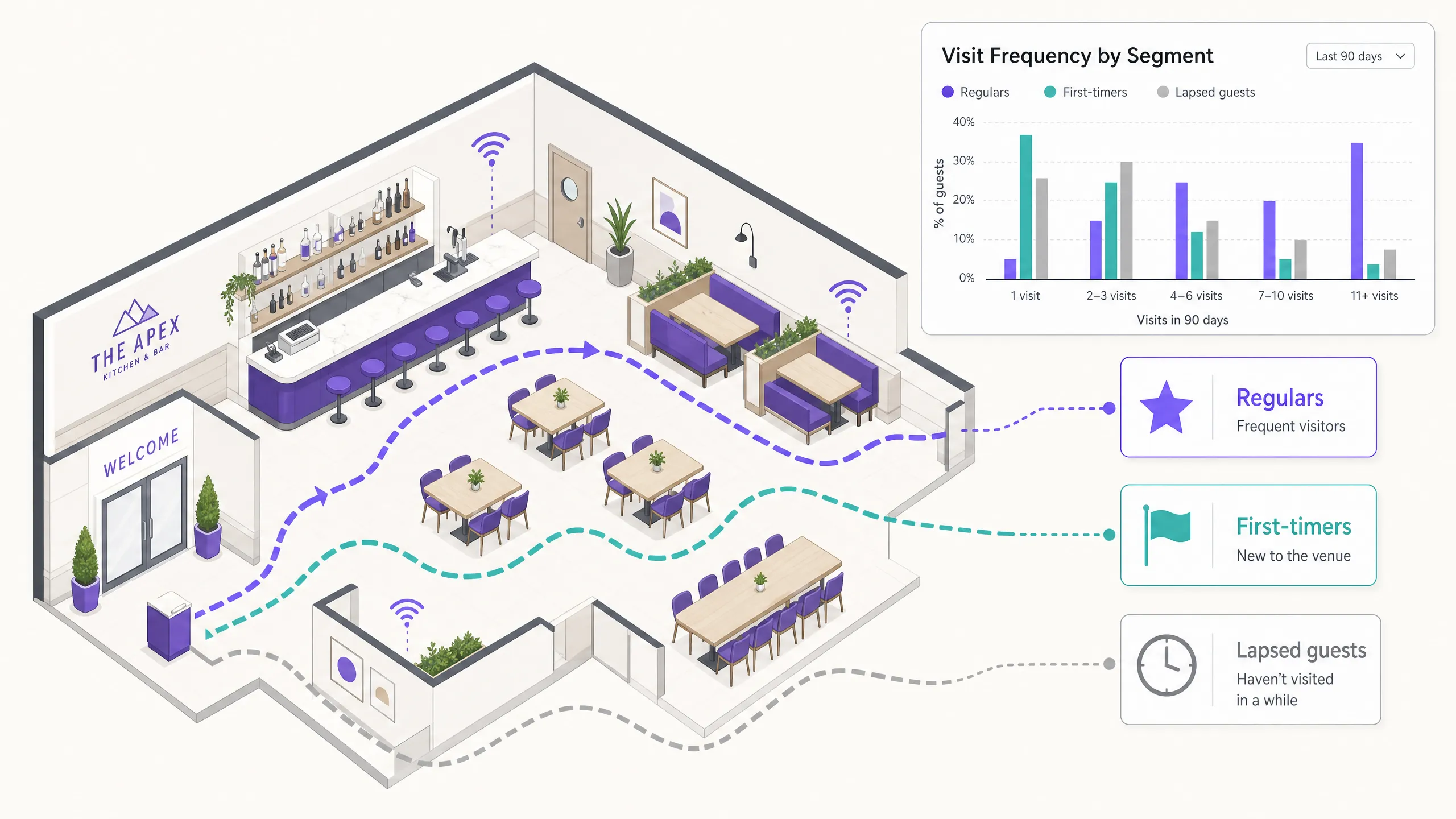
Why this matters for your venue
Most physical venues collect email addresses, but very few do anything meaningful with them. The typical approach is to blast the same newsletter to everyone on the list, once a month, and then wonder why open rates are sitting at 12%.
Here is the problem. A guest who visited your restaurant last Tuesday is not the same as a guest who came once in March and has not been back since. Sending them the same message is a waste of your budget and, frankly, a bit tone-deaf.
Visit frequency tells you something that demographic data cannot. It tells you about behavior. A guest who visits five times in 90 days has already decided they like you. Your job is to reward that, deepen it, and make them feel seen. A guest who visited once and disappeared is a different conversation entirely. You need to give them a reason to come back before they forget you exist.
Research from Bain & Company suggests that increasing customer retention by just 5% can increase profits by between 25% and 95%. The guests who visit most often are not just your most loyal. They are your most profitable. They spend more per visit, they are more likely to bring friends, and they cost far less to retain than a new guest costs to acquire.
The challenge has always been knowing who visits how often. If you rely on a loyalty card program or a booking system, you only capture a fraction of your foot traffic. Most guests do not book. Most do not carry a loyalty card. They just walk in, sit down, and leave.
That is where guest WiFi changes everything.
The approach
When a guest connects to your WiFi, they log in through a captive portal. They enter their name and email address, they accept your terms and conditions, and they get online. That is a conscious choice. That is GDPR-compliant, first-party consent. Not a scraped list. Not a purchased database. A real person who chose to share their details with you.
Purple Engage captures that login and ties it to a guest profile. Every subsequent visit, when that same guest logs back in, the system records it. Over time, you build a picture: how many times they have visited, how recently, how long they typically stay.
From that data, you can define three core segments.
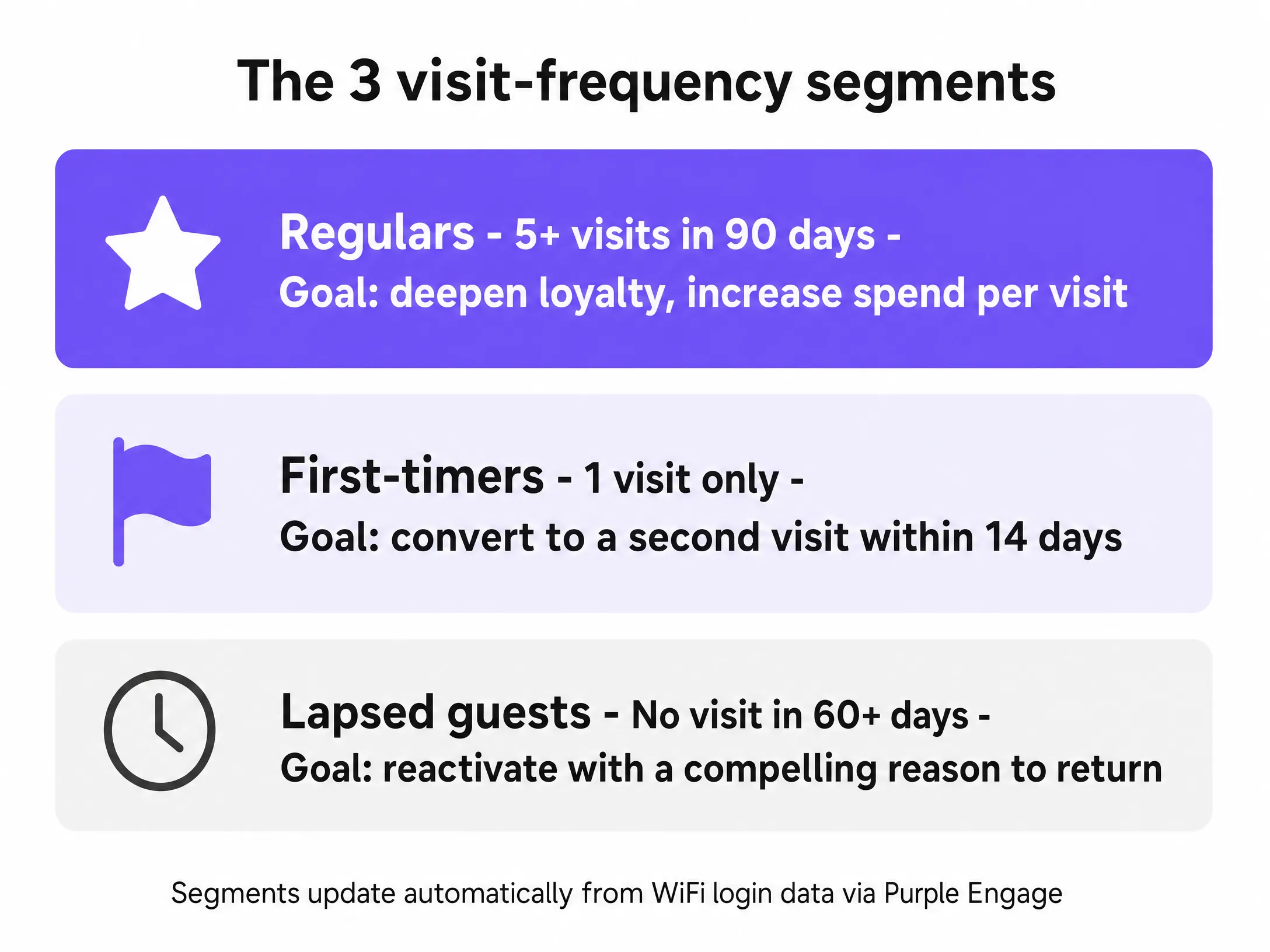
First-timers. These are guests who have logged in exactly once. They came, they connected, they left. You have their email. You have a window of roughly 14 days before the memory of their visit fades. The goal is simple: get them back for a second visit. Research consistently shows that a guest who visits twice is significantly more likely to become a regular than one who visits once. That second visit is the conversion moment.
Regulars. These are guests who have visited five or more times in the past 90 days. They are your advocates. They are the people who recommend you to friends. The goal here is not to convert them - they are already converted. The goal is to reward them, make them feel like insiders, and increase their spend per visit.
Lapsed guests. These are guests who visited at least once but have not been back in 60 days or more. They have not unsubscribed. They have not told you they dislike you. They have just drifted. The goal is reactivation. A well-timed, personalized win-back campaign can recover a meaningful percentage of this group.
The key thing to understand is that these segments update automatically. You do not need to manually export a spreadsheet and sort it every week. Purple Engage does that work for you, based on live WiFi login data.
How to do it with your guest WiFi
The technical implementation relies on the network infrastructure you already have. Purple integrates with Cisco Meraki, HPE Aruba, Ruckus, Juniper Mist, Ubiquiti UniFi, Cambium, Extreme, and Fortinet. The hardware provides the connection; Purple provides the intelligence.
When a guest connects, the hardware sends the MAC address to the Purple cloud overlay via RADIUS. If the MAC address is unknown, Purple presents the captive portal. The guest completes the login, granting GDPR-compliant consent. If the MAC address is known, Purple authenticates the device seamlessly and logs the visit.
This data flows directly into Purple Engage. The platform evaluates the guest's visit history against the segment rules you have defined. If a guest hits their fifth visit in 90 days, the system moves them into the 'Regulars' segment and triggers the associated automation.
This eliminates the manual data handling that plagues traditional CRM deployments. The customer list builds itself from guest WiFi logins, as verified, conscious-choice, first-party data. Generic email tools like Mailchimp send the campaign but do not build the list.
What to send, and when
Let's get specific about each segment.
First-timers
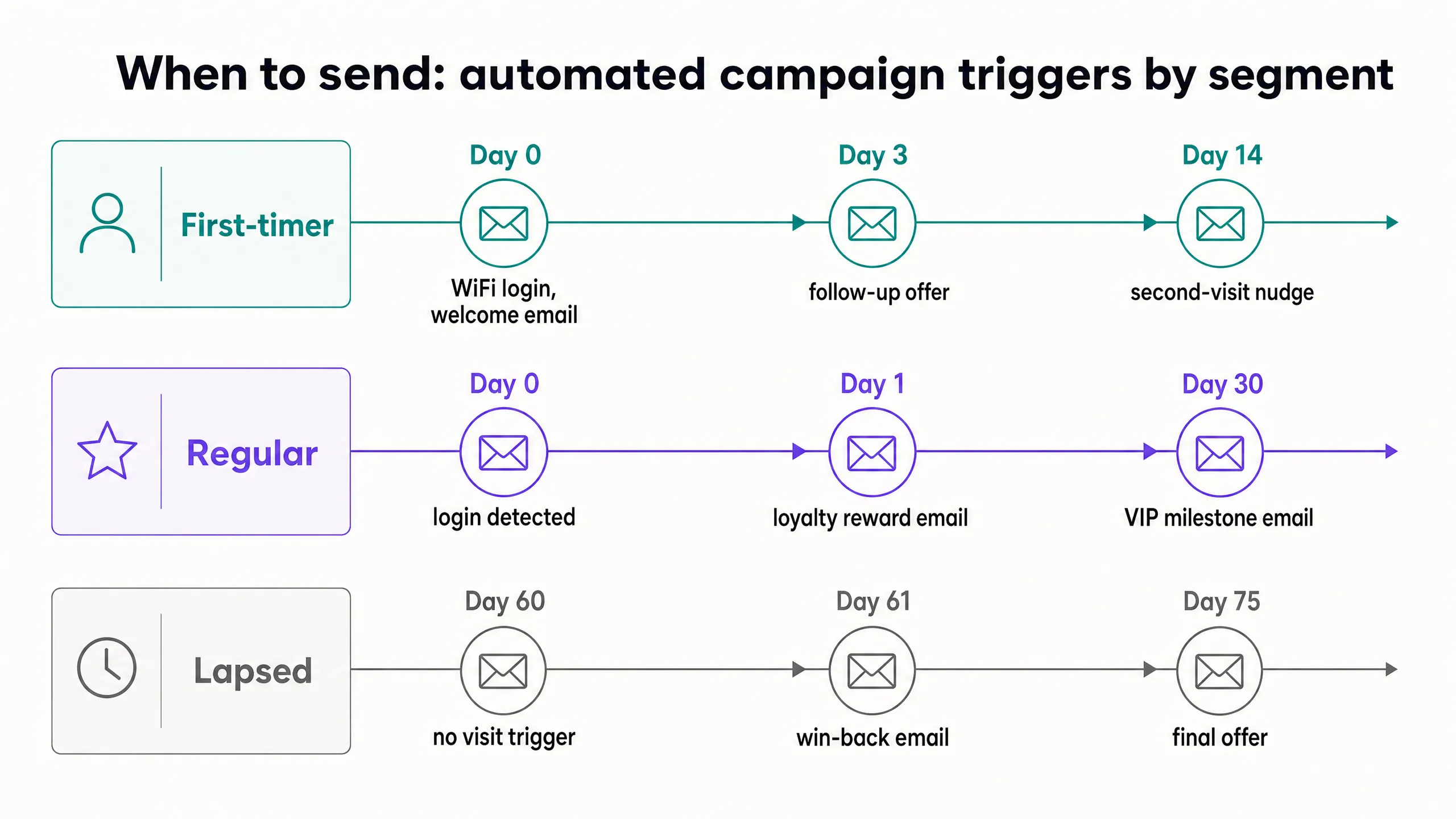
For first-timers, timing is everything. Send a welcome email within 24 hours of their first login. Keep it warm but not gushing. Acknowledge the visit, tell them something they might not know about you - an upcoming event, a dish they might have missed, a reason to come back. Include a specific offer with a clear expiry. Not a vague "come back soon." Something like: "Enjoy a complimentary dessert on your next visit before the end of the month." The expiry creates urgency. The specificity makes it feel like a real offer, not a mass mailout.
If they do not return within 14 days, send a second email. Keep it short. A single line of copy and a clear call to action is often more effective than a designed newsletter. "We have not seen you since your visit on the 5th. Here is something to bring you back." That level of personalization - referencing the actual visit date - is only possible because the data came from a WiFi login, not a generic sign-up form.
Regulars
For regulars, the approach is different. They do not need to be convinced to visit. They need to feel valued. A loyalty reward email - triggered when a guest hits a visit milestone, say their 10th visit - lands very differently from a generic newsletter. "You have visited us 10 times. That means a lot to us. Here is something to say thank you." That email has a purpose. It acknowledges a behavior. It rewards it.
You can also use dwell time data here. If a regular typically stays for 90 minutes, you know they are a sit-down guest, not a grab-and-go. You can tailor your messaging accordingly. Invite them to a tasting evening. Offer them a reserved table on a quiet night. The data makes the personalization possible.
Lapsed guests
For lapsed guests, the win-back campaign is a two-email sequence. The first email goes out at day 60 of no visits. It should acknowledge the gap without being passive-aggressive about it. "It has been a while. We have missed you." Then a clear, time-limited incentive. The second email goes out at day 75 if they still have not returned. This is your last shot. Make the offer compelling. If they do not respond to this, move them to a low-frequency general list rather than continuing to chase them.
Measuring what works
Open rate tells you whether your subject line worked. Click rate tells you whether your offer was compelling. Neither tells you whether the guest actually came back.
The metric that matters is return visit rate by segment. Purple Engage tracks this because the same WiFi login data that built the segment also records the return visit. Close the loop.
When a guest receives a win-back email and subsequently logs onto the WiFi at the venue, Purple attributes that visit to the campaign. You can measure the exact revenue generated by the email, based on your average spend per head. This shifts the conversation from marketing vanity metrics to tangible business outcomes.
Where to start
- Define your thresholds. The numbers used here (one visit for first-timers, five in 90 days for regulars, 60 days absent for lapsed) are starting points. Adjust them based on your venue type.
- Write the copy. Focus on clear, direct messaging with specific, time-bound offers.
- Configure the triggers. Set up the automations in Purple Engage based on visit count and recency.
- Monitor and refine. Track the return visit rate and adjust the timing or the offer if a segment underperforms.
Listen to the Podcast
To dive deeper into the strategy, read our guide on WiFi-triggered email campaigns: what to send and when. For an overview of the platform, visit the Guest WiFi page or the Product overview.