
तुमच्या नफ्याशी तडजोड न करता फर्स्ट-पार्टी ईमेल लिस्ट वाढवा
हा मार्गदर्शक दाखवतो की भौतिक ठिकाणे (physical venues) नफा कमी करणाऱ्या डिस्काउंट्सची गरज न उरता, गेस्ट WiFi चा वापर करून उच्च-दर्जाची, GDPR-compliant ईमेल लिस्ट कशी तयार करू शकतात. हे भेटीच्या ठिकाणी थेट फर्स्ट-पार्टी डेटा कॅप्चर करण्याचे मेकॅनिक्स स्पष्ट करते, वेगवेगळ्या चॅनेल्समधील ऑप्ट-इन दरांची तुलना करते आणि प्रत्येक WiFi लॉगिनला एका व्हेरिफाइड, जाणीवपूर्वक-निवडलेल्या ऑप्ट-इनमध्ये बदलण्यासाठी Purple Engage तैनात करण्यासाठी व्यावहारिक फ्रेमवर्क प्रदान करते.
आपल्या वेन्यूसाठी हे का महत्त्वाचे आहे
ईमेल सूची तयार करणे म्हणजे सहसा नफ्याचे नुकसान सहन करणे होय. बहुतांश वेन्यू ईमेल पत्त्याच्या बदल्यात १०% सूट किंवा विनामूल्य स्टार्टर देतात, ज्यामुळे पाहुण्यांना भेट देण्यापूर्वी कूपनची वाट पाहण्याची सवय लागते. यामुळे तुमच्या सर्वात निष्ठावान ग्राहकांकडून मिळणारा नफा कमी होतो आणि केवळ सुरुवातीच्या बक्षिसासाठी येणारे व तात्पुरते ईमेल पत्ते वापरणारे लोक आकर्षित होतात.
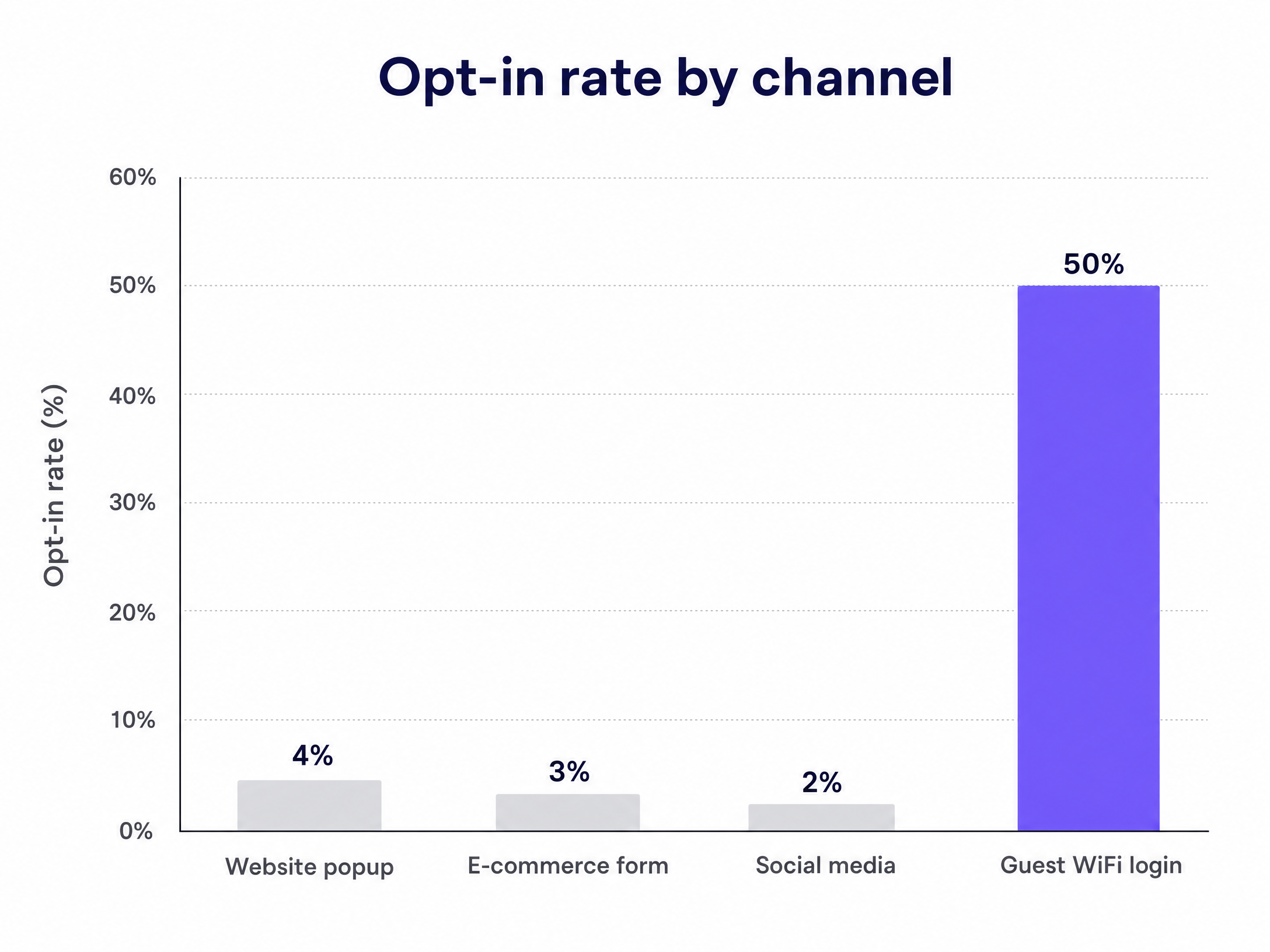
Guest WiFi द्वारे प्रथम-पक्ष (first-party) डेटा गोळा करणे हे चित्र बदलू शकते. तुम्ही इंटरनेट प्रवेशाच्या बदल्यात सत्यापित, ऐच्छिक संमती (opt-in) मिळवता. पाहुण्यांना त्या क्षणी आवश्यक असलेली गोष्ट मिळते आणि तुम्ही कोणताही नफा न गमावता जागरूक-निवड करणाऱ्या सदस्यांचा डेटाबेस तयार करता. ८०,००० पेक्षा जास्त थेट वेन्यूवरील Purple च्या डेटावर आधारित, Guest WiFi लॉगइन्स ५०% पर्यंतचे opt-in दर देतात, तर वेबसाइट पॉपअप्सची सरासरी केवळ २% ते ५% असते (Purple, २०१४).
अशा प्रकारे तयार केलेली सूची तुमच्या वास्तविक ग्राहक संख्येचे (footfall) प्रतिबिंब दर्शवते. जेव्हा तुम्ही Purple Engage वापरता, तेव्हा तुमच्या वेन्यूमध्ये आधीपासून उपस्थित असलेल्या लोकांचा डेटा गोळा करून ही सूची २४ तास स्वयंचलितपणे तयार होते. Mailchimp, Klaviyo आणि HubSpot सारखी सामान्य साधने मोहीम (campaign) पाठवतात, परंतु ते सूची तयार करत नाहीत.
दृष्टिकोन
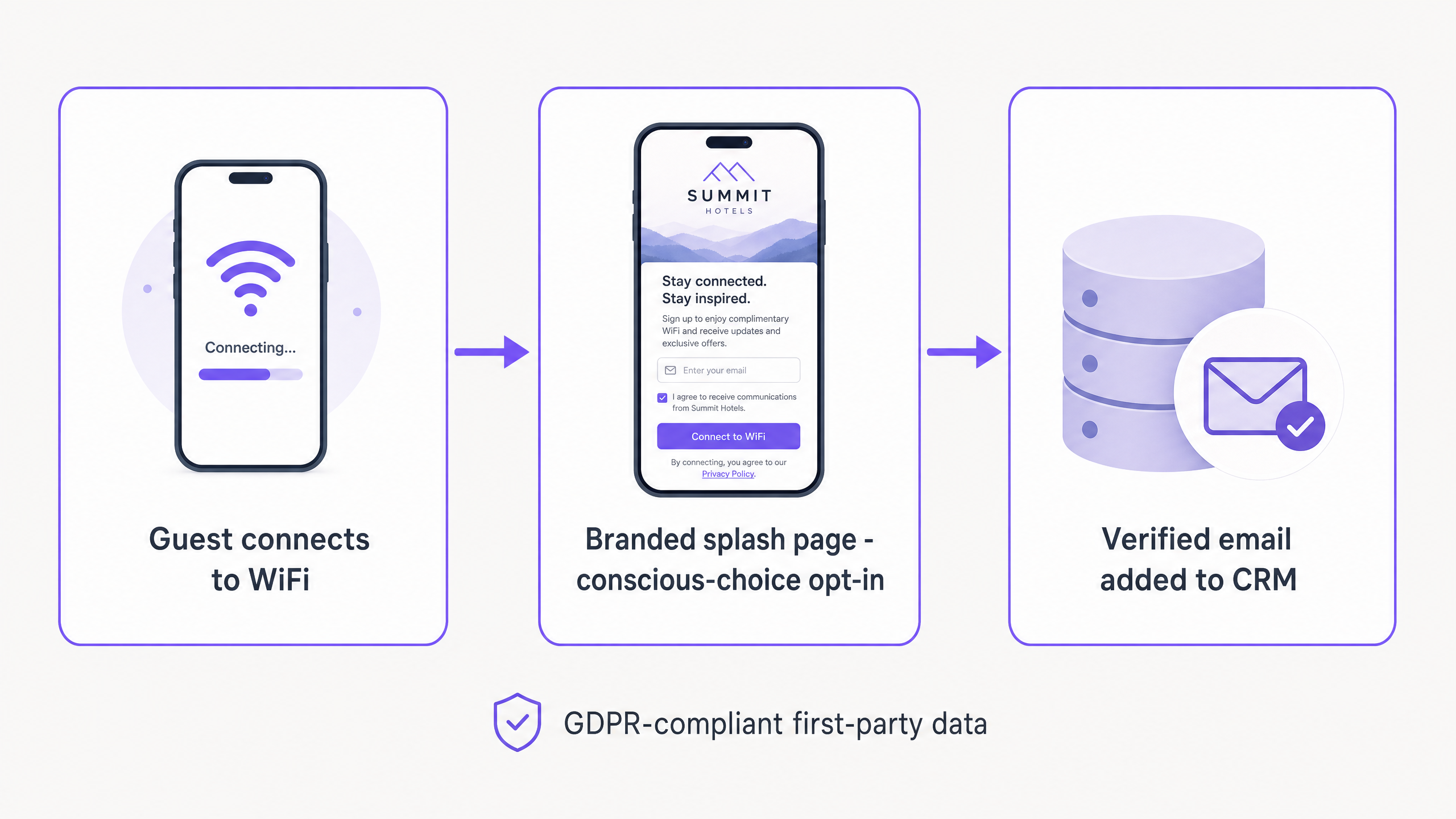
याची मुख्य प्रणाली कॅप्टिव्ह पोर्टल (captive portal) आहे - हे एक ब्रँडेड वेब पेज आहे ज्याच्याशी पाहुण्यांनी तुमचे WiFi नेटवर्क वापरण्यापूर्वी संवाद साधणे आवश्यक आहे. पाहुणा तुमच्या Guest WiFi SSID शी कनेक्ट होतो, त्याला लॉगइन पेजवर पुनर्निर्देशित केले जाते आणि तो त्याच्या ईमेल पत्त्याद्वारे किंवा सोशल अकाउंटद्वारे सत्यापित होतो. हे प्रमाणीकरण ओळख सत्यापित करते, बाऊन्स दर कमी करते आणि एकाच पायरीमध्ये प्रथम-पक्ष डेटा प्रोफाइल गोळा करते.
यात आणि सूट-आधारित साइन-अप्समधील मुख्य फरक म्हणजे प्रेरणा. कॅप्टिव्ह पोर्टलवरील पाहुण्याला इंटरनेट प्रवेश हवा असतो. ते आधीच तुमच्या वेन्यूमध्ये असतात आणि तुमच्या ब्रँडशी जोडलेले असतात. WiFi हा मूल्याचा विनिमय आहे. तुम्हाला बिलावर सूट देऊन हा व्यवहार अधिक आकर्षक करण्याची आवश्यकता नाही.
Pizza Express ने या एकत्रीकरणाचा (integration) वापर करून दोन वर्षांत त्यांच्या CRM मध्ये ३.७ दशलक्ष युनिक युजर्सची नोंदणी केली (Purple, २०१४). Harrods ने त्यांच्या निष्ठा योजनांना (loyalty schemes) प्रोत्साहन देण्यासाठी याच जागरूक-निवड संमती मॉडेलचा वापर करून त्यांच्या Guest WiFi प्रोग्राममधून गुंतवणुकीवर ५७ पट परतावा (ROI) मिळवला (Purple, २०१४).
हे रिटेल वातावरणाला विशेषतः कसे लागू होते याबद्दल अधिक माहितीसाठी, Turning retail footfall into an email list पहा.
तुमच्या Guest WiFi सह हे कसे करावे
Purple हे Cisco Meraki, HPE Aruba, Ruckus, Juniper Mist, Ubiquiti UniFi, Cambium, Extreme आणि Fortinet यांच्याशी जोडणारे, कोणत्याही हार्डवेअरवर चालणारे क्लाउड ओव्हरले म्हणून काम करते. तुमचे सध्याचे हार्डवेअर न बदलता तुम्ही हे तैनात करू शकता.
पायरी १ - नेटवर्क कॉन्फिगर करा. तुमच्या कॉर्पोरेट नेटवर्कपासून वेगळे केलेले, एक समर्पित अतिथी WiFi SSID सेट करा. ही एक सामान्य पद्धत आहे आणि यामुळे तुमचे व्यावसायिक सिस्टम्स सार्वजनिक रहदारीपासून सुरक्षितपणे वेगळे राहतात.
पायरी २ - स्प्लॅश पेज डिझाइन करा. एक ब्रँडेड लॉगिन पोर्टल तयार करा. डिझाइन साधे आणि डेटाच्या आवश्यकता किमान ठेवा. केवळ नाव आणि ईमेल पत्ता विचारा. या टप्प्यावर जन्मतारीख किंवा पत्ता विचारू नका.
पायरी ३ - संमतीच्या अटी सेट करा. तुमचे गोपनीयता धोरण स्पष्टपणे सादर करा आणि मार्केटिंग संमती मिळवण्यासाठी अनचेक केलेला चेकबॉक्स वापरा. अतिथीने त्यावर स्वतःहून टिक करणे आवश्यक आहे. ही GDPR ची आवश्यकता आहे आणि जाणीवपूर्वक घेतलेल्या निवडीची व्याख्या आहे. Purple हे GDPR, CCPA आणि ISO 27001 चे पूर्णपणे पालन करते.
पायरी ४ - तुमचे CRM कनेक्ट करा. नवीन प्रोफाइल्स स्वयंचलितपणे सिंक करण्यासाठी Purple Engage ला तुमच्या सध्याच्या CRM किंवा मार्केटिंग ऑटोमेशन प्लॅटफॉर्मशी जोडा. Purple च्या नेटवर्कवर प्रति लीड सरासरी खर्च £०.२८ आहे (Purple, २०२४), आणि संकलनाच्या वेळी ईमेल पडताळणी केल्याने डेटाबेसची अचूकता ८३% ने सुधारते (Purple, २०२४).
पायरी ५ - सक्रिय करा आणि निरीक्षण करा. एकदा सुरू झाल्यावर, ही प्रणाली पार्श्वभूमीत शांतपणे चालते. पहिल्या महिन्यादरम्यान, ऑप्ट-इन दर, यादीतील वाढ आणि ईमेल पडताळणी दर साप्ताहिक ट्रॅक करा.
काय पाठवायचे आणि कधी
अतिथी WiFi यादीचे मूल्य ते प्रदान करत असलेल्या संदर्भामध्ये असते. अतिथी तुमच्या आवारात कधी आहे आणि कधी बाहेर पडतो हे तुम्हाला ठाऊक असते. तुमच्या संवादांचे ऑटोमेशन करण्यासाठी त्याचा वापर करा.
| ट्रिगर | कधी पाठवायचे | ईमेल मजकूर | ध्येय |
|---|---|---|---|
| पहिले WiFi लॉगिन | लॉगिननंतर ३० मिनिटांनी | आवारातील वैशिष्ट्ये किंवा कार्यक्रमांवर प्रकाश टाकणारा स्वागत ईमेल | नातेसंबंध निर्माण करणे |
| नेटवर्क डिस्कनेक्ट | बाहेर पडल्यानंतर २ तासांनी | पुनरावलोकन विनंती (Google, TripAdvisor) | सामाजिक पुरावा मिळवणे |
| ३० दिवसांत भेट नाही | भेट न दिल्याचा ३० वा दिवस | पुन्हा सक्रिय करण्याचा ईमेल | गमावलेल्या अतिथींना परत मिळवणे |
| पुन्हा भेट (५वी+) | लॉगिननंतर १ तासाने | लॉयल्टी प्रोग्रामचे आमंत्रण | ग्राहकाचे आजीवन मूल्य वाढवणे |
स्वागत ईमेल हा सर्वात महत्त्वाचा संदेश आहे. तो नातेसंबंधाचा पाया घालतो. यामध्ये कोणतीही सूट समाविष्ट करू नका. तुमच्या आवारातील काहीतरी वेगळे वैशिष्ट्य - जसे की एखादी खास डिश, आगामी कार्यक्रम किंवा नवीन मेनू हायलाइट करा. तुम्ही किंमतीवर नव्हे, तर अनुभवावर आधारित नातेसंबंध निर्माण करत आहात.
पुन्हा सक्रिय करण्याचा ईमेल ही एकमेव अशी परिस्थिती आहे जिथे लक्ष्यित ऑफर देणे योग्य ठरते. तुम्ही आधीच गमावलेल्या अतिथीला परत मिळवण्याचा प्रयत्न करत आहात. तरीही, अनुभवाला प्राधान्य द्या. दीर्घकालीन यादीच्या आरोग्यासाठी, "आम्ही नवीन मेनू लाँच केला आहे" हे "येथे १०% सूट मिळवा" पेक्षा चांगली कामगिरी करते.
यशाचे मोजमाप
ओपन रेट आणि क्लिक रेट हे केवळ कथेचा एक भाग दर्शवतात. प्रत्यक्ष आवारासाठी, ईमेल मार्केटिंगचे खरे मोजमाप म्हणजे पुन्हा भेट देण्याचा दर आणि प्रति पाठवलेला महसूल हे आहे.
Purple जेव्हा डिव्हाइसेस पुन्हा व्हेन्यूमध्ये प्रवेश करतात तेव्हा त्यांचा मागोवा ठेवत असल्याने, तुम्ही ऑनलाइन मोहिमांचा ऑफलाइन प्रभाव मोजू शकता. जर तुम्ही ५,००० सदस्यांना मंगळवारच्या रात्रीच्या कार्यक्रमाचा प्रचार करणारा ईमेल पाठवला, तर Purple Engage तुम्हाला मंगळवारी संध्याकाळी त्यापैकी किती प्राप्तकर्ते तुमच्या दारात आले हे अचूक सांगू शकते. Mailchimp, Klaviyo आणि HubSpot हे त्यांच्या स्वतःहून करू शकत नाहीत.
या चार मेट्रिक्सचा मागोवा घ्या:
- ऑप्ट-इन दर (Opt-in rate) - WiFi लॉगिनची टक्केवारी ज्याद्वारे मार्केटिंग ऑप्ट-इन प्राप्त होते. लक्ष्य: ४०% किंवा त्याहून अधिक.
- यादी वाढीचा दर (List growth rate) - दर आठवड्याला जोडले जाणारे नवीन सत्यापित ईमेल. तुमच्या साप्ताहिक गर्दीशी (footfall) याची तुलना करा.
- प्रति पाठवणी महसूल (Revenue per send) - मोहिमेमुळे मिळालेला एकूण महसूल भागिले पाठवलेल्या ईमेलची संख्या.
- पुन्हा भेट देण्याचा दर (Return visit rate) - ईमेल मिळाल्यापासून १४ दिवसांच्या आत प्रत्यक्ष परत येणाऱ्या पाहुण्यांची टक्केवारी.
९० दिवसांनंतर, WiFi द्वारे मिळालेल्या पाहुण्यांच्या लाइफटाइम व्हॅल्यूची तुलना सवलत कोडद्वारे मिळालेल्या पाहुण्यांशी करा. WiFi कोहॉर्ट सातत्याने उच्च दीर्घकालीन मूल्य दाखवते कारण ब्रँडसोबतचे त्यांचे नाते किमतीवर आधारित नसते.
कुठे सुरू करावे
- तुमच्या हार्डवेअरचे ऑडिट करा. तुमचे ऍक्सेस पॉइंट्स समर्थित सूचीमध्ये आहेत याची खात्री करा (Cisco Meraki, HPE Aruba, Ruckus, Juniper Mist, Ubiquiti UniFi, Cambium, Extreme, Fortinet).
- तुमच्या सध्याच्या स्प्लॅश पृष्ठाचे पुनरावलोकन करा. ते ब्रँडेड आहे का? संमती चेकबॉक्स डीफॉल्टनुसार अनचेक केलेला आहे का? ते दोनपेक्षा जास्त फील्ड विचारते का?
- तुमच्या ऑटोमेशनची योजना आखा. लाइव्ह जाण्यापूर्वी वेलकम ईमेल आणि पुनरावलोकन विनंतीचा मसुदा तयार करा.
- तुमची बेसलाइन सेट करा. तुमचा सध्याचा ऑप्ट-इन दर, यादीचा आकार आणि साप्ताहिक गर्दीची नोंद करा जेणेकरून तुम्ही प्रभावाचे मोजमाप करू शकाल.
- लाँच करा आणि मॉनिटर करा. नवीन स्प्लॅश पृष्ठ तैनात करा आणि पहिल्या ३० दिवसांसाठी दर आठवड्याला ऑप्ट-इन दर, यादी वाढ आणि पुन्हा भेट देणाऱ्या दराचा मागोवा घ्या.