
पाहुण्यांच्या पहिल्या भेटीनंतर त्यांना काय ईमेल करावे
आपल्या वेन्यूसाठी हे का महत्त्वाचे आहे
पहिली भेट हा ग्राहक जीवनचक्रातला सर्वात महत्त्वाचा क्षण असतो. मग ते जेवणारे ग्राहक असोत, खरेदीदार असोत किंवा हॉटेलचे पाहुणे असोत, ते तुमच्या दारातून आत येतात, तुमच्या वेन्यूचा अनुभव घेतात आणि निघून जातात. त्यांना परत आणण्यासाठी विश्वासार्ह यंत्रणा नसल्यास, तुम्ही त्यांच्या दुसऱ्या भेटीसाठी पूर्णपणे नशिबावर अवलंबून राहता.
Bain & Company च्या संशोधनानुसार, नवीन ग्राहक मिळवण्याचा खर्च सध्याच्या ग्राहकाला टिकवून ठेवण्यापेक्षा पाच ते सात पटीने जास्त असतो. तरीही बहुतेक भौतिक वेन्यू केवळ नवीन ग्राहक मिळवण्यासाठी मोठ्या प्रमाणात गुंतवणूक करतात आणि फॉलो-अपमध्ये काहीच करत नाहीत. भेटीनंतरचा ईमेल ही दरी भरून काढतो. रिपीट फूटफॉल, लाइफटाइम व्हॅल्यू आणि प्रति सेंड महसूल वाढवण्यासाठी हे तुमचे सर्वात थेट साधन आहे.
समस्या ईमेलची नाही. Mailchimp, Klaviyo आणि HubSpot सारखी टूल्स मोहीम पाठवू शकतात. खरी समस्या यादीची आहे. जर तुम्ही तुमच्या वेन्यूला पहिल्यांदा भेट देणाऱ्या व्यक्तीला ओळखू शकला नाहीत, तर तुम्ही संबंधित फॉलो-अप ट्रिगर करू शकत नाही. शेवटी तुम्ही संमिश्र प्रेक्षकांना सामान्य न्यूजलेटर्स पाठवता, ज्यामुळे संदेशाचा प्रभाव कमी होतो आणि परतावा घटतो.
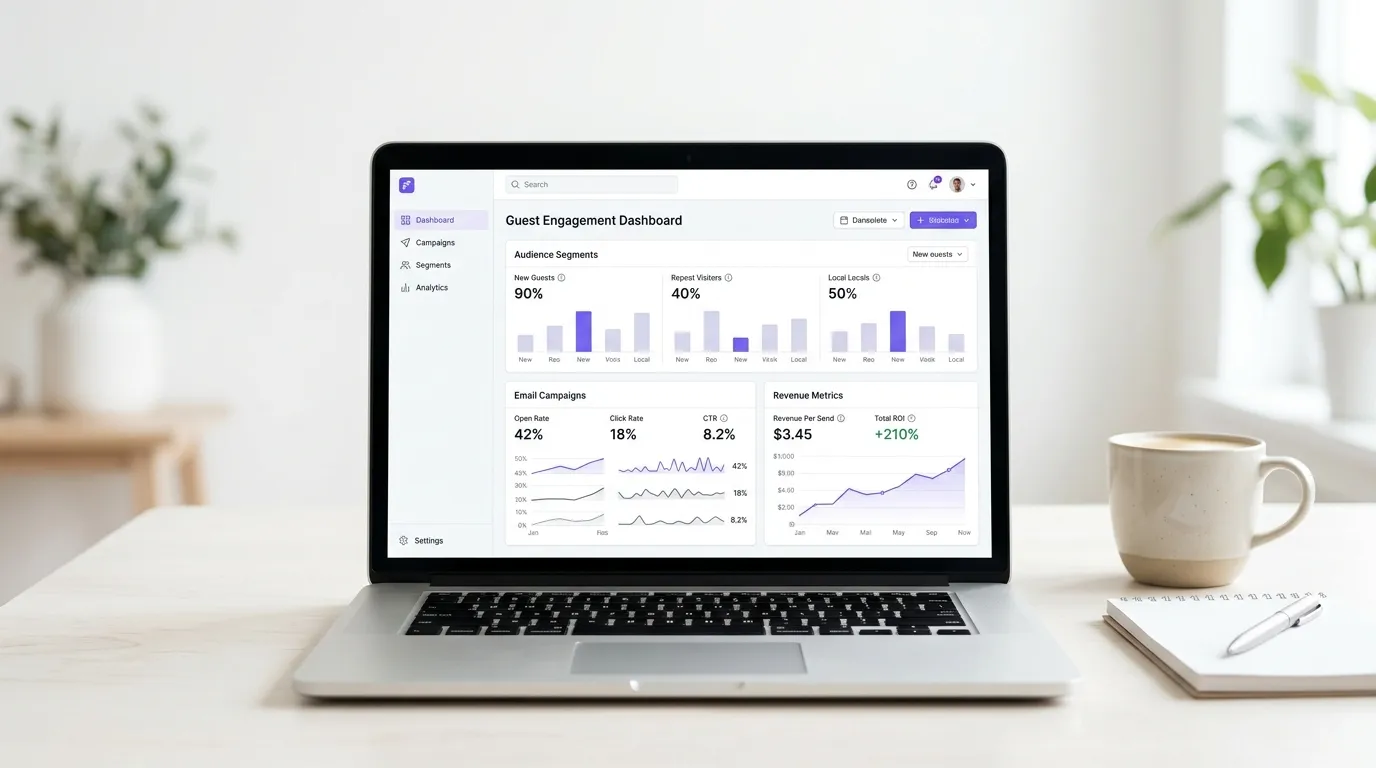
Purple Engage मूळ स्त्रोतापासूनच याचे निराकरण करते. WiFi लॉगिनद्वारे ग्राहकांची यादी स्वयंचलितपणे तयार होते - जी सत्यापित, स्वयं-निवडलेला फर्स्ट-पार्टी डेटा आहे. जेव्हा ग्राहक त्यांच्या टेबलवर बसलेले असतात किंवा तुमच्या दुकानात फिरत असतात, तेव्हा त्यांचे प्रोफाइल तुमच्या CRM मध्ये आधीपासूनच तयार असते. ते पहिल्यांदा भेट देणारे ग्राहक म्हणून चिन्हांकित केले जातात आणि ते वेन्यूमधून बाहेर पडताच स्वयंचलित मोहीम ट्रिगर करण्यासाठी तयार असतात.
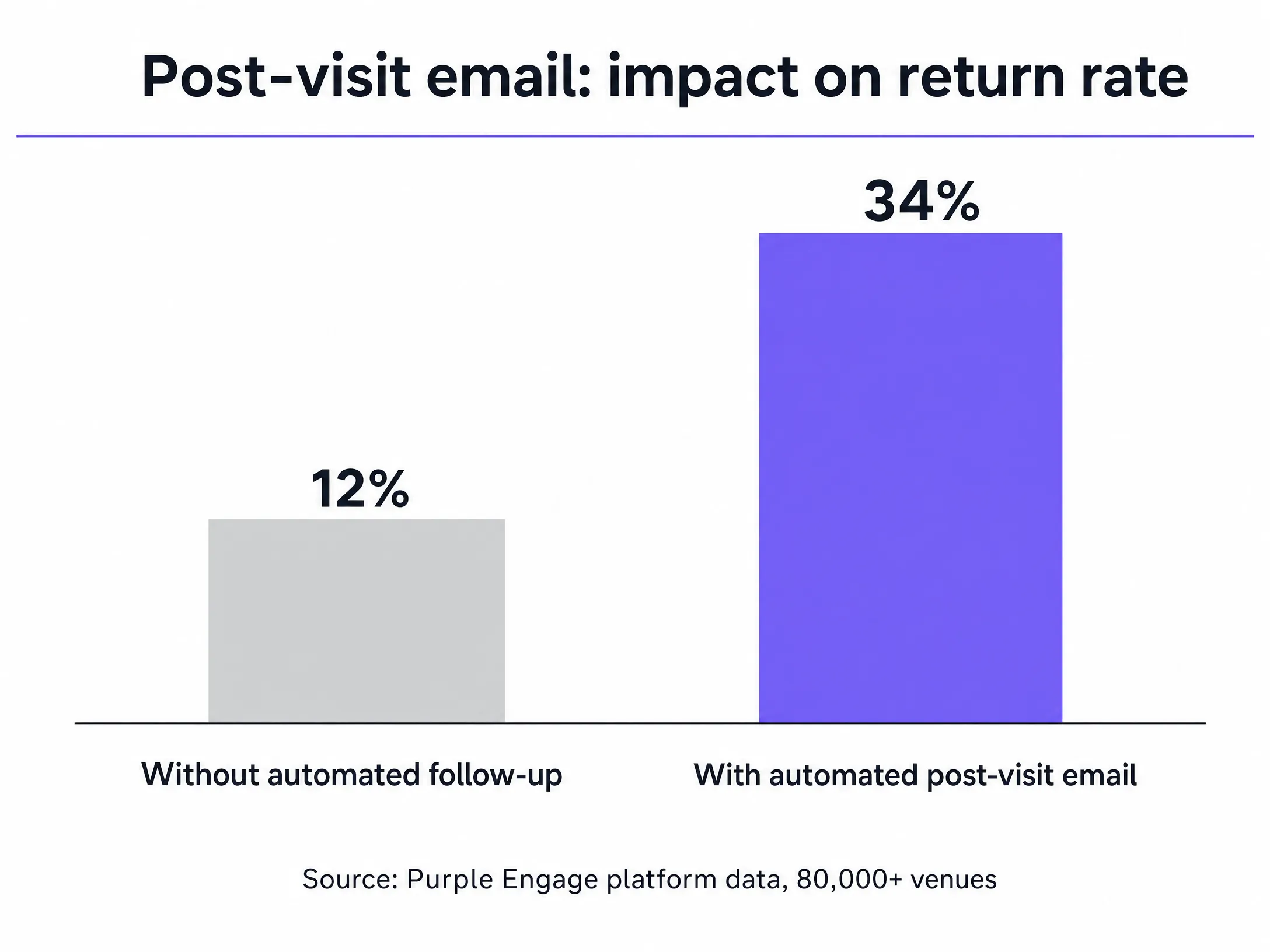
Purple जगभरातील 80,000 पेक्षा जास्त सक्रिय वेन्यूमध्ये चालते आणि 2024 मध्ये यामध्ये 440 दशलक्ष लॉगिनची नोंद झाली आहे (Purple अंतर्गत डेटा). या मोठ्या प्रमाणाचा अर्थ असा आहे की पहिल्या भेटीची ओळख पटवणारे लॉजिक प्रत्येक वेन्यू प्रकारात तपासले गेले आहे, मग ते क्विक-सर्व्हिस रेस्टॉरंट्स असोत, 200 खोल्यांची हॉटेल्स असोत की फ्लॅगशिप रिटेल स्टोअर्स असोत. तुम्ही एक साइट चालवत असाल किंवा 500, इन्फ्रास्ट्रक्चर तेच राहते.
दृष्टिकोन
याचा मुख्य दृष्टिकोन प्रेझेन्स डिटेक्शन, संमती घेणे आणि वेळेवर आधारित ऑटोमेशन हा आहे. जेव्हा एखादा ग्राहक येतो तेव्हा WiFi ऑथेंटिकेशन इव्हेंटद्वारे Purple त्याचा शोध घेते. हे Captive Portal च्या माध्यमातून त्यांचा ईमेल पत्ता आणि संमती मिळवते - हा एक ब्रँडेड लॉगिन पृष्ठ आहे जो तुमच्या अटी स्पष्टपणे सादर करतो आणि GDPR Article 6(1)(a) चे पूर्ण पालन करून सक्रिय ऑप्ट-इनची नोंद करतो. जेव्हा ग्राहक नेटवर्कवरून डिस्कनेक्ट होतो, तेव्हा सिस्टम त्यांच्या जाण्याची नोंद करते आणि ऑटोमेशन टाइमर सुरू करते.हा दृष्टिकोन मॅन्युअली तयार केलेल्या लिस्टच्या विश्वासार्हतेवर परिणाम करणाऱ्या तीन त्रुटी दूर करतो. पहिली म्हणजे पॉईंट-ऑफ-सेल स्टाफचे विसंगत वर्तन - प्रत्येक ग्राहकाला त्यांच्या ईमेल पत्त्यासाठी विचारण्यासाठी ट्रेनिंग, प्रोत्साहन आणि सातत्याने अंमलबजावणी आवश्यक असते, जी बऱ्याच टीम्स मोठ्या प्रमाणावर कायम ठेवू शकत नाहीत. दुसरी म्हणजे वेबसाइटवर साइन-अप करण्याचे कमी प्रमाण - Sumo डेटा नुसार, वेबसाइटवरील ईमेल फॉर्म्ससाठी सरासरी ऑप्ट-इन दर २% पेक्षा कमी आहे. तिसरी म्हणजे पहिल्यांदा भेट देणारे आणि नेहमी भेट देणारे यांच्यात फरक न ओळखता येणे - नेटवर्क-स्तरीय उपस्थिती शोधल्याशिवाय, साइन अप करणारी व्यक्ती एकदा आली आहे की ५० वेळा आली आहे हे जाणून घेण्याचा तुमच्याकडे कोणताही मार्ग नाही.
कारण Purple हे MAC addresses ट्रॅक करते आणि त्यांना प्रमाणीकृत प्रोफाइलशी जोडते, त्यामुळे ही पहिली भेट आहे की पुन्हा झालेली भेट आहे हे अचूकपणे समजते. याचा परिणाम म्हणजे एक अशी लिस्ट तयार होते जी नेहमी अद्ययावत, नेहमी व्हेरिफाइड आणि नेहमी भेटींच्या इतिहासानुसार विभागलेली असते - आणि यासाठी तुमच्या टीमकडून कोणत्याही मॅन्युअल कष्टाची गरज नसते.
येथे संमतीचे मॉडेल महत्त्वाचे ठरते. GDPR ची अशी आवश्यकता आहे की मार्केटिंग संदेशांसाठी मिळवलेली संमती ही मुक्तपणे दिलेली, विशिष्ट, माहितीपूर्ण आणि स्पष्ट असावी (कलम ७). Purple चे captive portal या मानकांची पूर्तता करण्यासाठी डिझाइन केले आहे. ग्राहकांना मेलिंग लिस्टमध्ये आधीच प्री-टिक केले जात नाही; ते स्वतः सक्रियपणे अटी स्वीकारतात. हा फरक केवळ तुमचे कायदेशीर संरक्षण करत नाही तर, अधिक व्यावहारिकपणे, याचा अर्थ असा की तुमची लिस्ट अशा लोकांची बनते ज्यांना खरोखरच तुमच्याकडून माहिती मिळवायची आहे. अत्यंत सक्रिय लिस्ट्स चांगली कामगिरी करतात, अनसबस्क्राइबचे प्रमाण कमी राहते आणि डिलिव्हरेबिलिटी जास्त राहते.
तुमच्या guest WiFi च्या सहाय्याने हे कसे साध्य करावे
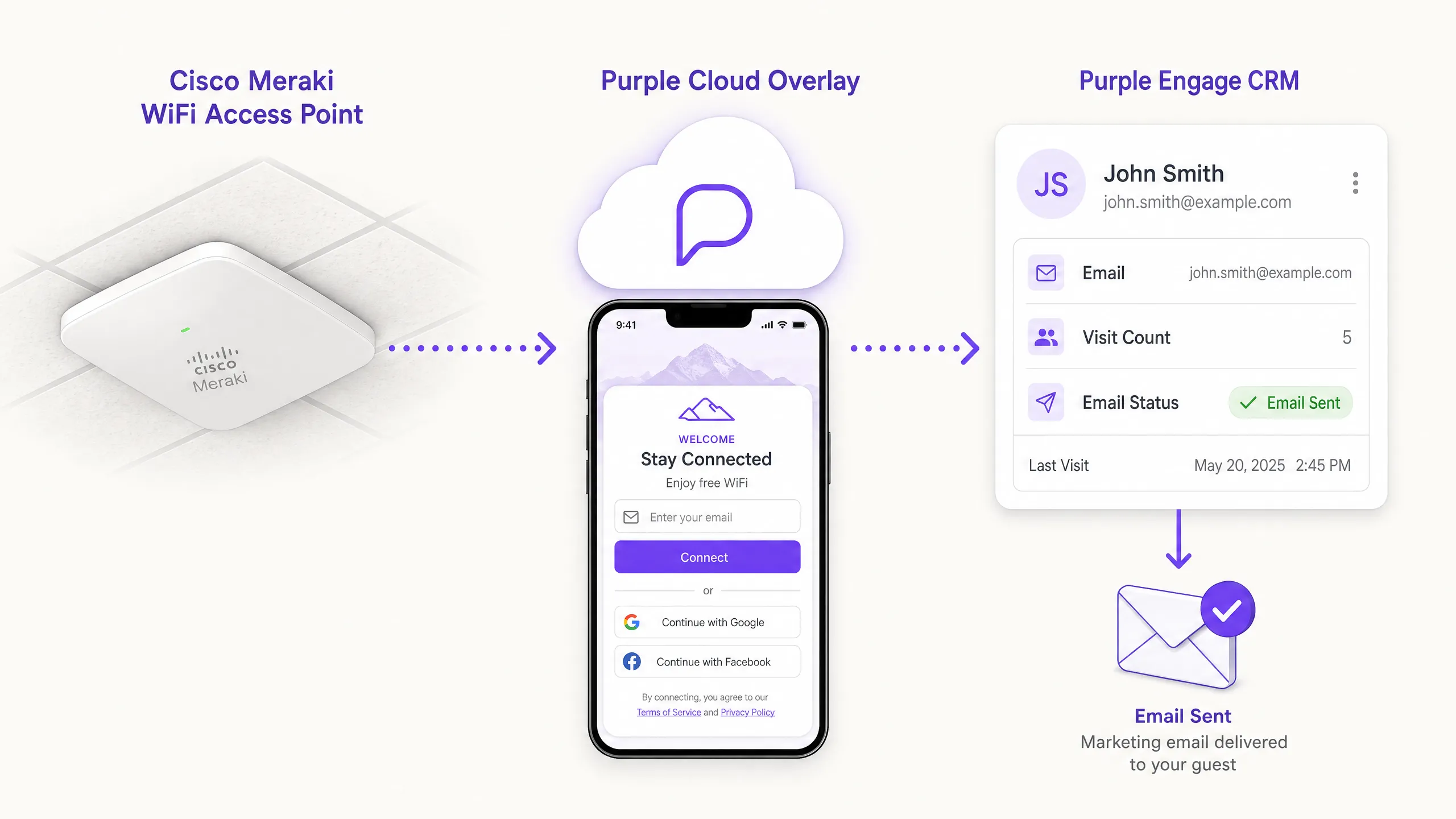
Purple Engage WiFi लॉगिनच्या वेळी पहिल्या भेटीचा शोध घेते आणि फॉलो-अप स्वयंचलितपणे ट्रिगर करते. या वर्कफ्लोमध्ये चार टप्पे आहेत.
पायरी १ - डेटा गोळा करा. ग्राहक Guest WiFi नेटवर्कशी कनेक्ट होतो. captive portal एक स्पष्ट, ब्रँडेड लॉगिन पृष्ठ दाखवते. ते त्यांच्या पसंतीची पद्धत (Google Workspace, Microsoft Entra ID किंवा मानक ईमेल फॉर्म) वापरून प्रमाणीकरण करतात आणि अटी स्वीकारतात, ज्यामुळे मार्केटिंग संदेश मिळवण्यासाठी GDPR-सुसंगत संमती मिळते. लॉगिन प्रक्रियेला ३० सेकंदांपेक्षा जास्त वेळ लागत नाही आणि कोणत्याही ॲप डाउनलोडची आवश्यकता नसते.
पायरी २ - पहिल्या भेटीची ओळख पटवा. Purple डिव्हाइस आणि प्रोफाइलची नोंद करते. जर या प्रोफाइलने या ठिकाणी (किंवा तुम्ही एकापेक्षा जास्त ठिकाणी काम करत असल्यास तुमच्या संपूर्ण मालमत्तेत) पहिल्यांदाच प्रमाणीकरण केले असेल, तर Purple Engage CRM मध्ये ती पहिली भेट म्हणून चिन्हांकित केली जाते. ही प्रणाली केवळ MAC addresses नव्हे, तर प्रमाणीकृत प्रोफाइलचा संदर्भ देऊन नवीन डिव्हाइसेस आणि नवीन लोक यांच्यातील फरक ओळखते.
पायरी ३ - मोहीम ट्रिगर करा. Purple Engage मधील स्वयंचलित नियम पहिल्या भेटीच्या इव्हेंटवर लक्ष ठेवतो. जेव्हा ग्राहक नेटवर्कवरून डिस्कनेक्ट होतो (ते तेथून बाहेर पडल्याचे दर्शविते), तेव्हा सिस्टम विलंब टायमर सुरू करते आणि पाठवण्यासाठी ईमेल रांगेत ठेवते. तुमच्या मार्केटिंग टीमकडून कोणत्याही मॅन्युअल कृतीची आवश्यकता नसते.
पायरी ४ - पाठवा आणि ट्रॅक करा. कॉन्फिगर केलेल्या विलंबा नंतर ईमेल पाठवला जातो. त्यानंतर ग्राहक पुढील WiFi ऑथेंटिकेशन इव्हेंट्सचा मागोवा घेऊन पुन्हा त्या ठिकाणी येतो की नाही यावर Purple लक्ष ठेवते, ज्यामुळे तुम्हाला ईमेल पाठवणे आणि प्रत्यक्ष पुन्हा भेट देणे यामधील थेट दुवा मिळतो. यामुळे ॲट्रिब्युशन लूप पूर्ण होतो जो सामान्य ईमेल प्लॅटफॉर्म पूर्ण करू शकत नाहीत.
Purple हे Cisco Meraki, HPE Aruba, Ruckus, Juniper Mist, Ubiquiti UniFi, Cambium, Extreme आणि Fortinet हार्डवेअरसोबत काम करते. तुम्हाला तुमची सध्याची पायाभूत सुविधा बदलण्याची गरज नाही. Purple क्लाउड ओव्हरले तुमच्याकडे आधीपासून असलेल्या गोष्टींच्या थेट वर चालते.
काय आणि कधी पाठवायचे
वेळ आणि मजकूर हे दोन घटक आहेत जे ठरवतात की ईमेल पुन्हा भेटीसाठी प्रवृत्त करतो की त्याकडे दुर्लक्ष केले जाते.
वेळ: २४-तासांचा नियम. बहुतेक ठिकाणांसाठी, ग्राहक निघून गेल्यावर २४ तास हा सर्वोत्तम वेळ असतो. ती भेट अजूनही त्यांच्या स्मरणात ताजी असते, ते त्यांच्या दैनंदिन दिनचर्येत परतलेले असतात आणि त्यांच्याकडे ईमेल वाचण्यासाठी आणि त्यानुसार कृती करण्यासाठी वेळ असतो. ते निघून गेल्यावर लगेच पाठवणे त्रासदायक वाटू शकते. एक आठवडा थांबल्यास त्या भेटीशी असलेले भावनिक नाते संपून जाते.
उद्योग-विशिष्ट बदल करणे आवश्यक आहे. हॉटेलने ४८ तासांचा विलंब वापरावा - पाहुणे सहसा चेकआउटच्या दुसऱ्या दिवशी घरी प्रवास करत असतात आणि प्रवासात ईमेल तपासण्याची शक्यता कमी असते. त्याच आठवड्यात पुन्हा भेट देण्याचे उद्दिष्ट ठेवणारे क्विक-सर्व्हिस रेस्टॉरंट्स दोन तासांचा विलंब वापरू शकतात, ज्यामुळे ब्रँड अजूनही ग्राहकांच्या मनात असतानाच त्यांना गाठता येते आणि त्यांना रात्रीच्या जेवणासाठी परत येण्याचे कारण मिळते. स्टेडियम आणि इव्हेंटच्या ठिकाणांनी इव्हेंटनंतर १२ ते २४ तासांचे लक्ष्य ठेवावे, जेव्हा चाहते घरी परत स्थिरावतात आणि पुढील सामन्याची वाट पाहू लागतात.
| ठिकाणाचा प्रकार | शिफारस केलेला विलंब | तर्कसंगतता |
|---|---|---|
| रेस्टॉरंट (कॅज्युअल डायनिंग) | २४ तास | आठवणी ताज्या आहेत, ग्राहक त्यांच्या दिनचर्येत परत आले आहेत |
| फास्ट फूड/क्विक सर्व्हिस | २ तास | त्याच दिवशी किंवा दुसऱ्या दिवशी पुन्हा भेट देण्यास प्रवृत्त करते |
| हॉटेल | ४८ तास | पाहुणे चेकआउटच्या दिवशी घरी प्रवास करत असण्याची शक्यता असते |
| रिटेल | २४ तास | विचारपूर्वक केलेल्या खरेदीसाठी मानक वेळ |
| स्टेडियम/इव्हेंटचे ठिकाण | १२-२४ तास | चाहते घरी परत स्थिरावले आहेत, पुढील सामन्याची वाट पाहत आहेत |
मजकूर: एक ध्येय, एक कृती. ईमेलने फक्त एकच गोष्ट केली पाहिजे: ग्राहकाला परत येण्याचे कारण देणे. त्याची रचना खालीलप्रमाणे करा.
त्यांच्या भेटीबद्दल मनापासून आभार मानून सुरुवात करा. शक्य असल्यास, ठिकाणाचे नाव किंवा तारीख समाविष्ट करा - हे सूचित करते की हा मास-ब्लास्ट स्पॅम ईमेल नाही.
एक विशिष्ट, मूर्त प्रोत्साहन ऑफर करा. एक मोफत कॉफी, एक कॉम्प्लिमेंटरी स्टार्टर किंवा त्यांच्या पुढील खरेदीवर १०% सूट. प्रोत्साहन महाग असण्याची गरज नाही, परंतु ते विशिष्ट आणि मिळवण्यास सोपे असावे. ग्राहकाने काउंटरवर दाखवलेला QR कोड हा रिडेम्प्शनसाठी सर्वोत्तम मार्ग आहे. यासाठी कर्मचाऱ्यांना प्रशिक्षण देण्याची गरज नाही, कोणतेही कोड लक्षात ठेवण्याची गरज नाही आणि रिडेम्प्शनच्या वेळी कोणतीही अडचण येत नाही.
एक लहान फीडबॅक विनंती समाविष्ट करा. एकच प्रश्न, किंवा दोन मिनिटांच्या सर्वेक्षणाची लिंक. हे तुम्हाला ऑपरेशनल इंटेलिजन्स देते आणि ग्राहकांना हे दाखवते की तुम्ही त्यांच्या मताची कदर करता. ज्या जागा पोस्ट-व्हिजिट ईमेलमध्ये फीडबॅक मागतात, तिथे सामान्यतः फीडबॅक न मागणाऱ्यांच्या तुलनेत दुसऱ्या भेटीचे दर जास्त दिसतात, कारण विचारण्याची ही कृती संबंध जोडण्याची भावना निर्माण करते.
एका स्पष्ट कॉल टू ॲक्शनसह (call to action) शेवट करा. एक बटण. एक लिंक. परत येण्याचे एक कारण. ग्राहकाला पाच गोष्टी करायला सांगू नका. प्रत्येक अतिरिक्त पर्याय त्यांनी कोणतीही कृती करण्याची शक्यता कमी करतो.
विषय ओळी (Subject lines). ईमेल उघडला जाईल की नाही हे विषय ओळ ठरवते. ते लहान, विशिष्ट आणि वैयक्तिक ठेवा. "[First Name], आम्ही तुमच्यासाठी एक मोफत कॉफी सेव्ह केली आहे" हे नेहमीच "तुमच्या भेटीबद्दल धन्यवाद" पेक्षा चांगली कामगिरी करते. जर तुम्ही ऑथेंटिकेशन दरम्यान ग्राहकाचे पहिले नाव मिळवले असेल, तर ते वापरा. "आम्हाला तुम्हाला पुन्हा पाहायला आवडेल" सारखी सामान्य वाक्ये टाळा - ती वैयक्तिक ऐवजी मास मेलिंग दर्शवतात.
सेगमेंटेशन (Segmentation). Purple Engage तुम्हाला भेटीची वेळ, आठवड्याचा दिवस, घालवलेला वेळ आणि भेटीची वारंवारता यानुसार विभागणी (segment) करण्याची परवानगी देते. मंगळवारी दुपारच्या जेवणाच्या वेळी भेट देणाऱ्या ग्राहकाच्या वर्तनाचा पॅटर्न शनिवारच्या रात्री भेट देणाऱ्या ग्राहकापेक्षा वेगळा असतो. अधिक संबंधित फॉलो-अप पाठवण्यासाठी त्या डेटाचा वापर करा. दुपारच्या वेळचा पाहुणा रात्रीच्या जेवणाच्या ऑफरला प्रतिसाद देऊ शकतो. वीकेंडला येणाऱ्या पाहुण्याला वीकडेच्या अर्ली-बर्ड प्रमोशनमध्ये रस असू शकतो. जो ग्राहक तीन तास थांबला तो २० मिनिटे थांबलेल्या ग्राहकापेक्षा अधिक गुंतलेला असतो - पहिल्या ग्राहकासाठी अधिक चांगल्या इन्सेंटीव्हचा विचार करा.
ग्राहकांच्या डेटाची रणनीती सुरवातीपासून कशी तयार करावी याबद्दल अधिक माहितीसाठी, आमचे संबंधित मार्गदर्शक पहा: QR codes vs WiFi login for capturing customer emails.
निकालांचे मोजमाप करणे
केवळ ओपन रेट्स (open rates) मोजू नका. ओपन रेट हे केवळ दाखवण्याचे मेट्रिक आहे. क्लिक-थ्रू रेट हे एक माध्यम आहे. दोन्हीपैकी कोणतेही तुम्हाला ग्राहक परत आला की नाही हे सांगत नाही.
Purple हे WiFi नेटवर्कद्वारे प्रत्यक्ष जागेवरील उपस्थितीचा मागोवा घेत असल्याने, तुम्ही वास्तविक रिटर्न-व्हिजिट रेट मोजू शकता - अशा ग्राहकांची टक्केवारी ज्यांना पोस्ट-व्हिजिट ईमेल मिळाला आणि त्यांनी तुमच्या जागेत प्रत्यक्ष परत पाऊल ठेवले. मोहिमेच्या यशाचे मूल्यांकन करण्यासाठी हे प्राथमिक मेट्रिक आहे.
Purple Engage मध्ये एक साधी तुलना सेट करा: ज्या ग्राहकांना ईमेल मिळाला आहे त्यांचा रिटर्न-व्हिजिट रेट विरुद्ध नियंत्रण गट (control group) ज्यांना ईमेल मिळाला नाही. जर तुमच्याकडे पॉइंट-ऑफ-सेल डेटा समाकलित (integrate) असेल, तर प्रति पाठवल्या गेलेल्या ईमेलनुसार महसुलाची गणना करा. हे तुम्हाला मोहिमेच्या आणि व्यावसायिक परताव्याच्या मधील थेट, दृश्यमान दुवा देते.
ट्रॅक करण्यासारख्या दुय्यम मेट्रिक्समध्ये भेटींमधील वेळ (ईमेल पहिल्या आणि दुसऱ्या भेटीमधील अंतर कमी करत आहे का?), इन्सेंटीव्ह रिडेम्प्शन दर (ऑफर पुरेशी आकर्षक आहे का?) आणि अनसबस्क्राइब दर (ईमेल प्रेक्षकांसाठी पुरेशा प्रमाणात संबंधित आहे का?) यांचा समावेश होतो. बेंचमार्क्सबद्दल एक महत्त्वाची नोंद. Mailchimp च्या उद्योगविषयक डेटा नुसार, रिटेल आणि हॉस्पिटॅलिटीमधील सरासरी ईमेल ओपन रेट्स २०% ते ३०% च्या दरम्यान असतात. भेटीनंतर पाठवले जाणारे ईमेल्स सहसा या बेंचमार्क्सपेक्षा चांगली कामगिरी करतात कारण ते एखाद्या प्रत्यक्ष घटनेमुळे ट्रिगर होतात आणि त्यामध्ये संबंधित ऑफर असते. पण पुन्हा एकदा लक्षात ठेवा, ईमेल ओपन रेट हे उद्दिष्ट नाही. पुन्हा भेट देणे हे उद्दिष्ट आहे.
दर ३० दिवसांनी डेटाचे पुनरावलोकन करा आणि एका वेळी एकच गोष्ट बदला. वेगवेगळ्या इन्सेंटिव्ह्सची चाचणी घ्या. वेगवेगळ्या सब्जेक्ट लाईन्सची चाचणी घ्या. वेगवेगळ्या विलंबाची (delays) चाचणी घ्या. ही मोहीम स्वयंचलितपणे चालत असल्याने, तुमचे काम त्याचे व्यवस्थापन करणे नसून ते अधिक सक्षम (optimise) करणे हे आहे.
सामान्य चुका टाळणे
आपली पहिली पोस्ट-व्हिजिट मोहीम राबवणाऱ्या संस्थांमध्ये चार चुका वारंवार दिसून येतात.
पहिली चूक म्हणजे कमकुवत इन्सेंटिव्ह. सामान्य सवलत (generic discount) सहज विसरली जाते. एक विशिष्ट, प्रत्यक्ष दिसणारी ऑफर - जसे की मोफत वस्तू, कॉम्प्लीमेंटरी अपग्रेड, राखीव टेबल - ही एका भेटीसारखी वाटते. भेटवस्तूंमुळे परस्पर आदराची भावना निर्माण होते. सवलतींमुळे केवळ किमतीबाबत संवेदनशीलता निर्माण होते.
दुसरी चूक म्हणजे क्लिष्ट रिडेम्प्शन प्रक्रिया. जर ग्राहकाला व्हाउचर प्रिंट करावे लागत असेल, कोड लक्षात ठेवावा लागत असेल किंवा मॅनेजरशी बोलावे लागत असेल, तर या त्रासामुळे कन्वर्जन नष्ट होते. ईमेलमधील QR कोड जो ग्राहक काउंटरवर दाखवतो, तो रिडीम करण्यासाठी फक्त तीन सेकंद लागतात. हे गाठायचे मानक आहे.
तिसरी चूक म्हणजे प्रत्येकाला एकच ईमेल पाठवणे. Purple Engage तुम्हाला सेगमेंट करण्यासाठी डेटा देते. त्याचा वापर करा. शुक्रवारी रात्री आलेला आणि ९० मिनिटे थांबलेला पहिलाच ग्राहक आणि सोमवारी सकाळी २० मिनिटांसाठी भेट दिलेला ग्राहक, हे दोन पूर्णपणे वेगळे ग्राहक आहेत. ऑफरमधून हा फरक दिसून आला पाहिजे.
चौथी चूक म्हणजे प्रवेशद्वारावर WiFi चा प्रसार न करणे. जर ग्राहक नेटवर्कशी जोडले गेले नाहीत, तर तुम्ही त्यांचा डेटा मिळवू शकत नाही. दारावरील एक सोपा बोर्ड, टेबल कार्ड किंवा स्वागतादरम्यान कर्मचाऱ्यांनी केलेली छोटीशी चर्चा यामुळे ऑप्ट-इनचे प्रमाण लक्षणीयरित्या वाढेल. मोहीम तितकीच चांगली असते जेवढी ती ज्या लिस्टवर चालते ती लिस्ट चांगली असते.
सुरुवात कुठे करावी
तुमची पहिली पोस्ट-व्हिजिट मोहीम लाईव्ह करण्यासाठी येथे एक क्रमवार चेकलिस्ट दिली आहे.
१. Captive Portal सुरू करा. तुमच्या अतिथी WiFi साठी ऑथेंटिकेशन आवश्यक असल्याची खात्री करा जेणेकरून फर्स्ट-पार्टी डेटा गोळा केला जाईल. प्रवेशद्वारावर स्पष्ट साईनबोर्ड लावून WiFi चा प्रसार करा. २. ऑटोमेशन सेट अप करा. Purple Engage मध्ये, पहिल्या भेटीच्या इव्हेंटद्वारे ट्रिगर होणारी नवीन स्वयंचलित मोहीम तयार करा. ३. ईमेल डिझाइन करा. ते साधे, ब्रँडशी सुसंगत आणि एकाच कॉल टू ॲक्शनवर केंद्रित ठेवा. स्पष्ट ऑफर असलेला प्लेन-टेक्स्ट ईमेल अनेकदा क्लिष्ट डिझाइन केलेल्या HTML ईमेलपेक्षा चांगली कामगिरी करतो. ४. विलंब (delay) सेट करा. तुमच्या संस्थेच्या प्रकारासाठी योग्य कालावधीत पाठवण्यासाठी ट्रिगर कॉन्फिगर करा. शंका असल्यास, २४ तासांपासून सुरुवात करा. ५. इन्सेंटिव्ह निवडा. सोप्या रिडेम्प्शन मेकॅनिझमसह (उदा. QR कोड) एक विशिष्ट, प्रत्यक्ष मिळणारी ऑफर निवडा. ६. निरीक्षण आणि ऑप्टिमायझेशन करा. ३० दिवसांनंतर रिटर्न रेट तपासा आणि आकडेवारी बदलत नसल्यास इन्सेंटिव्ह किंवा वेळेमध्ये बदल करा.