How to build a guest WiFi email list that actually converts
This guide shows venue marketing directors how to build a high-converting, GDPR-compliant email list using guest WiFi logins. It explains how capturing first-party data at the point of physical presence outperforms bought lists and manual forms.
Listen to the audio version of this guide:
Why this matters for your venue
If you operate a restaurant, a hotel, a bar, or a retail venue, you already have the raw material for a high-performing email list. Real people are physically present in your space. The problem is that most venues let those people walk out the door without capturing a single verified contact detail. They rely on bought lists that bounce, or paper sign-up forms that nobody completes. They hand the job to a generic email tool like Mailchimp and wonder why their open rates are in single digits.
This guide outlines a different approach. It explains how to build a guest WiFi email list. This list grows automatically every time someone connects to your venue WiFi. Every address is verified. Every opt-in is a conscious choice. Every campaign you send lands in an inbox that actually belongs to a real person who has been in your venue.
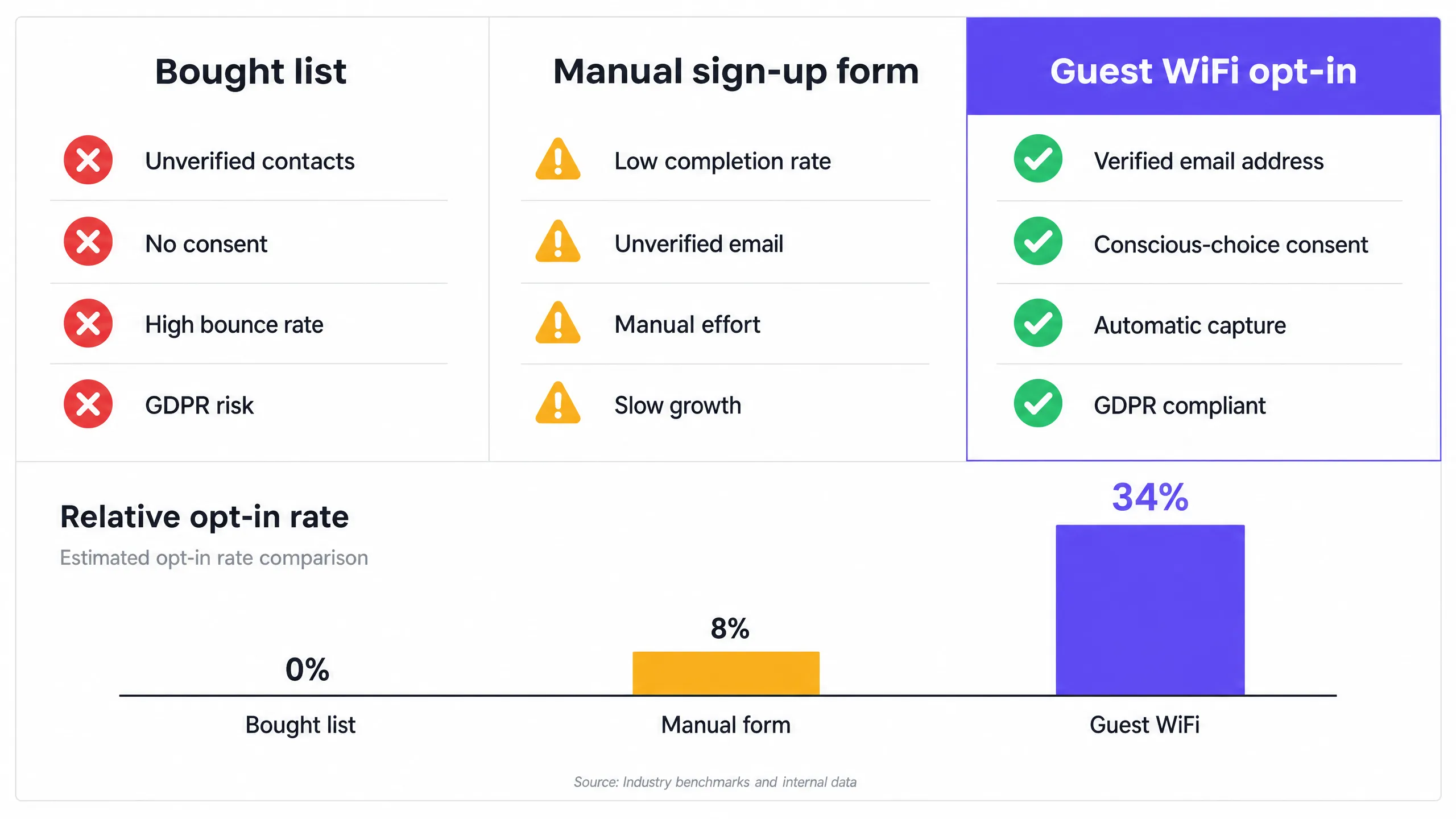
The business case is clear. Purple processes 440 million logins across 80,000+ live venues every year. Across those venues, the average opt-in rate through a guest WiFi login page sits at around 30% to 40% of connecting guests. A well-run restaurant with 200 covers a day can realistically add 20 to 30 verified email addresses to its list every single day. This happens without any staff effort, without any forms, and without any incentive beyond the WiFi access the guest was already going to use.
Compare that to a bought list. A bought list gives you zero verified contacts. Every address on it belongs to someone who has never heard of your venue, never opted in to hear from you, and is very likely to mark your email as spam. GDPR makes bought lists legally risky. The Information Commissioner's Office in the UK has issued fines exceeding £500,000 for unlawful email marketing.
Manual sign-up forms perform marginally better than bought lists. Completion rates rarely exceed 8% of visitors, the email addresses are unverified, and the process depends on staff remembering to ask.
Guest WiFi changes the equation entirely.

The approach
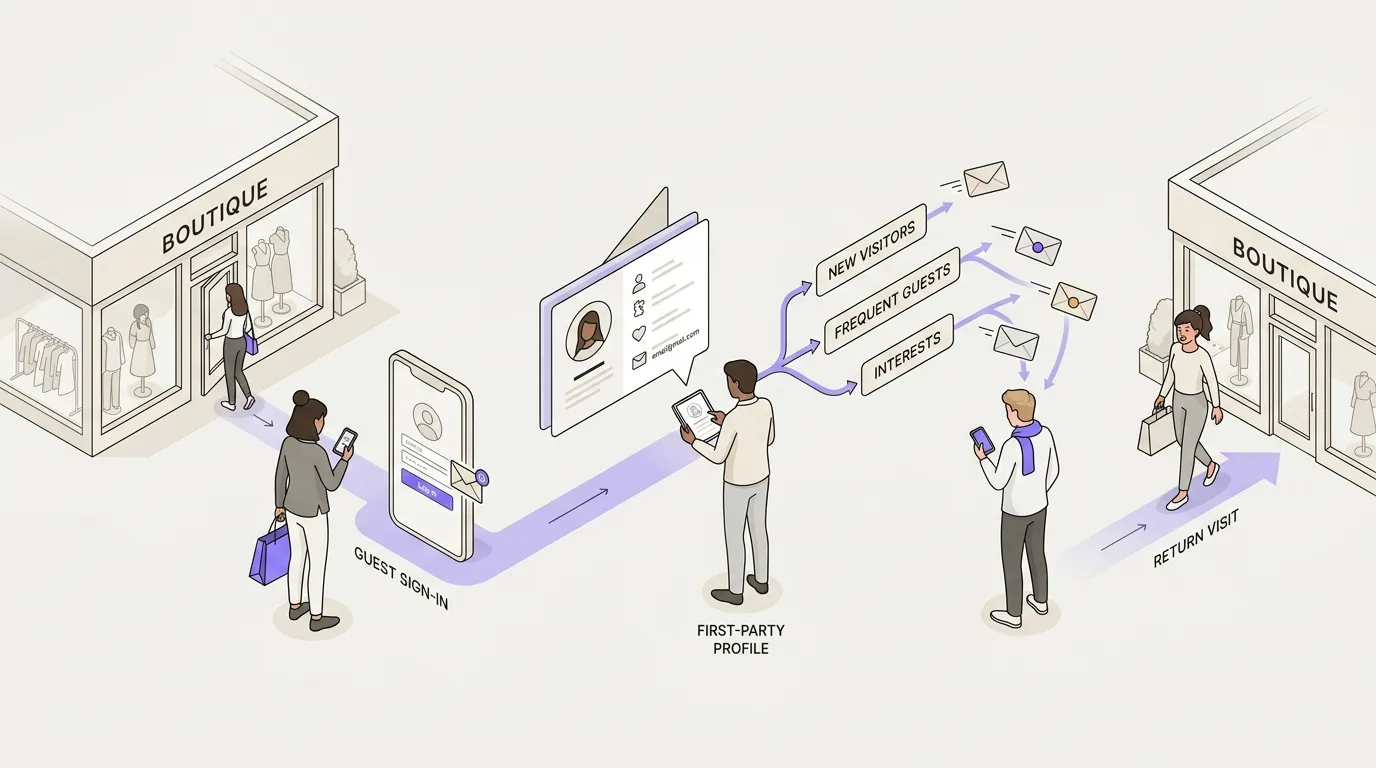
When a guest arrives at your venue and opens their phone, they see your WiFi network. They tap to connect. Instead of going straight online, they land on a captive portal. This is a branded login page that you control.
That page asks them to enter their email address and to tick a box confirming they are happy to receive marketing communications from you. That tick is their conscious-choice opt-in. It satisfies the GDPR requirement for freely given, specific, informed, and unambiguous consent. The email address they enter is the one they actually use, because they need it to get online. It is verified by the act of login.
Purple Engage captures that data automatically. Every login populates your contact list in real time. You do not need to export a spreadsheet, import it into another tool, or clean the list manually. The list builds itself.
This is where the differentiation from tools like Mailchimp or Klaviyo becomes important. Those tools are excellent at sending campaigns. They do not build the list. Mailchimp will send an email to 10,000 addresses you imported from a spreadsheet. It will not tell you which of those addresses belong to people who have actually visited your venue, how many times they have visited, or whether they opted in at the point of physical presence. Purple Engage does all of that, because the data originates from the WiFi login.
The result is a list segmented by real behaviour. You know who visited once and never came back. You know who visits every week. You know which guests visited on a Friday evening versus a Tuesday lunchtime. You know which guests have not been in for 60 days. That behavioural data makes the difference between a generic newsletter and a campaign that drives a measurable return visit.
How to do it with your guest WiFi
The login page is the first piece of marketing your guest sees. Keep it clean. Use your brand colours and logo. Write one sentence that tells the guest what they are signing up for. Make the opt-in checkbox visible and the language honest.
Do not pre-tick the box. GDPR requires the opt-in to be an active choice, not a default. Pre-ticked boxes are non-compliant.
You can use the login page to ask one or two preference questions. Ask for preferred visit time or dietary requirements. Keep it to two questions maximum. Every additional field reduces completion rates. The email address and the opt-in are the non-negotiables.
Purple Engage works across Cisco Meraki, HPE Aruba, Ruckus, Juniper Mist, Ubiquiti UniFi, Cambium, Extreme, and Fortinet hardware. If you have any of those access points in your venue, you can deploy Purple Engage as a cloud overlay without replacing any hardware.
What to send, and when
Do not treat the WiFi list like a broadcast channel. Guests who opted in at your venue expect relevant, venue-specific communications. If you send them generic promotional emails every week, they will unsubscribe. Frequency matters. Two to four emails per month is a reasonable ceiling for most hospitality venues.
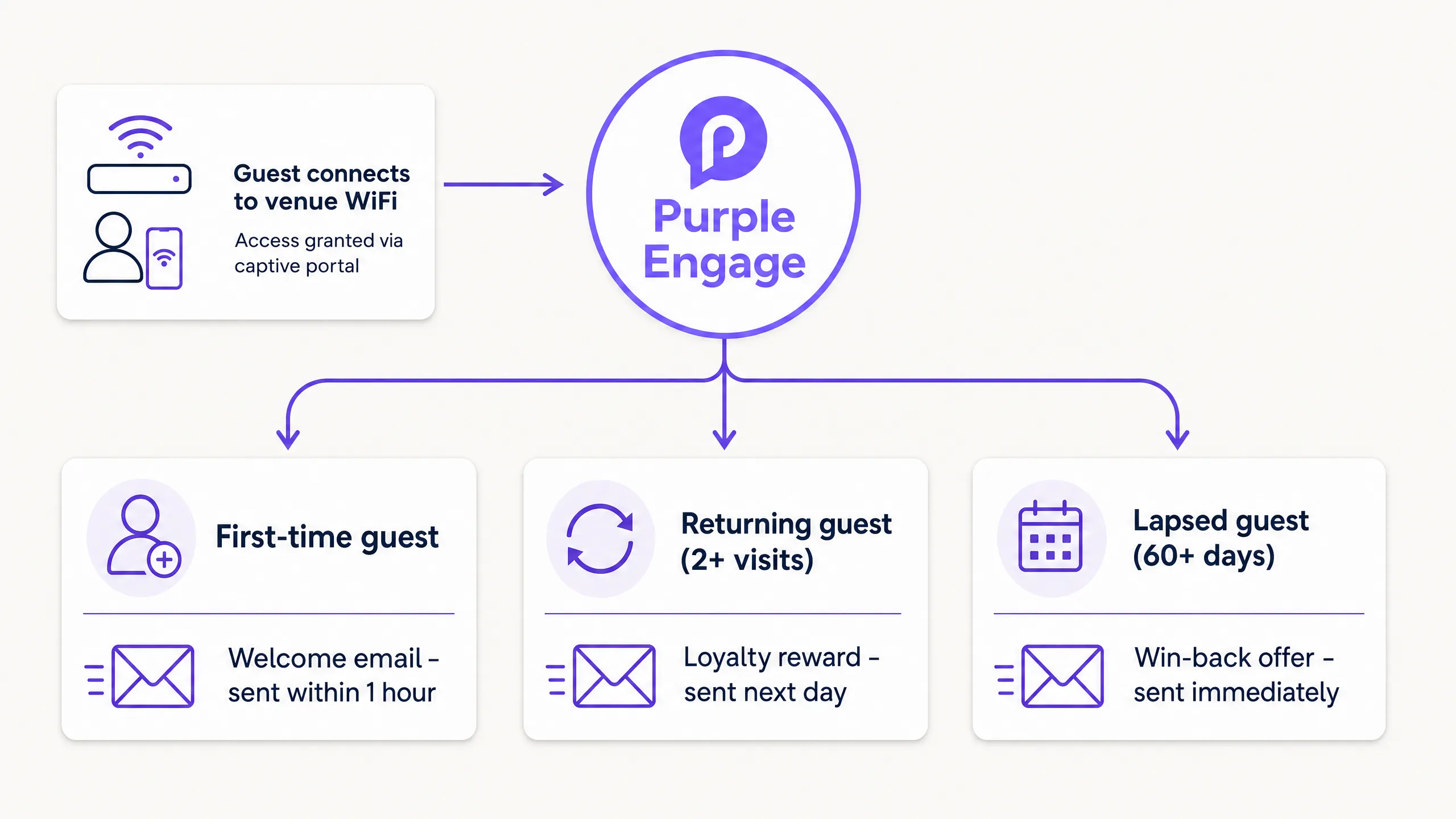
Triggered automations based on visit behaviour are more effective than scheduled broadcasts. Purple Engage gives you visit frequency, last visit date, and connection history. Use that data to segment your campaigns.

Set up three core automations:
- Welcome email: Sent within one hour of a first visit. Introduce the brand and set expectations.
- Loyalty reward: Sent the day after a second visit. Offer an incentive for a third visit.
- Win-back offer: Sent to any guest who has not connected in 60 days. Provide a strong reason to return.
For more detail on automation timing, read our guide on WiFi-triggered email campaigns: what to send and when.
Measuring what works
Set a 90-day review. Look at list growth rate, opt-in rate, open rate, click rate, and redemption rate on any offers you include.
If your opt-in rate is below 20%, revisit your login page copy. If your open rate is below 25%, look at your subject lines. If your redemption rate is near zero, the offer is wrong for the audience.
Tie your metrics back to revenue. Track email-attributed revenue by matching redemption codes in the campaigns to till data.
Where to start
- Audit your existing hardware: Check which access points you have installed against the supported list.
- Configure your captive portal: Design your login page with your brand and write honest opt-in copy.
- Connect Purple Engage: Integrate directly with Mailchimp, Klaviyo, or HubSpot.
- Set up automations: Configure your welcome, loyalty, and win-back emails before going live.
- Review data: Schedule a 90-day review to check opt-in rates and redemption metrics.