
QR codes vs WiFi login for collecting customer emails
Video overview
Why this matters for your venue
Every guest who walks through your doors and leaves without giving you their email address is a missed opportunity. You cannot run retargeting ads to someone you cannot identify. You cannot send a birthday offer to someone whose name you do not know. You cannot measure whether your Tuesday promotion actually brought people back if you have no way to connect the email send with a venue visit.
Building an owned email list is the most cost-effective marketing investment a physical venue can make. The cost per send is a fraction of paid social media. The audience is permanently yours, not rented from a platform that can change its algorithm overnight. And because the contacts come from people who physically visited your venue, their intent signal is incredibly strong.
The question is not about building the list. The question is how. Currently, two methods dominate the conversation: QR code sign-up forms and guest WiFi login capture. They are not equal. The performance gap is significant, and understanding why it exists will help you make the right decision this quarter.
Methods
Where QR codes work - and where they fail
QR codes have a valid role in venue marketing. They are cheap to deploy, require no network integration, and can be placed anywhere. For specific use cases - such as linking to a menu, directing guests to a review page, or promoting a specific event - they are perfectly adequate.
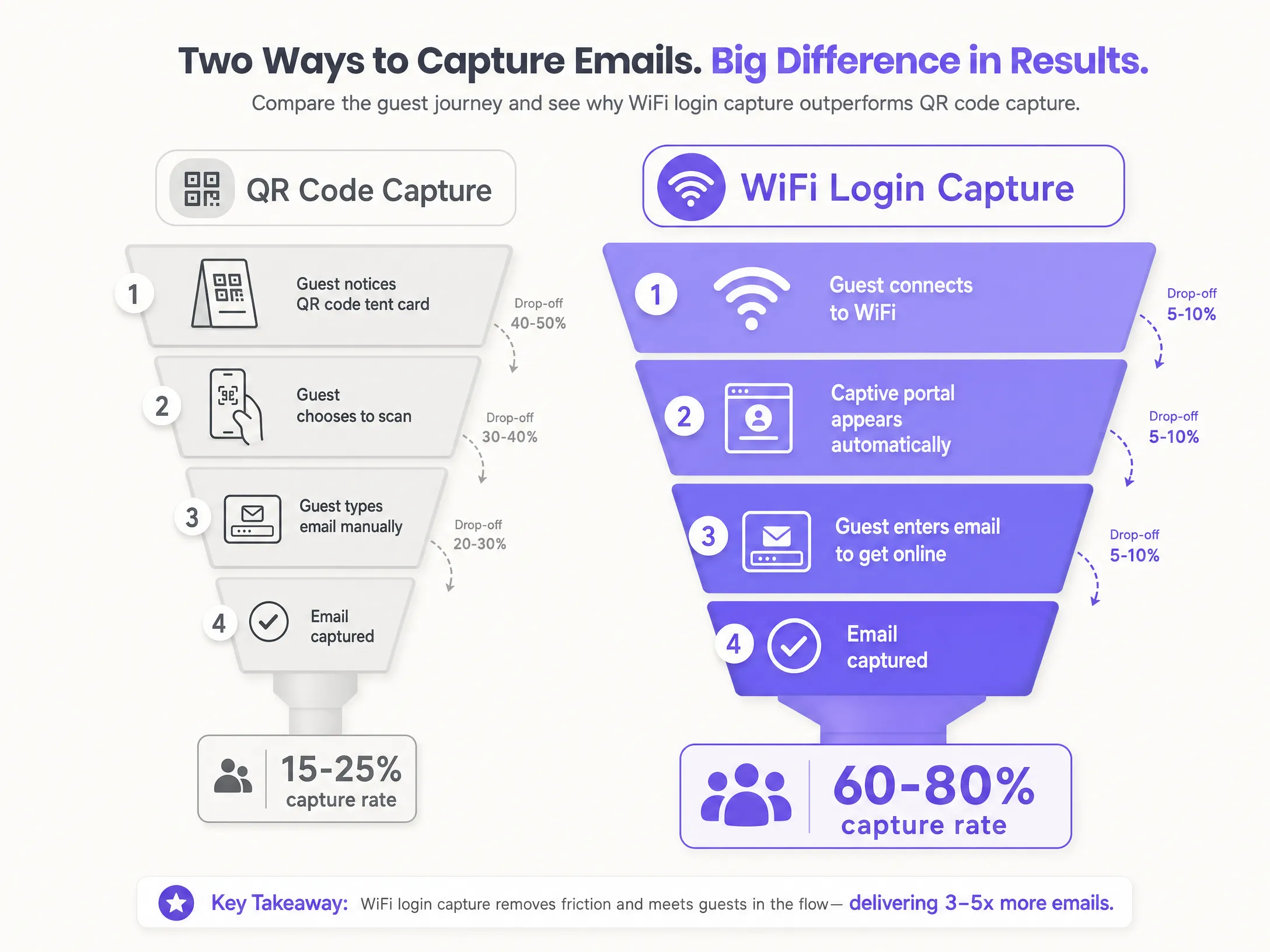
For email capture, they are not suitable. The problem is friction. A guest must complete four to five steps before you capture their email: noticing the code, deciding to scan it, waiting for the page to load, manually typing their email address, and submitting the form. Every step is a drop-off point.
Consider just the typing step. Most guests use a mobile keyboard. Typos are common. Some guests will deliberately enter a fake address just to get a discount code. Others will start filling out the form and abandon it when conversation at the table starts. The result is a capture rate of just 15% to 25% of your foot traffic - and a significant portion of what you do capture is incorrect or undeliverable.
QR codes also rely on active intent. The guest must make a decision to participate. In a busy restaurant or bar, most guests are focused on the experience, not on scanning a tent card. The QR code competes with conversation, food, and other activities on their phone. Passively placed codes rarely yield high opt-in rates.
Why WiFi login captures more
Guest WiFi capture works on a different principle. The guest already wants one thing: internet access. When they select your network, a Captive Portal - a branded login page - automatically appears. They enter their email address to get online. This exchange of value is immediate and unambiguous.
Because motivation is high and friction is low, WiFi login capture typically delivers a 60% to 80% capture rate from the same foot traffic. This brings in three to four times more contacts without any additional marketing spend and without relying on staff to promote the sign-up process.
Data quality is also superior. A guest who types a fake email address to access WiFi will not be able to get online, because the verification email will not arrive. This built-in incentive to provide a real address means your CRM will be filled with accurate, deliverable contacts. You can strengthen this further by offering social login via Google Workspace or Microsoft Entra ID, which authenticates the guest against an existing verified account.
Crucially, every email captured via WiFi login is a conscious opt-in. The Captive Portal displays a clear marketing consent checkbox alongside the terms and conditions - which is unchecked by default. The guest makes an active decision to receive your marketing messages. This is exactly what GDPR requires. Your database does not just grow; it remains legally compliant.
How to do this with your guest WiFi
Purple Engage integrates directly with your existing hardware as a cloud overlay. There is no need to replace your access points. Purple works with Cisco Meraki, HPE Aruba, Ruckus, Juniper Mist, Ubiquiti UniFi, Cambium, Extreme, and Fortinet. Configuration is extremely simple.
Step 1: Configure the Captive Portal. Set up a branded splash page to appear when guests connect to your Guest WiFi. Use your logo, brand colours, and a short, clear message. Keep the design clean. The goal is to get the guest online quickly, not to sell to them on the login page.
Step 2: Define your data fields. Make the email address and first name mandatory. Add optional fields - date of birth is the most valuable for campaign automation - but do not make them mandatory. Every additional mandatory field reduces your form completion rate. Keep only the minimum fields required to run your core automations mandatory.
Step 3: Ensure GDPR compliance. Include a clearly worded marketing consent checkbox, unchecked by default. Link to your privacy policy. Do not bundle marketing consent with the WiFi access agreement. Under GDPR, these are separate decisions. A guest must be able to access the WiFi without ticking the marketing box. Your opt-in rate will still remain high because the guest is already engaged and motivated.
Step 4: Automate data sync. Purple Engage connects with your CRM and email platform. Data from every WiFi login automatically syncs to your marketing database. This list builds itself without any manual exports or spreadsheet imports.
For multi-site operators, Purple's cloud overlay architecture means you can manage all locations from a single dashboard. You can run location-specific campaigns or group-wide campaigns, and you can identify guests who visit multiple sites - a valuable segment for loyalty programmes.
What to send and when to send it
Collecting emails is just the beginning. The real value lies in the subsequent automation. Three campaigns should be launched from day one.
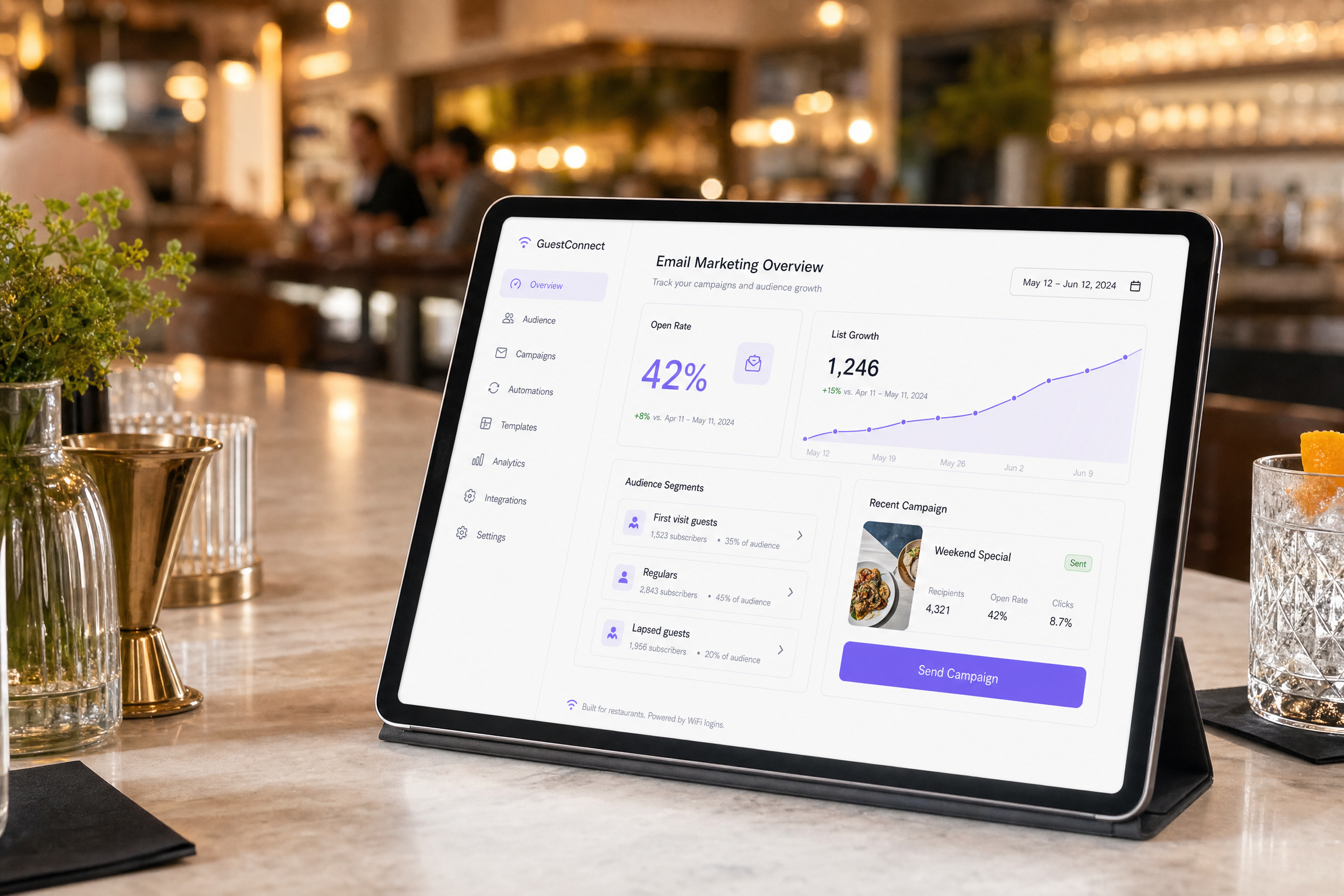
The welcome email. Send this automatically within 24 hours of a guest's first WiFi connection at your venue. Thank them for visiting, introduce your brand, and include a clear incentive for their next visit - such as a discount, a free item, or an exclusive offer. Timing is critical: a welcome email sent within 24 hours consistently performs much better than one sent a week later, as the experience is still fresh in their mind. This single, properly configured automation will drive measurable repeat footfall.
The birthday campaign. If you collected the date of birth during WiFi login, set an automated email to send two weeks before the guest's birthday. Offer a personalised and time-limited promotion. Birthday campaigns are among the highest-converting automations in hospitality marketing because the offer is relevant and the timing is predictable.
The lapsed guest campaign. Set a timeframe - such as 60 or 90 days without a WiFi connection at your venue - and automatically trigger a re-engagement email when a guest crosses this threshold. Keep the message simple: acknowledge the absence, offer an appealing incentive, and give them a reason to return this week. This campaign directly combats customer churn and targets individuals who have already demonstrated they like your venue.
The same logic applies to retail. A shopper who connected to your in-store WiFi three months ago and has not returned is a lapsed customer. The triggers and offers change here, but the mechanics remain identical. See Converting retail footfall to an email list for a detailed guide on retail-specific implementation.
Measuring what works
Do not measure the effectiveness of email campaigns by open rates alone. Open rates only tell you if your subject line worked. They do not tell you if the campaign generated any revenue.
Because Purple tracks device connections to your WiFi, you can close the loop between email sends and venue visits. Send a re-engagement campaign to 1,000 lapsed guests on a Tuesday. Two weeks later, Purple will show you exactly how many of them returned to your venue and connected to the WiFi. This is the true ROI of your campaign - not a click-through rate, but a physical return visit.
This changes how you optimise. Instead of testing subject lines to increase open rates, you test offers to increase return visits. Instead of reporting click-through rates, you report revenue generated per email sent. These are the metrics that align directly with the business outcomes your board cares about.
Purple processed 440 million logins across 80,000+ live venues in 2024 (Purple internal data). The patterns in that data are clear: venues that run automated welcome and re-engagement campaigns to lists built from their WiFi see measurably higher return visit rates compared to those relying solely on QR code databases.
Where to start
- Audit your current capture rate. Count how many emails you collect per week from QR codes. Divide this by your weekly footfall. If this number is below 25%, you are leaving too many contacts on the table.
- Enable the Captive Portal. Configure your existing hardware to redirect guest traffic through a branded Purple login page. This is a configuration change, not a hardware replacement.
- Set the mandatory fields. Email address and first name. Add date of birth as optional.
- Add a GDPR checkbox. Unchecked by default. Linked to your privacy policy.
- Connect to your CRM. Automate data sync so every login flows into your marketing database without manual intervention.
- Launch the welcome automation. A single automated email sent within 24 hours of the first visit, containing a clear incentive to return.
- Review after 30 days. Compare your new weekly capture rate against your baseline. That gap is the size of the opportunity you were missing.