
What Is an Audit Log? Fields, Retention and Compliance
What is an audit log? Learn the fields it records, how long to keep it, and how to make it trustworthy for compliance and investigations.

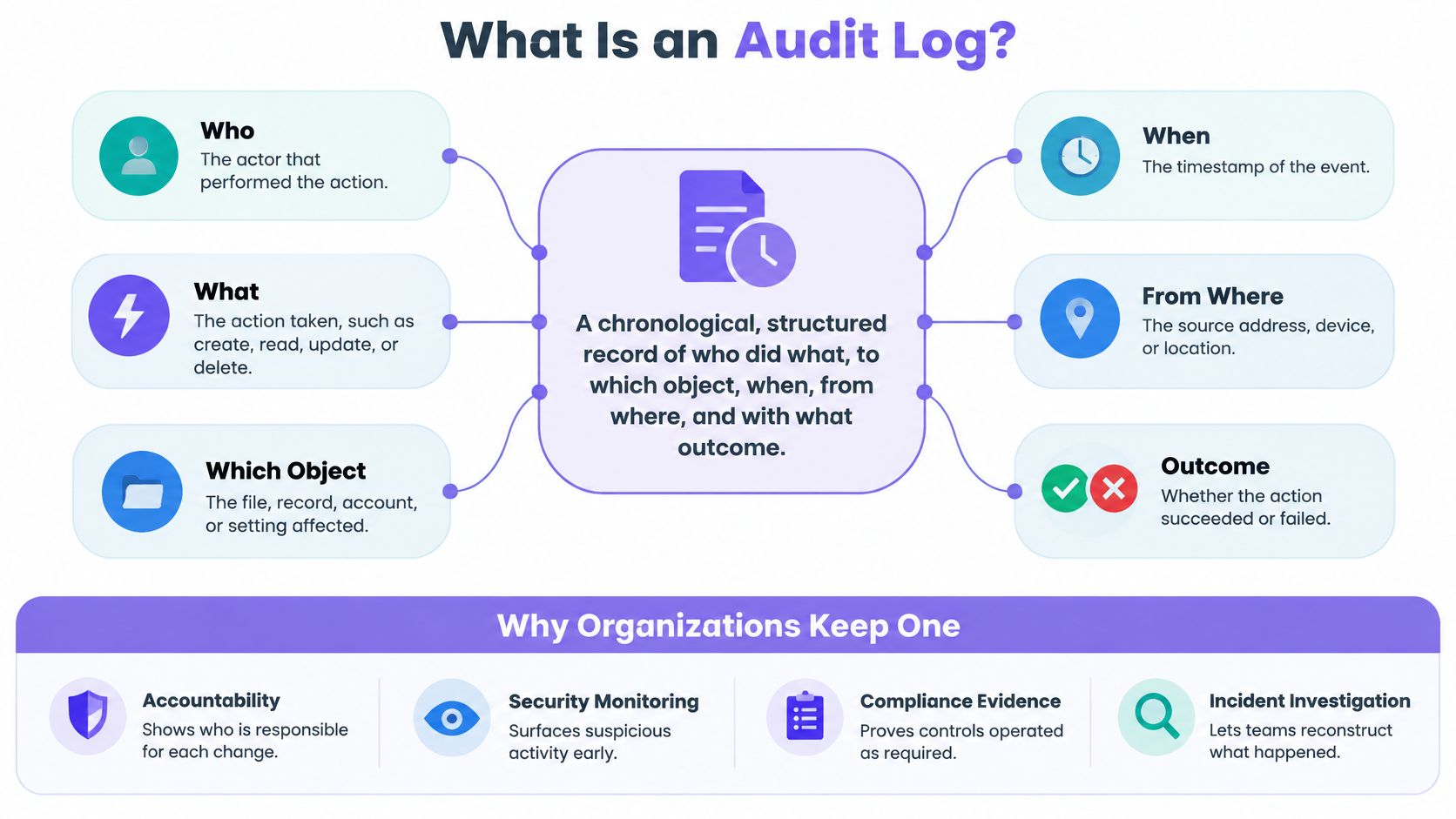
An audit log is a chronological, structured record of who did what, to which object, when, from where, and with what outcome, kept so the activity can be verified later. If you can see that an action happened but you can't name the actor, the object, or the outcome, do you have evidence, or just a note that something occurred?
That question exposes the gap in how teams talk about logging. Many systems keep files full of events, and many vendors describe any of those files as an audit log. The name alone tells you nothing. What matters is whether a record can be checked months later by someone who wasn't involved, and whether it proves that controls operated as they were supposed to.
Table of Contents
- What an Audit Log Is and Why Organizations Keep One
- What Every Entry Records and What It Leaves Out
- Audit Logs Compared With Trails, App Logs and Monitoring Feeds
- Which Standards Expect an Audit Log
- Protecting Integrity and Setting Retention Periods
- How to Reconstruct an Incident From an Audit Log
- Handling Privacy Requests Without Destroying Evidence
- Misconceptions and a Governance Check Before You Trust Your Log
What an Audit Log Is and Why Organizations Keep One
Start with the definition you can test. An audit log is a chronological, structured record of who did what, to which object, when, from where, and with what outcome. The NIST glossary definition of an audit log frames it as a chronological record that provides documentary evidence of specific system events, including accesses and operations performed during a defined period.
Chronological means order matters. Structured means each entry carries the same fields, so you can search and compare entries instead of reading free text. Evidence means the record exists for someone else to rely on later, not just for the engineer who wrote the code.
Why the Record Exists
Organizations keep an audit log for four connected reasons. Accountability connects an action to a person, process, or system that can answer for it. Investigation lets a team reconstruct a sequence after something goes wrong. Compliance proves a required control operated. Change reconstruction shows how a record or setting reached its current state.
Those purposes separate an audit log from a generic error file. An error file helps a developer find a bug. It may record a stack trace and nothing about who triggered the action. An audit log can document successful and failed logins, password changes, privilege use, configuration changes, data modifications, administrative actions, and access attempts, whether or not anything technically failed.
The Six Facts a Useful Entry Establishes
NIST guidance expects a useful audit record to establish at least six facts. Those facts are what event occurred, when it occurred, where it occurred, its source, its outcome, and the identity of the person, process, or entity involved. Miss one and the entry gets weaker. An entry with no outcome can't tell you if a change applied. An entry with no identity can't support accountability.
Those fields let investigators rebuild a timeline, separate authorized activity from suspicious behaviour, identify affected systems, and connect an action to an accountable identity. That's the practical test. Pick any entry and ask whether a stranger could answer those six questions from that entry alone.
From Troubleshooting to Accountability
Audit logging started close to operations, as a way to troubleshoot systems. It moved toward formal accountability and cybersecurity evidence as organizations needed records that supported monitoring, analysis, investigation, and reporting of unlawful or unauthorized activity. The shift changes what you record. You're no longer writing notes for yourself. You're writing evidence for a future reader who may challenge it.
Say a venue platform handles guest identities, consent changes, campaign approvals, integrations, and messages. A qualifying entry records who changed a consent status, when an approval happened, which record or audience was affected, and whether the operation succeeded. If it only says "update completed," it isn't doing audit work, whatever the file is called.
What Every Entry Records and What It Leaves Out
Every event has to answer four questions. When did it occur, where did it occur, who initiated or was affected by it, and what happened? The OWASP Logging Cheat Sheet builds its schema around those questions and recommends a consistent, machine readable format.
Machine readable matters because entries don't stay in one system. You'll query and correlate them across applications, identity systems, APIs, and infrastructure. OWASP also recommends centralising application logs in a log server or SIEM, because local only records are difficult to correlate during incident response. If entries live on individual servers in different formats, you'll spend an investigation translating instead of investigating.
Core Fields in an Audit Log Entry
| Field | Question it answers | Example value |
|---|---|---|
| Event ID | Which exact event is this? | evt_7Qx2, immutable |
| Timestamp | When did it happen? | 2026-03-14T09:12:04Z, UTC |
| Actor | Who initiated it? | j.smith, staff account, role marketing manager |
| Authentication context | How was the actor verified? | Single sign on with MFA passed |
| Scope | Which tenant or venue was affected? | Venue 214, London site |
| Source system | Which application or service recorded it? | Consent service, web admin console |
| Action | What was done? | consent.status.change |
| Object | What record or audience was affected? | Guest reference G-48192 |
| Before and after | What changed? | Email consent, opted in to opted out |
| Authorization decision | Was the action permitted, and under which rule? | Allowed, role rule ADMIN_CONSENT |
| Correlation or approval ID | Which batch, approval or campaign is this linked to? | Approval APR-2210, batch B-88 |
| Outcome | Did it succeed or fail? | Success |
| Origin | From which network or device? | Office IP range, managed laptop |
Two fields get left out most often, and they're the ones investigators need later. The authorization decision tells you whether the actor was allowed to act, not just that they did. The correlation ID links hundreds of individual changes back to one bulk update and its approval. Without it, a bulk export looks like hundreds of unrelated events, and you can't prove who approved the batch.
Practical rule: If you can't link an individual change back to the approval that authorized the batch, you don't have a complete record of that change.
Events Worth Recording
Group event selection by risk, not by whatever the application happens to emit.
- Authentication: Successful and failed logins, lockouts, and MFA changes.
- Authorization: Permission grants, denied access attempts, and privilege use.
- Data changes: Creates, edits, deletes, exports, and bulk updates.
- Administrative and configuration changes: Policy edits, API key creation, and webhook changes, including webhook verification failures.
- Privacy and consent: Opt ins, opt outs, access requests, and deletion requests.
- Messaging activity: Approval decisions, message sends, and failed deliveries.
That grouping keeps you honest about coverage. Teams often log data changes thoroughly and forget administrator access entirely, which is exactly the activity an auditor asks about first.
What Never Belongs in an Entry
An audit log is read by more people than the source system, and it's kept for longer. That makes it a risky place for secrets. Never record passwords, tokens, session cookies, encryption keys, payment card data, or unnecessary personal information.
Represent sensitive values with categories, masked values, or stable references instead. Record "payment method updated" and a reference to the payment record, not the card number. Record a guest reference, not the guest's email address and phone number repeated in every entry.
Selection is deliberate for the same reason. Logging everything raises privacy exposure and storage cost, and buries the events that matter. Logging too little leaves gaps you can't fill after the fact. You can't recover an event you never wrote, so choose coverage by what you'd need to establish in an investigation, then document that reasoning.
Audit Logs Compared With Trails, App Logs and Monitoring Feeds
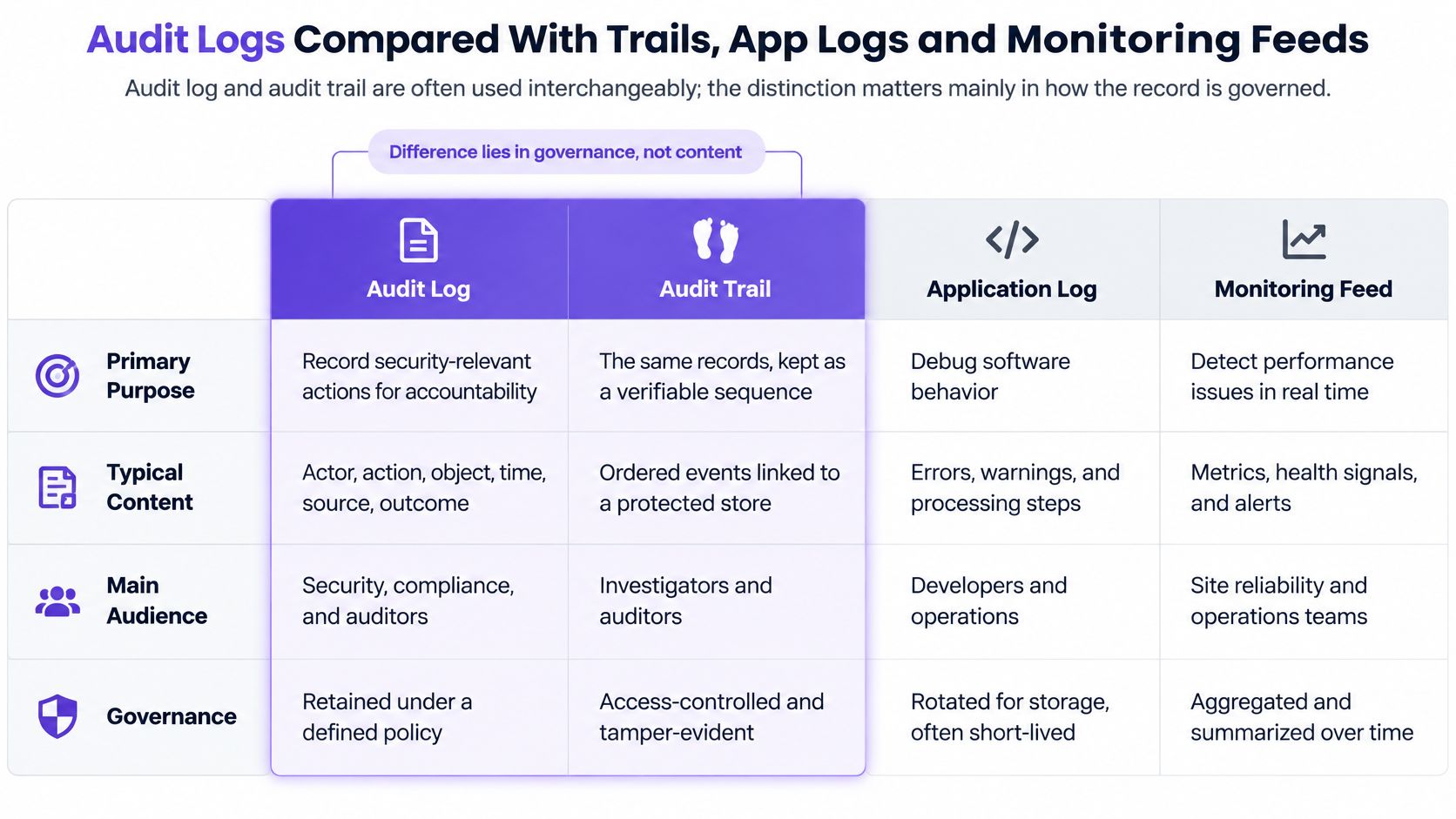
People use audit log and audit trail interchangeably, and arguing about the words rarely helps. The distinction that matters is governance, meaning how the record is protected, retained, and produced on request. Two systems can hold identical events. The one governed as evidence is the audit record.
Audit Log Compared With Related Records
| Record type | Main purpose | Typical reader | Retention pattern |
|---|---|---|---|
| Audit log | Evidence of who did what, when, and with what outcome | Compliance, investigators, auditors | Set by policy, months to years, with hot and cold tiers |
| Audit trail | Same evidentiary purpose, often used as a synonym | Compliance, auditors | Same as the audit log it describes |
| Application or debug log | Troubleshooting errors and behaviour | Developers, support engineers | Often days to weeks, shorter than audit records |
| Security monitoring feed (SIEM) | Detecting threats quickly across systems | Security operations analysts | Searchable window set by the monitoring team |
| Database transaction log | Recovery and replication of data changes | Database administrators | Governed by recovery needs, not audit needs |
| Version history | Showing what a record looked like at each revision | Content owners, editors | Often kept with the record itself |
The One Distinction That Matters Most
An audit log must preserve defensible historical evidence. A monitoring feed is optimized for detecting events quickly. Those goals pull in opposite directions. A feed can sample, aggregate, and drop detail to stay fast. An evidentiary record can't drop an inconvenient entry and still be trusted.
That doesn't make them rivals. Sending application logs to a central log server or SIEM is good practice, and the same events often feed both. Detection improves because analysts see activity across systems in one place. But a SIEM feed on its own doesn't satisfy evidentiary needs if events can be filtered out, summarized away, or rotated out before an investigator asks for them.
A record built to alert you quickly and a record built to be believed later are doing different jobs, even when they contain the same events.
Telling Which Record You're Looking At
Ask what question the record was built to answer. "Why did this request fail?" points to a debug log. "Is something attacking us right now?" points to a monitoring feed. "Can we roll the database back?" points to a transaction log. "What did this page say last Tuesday?" points to version history.
The audit question is different. It's "who did this, were they allowed to, and can we prove it?" If the record can't answer that, calling it an audit log in a policy document won't make it one.
Which Standards Expect an Audit Log
An audit log becomes a formal control requirement when an investigation needs history that survives the discovery of an incident. That's the thread running through every standard below. Each one assumes you'll learn about a problem after the activity happened, and that you'll still need to show what took place.
Payment Card Expectations
Organizations under the payment card standard face the most concrete framing. PCI Security Standards Council guidance sets a minimum retention period for audit trail history, and part of that history must stay immediately available for analysis rather than sitting in an archive you have to restore. The split matters operationally. Durable storage preserves evidence over the full period. Immediately available storage lets you detect and respond without waiting.
That requirement only binds organizations in scope for the payment card standard. If you don't process card data, it doesn't apply to you directly. It's still a useful reference because it separates two ideas teams conflate, keeping evidence and being able to search it quickly.
NIST and OWASP Guidance
NIST guidance takes a different approach. It expects organizations to identify the event types they can log, select the events their security and privacy objectives require, document why that selection is adequate for after the fact investigations, and review the selection periodically. There's no universal event list. The obligation is to make a defensible choice and write down your reasoning.
OWASP guidance is practitioner facing. It advises retaining logs long enough to investigate slow moving incidents and meet applicable obligations, and centralising application logs in a log server or SIEM so you can correlate them. Read together, NIST asks you to justify coverage and OWASP asks you to make that coverage usable.
DORA and Sector Specific Duties
The EU Digital Operational Resilience Act, known as DORA, applies to covered financial entities and relevant ICT providers. It expects ICT activity to be recorded in a form that supports investigation and audit, covering areas such as data access, system changes, and administrative actions. The direction is clear. Having logs somewhere isn't the test. Being able to investigate from them is.
Working Out What Applies to You
Scope decides everything, so settle it before you pick event classes or retention periods. A card processing business may face PCI obligations. A bank may face DORA. A multi site venue operator may fall under neither directly, yet still need reliable evidence for its own governance, its contracts, and its data protection duties.
That last point is where teams get caught. Falling outside a named standard doesn't remove the need for accountability. It just means you set the requirement yourself and document it. If you use a platform to process guest data, check what the contract says about audit information and subprocessors. Our data processing agreement is where we set out those commitments for customers who need them in writing.
Don't copy a numeric retention value from a standard you aren't under and treat it as a universal rule. Use it as context, then set your own period against your obligations, your investigation needs, and your storage costs.
Protecting Integrity and Setting Retention Periods
An audit log is useful only if its entries remain trustworthy. Control who can access or delete the records, decide how long each event class is kept, and check that logging continues to work. If the same administrator can change a consent status and erase the entry recording that change, the record cannot reliably show what happened.
Integrity Controls That Make an Entry Believable
Store audit records in an append-only or tamper-evident repository, with restricted deletion privileges and separately monitored administrative access. Append-only storage lets new entries be added but prevents normal product functions from editing or removing existing ones. Separate monitoring means access to the log itself generates a record.
Several techniques can strengthen integrity:
- Hash chaining: Each entry's hash depends on the previous entry. Altering or removing an entry breaks the chain.
- Signed events: Cryptographic signatures help verify that entries came from the system that claims to have written them.
- Write-once storage: The storage layer prevents modification after an entry is written.
- Independent timestamping: A separate time source confirms when an entry existed.
- Gap alerting: Alerts flag sequence gaps or unexpected deletions.
Choose controls that fit your systems and document how they work. The goal is to make unauthorized changes detectable and explainable. Record attempted actions as well as completed ones: authorization failures, approvals, execution results, and administrative changes. A denied attempt to export guest data may matter more than a routine successful edit.
Retention Reference Values
| Requirement | Reference value | Context |
|---|---|---|
| PCI DSS audit trail retention | At least 1 year | Organizations subject to the payment card standard |
| PCI DSS immediately available history | At least 3 months | Available for analysis without restoring archives |
| Cold storage after hot period | Lower-cost archive for the remaining retention period | Keeps older records available while reducing storage costs |
These values apply in specific contexts, not as universal rules. Hot and cold storage tiers can help balance search speed and cost: recent entries remain quick to search, while older records move to an archive that takes longer to retrieve. If everything stays in hot storage, cost may create pressure to delete early. If everything goes straight to cold storage, retrieval can delay an investigation.
Set retention by event class, based on applicable obligations and investigation needs. Unlimited retention can increase privacy exposure, storage costs, and search times. Document the reason for each period, then delete records on schedule. For smaller organizations developing a practical policy, small business retention advice from Networking2000 offers a starting point.
Retention rule: Keep entries long enough to investigate incidents discovered late, and no longer than you can justify in writing.
Documentation a Defensible Implementation Needs
Document the event classes you record and why, your retention and legal hold policies, who holds which access roles, how exports are produced and authenticated, how clocks are synchronized, what alert thresholds you use, and what backup controls protect the store. Then check periodically that logging still works. A silent logging failure can make a quiet system look normal.
Clock synchronization matters because entries from systems with drifting clocks can produce a misleading timeline. Synchronize systems to UTC and verify that synchronization continues.
When assessing a vendor, ask for documented information about its security and governance practices. Purple Engage's security and governance information can help IT and compliance leads assess the platform.
How to Reconstruct an Incident From an Audit Log
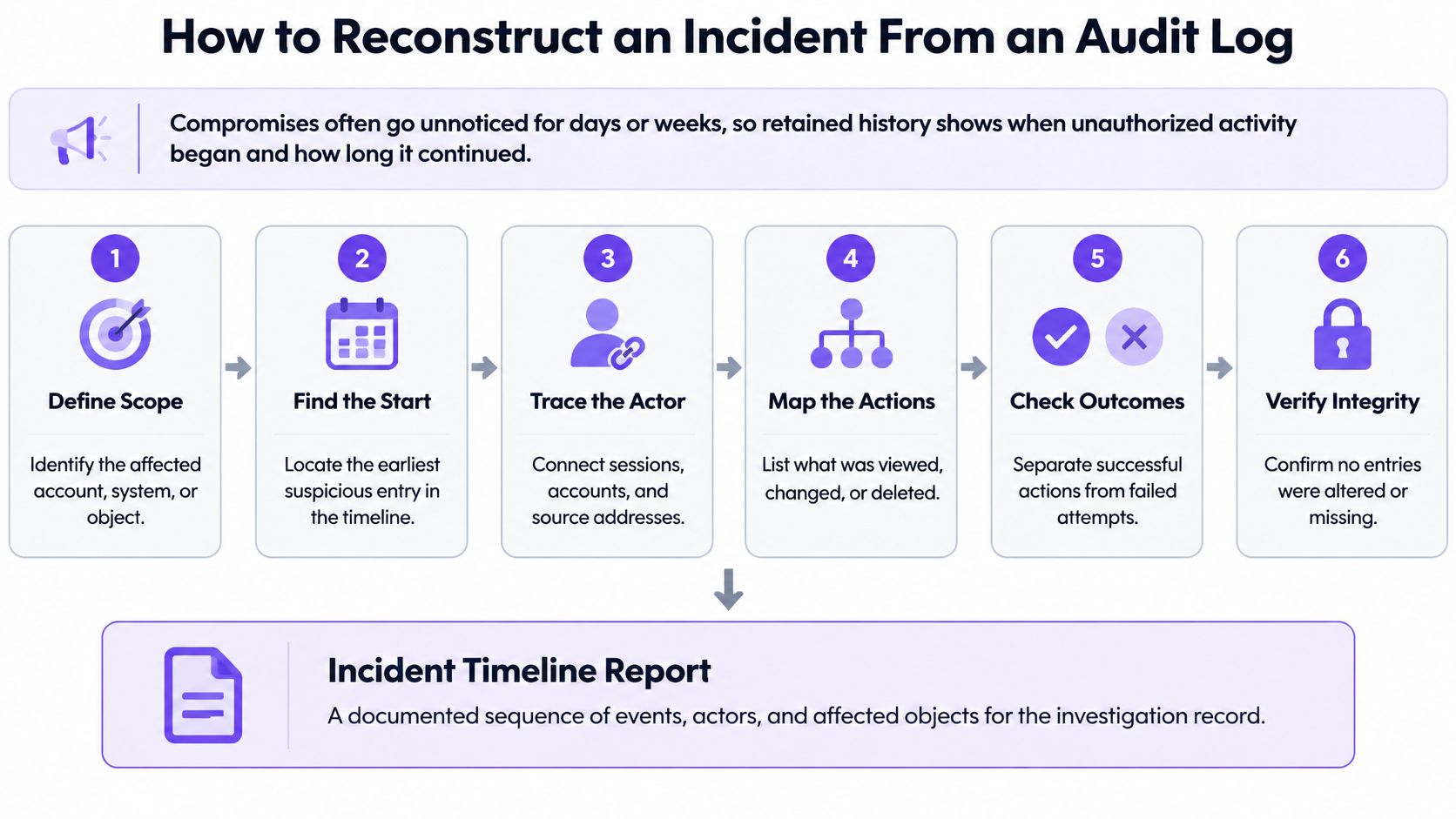
Reconstruction needs history because compromises often aren't noticed immediately. The PCI Security Standards Council guidance on effective daily log monitoring requires organizations subject to the relevant payment card standard to retain audit trail history for at least 1 year, while keeping a minimum of 3 months immediately available for analysis.
That requirement exists for a forensic reason. Investigators need enough history to determine when unauthorized activity began, how long it continued, and which systems or records were affected. If your log only covers the last few weeks, you can describe what you found today and nothing about how it started.
The diagram below sets out the reconstruction sequence before the worked steps that follow.
A Seven Step Reconstruction
Define the question and the time window. Write down exactly what you're trying to establish, such as consent changes for one venue in the last 30 days. A vague question produces a vague search. A specific one tells you which fields to filter on.
Confirm coverage and clocks. Check that the log source covers that window, and that its clocks are synchronized in UTC. If part of the window sits in cold storage, retrieve it before you start drawing conclusions.
Filter by action type and scope. Pull events matching the action, such as consent.status.change, scoped to venue 214. Scope first, because multi site activity will otherwise drown the entries you need.
Pull actor, authentication context, and origin. For each matching event, note who acted, how they were verified, and which network or device they used. A familiar actor from an unfamiliar origin is a pattern worth pausing on.
Check the authorization decision and correlation ID. Confirm each action was permitted and link bulk updates to their approval. Entries sharing a correlation ID belong to one decision, so assess them together rather than one by one.
Build the timeline and compare values. Order events by timestamp and compare before and after values for each change. This step reveals whether a record changed once or was changed, reverted, and changed again.
Separate authorized from suspicious, then record findings. Mark which activity matches an approval and which doesn't, and write up findings with the event IDs as evidence references. Your conclusion should point to specific entries, not to a general impression.
The short walkthrough below shows that timeline building in practice, using the same field by field approach.
Where Reconstructions Break Down
Three problems recur. Missing events are the worst, because you can't distinguish "nothing happened" from "nothing was recorded." Mismatched time zones scramble ordering, so an approval appears to follow the action it approved. Records masked too early remove the reference you needed to connect an entry to a guest or a campaign.
For multi site operations, append only records across consent, audience, offer, approval, integration, and messaging actions make this work across locations. Without a shared scope field, you can't tell whether a pattern is one venue's problem or a group wide one. That's a design decision you make long before any incident.
Handling Privacy Requests Without Destroying Evidence
A guest asks you to delete their data. Your audit log holds entries about that guest, including the consent changes you're accountable for. Deleting everything destroys your evidence. Refusing outright ignores the request. You need a pattern that respects both.
The conflict is real but narrower than it looks. An audit entry doesn't need to contain the guest's personal data to do its job. It needs to prove an action happened, who did it, and what the outcome was. Separate those two things and most of the tension disappears.
A Working Pattern in Five Steps
Log the request itself first. Record the request as an event before you act on it, with its type, received time, the actor handling it, and eventually its outcome. If someone later asks how you handled it, the handling is itself evidenced.
Separate personal data from the event record. Keep a stable guest reference in the audit entry rather than names, contact details, or raw consent text. The reference lets you correlate entries while the personal data lives in the operational record where deletion can reach it.
Apply deletion to the operational record. Delete or restrict the guest record as required, and leave the audit entry in place for its retention period unless a documented rule allows earlier removal. The entry now points to a reference that no longer resolves to personal data, which is usually the outcome you want.
Place a legal hold where needed. If an open investigation or dispute still needs specific entries, hold them explicitly rather than pausing deletion informally. A named hold with a reason and an owner survives staff changes. A verbal understanding doesn't.
Record the decision and its basis. Note why a field was masked or removed, which rule you applied, and who approved it. An auditor who finds a masked field with no explanation will treat it as a gap. An auditor who finds a documented decision will usually move on.
Questions to Confirm With Legal Counsel
Two questions need legal input rather than an engineering judgement call. Which retention period applies to each event class, given your sector and contracts? And does a masked entry still count as a complete record for the purpose you kept it for?
Get those answers per event class, not as one blanket statement. A consent change and a failed login don't carry the same evidentiary weight, and they may not carry the same retention duty. Documenting the difference is what makes your position defensible.
Transparency helps on the guest side too. People making requests want to know what you hold and what happens to it. Our privacy notice sets out how we describe that handling, and your own notice should be able to explain, in plain terms, that a minimal record of the request itself may be retained after deletion.
Deleting the guest record and keeping a reference only entry that proves you deleted it aren't contradictory. Doing the second is how you evidence the first.
Misconceptions and a Governance Check Before You Trust Your Log
Can an audit log be trusted, and what changes when an investigator asks for it? That's the question most introductory explanations skip. The NIST SP 800-171 control reference for audit record generation reflects the expectation that organizations determine and document which events are significant and relevant to ongoing auditing needs, rather than logging indiscriminately.
That expectation corrects four common misconceptions.
Four Misconceptions Worth Dropping
More logs means better evidence. It doesn't. Defensible coverage of significant events matters, and volume can bury the entries you need while increasing privacy exposure.
Keeping logs is enough. Auditability depends on integrity, completeness, access control, and retrieval, not mere storage. A log you can't search or can't prove is unaltered won't carry an investigation.
An audit log is a backup. It records activity. It doesn't restore deleted data, and it won't rebuild a guest record you've lost.
The audit log stops attacks. It supports investigation after the fact and can feed detection, but on its own it prevents nothing.
DORA illustrates where regulation is heading. It became effective in January 2025 and requires covered financial entities and relevant ICT providers to record and log ICT activities, including data access, system changes, and administrative actions, in a form that supports investigation and audit. The shift is from "have logs" to "be able to investigate."
A Governance Check You Can Run This Week
Answer each question with evidence, not with an assurance.
- Event scope: Are the events we record the right ones for our risk and regulation, and is that documented?
- Entry completeness: Does every entry carry UTC time, actor, scope, outcome, and correlation ID?
- Integrity: Is the store append only or tamper evident, with restricted deletion and separately monitored admin access? Can an administrator alter or delete an entry?
- Retention: Is retention documented per event class, with hot and cold tiers and legal holds?
- Retrieval: Can we export records for an auditor and authenticate that export?
- Clocks: Is clock synchronization verified, or merely assumed?
- Privacy handling: Can we honour a consent or deletion request without destroying evidentiary history?
Don't try to fix everything at once. Pick one high risk workflow, such as consent changes or bulk exports, trace it through the checklist, and fix the first gap you find. One fully evidenced workflow teaches you more than a group wide review that produces a long list and no changes.
This is also a fair lens for judging platforms you buy. Purple Engage offers enterprise features including an audit record, API and webhooks for the people who sign off a marketing platform, and it provides one guest record, one consent ledger and one measurement system across every channel, combining data from WiFi, till, booking and hotel stay sources. Engage records more than 60 event types for each guest, including WiFi sign ins, purchases, bookings, check outs, form submissions, campaign activity and survey responses. Those details only help if the record behind them is governed properly, which is why the checklist matters more than the feature list.
Tamper resistance and explainability matter more than sheer log volume. If you remember one test when someone asks what is an audit log in your own stack, use that one. Could you hand this record to a skeptical outsider and have them believe it?
If you're assessing how consent changes, approvals, exports, and message sends are evidenced across your venues, Purple Engage gives you an audit record alongside one guest record and one consent ledger checked at approval and again before every message. Visit us to see how that record is structured, which event types it covers, and how your IT and compliance leads can review it before you commit.