
Captive portal for WiFi: How it works and who needs one
Learn what a captive portal for WiFi is, how venues use it, which consent rules apply, and which integration options fit your network.
If a guest can join your WiFi and browse straight away, what exactly did they agree to, and what did you learn about them? That's the gap a captive portal for WiFi fills, but only if you separate three jobs that are often bundled into one screen. One job controls network access. A second records acceptance of your terms of use. A third asks for marketing consent, and it's not the same as the other two.
A front desk can let someone in, explain the house rules, and invite them to join a mailing list. Those are related, but they're not one decision. When venues treat them as one tick box, guests get confused, consent gets shaky, and devices that never open a browser can slip past or get stuck.
Table of Contents
- How a Captive Portal Works Stage by Stage
- Where Venues Use a Captive Portal
- Guest Data, Consent and What to Ask For
- Login Methods Compared by Effort and Data
- Why Captive Portals Fail and How to Prevent It
- Integration Options With Your Existing Network
- Choose the Portal Setup Your Venue Needs
How a Captive Portal Works Stage by Stage
Think of hotel reception. Every guest passes the desk before collecting a room key, and a portal works the same way between joining WiFi and reaching the internet. The guest joins the network first, but that connection alone doesn't grant unrestricted browsing.
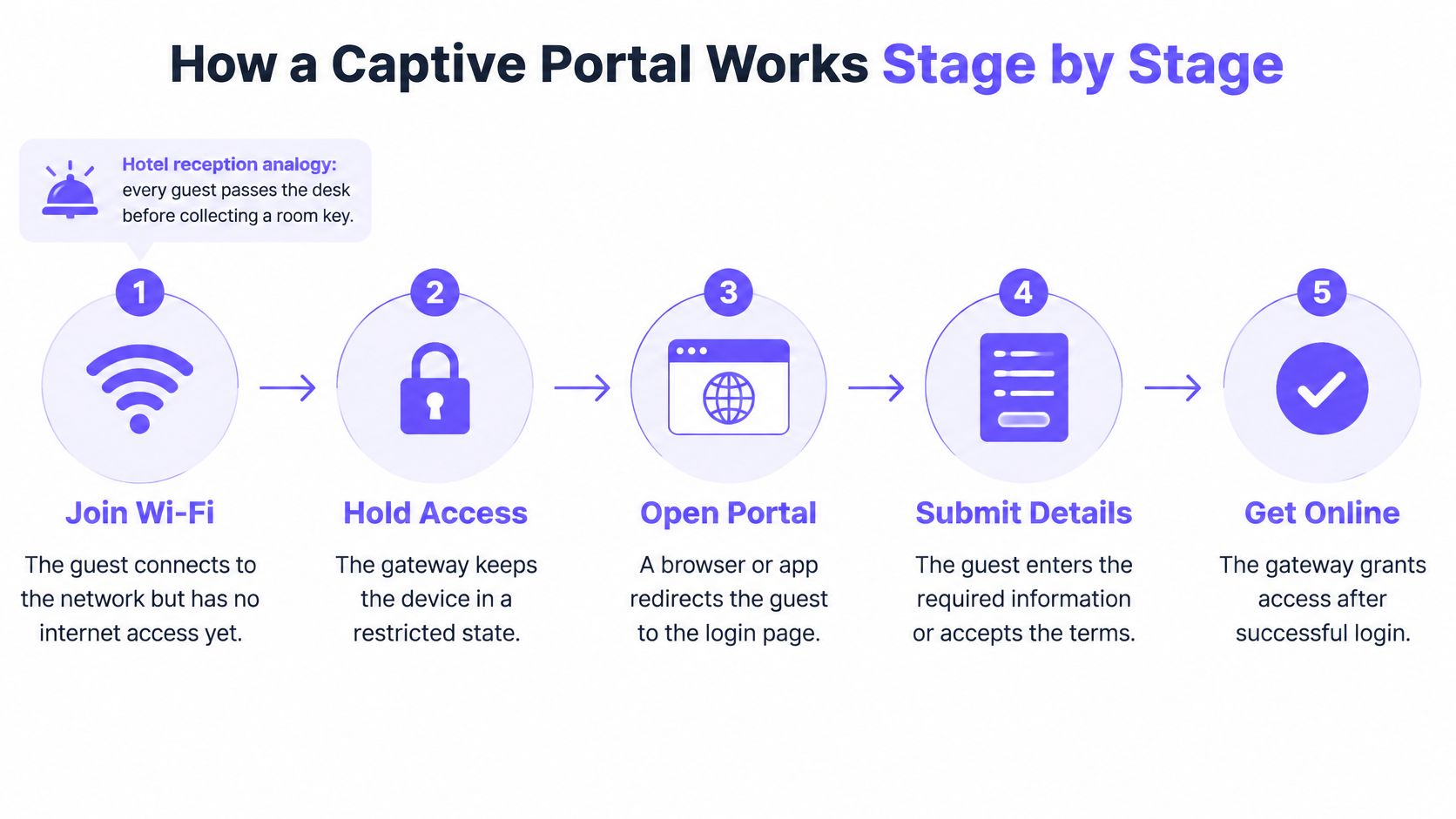
Say a guest in a cafe taps your network name. Her phone associates with an access point and gets local network settings, yet the gateway holds her in a restricted state. When she tries to browse, that request is intercepted and she's redirected to your portal page instead of the site she asked for.
That's the transaction the Advantech captive portal documentation describes, where a user joins an open or semi-open network and is redirected to a portal that may request credentials, payment, registration, or acceptance of terms before access is granted. She then authenticates by accepting terms, entering an email, or paying. Once she completes that step, the network authorises her device and lets normal traffic through.
| Stage | What happens |
|---|---|
| 1. Association | Device joins the guest network |
| 2. Interception | Browser request is redirected to the portal page |
| 3. Authentication | Guest enters an email, accepts terms or pays |
| 4. Authorisation | Network grants the device internet access |
| 5. Session end | Timer expires and the device returns to the portal |
The same flow applies in an airport or a small cafe because the portal is where your network policy decides who gets online. When the timer expires, authorisation ends and the device returns to the portal.
Try this test: Connect a phone to your guest network, open a plain HTTP page, and confirm the login page appears before any browsing works.
Where Venues Use a Captive Portal
Your venue type should set the portal's job before anyone designs the screen. A cafe, a hotel, and a hospital don't need the same login step, and forcing one template on all three creates friction in different places.
| Venue type | Goal | Login step | Typical session length |
|---|---|---|---|
| Cafe and restaurant | Fast sign-in and a guest list | Terms plus optional email | 1 to 2 hours |
| Hotel and accommodation | Access tied to a room or booking | Booking or room check, voucher or access code | Length of stay |
| Retail centre | Measure repeat visits | Email or account sign-in that recognises returning guests | 2 to 4 hours |
| Event, coworking or hospital | Time-limited access | Voucher or access code | Event day or booked slot |
Cafes, hotels and retail centres
Say a cafe guest joins between ordering and sitting down. She sees one screen with the terms and an optional email box, taps connect, and she's online in seconds. Add five more fields and she'll switch to mobile data instead.
A hotel has the opposite risk. If the portal doesn't check a room or booking, anyone in the lobby or street outside can use bandwidth meant for paying guests. Retail centres face a measurement problem. Without logic that recognises a returning device or account, every visit looks like a first visit and repeat visits can't be measured.
Events, coworking spaces and hospitals
These venues care more about the session timer and access code than the form. A day pass, appointment, or event ticket defines how long access should last. When that period ends, access should end cleanly without staff manually removing devices.
Whatever your setting, it's worth reviewing these public WiFi pitfalls explained before you assume a login page alone makes guests safe. A staff-only network secured with a managed key gains nothing from a portal. It only adds a step your team doesn't need.
Write down the single outcome your guest network must deliver. That sentence decides your login method far better than a list of fields you'd like to collect.
Guest Data, Consent and What to Ask For
Does getting online have to mean handing over personal data? Many venues assume yes, and build the longest form they can get away with. The evidence says that's a choice, not a requirement.
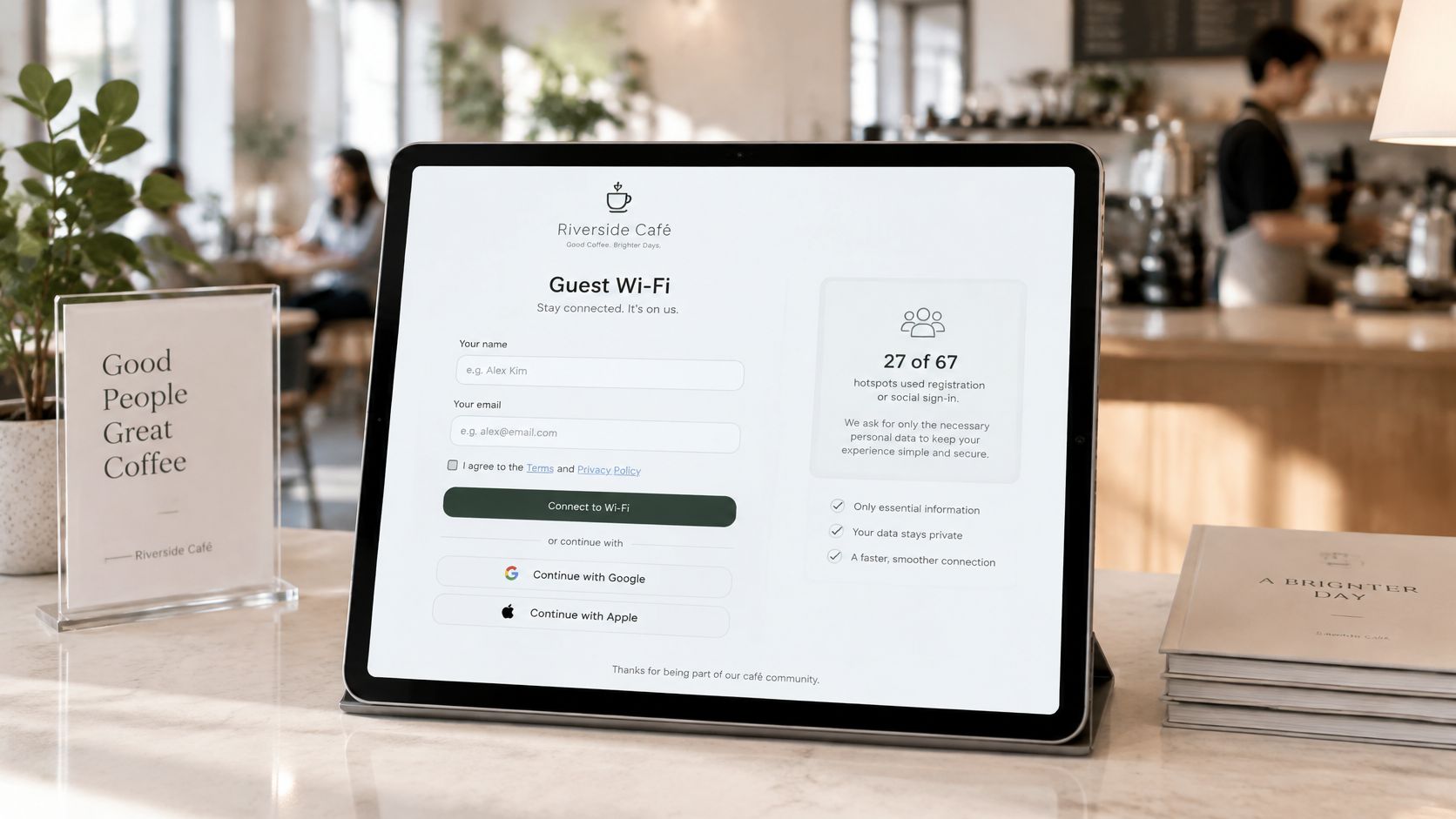
In a 2019 academic study of 67 public WiFi hotspots, 27 hotspots, 40.3% of the sample, used social login or a registration page to collect personal information, and in 19 cases completing that process was mandatory for internet access. The same study found 40 hotspots, or 59.7%, allowed internet access without requesting explicit personal data. So a portal doesn't automatically equal marketing registration.
Three functions on one screen
Separate these clearly in your design and in your records.
- Controlling network access: The gateway decides whether this device may reach the internet.
- Showing terms of use: The guest accepts acceptable-use conditions for the connection itself.
- Obtaining marketing consent: The guest agrees to receive messages later, which is a separate decision.
Here's the point readers most often miss. Only an explicit opt-in is treated as marketing consent; accepting WiFi terms does not grant marketing consent. A guest who ticks a box to get online hasn't agreed to your newsletter. Treating that tick as permission puts your list and your reputation at risk.
A layout guests can understand
Put a required terms tick next to the acceptable-use wording. Below it, place a separate, unticked marketing checkbox with its own plain sentence, such as an invitation to receive offers by email. Add a visible privacy notice link that opens before the guest submits anything, not buried after sign-in.
That separation aligns with the practical checks in this GDPR compliant email marketing checklist for venues. It also gives guests a real choice. Someone can refuse marketing and still get online, which is exactly how it should work.
More fields doesn't mean more value. Each extra question costs completions and adds data you're responsible for protecting.
When a guest does opt in, the portal can store their email, visit date and preferred location in a central record. When a guest connects and logs in using their email address or a social profile, we capture that data and store it in a centralized CRM. That's how a venue builds first-party data it owns, rather than relying on a platform's audience.
Answer three questions before launch. What data is strictly needed to provide access? How long will you keep identity and device records? Can a guest refuse marketing and still get online? If any answer is vague, fix the form before you fix the design.
Login Methods Compared by Effort and Data
Every login method trades guest effort against data captured and reliability across devices. Read the table from top to bottom and you'll see that trade-off grow step by step.
| Login method | Data collected | Guest effort | Best fit |
|---|---|---|---|
| Terms-only click-through | Device record only | Very low | Cafes wanting quick access |
| Voucher or access code | Code redemption only | Low | Hotels and events with printed or paid access |
| Email registration | Email address and marketing opt-in | Medium | Venues building a guest list |
| Social login | Profile data the provider allows | Low | Guests who prefer one-tap sign-in |
| SMS one-time code | Mobile number | Medium | Venues that need verified identity |
| Passpoint or certificate-based authentication | Device credentials, no portal page | Very low after setup | Large venues with managed devices |
From least data to most
Terms-only click-through asks for one tap and creates only a device record. It's fast, but it can't build a guest list. A voucher or access code adds control without asking who the guest is, which suits printed hotel cards and event passes.
Email registration asks more effort and returns a usable contact, provided the marketing opt-in stays separate. If you're weighing that against other capture routes, this comparison of QR code sign-up versus WiFi login for email capture helps you judge effort against data quality.
Social login feels like one tap, but it adds a third-party redirect. Some browsers and the small sign-in windows phones use for WiFi handle those redirects poorly, and guests may not remember a password they haven't typed in years. SMS one-time codes verify a number, yet they depend on the guest having mobile signal and a number that accepts the message.
Passpoint or certificate-based authentication removes the portal page after setup. It needs a managed profile on the device, so it suits staff and regular returning guests more than walk-in visitors meeting your network for the first time.
Decision rule: Match the login step to the single outcome you need, not to the largest set of fields you can collect.
Shortlist two methods now. You'll test both against your hardware and failure checks before choosing one.
Why Captive Portals Fail and How to Prevent It
A portal isn't just a branded page. Before login, the gateway holds each device in a restricted state and allows only discovery, login, and portal traffic. Most failures happen because that holding area is built or tested badly.
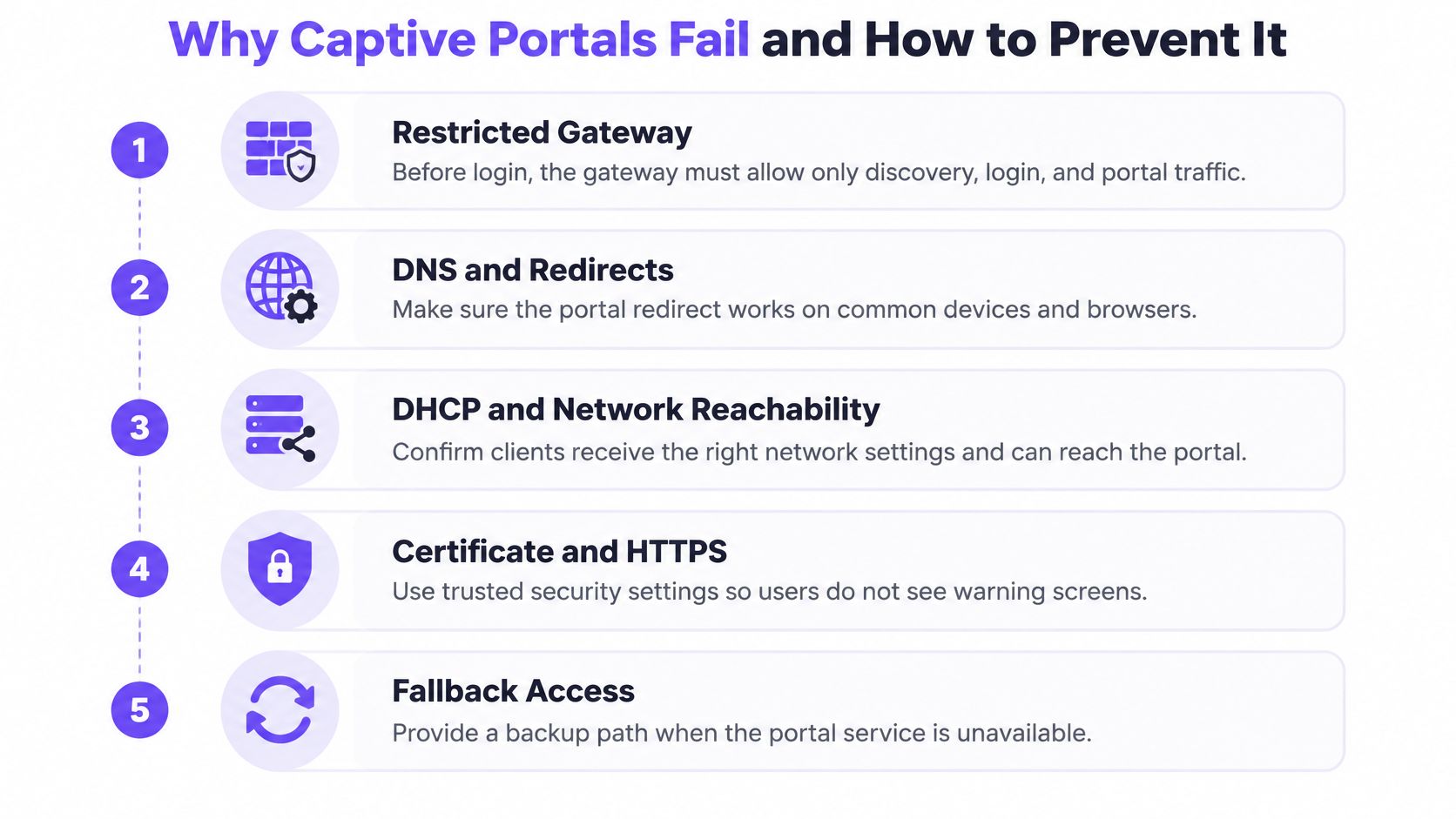
Four symptoms guests notice
The portal never appears. Most sites now use HTTPS, and browsers reject substituted certificates, so old HTTP interception can't reliably show your page. Operating systems instead run connectivity checks, such as the requests described in Apple's captive network support guidance to captive.apple.com over TCP ports 80 and 443, to detect whether internet access is being intercepted.
The page loads broken. The HTML arrives, but stylesheets, scripts, fonts, or identity-provider redirects are blocked inside the restricted state. Host portal assets locally or allowlist every endpoint the page needs.
Some guests bypass the portal. If you filter IPv4 but leave IPv6 open, traffic can pass around your rule. Give both paths equal treatment.
Guests loop back to login. The authorisation timer expires, or roaming between access points drops the session, and the guest is redirected repeatedly. That reads as broken WiFi, even when signal is strong.
Tests to run before launch
- Test real devices: Work through iOS, Android, Windows, macOS, and at least one IoT device such as a printer or TV.
- Measure two timings: Record time to portal and time to authorisation on each device.
- Force session expiry: Confirm the guest returns to the portal cleanly and can sign in again.
- Roam while connected: Walk between access points with a private MAC address enabled and watch whether access survives.
Keep a documented fallback for when portal detection fails, such as a short address staff can give guests to open manually. Don't weaken security by switching the network fully open.
Finally, help guests spot phishing. The network name should match the venue, the portal address should sit on the venue's own domain, and the browser should show a valid TLS certificate for that domain. A legitimate portal never asks for bank details or a social media password.
Integration Options With Your Existing Network
You don't need to rip out your network to add a portal. Start with how devices learn the portal exists, because that decides reliability for phones that never open a browser first.
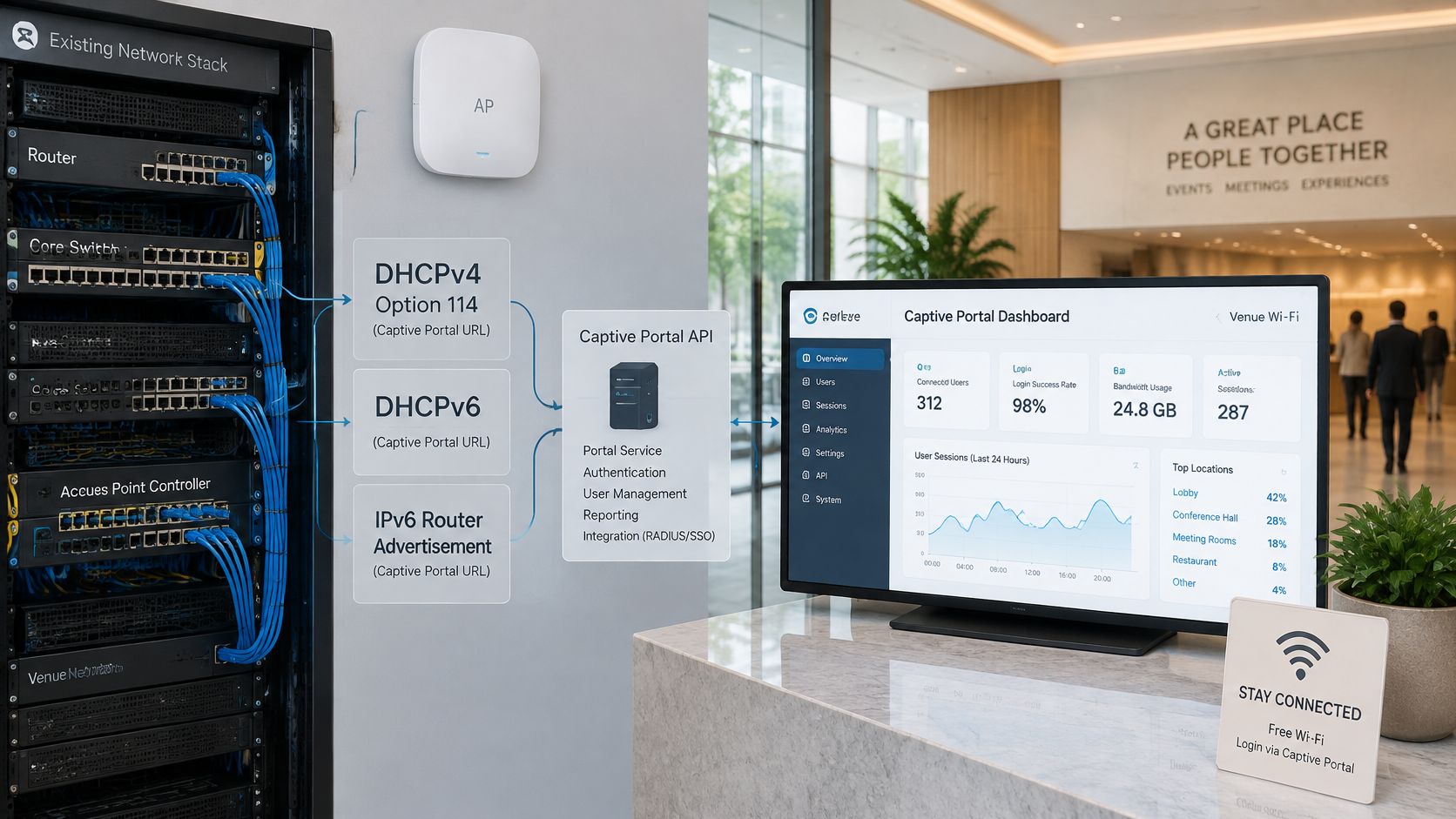
The image below shows how the portal sits between your access points and the systems that receive guest records.
The standards path
Under the approach described in Fortinet's captive portal administration guide, RFC 8910 defines how a network advertises its portal API endpoint through DHCPv4 option 114, DHCPv6, or IPv6 Router Advertisements. RFC 8908 then specifies an HTTPS JSON API using the application/captive+json media type, exposing whether the client is still captive, the user-facing login URI, and session information such as remaining access time.
In plain terms, the network tells the operating system directly where to sign in and how long access lasts. That reduces dependence on failed redirects, especially when apps use HTTPS or certificate pinning. Both the API endpoint and portal must use TLS with certificate validation, or an attacker could forge an authorised state or change the login destination.
This short video walks through how those integration points fit together in practice.
Map each connection point
A portal layer can sit on top of your existing hardware, including Cisco Meraki, HPE Aruba, and Ubiquiti UniFi, and it can run with or without a dedicated WiFi platform on your sign-ins. Your IT lead should map four points before choosing settings.
- Access point controller: Owns the network name, restricted state, and redirect or API advertisement.
- Identity source: Checks room numbers, vouchers, staff accounts, or social sign-in.
- Guest record system: Receives consented contact details, as shown across the available Purple WiFi integrations.
- TLS certificate: Must match the portal domain guests see, with renewal owned by a named person.
Run one decision test. If your network supports the RFC 8910 advertisement on IPv4 and IPv6, keep it and test the JSON responses. If it doesn't, plan for a browser-based redirect with a documented fallback.
Choose the Portal Setup Your Venue Needs
Three separate decisions hide inside one sign-in screen: network access, terms acceptance and marketing consent. Access puts the device on the network. Terms acceptance records that the guest agreed to your rules. Marketing consent is a deliberate opt-in, and accepting WiFi terms does not grant it. A setup that merges those into one tick either collects consent you cannot use or blocks guests who would happily have logged in.
Three starting points
A cafe needing fast access and an opt-in list should use terms plus optional email. The email field and the marketing opt-in appear only when the guest actively chooses them. Check the guest record system first, so new contacts land somewhere useful.
A hotel tying access to bookings should use a room or booking check, or vouchers issued at check-in. Capture the stay reference needed to authorise access, not extra profile fields. Check the identity source first, because front desk staff will troubleshoot mismatches.
A multi-site group needing consistency should standardise one consent record and reporting across sites. Email registration with the same separate opt-in everywhere means each site handles refusals the same way. Check reporting and data retention first.
Devices the portal will never see
A captive portal only works on hardware that can open a browser. Smart TVs, printers, till terminals and in-room gadgets have nothing to render the page on, so they sit in the restricted state indefinitely. Give those devices a separate path, such as per-device keys on a staff or device network, and reserve the portal for phones and laptops that can show a login.
Before launch, confirm your hardware supports the standards path or your fallback is documented. Run the device, expiry, roaming and IPv6 checks with real guest devices, not only a laptop in the office.
Purple Engage fits venues that want the sign-in to feed later marketing. It is an all-in-one marketing system for physical spaces that turns every WiFi sign-in into a return visit, with or without Purple WiFi, and proves which campaigns did it. It combines WiFi sign-ins, till sales, bookings, forms, files, messages and survey answers into one guest record matched by email. Because it works with or without Purple WiFi and reads your existing systems, you can connect it to the hardware and tills you already run.
Do one thing this week. Write down the one outcome your portal must deliver, then map your login method, data fields and first integration check to that outcome.
If you're setting up a captive portal for WiFi and want each consented sign-in to become a usable guest record, Purple Engage brings WiFi sign-ins together with till sales, bookings, forms and survey answers in one place. Visit the site to see how it works on the hardware you already run and how it helps turn a first connection into a return visit.