
Operational management system: What multi-site venues need
Learn what an operational management system does for multi-site venues, which features matter, how it connects POS and bookings, and how to choose one.
It's Friday afternoon. One venue manager is updating a paper rota, another is chasing a booking amendment, and head office is comparing till exports that don't agree. Meanwhile, marketing is preparing an offer for guests whose latest visits haven't reached the CRM. You don't need another screen showing the disagreement. You need clear rules for which record to trust, who fixes exceptions, and what staff should do next.
Table of Contents
- What an Operational Management System Is
- Core Capabilities to Check Before You Buy
- Connecting POS, Bookings and CRM Without Duplicate Guests
- Who Owns Decisions and Approves AI Actions
- Keeping Operations Running During Outages and Conflicts
- Getting Frontline Teams to Use the System
- Choose a System by Venue Setup
What an operational management system is
An operational management system connects daily activities into a repeatable operating loop: define the process, measure performance, spot variation, standardise the fix and monitor the result. Software supports that loop, but ownership and working procedures make it function.
Think of air traffic control. The controller doesn't fly the aircraft, but maintains a shared picture and sets rules for who moves when. A venue group needs the same coordination between reservations, staffing, sales and guest communications, without pretending that one application should replace every specialist tool.
The operating loop in practice
Say a restaurant group runs several sites. Managers prepare Friday rotas on paper, tills report sales only after closing, and the booking team learns about a private event through a text message. Everyone has information, but nobody has a dependable way to turn the change into a staffing decision.
A functioning system would make the booking change available to the responsible manager, create a staffing exception, record the decision and check whether the revised plan was completed. It wouldn't just add the private event to a dashboard.
Most products bundle these components:
- Shared data: Relevant records from POS, bookings, WiFi and other operational sources.
- Rules and workflows: Tasks, approvals and escalation paths that turn information into action.
- Performance measures: Consistent views of individual sites and the group.
- An audit record: Evidence of changes, decisions and completed work.
The loop is easier to assess when you separate observation from action.

More than a software category
The history of operations management connects systematic time studies with statistical control charts, explaining why modern systems combine procedures, indicators, audits, corrective actions and management review. Buying software without these practices gives you a reporting layer, not a complete management system.
Before shortlisting, compare restaurant systems with UI Lib to distinguish broad restaurant-management tools from applications focused on particular workflows. Then define which operating responsibilities you need the software to support.
Practical test: When a person discovers a recurring problem that the system should have flagged, identify the missing detection, ownership or escalation loop.
Human judgement remains necessary. The aim isn't to eliminate it, but to stop relying on someone remembering to check every disconnected source.
Core Capabilities to check before you Buy
| Capability | Question it answers | Multi-site test |
|---|---|---|
| Unified guest record | Is one guest one profile across till, WiFi and bookings? | The same guest visiting different sites shows one history |
| Shift and task scheduling | Who does what, at which site, and when? | A task template rolls out to all sites with local variations |
| Audit trail | Who changed a rule, offer or audience, and when? | Every change is logged per site and entries cannot be edited |
| Exception alerts | Which site is off its normal pattern? | An alert fires against each site's own baseline, not the group average |
| Integration connectors | Which source is authoritative, and what happens when it fails? | Each connector has an owner, failure behaviour and tested recovery steps |
| Role-based permissions | Who can approve, edit or export? | Site managers see only their venue; central staff approve across sites |
| Reporting by site | Are venues measured the same way? | Shared definitions, venue time zones and a holdout option for campaigns |
Make the demonstration prove the controls
Start with the guest record. Ask the demonstrator to find a guest who has booked at one venue and purchased at another using the same email. Can staff see a coherent history, and can the demonstrator explain why the records matched? A polished profile screen doesn't prove the matching works.
For scheduling, ask them to publish a shared closing checklist, adjust a local requirement and change the assigned employee. Check whether the local variation survives the next central update. Otherwise, managers will maintain their own copies.
Move to the audit trail before admiring the reporting. Ask someone to change an audience rule and then attempt to edit the history. You need the previous value, new value, actor, venue and action time, not merely a last-modified label.
With exception alerts, make the vendor demonstrate a quiet venue falling below its own expected activity while a busy venue performs normally. Group totals can hide a local problem.
Test failure, access and measurement
For connectors, ask the demonstrator to interrupt a feed, show the warning and explain how missing events return. Establish whether support comes from the software vendor, an integration partner or your own team. An integration logo isn't an operating commitment.
Review contractual boundaries too. Documents such as 10Seat's restaurant booking platform usage rules belong alongside technical specifications when you assess a booking dependency. Don't assume that technical access grants unrestricted use of the underlying service or records.
For permissions, sign in as a venue manager and try to export another site's guests. Then test central approval without granting unrestricted administration. Permission controls should work in exports and APIs, not just hide menu items.
Finally, ask reporting to reconcile a refunded purchase, a late booking change and activity around local midnight. For campaigns, require a holdout option so you can distinguish incremental outcomes from purchases guests would have made anyway.
Score every capability pass, partial or fail, recording the evidence and any workaround. Treat a failure on audit history or permissions as disqualifying for a multi-site group. A workaround that depends on everyone behaving perfectly isn't a control.
Connecting POS, bookings and CRM without duplicate guests
A guest books with a work email, pays at the till under a personal address and signs into WiFi with a third one. Your systems may hold three profiles for the same person. Connecting the feeds does not establish identity by itself, and a mistaken merge can be harder to fix than a duplicate.
The aim is to connect records while preserving which system owns each fact. The diagram shows the intended relationship, not a guarantee that every incoming record can be matched.
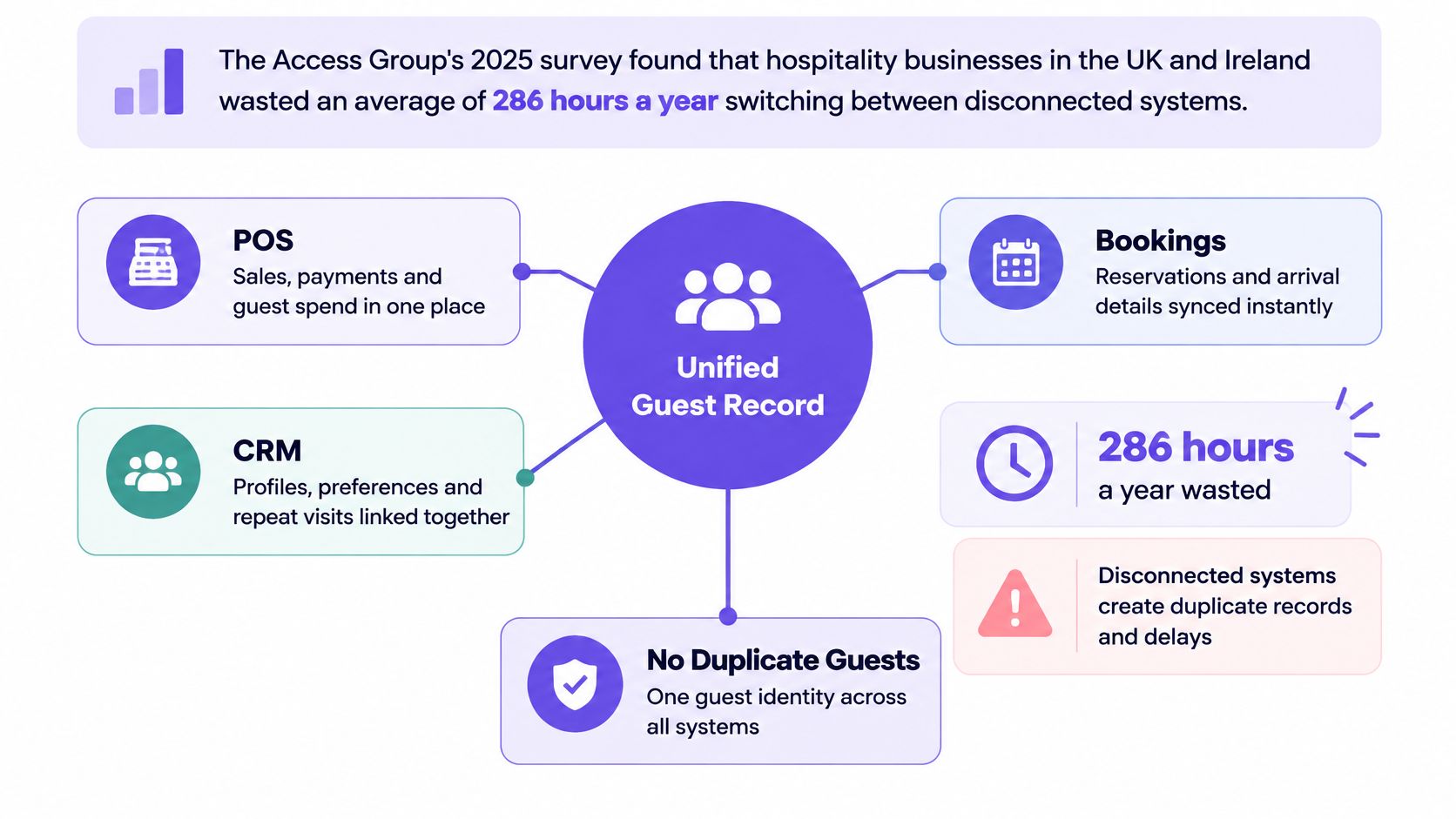
| Source system | Typically holds | Authoritative for | Common conflict |
|---|---|---|---|
| Point of sale (POS) | Sales, items, covers and tills | Transaction totals and spend | Refunds or splits posted after the sale |
| Booking system | Reservations, party size and no-shows | Booking status and arrival | The same guest booked under different emails |
| CRM | Contacts, consent and segments | Contact preferences and marketing eligibility | Duplicate records from manual imports |
| WiFi sign-in | Device sign-ins and login times | Presence on site, subject to identity checks | Shared devices and guests without an email |
| Property management system (PMS) | Room stays, check-in and check-out | Stay status | Late check-out updates overwriting booking-derived status |
Write the integration contract
Which source owns each field? Set authority field by field, not application by application. The POS owns transaction amounts, but may not hold the guest's preferred contact address. Preserve source identifiers and event times so staff can trace disagreements to their origin.
How are records matched? Start with normalised email, then use a verified phone number where your matching policy permits it. Send conflicting identifiers for review rather than merging automatically. A shared surname or device alone is weak evidence. A clear identity resolution approach should define matching evidence, ambiguous cases and how to reverse an incorrect merge.
When is eligibility checked? Check consent and campaign eligibility immediately before sending. A segment created earlier can become invalid after an opt-out, cancellation or identity correction.
What writes back? For venue-marketing workflows, read from tills and bookings without overwriting their transactional records. Staff correcting a refund or reservation should use the application that owns that record. Keep operational annotations separate from financial and reservation records unless a deliberately designed write-back workflow requires otherwise.
This video provides an additional visual reference for connected systems.
Finish with a reconciliation sample of guests appearing at different venues. Check that confident matches resolve correctly, uncertain records stay separate, and refunds and cancellations retain their original source references.
Who owns decisions and Approves AI actions
At a multi-site venue, a campaign can be ready to send while no one is sure who can approve it. Assign decision rights to named people, not broad teams such as operations, IT or marketing. An enterprise owner sets shared policies for data, consent, suppliers and approvals. A platform owner manages connectors, access and security. Venue managers handle daily tasks and local exceptions.
Keep preparation separate from execution. AI can identify opportunities and draft plans, but a person should approve messages, offers and budget changes before they take effect. Assign a named human to handle consent changes and data deletion.
Turn governance into assignments
The Govern function in the NIST Cybersecurity Framework 2.0 can help structure policy ownership. Identify can help maintain an inventory of data flows, venues, processors and APIs. Apply both to the operating model, rather than leaving them as security-team paperwork.
For each connector, name an owner and document security requirements, monitoring signals, failure behaviour and recovery steps. Set a common enterprise baseline, then define which local procedures venue managers can change.
| Decision | Approver | Rule |
|---|---|---|
| Audience definitions and offers | Central sign-off | Record approval before the campaign sends |
| Site task templates | Venue manager | Local variations stay within the enterprise baseline |
| New integrations | Platform owner and security reviewer | Confirm the connector meets agreed requirements before go-live |
| Guest data exports | Data owner | Record the requester and purpose |
| AI-generated messages and budget changes | Local or central owner | Approve before execution |
| Consent changes and data deletion | Named human | Do not automate |
The approval path should reflect the consequence of the action. Drafting a campaign is not the same as committing spend or changing a guest's eligibility.
Give approvers enough evidence to disagree
An approval workflow only works when the approver has authority, relevant context and time to review the proposal. A name in a workflow is not a decision right.
Show the recommendation with its supporting records, intended audience, exclusions, cost exposure and rollback route. Don't ask a manager to approve an unexplained score or a confident paragraph. A usable audit log should record the recommendation, decision, person responsible and outcome, including rejection. If a manager declines because the venue is already full, capture the reason without making the process burdensome.
Test rejection during the demonstration. If declining a proposal is harder than approving it, the workflow needs revision.
Before rollout, list a named owner and deputy for each decision. Shared responsibility without a final decision-maker leaves exceptions waiting.
Keeping operations Running during Outages and conflicts
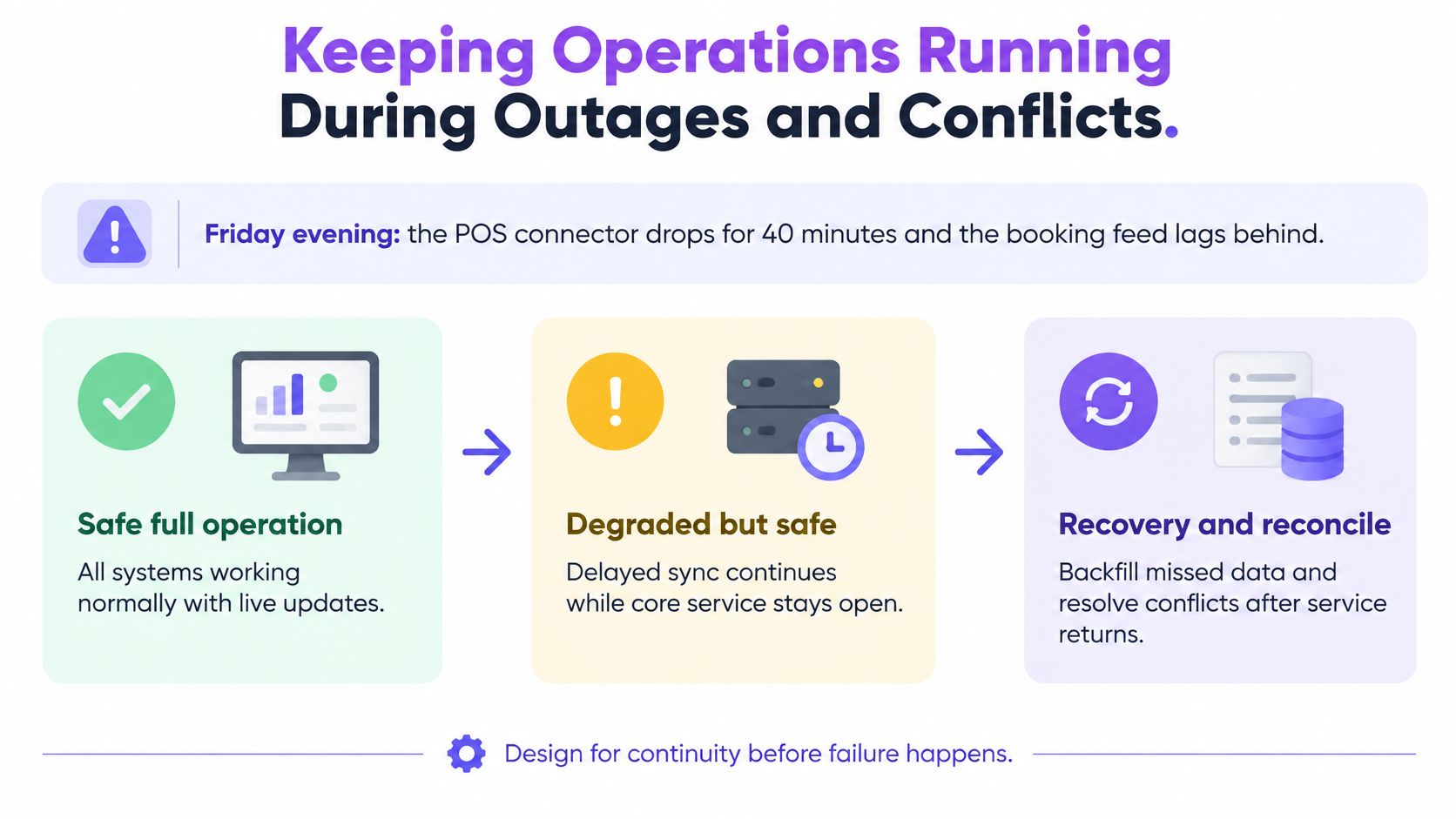
Say the POS connector drops during Friday service and the booking feed falls behind. Staff can still take payments and seat guests, but the marketing platform no longer has a trustworthy current picture. Keeping the venue open and continuing every automated action are different decisions.
Define safe full operation, degraded but safe operation and unsafe operation. Delayed segmentation can be acceptable if staff understand the delay and non-critical processing waits. Sending to an audience whose eligibility can't be verified is unsafe.
The recovery path should make those distinctions visible to the duty manager.
Specify recovery before the incident
ISO 22301 frames business continuity as a management system that organisations establish, operate, monitor, review and continually improve. Translate that approach into testable operating rules, not a recovery document that nobody opens during service.
- Set dependency-specific targets. Define the longest tolerable delay for segment refreshes, booking updates and message delivery. Assign an escalation owner when each target is exceeded.
- Fail closed for sensitive actions. If the platform can't check current consent or eligibility, pause the send. Don't substitute yesterday's audience.
- Queue non-critical work. Reporting and enrichment can wait. Preserve event identifiers so replay doesn't create duplicate purchases or trigger duplicate journeys.
- Preserve the audit trail. Keep append-only records of alerts, overrides and recovery actions throughout the incident.
- Reconcile after restoration. Compare source events with accepted events, investigate mismatches and distinguish missing records from deliberate exclusions.
- Exercise the playbook regularly. Include expired credentials, delayed events, repeated events and out-of-order updates, not just a clean disconnection.
The delivery mechanism affects the recovery design. Understanding webhooks versus APIs helps you establish whether missed notifications are retried, whether records can be fetched again and who initiates reconciliation.
Don't confuse reconnection with recovery
A green connector indicator only confirms that communication has resumed. It doesn't prove that every missed refund, cancellation or opt-out has arrived in the right order.
An incident is closed when there are no unexplained reconciliation gaps, not when the connection turns green.
Give the manager a plain status message describing what remains unavailable and which actions are paused. Every unexplained gap should produce a correction to the connector, monitoring rule or recovery playbook.
Getting frontline teams to use the system
Low adoption can begin with fragmented work rather than unwilling staff. When employees must consult a radio, paper rota, booking screen and separate task application to finish a shift, another login can add work instead of removing it.
Research and Markets' frontline-worker technology analysis identifies legacy fragmentation, integration complexity and labour scarcity as deployment challenges. Don't interpret workarounds as resistance until you've checked whether the official workflow is usable during service.
Replace a complete piece of work
Start at a pilot venue with a workflow that has a clear beginning and end, such as shift preparation. Configure the rota, task assignments, exception handling and handover together. Moving only the checklist online while leaving assignments on paper forces staff to reconcile both.
Use this rollout sequence:
- Make the pilot operational. Replace the paper version for the selected workflow at cutover, with a documented outage fallback. Don't run competing official versions indefinitely.
- Keep inputs narrow. Frontline staff should record completion and meaningful exceptions, not retype information already held in bookings or the till.
- Name a local owner. Give staff someone who can answer questions, correct assignments and escalate defects.
- Measure completed work. Compare eligible shift tasks with tasks closed in the system, checking that completion reflects actual work rather than bulk ticking.
- Retire duplicate records deliberately. Set a cutover date for spreadsheets and paper copies, then remove obsolete templates from normal circulation.
Test the awkward moments
Watch what happens when an employee swaps shifts, a manager leaves or connectivity weakens in the stockroom. Staff need clear handovers, reassignment controls and a visible distinction between saved work and unsynchronised work.
Don't use login counts as proof of adoption. A supervisor can open the application every day while continuing to allocate work through messages. Check whether service issues are resolved and handovers completed without someone maintaining a private parallel list.
Training should follow the task sequence employees perform, using their venue's terminology. A kitchen lead needs to know how to raise an equipment exception and find the escalation owner, not how to use every reporting screen.
Return to Friday's rota after go-live. If managers still use paper as the trusted working version, the operating loop hasn't moved into the system.
Choose a system by venue setup
Map your integrations before shortlisting vendors. The integration list determines what an operational management system can read, while the condition of those feeds determines what decisions you can safely support.
| Venue setup | Put first | Ask every vendor |
|---|---|---|
| Single restaurant with one till | Reporting and staff tasks | Can it read our POS without re-keying data? |
| Multi-site restaurant or bar group | One guest record and central approvals | How are duplicate guests matched, and which site's record wins? |
| Hotel group with bookings and stays | Booking and stay sync | What happens to messages and tasks when the PMS is down? |
| Retail chain with guest WiFi | Consent checks and approval before sending | Who signs off a campaign before it sends, and is that logged? |
Distinguish available connections from pilots
For our venue-marketing layer, Purple Engage combines WiFi, till, booking and hotel-stay sources into one guest record, consent ledger and measurement system. We can capture data from Purple WiFi, Juniper Mist, Square, Epos Now and Loyverse; Cisco Spaces, Cisco Meraki, Lightspeed X-Series, Oracle Simphony, ResDiary, Mews and apaleo are in pilot. We work alongside existing operational tools, not as a booking engine or rota replacement.
A pilot connection isn't the same as an established production dependency. Record availability, supported fields and a named go-live commitment before making it critical to your rollout.
Make the buying decision testable
- Inventory the estate. List every application holding guest or sales records at each venue, including local spreadsheets.
- Assign field authority. Mark which source owns each value and who resolves conflicts.
- Score the shortlist. Use the capability tests to record evidence, gaps and the cost of workarounds.
- Run a bounded pilot. Include contrasting venues, a campaign holdout and deliberate failure tests, with written acceptance criteria.
Start the integration map this week. Bring an operations lead, a venue manager and the platform owner together, then resolve the first disputed field before booking another sales demonstration.
Purple Engage offers a connected guest record, shared consent and measurement, with AI-prepared marketing plans that wait for human approval. Visit Purple Engage with your integration map to assess how its venue-marketing layer fits your existing systems and approval responsibilities.