
What is double opt in? Meaning, process and compliance
Learn what is double opt in: a two-step consent check, how it works, whether the law requires it, and how venues should set it up.
Double opt-in is a two-step sign-up in which a person submits an email address and then confirms it by clicking a link sent to that inbox before receiving any marketing.
If a guest's email address appears in your database, can you show that they asked for your messages? That's the gap double opt-in helps close. For venues collecting details through WiFi, bookings and QR codes, the important distinction is between having an address, having evidence of confirmation and having lawful permission to use it.
Table of Contents
- What Double Opt-In Means in Plain Terms
- How the Double Opt-In Process Works Step by Step
- Is Double Opt-In Legally Required
- What Double Opt-In Does to Your Email Results
- Trade-Offs of Lost Sign-Ups and Real Adoption
- How to Set Up Double Opt-In Across Venue Channels
- Test Your Consent Workflow Before the Next Send
What Double Opt-In Means in Plain Terms
Double opt-in is a two-step sign-up in which a person submits an email address and then confirms it by clicking a link sent to that inbox before receiving any marketing.
Say a café guest joins a mailing list through a QR code on their table. They enter their email address and select an explicit marketing opt-in. Rather than adding them to the active audience immediately, the café sends a message asking them to confirm.
It's similar to a bank sending a code by text before allowing you to add a new payee. The extra action checks that whoever made the request also controls the destination. It doesn't establish everything about their identity, but it connects the request to someone with access.
The guest completes the process across the sign-up page and their inbox.
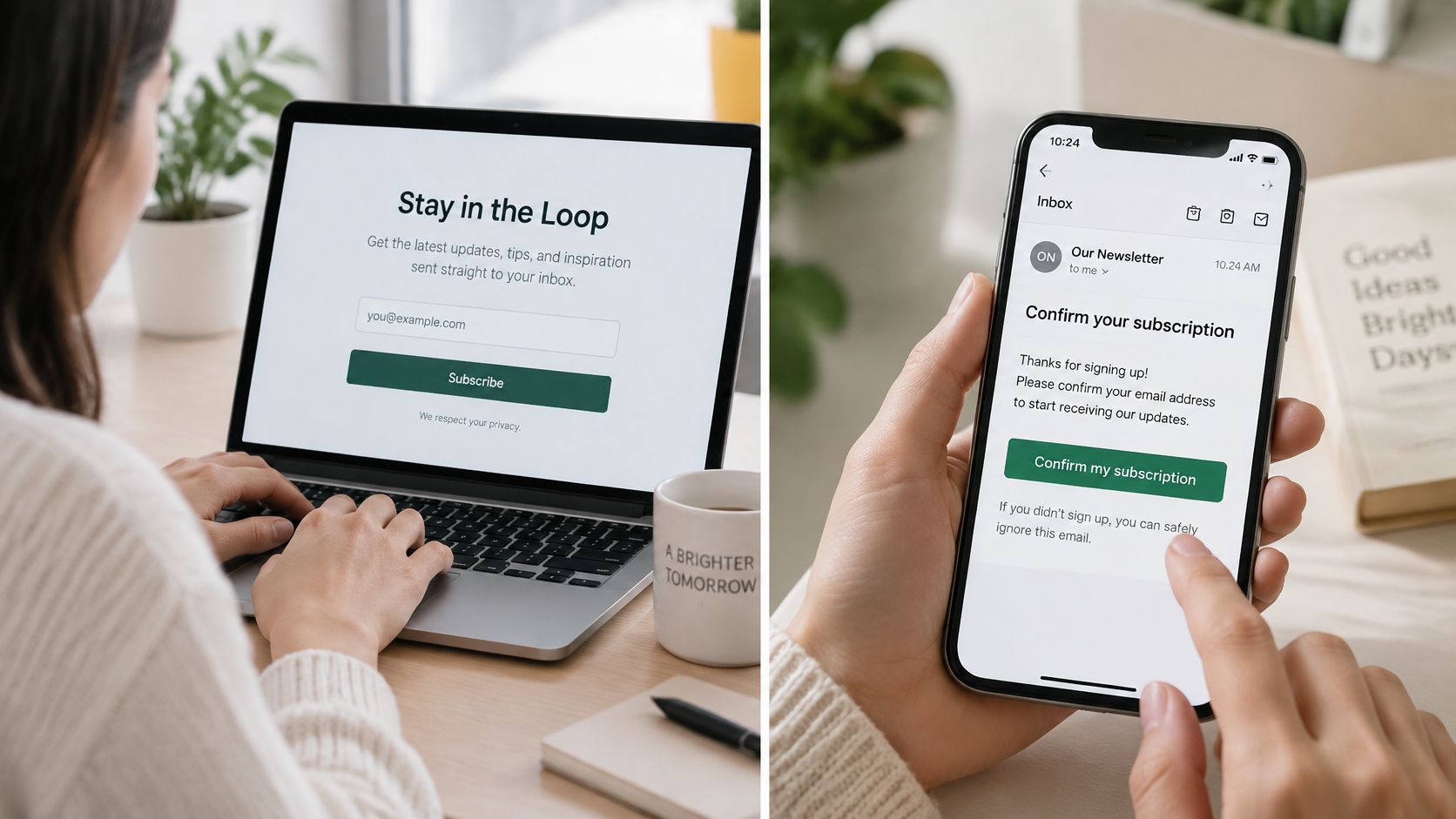
Single opt-in stops after the form submission. The address becomes active without a separate ownership check, so someone could enter a colleague's address or make a typing mistake without the system catching it through confirmation.
Single opt-in compared with double opt-in
| Feature | Single opt-in | Double opt-in |
|---|---|---|
| Sign-up steps | One: submit the form | Two: submit, then confirm by link |
| Address ownership checked | No | Yes, by the confirmation click |
| Marketing active from | Submission | Confirmation only |
| Mistyped or third-party sign-ups | Enter the list | Usually stopped at confirmation |
| Consent evidence kept | Form entry | Pending record plus confirmation timestamp |
| Audience size at sign-up | Larger, unverified | Smaller, verified |
The distinction between an initial request and confirmed permission matters operationally. The ICO's electronic-mail marketing guidance also makes clear that consent must identify the organisation and communication type, rather than being bundled ambiguously with unrelated terms.
So, what is double opt in in everyday marketing terms? It's a separate confirmation gate between someone completing your form and your team treating their address as ready for marketing. If your sign-up ends at submission, you're using single opt-in, even if the form includes a consent checkbox.
How the Double Opt-In Process Works Step by Step
A reliable workflow needs more than a confirmation email. Your database must recognise the difference between pending, confirmed and unsubscribed, then enforce those states when messages are sent.
The visual below shows the beginning of that journey.
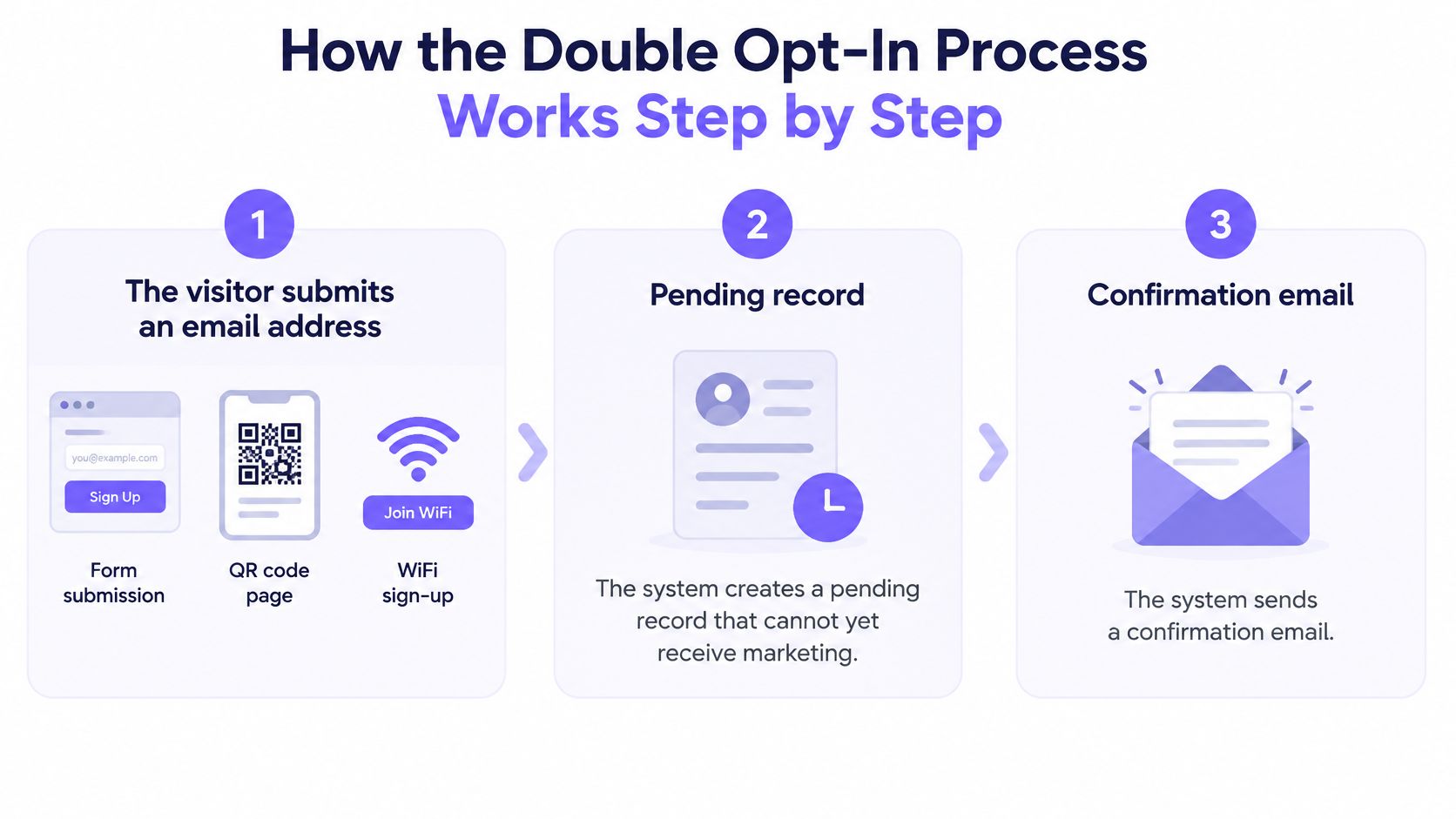
From request to confirmation
Create a pending record. A visitor submits their address through a form, QR page or WiFi sign-up. Store the request without making the contact eligible for promotional messages.
Send a focused confirmation email. Name the venue or organisation and explain which messages the person requested. Keep the message about confirmation, not an offer disguised as administration.
Validate the confirmation link. Generate a cryptographically random, single-use token tied to the pending subscription and intended channel. Choose a short expiry window that your team can justify and document in its policy, rather than treating an arbitrary duration as a legal requirement.
Show a clear confirmation page. Repeat what the person is subscribing to. Record the successful event, including its timestamp, source and wording version, so the action can be connected to the original request.
Activate only the intended channel. Move that subscription from pending to confirmed and invalidate the token. An email confirmation mustn't silently activate messaging elsewhere.
Check eligibility before dispatch. Require a current confirmed state and check suppression records immediately before sending. Historical confirmation never overrides a later unsubscribe.
Keep state changes controlled
Use this state path as your working model:
Unsubscribed → pending → confirmed → unsubscribed
Treat expired, reused or failed tokens as unsuccessful attempts. Offer a fresh confirmation route where appropriate, but never let an error page activate permission.
These controls put the planning and opt-out principles in the ICO's direct marketing guidance into an enforceable workflow. They also prevent staff from mistaking a database field for durable evidence of permission.
Common slips include sending a welcome email containing an offer while the record is still pending, and importing contacts directly into confirmed status. Both bypass the gate your team intended to create.
For a visual companion to the sign-up journey, the following video provides another way to follow the process.
Is Double Opt-In Legally Required
No single rule requires double opt-in everywhere. The legal question is whether you're allowed to send a particular message to a particular recipient. The confirmation question is what evidence you have that someone intentionally approved the subscription.
As PPC Land's explanation of double opt-in describes, the EU ePrivacy framework centres on prior consent, while the US CAN-SPAM framework generally uses an opt-out model. Neither should be reduced to a universal instruction to install a confirmation link.
GDPR doesn't prescribe that workflow. Consent must instead be freely given, specific, informed, unambiguous and demonstrable, a distinction explained in Suped's country-by-country discussion of double opt-in.
Marketing email rules by region
| Region | Core rule for marketing email | Is double opt-in required? |
|---|---|---|
| United Kingdom (PECR and UK GDPR) | Prior consent unless a soft opt-in applies | Not prescribed; consent must be demonstrable |
| European Union (ePrivacy Directive and GDPR) | Prior consent framework applied through national law | Not prescribed by GDPR; check each country |
| United States (CAN-SPAM) | Opt-out model with a working unsubscribe | No |
What a confirmation click can prove
A click can support the conclusion that someone controlling an address took an intentional action. It can't repair misleading consent wording, an improperly bundled choice or a purpose the guest was never told about.
For UK venues, the guide to PECR soft opt-in email rules helps distinguish consent from the narrower customer exception. Don't assume that having a booking or receipt automatically qualifies a contact.
Document the following for the contact's intended use:
- Applicable rule: The electronic-marketing law governing the country and channel.
- Permission route: The lawful basis and any customer exception relied on.
- Retained evidence: The request, wording shown, confirmation where used, and withdrawal history.
Arrange local legal review where countries or channels differ. Double opt-in supports a compliance decision; it doesn't replace one.
What Double Opt-In Does to Your Email Results
A benchmark cited by Prospeo, drawing on GetResponse data, reports an average open rate of 35.72% for double-opt-in lists versus 27.36% for single-opt-in lists, with click rates of 4.19% versus 2.36% respectively. These are benchmark observations, not proof that adding confirmation will cause the same improvement for your venue.
Benchmark open and click rates by opt-in model
| Metric | Double opt-in | Single opt-in | Gap |
|---|---|---|---|
| Average open rate | 35.72% | 27.36% | +8.36 points (about 31% higher) |
| Average click rate | 4.19% | 2.36% | +1.83 points (about 78% higher) |
The chart presents those same benchmark comparisons visually.
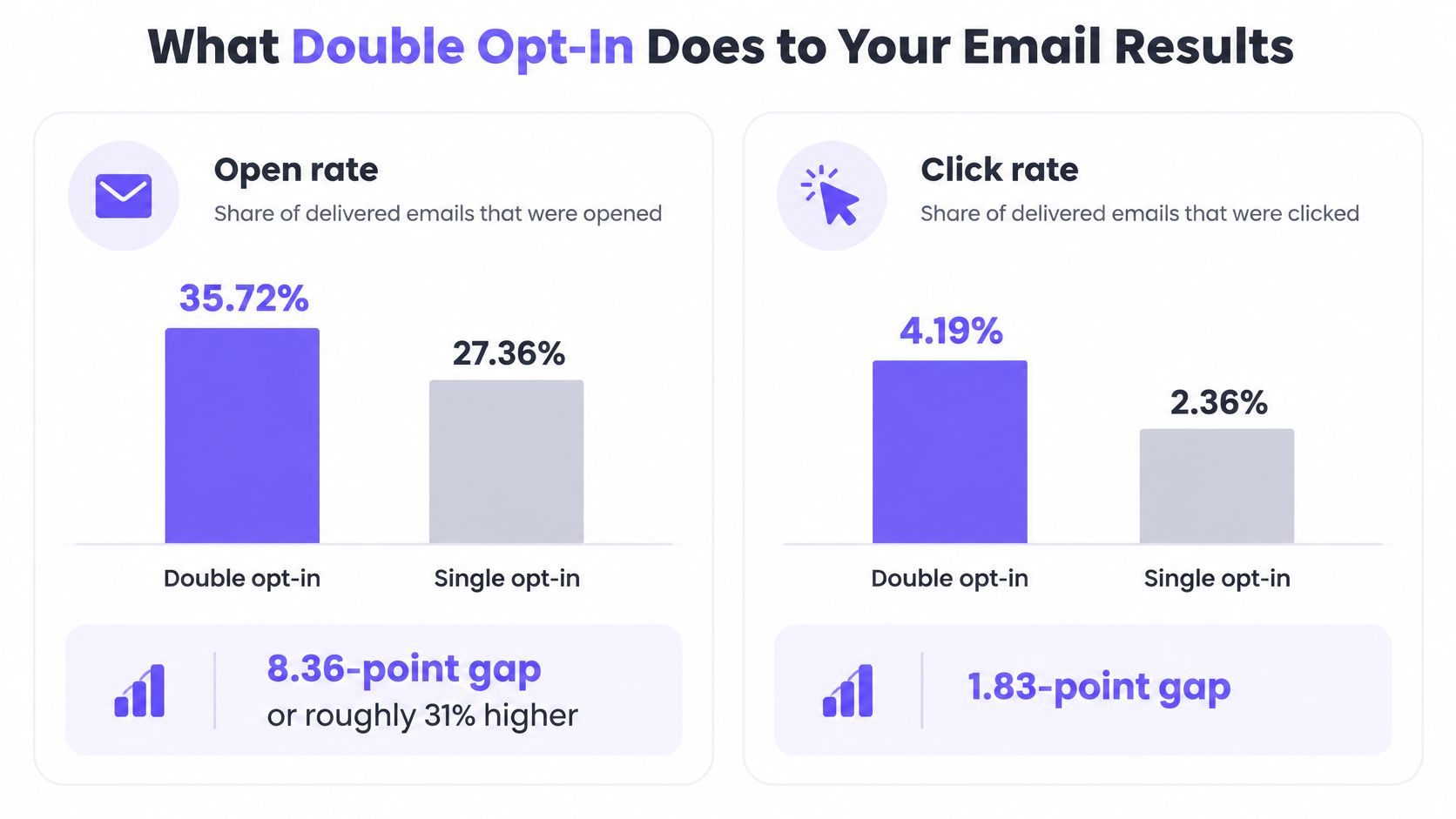
A plausible explanation is straightforward: confirmed addresses are more likely to be reachable and associated with people who intentionally requested messages. Removing unintended or invalid subscriptions changes the audience you're measuring.
But industry, audience, content, sender reputation and geography also affect results. The confirmation step itself selects for people willing and able to complete it, so these groups aren't necessarily comparable in every other respect.
Compare the right audiences
Form submissions aren't confirmed subscribers. If a venue collects many WiFi sign-ups but only some guests confirm, it shouldn't count every submission as an available marketing contact.
Keep separate measures for:
- Acquisition: People who submit the form.
- Confirmation: People who complete the verification action.
- Campaign response: Opens and clicks measured against the appropriate sent or delivered audience.
- Business outcome: Visits, bookings or purchases attributable to the campaign.
Confirmed subscribers are the starting pool for a double-opt-in campaign, not automatically the denominator for every reporting metric. Check how your sending platform defines each rate before comparing campaigns.
Inbox placement also deserves its own attention. Class A Media's explanation of why email deliverability matters adds useful context, while our email deliverability basics for venues provides a venue-focused reference.
A smaller available audience can be useful when it excludes bad addresses. Whether it produces more business still needs measurement, supported by records that distinguish the original request from final permission.
Trade-Offs of Lost Sign-Ups and Real Adoption
Confirmation can exclude genuine guests. Someone may mistype an address, miss the message, encounter corporate filtering or struggle to use the email on their phone. During a short café visit or hotel check-in, opening an inbox may not be their priority.
That's why a missing confirmation isn't proof of low interest. Some people don't want your messages; others couldn't finish the process you gave them.
Adoption isn't universal either. In 2025, Mailjet reported that 39.7% of surveyed email senders used double opt-in, 47.6% didn't and 12.7% were unsure. Those findings describe sender practice, not a recommendation to copy whichever approach is most common.
Reduce friction without inventing permission
Make the post-submission page explicit about the next action. Let guests correct an address, use an accessible confirmation email and provide a straightforward route to request a fresh link.
The Mailgun deliverability impact report discusses a restricted approach sometimes called confirmed opt-in lite, where unconfirmed contacts receive limited messages until they engage. Treat that as a policy choice needing legal review, not an exemption from marketing rules.
Calling a message a welcome email or newsletter doesn't make it non-marketing.
Under a full double-opt-in policy, keep pending contacts out of promotional sends. A restricted tier should contain only communications independently permitted under the applicable rules; engagement alone mustn't expand consent to SMS, WhatsApp or advertising audiences.
Measure net value
Compare your chosen workflow against a legally permitted alternative or holdout:
- Completion and quality: Track confirmation and invalid-address rates.
- Recipient response: Compare complaints, unsubscribes and deliverability.
- Commercial effect: Measure downstream visits, bookings, purchases and revenue.
Choose full double opt-in where verified intent and defensible evidence are priorities. Where short visits make completion difficult, improve the guest experience first; use any restricted tier only within a documented permission policy.
The decision is not only whether fewer people join. It's whether your venue gains a more useful, reachable audience without unnecessarily losing guests who wanted to subscribe.
How to Set Up Double Opt-In Across Venue Channels
Email, SMS, WhatsApp and advertising permissions aren't interchangeable. Build your consent model around the channel and purpose the guest approved, not around a single marketing-enabled flag on their profile.
A shared guest record can hold those permissions together without collapsing them into one decision. The activation rules below describe a channel-specific setup policy, not a claim that every jurisdiction mandates the same confirmation method.
Consent to store and activation point by channel
| Channel | Consent to store | Activate when |
|---|---|---|
| Explicit marketing opt-in, separate from WiFi terms | Confirmation link clicked | |
| SMS | Separate SMS opt-in naming the venue | Its own confirmation workflow completed |
| Separate WhatsApp opt-in | Its own confirmation workflow completed | |
| Advertising audiences | Marketing consent flagged for ad use | Only when separately authorised |
For a golf venue planning messaging alongside email, GolfRep's practical WhatsApp marketing guide provides channel-specific campaign context. Decide what permission is needed before building an audience or scheduling messages.
Build a useful consent ledger
Store enough information to reconstruct the guest's decision, rather than merely showing that a checkbox is currently selected.
- Original request: Form version, submission timestamp and source venue or device.
- Information shown: The privacy and marketing wording displayed to the guest.
- Scope: Organisation, channel and purpose covered by the request.
- Confirmation event: Timestamp and event identifier connected to the pending record.
- Withdrawal history: Suppression status and subsequent changes.
Keep operational guest information distinct from those permission fields. An email address collected for a booking can help identify a guest without authorising promotional contact.
Separate WiFi access from marketing
Accepting WiFi terms doesn't grant marketing consent. At a captive portal, the guest must make an explicit marketing choice rather than acquiring a subscription by connecting.
In our WiFi capture process, a guest enters their email, accepts the terms and opts in to marketing. We store that information in a centralised CRM alongside their visit date, dwell time and preferred location, while treating only the explicit opt-in as marketing consent.
The confirmation page should identify the sender and message type clearly. Avoid broad wording that appears to authorise every brand, venue and channel merely because the guest visited one location.
Finally, protect permission during routine database maintenance. Imports, profile merges and synchronisation jobs mustn't create confirmed status or erase a suppression decision. In our consent process, we check permission when an action is approved and again immediately before each message, and an opt-out remains effective after later imports.
Test Your Consent Workflow Before the Next Send
Run the workflow with test records before releasing a campaign. A successful email delivery isn't enough: your test must also demonstrate that the system blocks the actions it should refuse.
Run the acceptance checklist
- Submit your own address. Confirm that the record reads pending and isn't available for marketing.
- Complete confirmation. Check that only the intended channel becomes confirmed.
- Reuse the link. Verify that the completed token fails rather than creating another activation.
- Try an expired link. Confirm that it cannot activate permission and offers a safe fresh-link route.
- Unsubscribe. Check that the next attempted send is blocked, including a campaign approved before withdrawal.
- Import a test contact. Verify that an unconfirmed import stays unconfirmed. Reimport an opted-out test record and check that suppression survives.
- Inspect the audit trail. Find the original request, confirmation event, suppression history and final pre-send decision.
Repeat the relevant checks across connected venues and systems, not just inside the form builder. A booking integration or audience sync can introduce a bypass even when the sign-up page behaves correctly.
Evaluate the platform against the same rules
For multi-site WiFi operations, confirm that form answers reach the guest record and permission checks survive the journey from approval to dispatch. MarTech Do's guide to building a practical consent framework provides broader governance context; our guide to managing consent and unsubscribes for venue email addresses the operational handoff.
Purple Engage supports double-opt-in sign-up forms and surveys whose responses are written to the guest record. We use one consent ledger, check permission at approval and immediately before each message, prevent imports from reversing opt-outs, and provide erasure that stays erased.
Apply the checklist to our platform as you would any other option. Release the campaign only when every expected activation and every expected block works.
Purple Engage connects double-opt-in forms and surveys with guest records and consent checks before messages go out. Visit Purple Engage to explore how your team can manage channel-specific permission and durable opt-outs across your venues.