
AI chat and AI team
Ask your marketing anything. Approve what it plans.
Ask the AI chat how last month went, answered from your own figures. Ask for a win-back and get a plan. By default, nothing reaches a guest or spends money until a person approves.
Plain answers from your own numbers, with the next question ready to ask. It drafts the whole win-back. Nothing happens until you approve it.
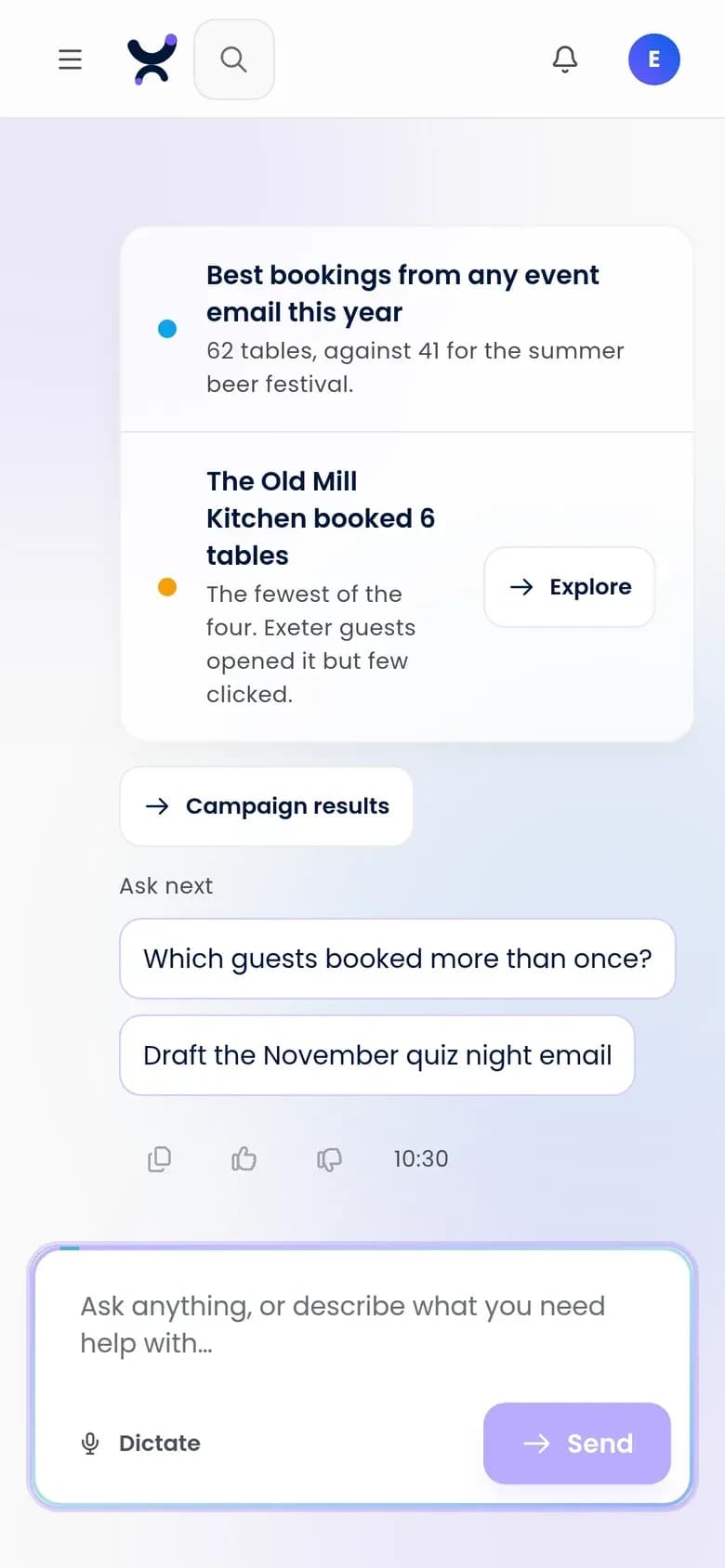
Purple Engage screens shown with sample data for a fictional pub group. Every name and figure is invented.
What can I ask the AI chat?
Anything about your guests, your campaigns or how Engage works, in plain words. It answers from your own figures, points out what is worth a look and suggests the next question.
- Plain answers from your own figures, with findings marked Worth a look or Needs attention
- Every number in an answer comes from what Engage read in your account, and the chat cannot give a figure it did not read
- How-to answers from Engage's own help guide, with a button that opens the right page
- Follow-up questions ready to tap
- Every chat kept at its own address, to reopen, rename or delete, with replies that stream as they are written and a Stop button
- The chat's planner runs on Google Gemini
Ask about your guests, your campaigns or how anything works, in plain words. Spot the regulars who have gone quiet, and what to do about them, in one question.
Purple Engage screens shown with sample data for a fictional pub group. Every name and figure is invented.
What happens when I ask for work?
The chat turns a request in plain words into a plan of at most 10 steps. Each step says what it will make, whether it reaches people and whether it can be undone.
- Requests in plain English, turned into a plan of at most 10 steps
- Each step marked: reaches people, can undo or cannot unsend
- A send step shows its reach, how much of it consent covers, who is left out and why, and sample recipients with their own subject line
- Change a plan by saying so before you approve it
- Drafts staged in the normal builders, and editable there
- Runs with your own permissions, never more
- Many actions undo in one click; sends and publishes cannot, and the preview says so
See exactly what the plan will make before anything goes. See exactly who a send reaches, and who consent leaves out, before anything goes.
Purple Engage screens shown with sample data for a fictional pub group. Every name and figure is invented.
How do approvals work?
By default, anything that reaches a guest or spends money stops for a person to approve: a send, a form publish, a webhook, a review reply or an ad launch. A failed send is never retried on its own.
- A preview of exactly what will happen: the recipient count after consent, named sample recipients, the evidence, what cannot be undone and side effects such as a tag that starts an automation
- Each approval belongs to one exact action: single-use, void if a word changes, expired after 24 hours, and given by a signed-in person, never an API key or an AI tool
- Ads are in pilot: they never run on a playbook, and nothing spends until a person approves
Approve the plan and Engage makes each piece, one click away. The send still waits for its own approval. 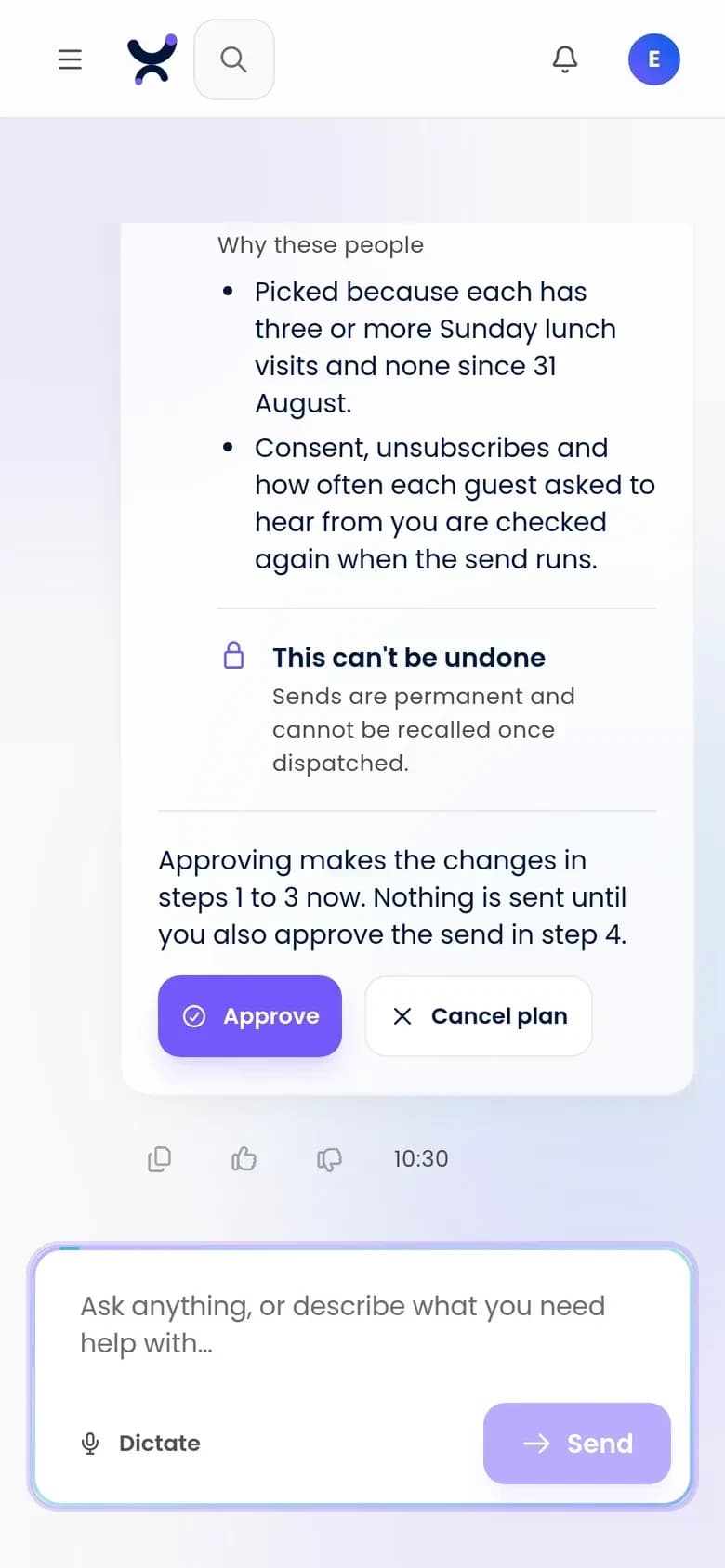
Check and approve a plan from your phone. Nothing is sent until you say so.
What goals can the AI team work toward?
A goal is a standing job with a target you set. Each cycle it measures progress, finds what is behind and stages work for a person to approve. Three of the four run on data most venues already have.
- Win back lapsed guests: stages a win-back email to the lapsed list, with a draft social post where an account is connected, and needs WiFi visits
- Fill quiet times: a slot running at least a quarter under its own normal for three weeks gets an offer that works only in that slot, and the email that carries it
- Grow opt-ins: proposes where to ask, such as a sign-up form, a welcome automation or a QR code in the venue, as a task for a person; never changes consent wording
- Grow reviews: works only through review requests, the same ask for every guest, and reads review counts once Google approves Purple's Business Profile API access
How does a goal keep me posted?
Each goal has a thread where every cycle posts one check-in: what it found and the draft it staged. The daily digest lists the goals that checked in. Reply to change a draft; only the approval control approves it.
- A thread per goal, opened on that goal
- One check-in per cycle, with the staged draft as a card
- The owner is told when a cycle stages a draft, sets a task or is blocked
- Reply "Thursday instead" and the staged draft changes
- You choose how often you review a goal: weekly, every two weeks or monthly
- A model writes the subject line, caption and check-in, checked for numbers it was not given and against your never-say list; the goal still picks the audience, offer, channel and day
What does Engage check on its own?
26 automatic checks compare your account with its own normal, most every night and a few hourly. They are rules, not guesses: a model never decides whether something happened. Some raise ideas with the rows behind them; others set tasks.
- Lapsed regulars: three or more WiFi visits in 90 days, none in the last 30 (checks that read visits need a connected WiFi system)
- Welcome gap: new WiFi sign-ups with no welcome message within seven days
- Return-rate drop: the 45-day return rate well below its normal range (needs about 10 months of history)
- Quiet slot: an hour of a venue's week at least 25% under its normal for three weeks running
- Campaign outlier: human opens or clicks far from usual within 72 hours of a send
- Deliverability risk: bounces above 5%, spam complaints above 0.1% or a worsening trend
- Automations: completion dropping sharply at one step, or new WiFi guests with no welcome automation
- Timing: sends set against the hours an audience opens, a resend to non-openers, a segment that grew with no sends and an event within 14 days with nothing planned
- Audience: few guests you can email, sign-ups that have stalled, an unsubscribe spike and first-time guests to bring back
- Chores: a held send waiting, an A/B test winner to pick, unfinished drafts, setup gaps, a campaign wrap-up and a weekly review
- Where connected: a drop in review rating, unanswered negative reviews, a worn-out design to refresh and a weekly lapsed-guest ad draft
How does the AI team raise ideas?
As idea cards with the rows behind them, ranked by contacts affected, confidence and a category weight (deliverability weighs most), adjusted by what has worked for you. The system writes every figure; a model may add one sentence with no number.
- Ranked cards you work on, snooze for seven days or archive
- The usual value, what happened, how unusual it is and the sample size, all written by the system
- A daily digest of the top three, and a knowledge panel of what the AI team knows about your venues, offers, dates and rules, each fact marked worked out, confirmed or your answer
- Staged email keeps a 5% held-back group, and what held up re-ranks similar ideas
What writing help does Engage give?
Subject lines and rewrites in your brand voice. Each account has a default ceiling of 20 million AI tokens a month; reaching it stops drafting, never the nightly ideas. Shared scoring, voice and checks are on the Creative Studio page.
- Subject-line suggestions and paragraph rewrites you accept or discard
- The writing tools see only your words, brand voice and never-say list, never guest records, with typed emails and phone numbers masked and the never-say list hard-checked
How much control can I hand over?
You choose how much the AI team does on its own, from working only when asked to running inside a playbook you approved. Each channel has its own setting, and a new account starts at Watch.
- Ask first: it works only when you ask
- Watch: idea cards and a digest, with nothing staged
- Draft ready: a draft staged behind each card, waiting for your approval
- Playbook: runs inside bounds an owner or admin approved, once earned
- Set per channel, with no channel inheriting another's, and changed only by a person who manages your Engage account, never the AI team
How does autopilot get earned?
Earned, never switched on for you. A goal's playbook becomes eligible after five drafts in a row approved unedited with the preview open, or after 60 days at Draft ready with at least 50 approvals and over 80% unedited.
- Earned on the record: one edit, rejection or dismissal starts the count of five again
- Eligible is not the same as on: an owner switches the playbook on
- A playbook is a standing approval with bounds (audience, content, schedule, contact caps and a hold window) that an owner or admin approves once; editing a bound voids it
- Each run is announced to the owner and every admin with a cancel link, then held 24 hours by default and never less than 2; if nobody can be reached, nothing sends
- Ads never qualify, an outside AI tool can never use a playbook, and review replies follow a narrower rule of their own, set out on the Reviews page
Questions
Does a goal send anything on its own?
Not by default. A goal stages drafts and tasks, and a person approves each send. Only a playbook that has been earned and switched on can send without a per-send approval, inside its bounds and after its hold.
Can the AI team do more than I can?
No. It runs as the signed-in person with no extra permissions, so it can only do what that person can do in Engage. Approving a send always needs a signed-in person, never the AI team itself.
Can the AI team make numbers up?
No. The system computes every figure on a card from your own data. A model may add one plain sentence, labeled as the AI team's reading, and a checker rejects it if it carries a number, a direction or a cause.
Which AI models does Engage use?
The AI chat's planner runs on Google Gemini. Writing, captions and checks run on Anthropic's Claude. Every call goes through one gateway, and the writing tools never see guest data.
What guest data does the AI see?
The writing tools see only your words, brand voice and never-say list, with typed emails and phone numbers masked. Guest-written text is masked and treated as data, never instructions. An MCP assistant reads what its key's owner can, including contact details: connect only tools your data protection policy allows.
Do I still need a marketer?
Yes. No human marketer is bundled with Engage. The AI team watches the numbers, raises ideas and prepares the work; your people decide what goes out.
Start free with Purple Engage
The free plan is listed at 500 credits a month, with unlimited* contacts and no card.