
Engage Reviews
Ask every guest for a review after their visit
Every guest gets the same message after a recorded visit, with no gating and nothing offered in return, and you see which unhappy guests came back.
Who does Engage Reviews ask for a review?
Every guest, after a recorded visit, with the same message, by email or text. No score or rating decides who is asked.
- The survey's "leave a review" button shows to every respondent, not only happy ones
- The same ask to every guest after a WiFi visit, a POS receipt, a hotel checkout or a completed booking, by email or text
- Asked at most once per venue in 12 months (adjustable), once in 14 days across venues, and never within 72 hours of a survey invitation
- Pausing a venue or the account needs a reason and is logged, and resuming never sends what the pause held back
Purple Engage screens shown with sample data for a fictional pub group. Every name and figure is invented.
What is review gating, and which rules apply?
Review gating means asking only the guests you expect to be happy, or screening guests first and sending only the happy ones to a review site. Google's review policy and the UK's fake-review rules both treat it as selective asking.
- Google's review policy bans incentives and selective asking
- UK: the Digital Markets, Competition and Consumers Act (fake-review rules since April 6, 2025) and the CMA's guidance (CMA208)
- US: the FTC rule on fake reviews, in force since October 2024
- Review links are refused in any template, campaign or automation outside the program, and Yelp links everywhere. A shortened link can slip past, so this lowers the risk rather than removing it
- In Engage, no score, survey answer, tag or rating decides who is asked, no offer can be attached, and no review prompt appears on the WiFi login screen
How do AI reply drafts stay accurate?
Once Google approves Purple's Business Profile API access, Engage drafts Google review replies using only facts from your venue's fact library. Pattern checks in code discard a risky draft, so by default a person approves each reply before it posts.
- A venue fact library: the only things an AI reply may state
- A keyword safety check in five languages runs in code on every review, flagging hygiene, illness, allergy, injury, discrimination, legal threats and staff safety
- Names, emails, links and phone numbers masked before the model sees a review; it never sees guest records or visit history
- A draft that promises money or a free item, cites an unknown fact or quotes a contact detail outside the library is discarded, not repaired
- 1 and 2 star reviews and any flagged risk need the venue owner, the venue's escalation contact or an administrator to approve the reply
Which review sites does Engage Reviews cover?
Guests are sent the right write-a-review link for Google, TripAdvisor, Facebook and Trustpilot, set per venue, and Engage never asks for Yelp reviews.
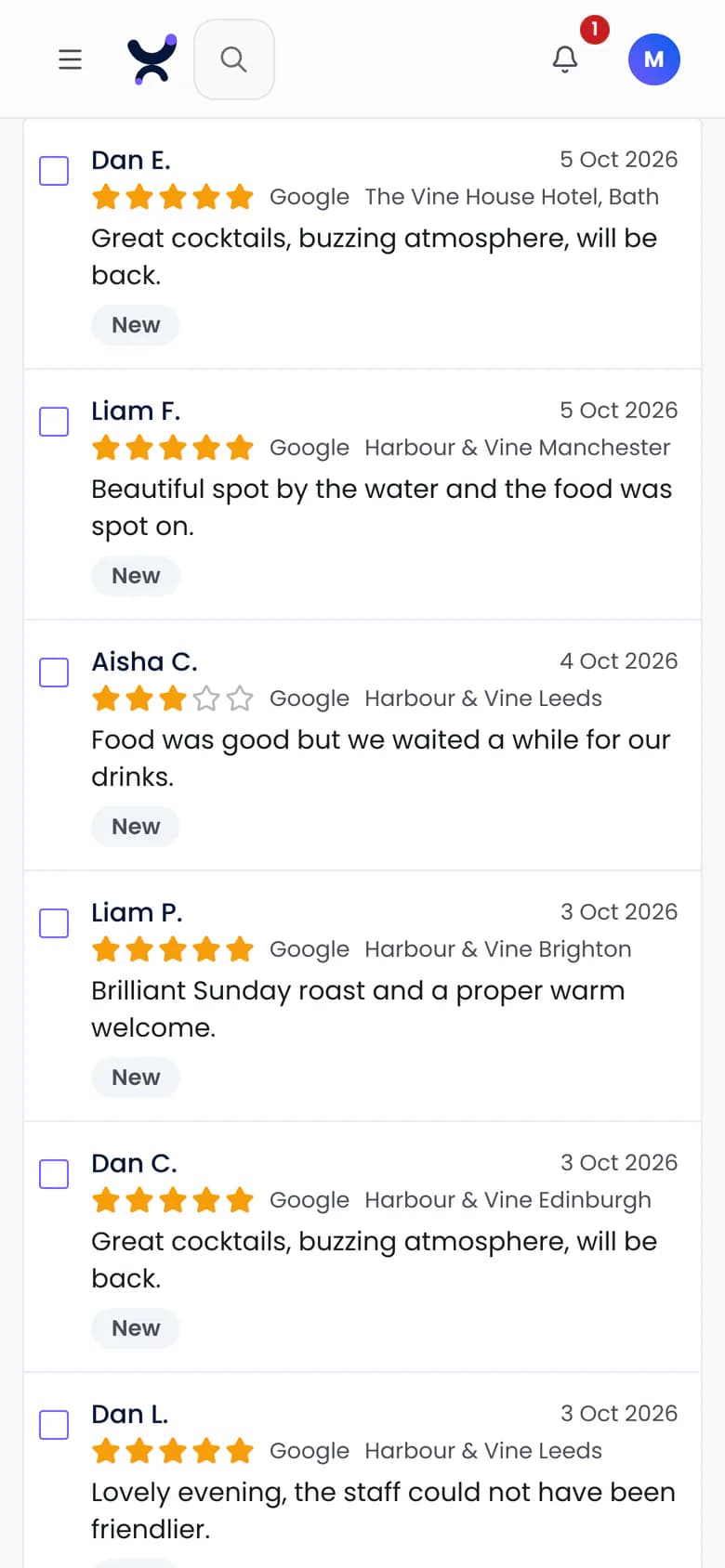
- A Google review inbox per venue and across venues, once Google approves Purple's Business Profile API access
- Write-a-review links for Google, TripAdvisor, Facebook and Trustpilot, each with a test button
Can I see whether an unhappy guest came back?
Yes. A low survey score can start a private recovery automation, with no review link. Engage then reports whether that guest came back: a recorded visit within 90 days of their response, compared with a held-back group.
- A low survey score can start a private recovery automation that never carries a review link; the score decides only who is followed up, never who is asked publicly
- Guests won back: a recorded visit within 90 days of their response
- New-review, risk and overdue-reply alerts that never carry the reviewer's name or text
- Reporting on rating, volume, reply rate, reply time and the request funnel, marked approximate where a figure cannot be exact
What can I learn across my venues?
One topic engine reads reviews and survey answers, showing what guests raise at each venue. Venues that start asking in the same week are compared with venues not yet asking, so a rise everywhere is not credited to the program.
- Topics across reviews and survey answers: food, drink, service, cleanliness, atmosphere, value, wait, location and booking, with segments built from direct survey answers
- Wave comparison against venues not yet asking: evidence, not proof, and it says "too early" rather than invent a result
- Public Google ratings for up to five named competitors per venue, a pilot the Purple team sets up with you
- A website widget per venue showing guests' own survey comments, only from guests with a recorded visit who agreed to be shown, newest first with no rating filter
Questions
Does Engage read and reply to my Google reviews?
It can, once Google approves Purple's access to its Business Profile API and each venue's Google profile is verified and active. Asking guests for reviews does not depend on it. Use the form on this page to tell us where your venues are.
Does Engage Reviews sync my TripAdvisor reviews?
No. Engage Reviews gives guests the correct TripAdvisor "write a review" link, and that is all. Syncing TripAdvisor reviews needs a TripAdvisor content contract.
Does Engage ask guests for Yelp reviews?
No. Yelp penalizes businesses that ask for reviews, so Engage never stores or sends a Yelp link and refuses one in any message.
Will replies ever post without a person approving them?
Not by default: every reply is a draft a person approves. An account can earn auto-publish from AI drafts approved unedited, then an administrator switches it on. It covers only 4 and 5 star reviews with no risk flag, posts the unedited draft with no hold and keeps every automatic reply in an audit trail. It switches off if unedited approvals fall or a person removes one.
Does Engage Reviews make my venue compliant?
Not on its own. It is built to follow Google's review policy, the UK Digital Markets, Competition and Consumers Act with the CMA's guidance, and the US FTC rule on fake reviews. How you ask for reviews, and what you offer guests, is still up to you.
We already use a review platform. Must we switch?
No. Engage can decide who is eligible and send the venue, trigger and channel to your own signed webhook, for your platform to send the invitation; there is no ready-made integration with a named platform. A group needing the widest review-site reach may keep a specialist suite and add Engage for verified visits and guests won back.
Make reviews part of your marketing
Ask the same way at every venue, on the same guest record, consent and results as your campaigns.