
CAN-SPAM Act requirements: What email senders must Do
Learn the CAN-SPAM Act requirements for commercial email, including consent, sender identification, opt-outs, and a compliance checklist.
Your restaurant group has a weekend promotion ready to send. The booking system supplied the guest list, an agency built the email, and a manager approved the offer. Then someone asks whether last week's unsubscribes made it into the audience.
That's where CAN-SPAM Act requirements become more than a footer checklist. A compliant-looking email can still reach someone who opted out because an import, automation, or partner used an outdated record. You need accurate messages and a workflow that keeps every sending tool working from the same rules.
Table of Contents
- What the CAN-SPAM Act Covers and When It Applies
- The Core CAN-SPAM Requirements at a Glance
- Opt-Out Rules and Consent Records That Hold Up
- Sender Identity, Subject Lines and Ad Labels
- How to Build a Compliant Campaign Step by Step
- Common Violations, Enforcement and Audit Steps
What the CAN-SPAM Act Covers and when it Applies
Say a restaurant group emails its guest list to promote weekend dining. The message is commercial because its main purpose is to sell a service, even if the recipients have visited before or the email looks like an editorial newsletter.
CAN-SPAM is an opt-out framework, not a general opt-in requirement. Think of it as traffic rules rather than a permission slip. It regulates how you send commercial email without requiring prior recipient consent for every commercial message.
President George W. Bush signed the law on 12/16/2003, and its principal commercial-email requirements took effect on 01/01/2004; the FTC's CAN-SPAM compliance guide explains the sender obligations, including keeping opt-out mechanisms functional for at least 30 days after sending and honoring requests within 10 business days.
Classify the message by its purpose
Commercial email includes advertising or promoting a product or service, including content on commercial websites. A newsletter linking to your venue's private-dining packages can therefore be promotional even when the email itself contains no checkout button.
An order confirmation serves a different purpose: it confirms something the customer already arranged. Transactional or relationship messages are treated differently, but a service-related subject line doesn't automatically turn a sales pitch into a transactional message.
Practical rule: If the main reason for sending the message is to sell something, treat it as commercial.
Coverage also extends beyond the employee who presses send. Agencies, vendors, and affiliates sending on your behalf need to meet the relevant standards too.
Before approving your next message, record:
- Primary purpose: Is it promoting an offer, confirming a transaction, or combining both?
- Responsible business: Whose products or services does it promote?
- Sending parties: Which internal tools and outside partners will deliver it?
Keep that classification with the campaign approval, rather than leaving each sender to guess.
The Core CAN-SPAM requirements at a Glance
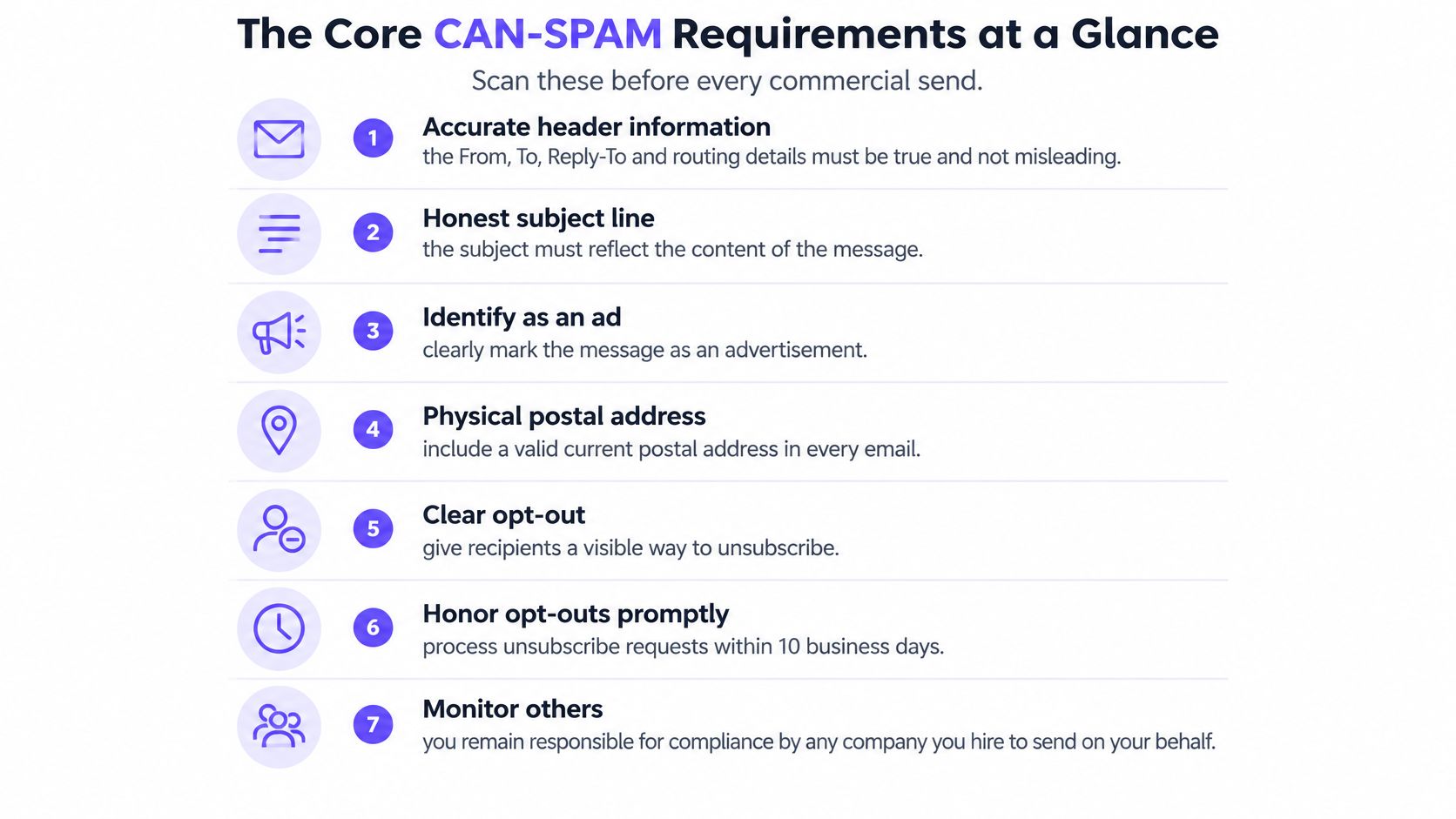
Use this checklist to review the message, the recipient controls, and anyone sending on your behalf.
Core CAN-SPAM requirements for commercial email
| Requirement | What the rule says | Quick check before sending |
|---|---|---|
| Accurate header information | From, To, Reply-To, routing, and domain details must accurately identify the sender | Does the From name and address match the business initiating the message? |
| Honest subject line | The subject must accurately reflect the message content | Would a recipient be surprised by the body after reading the subject? |
| Clear identification | Identify the message as an advertisement or solicitation unless recipients gave prior affirmative consent | Is the ad disclosure visible, or is the consent basis documented? |
| Valid postal address | Include a current street address, registered post-office box, or eligible private mailbox | Is the current address visible in every template? |
| Working opt-out | Provide a clear, conspicuous mechanism that remains functional for the required period | Has the unsubscribe mechanism been tested in a delivered email? |
| Opt-out honored | Process unsubscribe requests within the statutory deadline | Is suppression updated across every sending tool? |
| Third-party senders | The rules apply to agencies, affiliates, and vendors sending for the business | Do partners follow the same standard in writing? |
Turn each check into evidence
The quick-check column should produce something more useful than a check mark. Save the delivered test, the approved subject line, the audience-selection record, and confirmation that suppression reached the sending platform.
Assign responsibility according to who can fix the issue. The copywriter can check the subject, but the CRM owner should verify suppression, and the person managing the agency should collect partner evidence.
The visual checklist can also help campaign reviewers keep the different obligations in view.
Check the version recipients actually receive
A template preview isn't the final email. Conditional blocks, mobile styling, and platform-added footers can change what recipients see.
Use the checklist against a delivered test, including the plain-text version where available. Click through as a recipient rather than reviewing only the editor.
For an automated journey, review each active message and its audience rules. Approving the welcome email doesn't establish that a later win-back email uses the right footer or excludes unsubscribed guests.
Copy the table into your approval process and assign a named owner to every row. If a check has no owner, the campaign manager should resolve that gap before scheduling the send.
Opt-Out rules and consent records that Hold up
A consent record and an unsubscribe record answer different questions. Consent records explain what a guest agreed to; suppression records tell your systems not to send marketing. Don't treat missing consent as proof of permission, or an old consent entry as permission to ignore a later opt-out.
CAN-SPAM's opt-out model also doesn't settle every permission question. Other applicable laws, your platform's terms, and your own promises to guests may impose stricter conditions.
Make leaving easier than joining
Clear and conspicuous means recipients can recognize, read, and use the opt-out. Use descriptive unsubscribe text, readable contrast, and a working destination rather than hiding the option among legal notices.
Build a direct process that doesn't require payment, an account login, or extra personal information. If you offer a preference center, make stopping all marketing from the sender an obvious option, not merely a choice between topics.
The operational distinction matters: keeping the unsubscribe destination available is different from processing the request. Test both the guest-facing page and the record change behind it.
An unsubscribe confirmation on screen isn't enough if the next scheduled campaign still includes the address.
Stop imports from restoring eligibility
Suppose a guest unsubscribes from a restaurant group's marketing. Later, another location exports booking contacts, and a CSV import marks every address as subscribed. The guest receives another promotion because the import replaced the suppression status.
Prevent that with a shared suppression record checked by every import and every send. Match email addresses consistently, preserve the opt-out event, and keep purchase activity separate from marketing eligibility.
A useful consent record includes:
- Collection details: The sign-up source and date.
- Permission wording: What the guest saw.
- Affirmative action: How the guest indicated agreement.
- Import evidence: Any attestation accompanying an uploaded list.
- Later changes: Withdrawals and subsequent permission events, with their origin.
A purchase or WiFi sign-in isn't, by itself, evidence that someone agreed to marketing. Record permission according to the wording and action, not assumptions about the customer relationship.
Use this guide to managing consent and unsubscribes for venue email when mapping the handoffs between guest capture and sending. Then select recent opt-outs and trace whether an import, booking update, or automation subsequently restored their eligibility.
Sender identity, subject Lines and ad Labels
A strong promotion isn't automatically deceptive. You can advertise a new menu enthusiastically, provided recipients can tell who sent the message and the content matches the promise.
Start with the From name and sending address. A restaurant's recognizable trading name can help guests identify it, while a vague account-services identity can suggest a relationship or purpose that doesn't exist.
Compare the promise with the content
Review the subject and body together, especially when different people write them.
| Misleading approach | Why it creates a problem | More accurate alternative |
|---|---|---|
| A reward announcement that opens to a standard menu promotion | It suggests the recipient has earned something they haven't | New fall tasting menu now available |
| An order-confirmation subject on a sales campaign | It presents advertising as a transaction update | Explore our private-dining packages |
| A Re: prefix on an unsolicited promotion | It implies a previous conversation | Private dining for your next team event |
| A final-chance claim when the offer continues unchanged | It creates urgency the offer doesn't support | Weekend dining offer available now |
These alternatives are accurate only if the body supports them. If the menu isn't available yet, say when it launches rather than implying guests can order it now.
An agency or email platform may handle delivery without becoming the customer-facing business. Ask your technical owner to inspect the delivered headers and routing details so the setup accurately represents the sender rather than disguising the origin.
Make commercial identity visible
Where ad identification is required, use plain language and readable placement. A clear advertisement label near the promotional content is easier to recognize than a disclosure buried in low-contrast text.
Keep the physical postal address in the footer and update the master template when it changes. A website contact link isn't a substitute for the postal address itself.
Read the From line and subject without looking at the body. Would the recipient expect the email you actually wrote?
Technical delivery checks are a separate task from judging whether copy is honest. Use the Gmail and Yahoo sender requirements guide for venue marketers to organize that review without confusing inbox-provider policies with statutory requirements.
For a practical copy exercise, take a recent subject line and remove any implied reward, conversation, or urgency the body doesn't support. Rewrite it around the actual offer.
How to Build a compliant campaign Step by Step
Treat approval as a record of completed checks, not permission to schedule. The campaign owner should be able to show which audience, content, and sending configuration were approved.
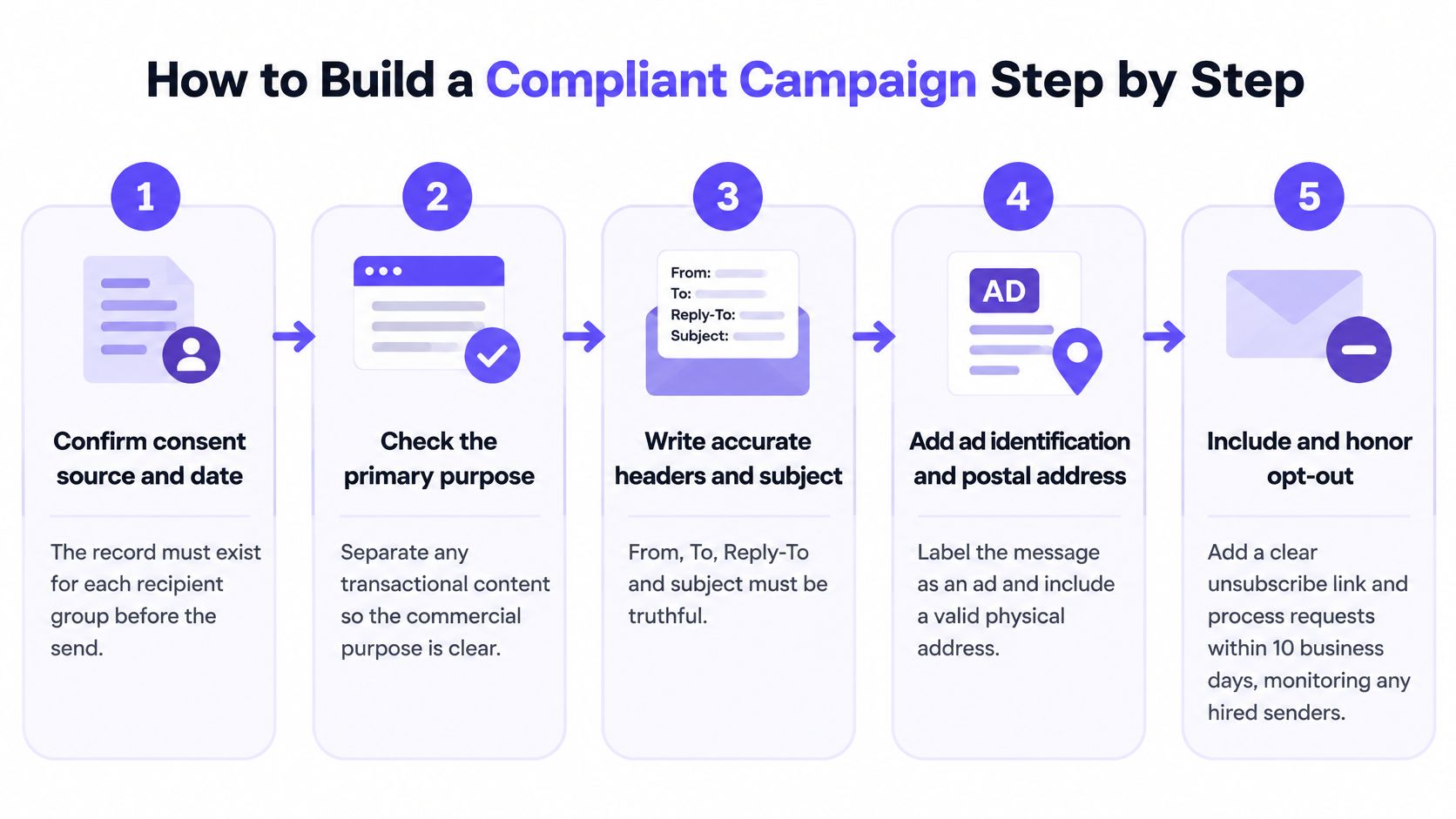
This process overview connects the audience review with the finished message.
Prepare the audience and message
Establish the recipient group's eligibility. Record the collection source, permission information where relevant, and applicable restrictions before approval. This is an operational control, not a claim that CAN-SPAM universally requires opt-in; the common slip is treating an imported subscribed field as evidence without checking its origin.
Determine the primary purpose. Review the subject, opening content, and visual emphasis, then separate service information from promotion where practical. A reservation confirmation should help the guest manage the reservation, not conceal a sales campaign behind a service label.
Verify sender details in the sending platform. Set the From identity, sending address, and Reply-To accurately, and have the technical owner verify the routing setup. Check the campaign settings themselves because duplicating a previous campaign can preserve the wrong brand or location.
Write the subject from the finished body. Describe the offer recipients will find, including any material limitations needed to keep the promise accurate. Recheck every test variant, since an honest main version doesn't make a misleading alternative acceptable.
Validate delivery and recipient controls
Review disclosure and the postal address. Add ad identification where required and confirm the footer contains the business's current valid postal address. Watch for custom HTML and copied templates that bypass your normal footer.
Test a direct unsubscribe path. Send to a controlled test contact, open the delivered email, and complete the opt-out rather than merely checking that a page loads. A one-click path is a useful implementation choice; verify the resulting suppression record and keep the destination available after the campaign ends.
Recheck eligibility at execution and synchronize withdrawals. Apply suppression immediately before delivery and distribute new opt-outs to every relevant tool and partner. The common failure is approving a queued audience, then sending it unchanged after some recipients have withdrawn.
For a companion walkthrough, use the video while checking your own campaign settings.
Keep a campaign record containing the approved content, audience criteria, delivered test, reviewer, and suppression result. The outcome should be a send with evidence for every check, plus a clear reason to pause if an integration or validation fails.
Common violations, enforcement and audit Steps
In 2024, the FTC's Verkada enforcement announcement described a proposed $2.95 million monetary penalty for alleged CAN-SPAM violations as the largest penalty the agency had obtained for a CAN-SPAM violation. The alleged conduct and proposed resolution shouldn't be presented as a trial finding, but the announcement demonstrates that sender practices can prompt substantial enforcement action.
For a venue operator, the useful response is to inspect the places where responsibilities change hands. Find out whether a template editor, CRM import, location manager, or outside agency can bypass a control without anyone noticing.
Common CAN-SPAM violations, causes and fixes
| Violation | Typical cause | Fix |
|---|---|---|
| Opt-out link missing or broken | Template built without a delivered-message test | Add the mechanism to every template and test it after sending |
| Opt-out not processed in time | Manual unsubscribe queue | Automate suppression and alert an owner when processing fails |
| Suppressed contacts re-added | CSV import overwrites suppression status | Check suppression before every import |
| Misleading subject line | Click-focused subject tests without accuracy review | Compare every subject variant with its body content |
| Zip code or postal address missing | Footer copied from an old template | Correct the master footer and audit active versions |
| Partner sends without rules | Agency or affiliate campaigns with no written standard | Require written compliance commitments and inspect actual sends |
Separate template repairs from process changes
A missing address may be a straightforward template repair. Update the master footer, inspect active automations, and check whether location-specific copies use their own version.
A suppression failure needs a different response. Changing the footer won't stop a booking import from restoring an unsubscribed address, and asking staff to be more careful won't fix an integration that overwrites eligibility.
Document the import rules, decide which system owns suppression, and test the failure path. If synchronization stops, the campaign owner should know whether the send is blocked, paused for review, or still proceeding.
Our approach in Purple Engage is to check consent when an action is approved and again immediately before each message; later imports don't reverse an opt-out. We treat only explicit opt-in as marketing consent, not acceptance of WiFi terms. Our deliverability risk check flags bounces above 5%, spam complaints above 0.1%, or a worsening trend; those are product risk indicators, not CAN-SPAM legal thresholds.
Run an audit that follows the guest record
Audit the path from collection to delivery, not just the appearance of the email. Include booking-triggered messages, location-managed campaigns, dormant automations, and partner sends in the inventory.
Review recent campaigns against the requirements table. Save the delivered messages and log each gap, including the affected template or sending configuration. Give each issue an owner and a resolution status so a repair isn't mistaken for a completed review.
Test opt-outs across every sending domain. Use controlled test contacts and complete the recipient journey without logging in or supplying unnecessary information. Confirm both the confirmation screen and the change in sending eligibility.
Challenge the import process. Add a suppressed test contact to an ordinary booking or register export and run it through the normal workflow. Verify that the contact remains excluded when a campaign audience is generated and when a queued message executes.
Collect partner commitments and evidence. Require agencies and affiliates to document sender identity, content approval, unsubscribe handling, and suppression exchange. Review delivered examples rather than relying solely on contractual promises.
Name a consent and suppression owner. Give that person authority to pause sends when the records disagree and require unresolved issues to reach leadership. Keep the decision history so staff changes don't erase the reason for a restriction.
An audit log should help you reconstruct who changed a record, what changed, and when. Preserve enough context to distinguish a genuine new permission event from a routine import or manual field edit.
Escalate unresolved risk before sending
Pause affected campaigns if you can't establish why recipients are eligible or whether withdrawals reach every sender. Preserve the relevant records while the team investigates rather than deleting the evidence during cleanup.
Take the audit results to counsel for high-risk lists, disputed permission, mixed-purpose messages, or cross-border audiences. Rules differ across countries and sectors, and this guide doesn't replace legal review.
Purple Engage brings WiFi sign-ins, purchases, bookings, and stays into a shared guest record with consent and approval controls for venue marketing. Visit Purple Engage to explore how a unified audience and durable opt-outs can support your email compliance workflow.