
What is a brand kit for venue marketing
See what is a brand kit, from fonts and colors to voice and templates, and why venues need rules before the next campaign.
A brand kit is the approved logos, colors, type, voice, imagery and templates plus the rules for using them, not the full brand strategy book. If you're briefing a birthday offer across restaurants, a hotel, or a retail WiFi estate this week, that kit is what stops each site inventing its own version of the name.
Guests treat the email, the register receipt, and the window poster as one place. Staff often don't have one shared folder that says which file is live. The pages below are the brief you'd give a multi-site team: concrete files, contrast numbers, and who may change what.
Table of Contents
- What a Brand Kit Is
- What Belongs in a Brand Kit
- Why Venues Lose Consistency Without a Kit
- Contrast Type and Color Rules That Hold Up
- Who May Change the Brand and Who May Not
- How the Same Kit Looks Across Venue Channels
- Build the Kit Before the Next Send
What a Brand Kit Is
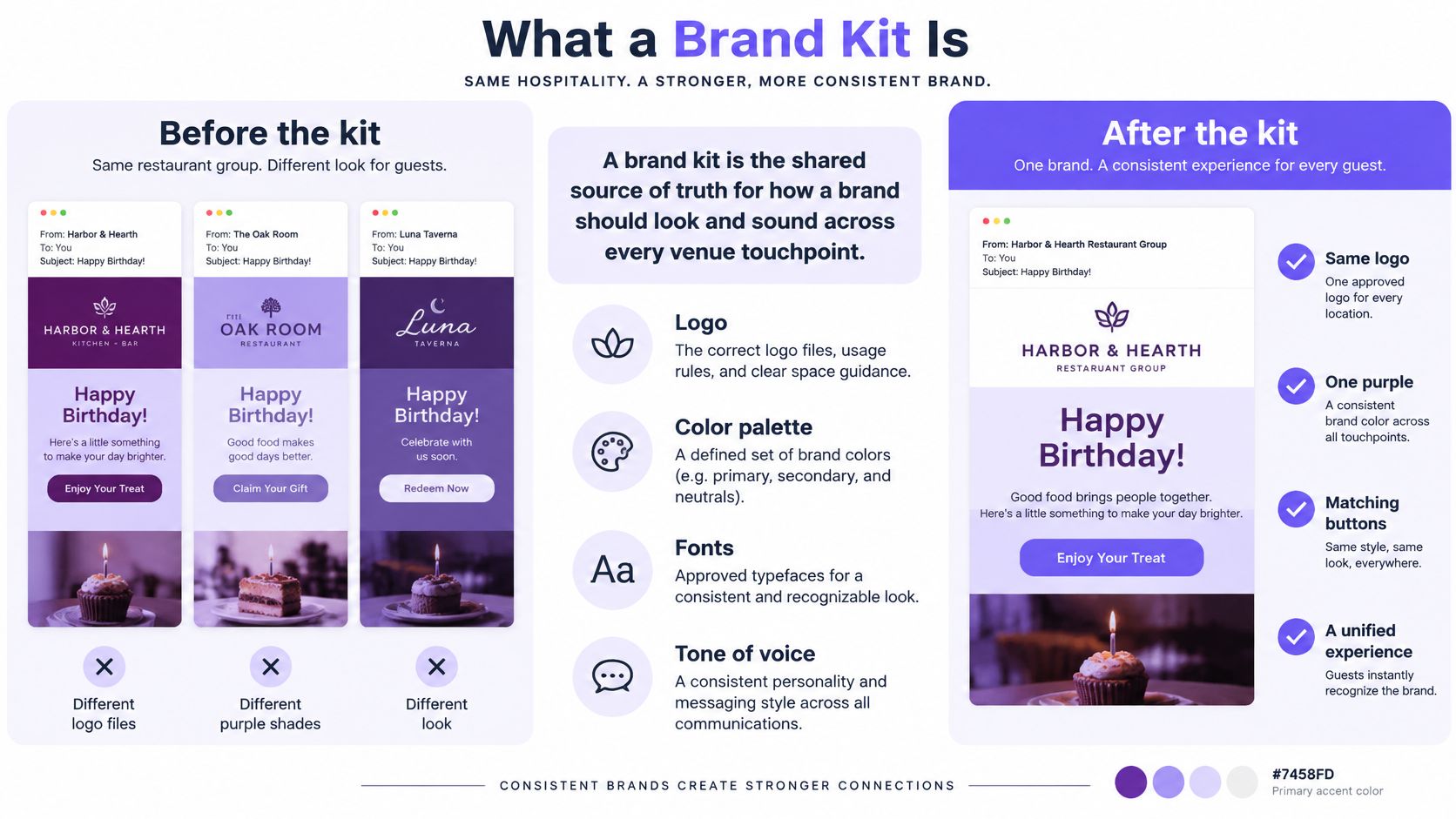
Say the same restaurant group sends a birthday email from three sites. Each site kept its own logo file. One header is a deep purple, one is washed out, and one uses an old wordmark someone exported last year. The guest doesn't read that as "local flavor." They read it as three different businesses.
What is a brand kit, in one sentence, is a practical, central system for applying the identity the same way every time. Adobe describes that kit as a source of truth for employees, agencies, freelancers, and other contributors. A brand book can still hold mission, positioning, messaging, and a long tone essay. The kit holds the pieces people open when they build a send.
| Document | Main job | Typical contents | Who uses it day to day |
|---|---|---|---|
| Brand book | Set direction | Mission, positioning, messaging, long-form voice | Leadership and brand owners |
| Brand kit | Produce materials | Logos, colors, type, imagery, templates, usage rules | Marketers, agencies, venue staff |
Think of it as mise en place. The ingredients are already measured, so a manager, a freelancer, or a new employee doesn't reinvent the dish on a Friday night. If you still need the longer direction written down, you can build a practical brand style guide beside the kit. Don't ask the kit to replace that essay.
From printed manuals to every guest touchpoint
Corporate identity manuals once standardized signage, packaging, and print. The useful step now is the move from a logo file to a governed system. The kit names which version is approved, how colors are reproduced, and how pieces combine. The same identity shows up in email, SMS landing pages, QR forms, menus, venue screens, employee materials, and paid ads.
A useful kit is an asset library plus usage rules. It is not a CRM, a consent ledger, a booking engine, or a measurement tool.
Open the shared folder before the next brief. If it doesn't name an approved logo, an approved color, and an approved typeface, you have downloads, not a kit.
What Belongs in a Brand Kit
A non-designer should be able to open this list during a send and know which file is allowed. Store the files. Leave "who may edit a locked file" for the decision rights later.
| Component | What to store | Venue use |
|---|---|---|
| Logo | Full lockup, icon, light and dark files, minimum size, clear space | Email header, receipt, signage |
| Color | HEX, RGB and CMYK tokens plus primary, surface, muted and destructive roles | Buttons, menus, screens |
| Typography | Primary and secondary faces, hierarchy, email and web fallbacks | Menus, emails, kiosks |
| Voice | Tone, never-say phrases, claim and consent rules | SMS, email, staff scripts |
| Imagery | Photo style, alt text, caption and motion notes, no stereotypes | Offers, social, venue screens |
| Templates | Email, offer page, survey, QR form and sign layouts | Birthday offer, review request |
Files that stop guesswork
Logo. Keep the full lockup, the icon, and light and dark versions. Write the minimum display size and the clear-space rule next to the files. A receipt printer and an email header both crop. Guesswork is how the wordmark loses its last letter.
Color. Don't store one swatch nicknamed after the brand. Store HEX, RGB, and CMYK tokens, and give each a job: primary, surface, muted, and destructive. A button, a menu panel, and an error on a kiosk then pull a named role instead of a nearby purple.
Typography. Store the primary face, the secondary face, and the hierarchy (headline, body, label). Then store an email and web fallback stack. Many inboxes won't load a custom font, and a missing face is how a menu becomes a default serif. Before you lock the stack, analyze font files so you know which weights you have, not which names sit in a slide.
Words, pictures, and locked layouts
Voice is a short operating note, not a brand essay. Tone, a never-say list, and the lines staff must keep for prices, claims, and consent wording belong here. If a price or an opt-in sentence can be rewritten on the floor, it will be.
Imagery covers photo style, alt-text notes, caption and motion notes, and a ban on stereotyped local scenes. A neighborhood photo can be specific without turning guests into a costume.
Templates are locked layouts for email, an offer page, a survey, a QR form, and in-venue screens. The only swaps are approved modules: the dish, the date, or the local offer. Check each row as present or missing against the live shared folder before the next brief goes out.
Why Venues Lose Consistency Without a Kit
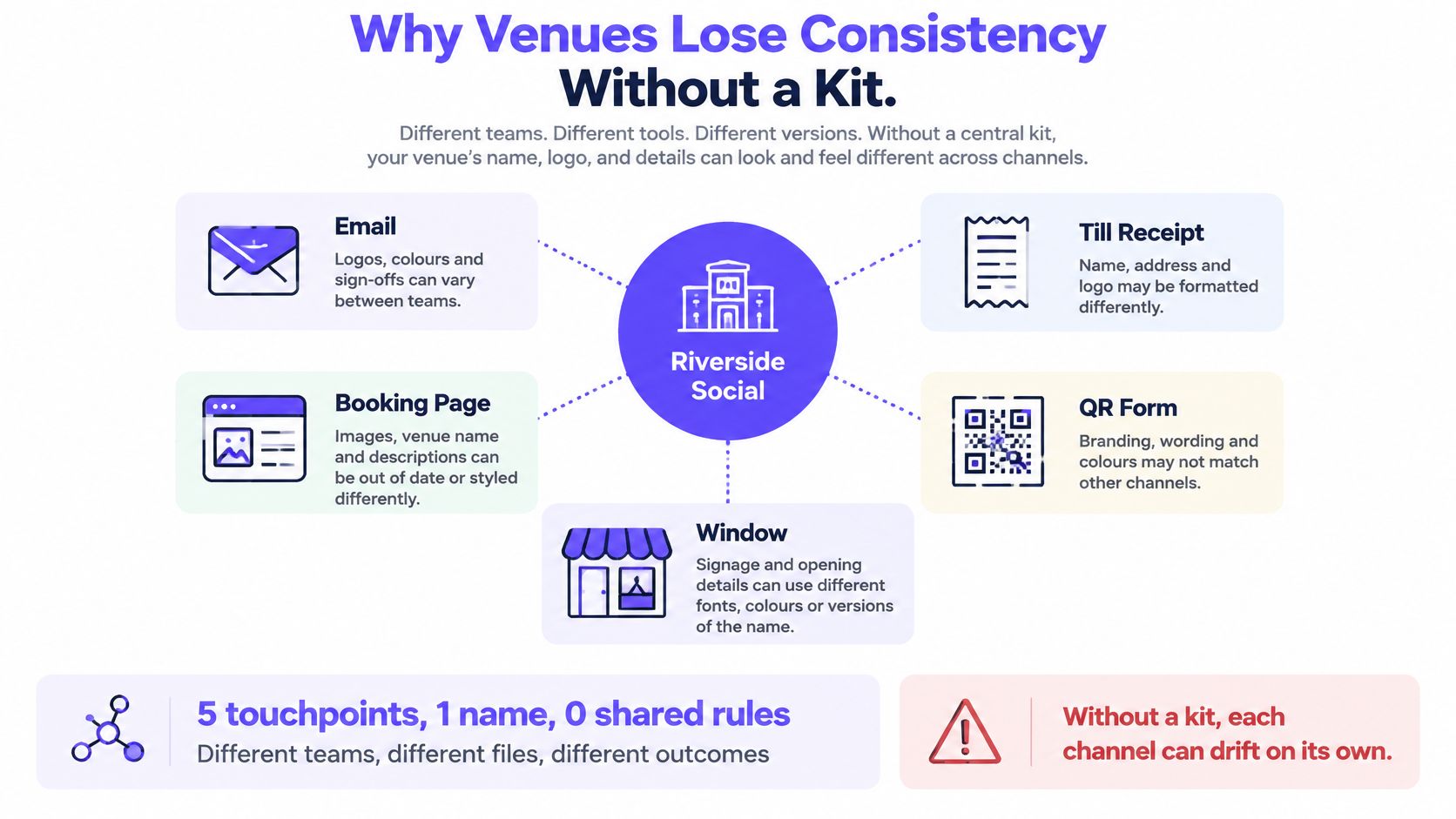
A group puts one name on an email, a register receipt, a booking page, a QR form, and a window poster. If each site or agency keeps a private folder, guests meet a different logo crop and a different tone. The problem is operational before anyone talks about growth.
In 2025, Our Own Brand, citing Lucidpress research, reported that 15% of companies had no brand guidelines, while only 30% had guidelines that were widely used or accessible across the organization. A PDF that nobody can open during a Friday send doesn't govern Monday's menu board. Access is the point, not the existence of a document.
| Finding | Figure | Year | Source |
|---|---|---|---|
| Companies with no brand guidelines | 15% | 2025 | Our Own Brand, citing Lucidpress |
| Companies whose guidelines were widely used or accessible | 30% | 2025 | Our Own Brand, citing Lucidpress |
| Externally sent documents and presentations that followed brand guidelines | 76% | 2025 | empower Corporate Design Report, Kantar Microsoft Office Study |
| Consumers who researched brand guidelines, values and practices | 40% | 2024 | G2 branding-statistics compilation |
The same year, empower's Corporate Design Report, based on a Kantar Microsoft Office Study, found that 76% of externally sent documents and presentations followed their company's brand guidelines. When a written system is available, a lot of outbound files do follow it. On the guest side, G2's branding-statistics compilation reported that in 2024 40% of consumers researched brand guidelines, values, and practices. Your email, receipt, and menu should match because guests look.
Three ways a venue drifts
An old export. A local manager grabs last year's logo from a desktop because the shared file is buried.
An untested button. An agency picks a lighter color that looks fine on their monitor and fails on a cell phone.
A rewritten offer. A translated SMS drops the approved wording, so the promise no longer matches the email.
For groups sending across sites, the same drift shows up in email for multi-site restaurant groups. Consistency here protects recognition and cuts approval arguments. It isn't a promised revenue percentage.
Ask two sites this week for the live logo and the primary button color. If the files don't match, you don't have one kit.
Contrast Type and Color Rules That Hold Up
Treat contrast as an acceptance test, not a late audit. WCAG 2.2 requires ordinary text and images of text to reach at least 4.5:1 against the background, and large-scale text at least 3:1. Logos and brand names are exempt from that specific rule. Record those floors in the kit so a template can fail a bad pair before anyone hits send.
A swatch called "brand purple" isn't a test. The kit needs tested foreground and background pairs for body text, buttons, links, and form labels, plus light and dark logo variants and minimum sizes. Decorative use can be listed as an exception. Text the guest must read cannot.
Color jobs, not nicknames
Use the roles as jobs, not as a second asset list.
- Primary: the main action, such as the book or redeem button.
- Surface: the page or panel behind the text.
- Muted: secondary text, such as a date or a footnote.
- Destructive: errors and failed form states.
Say a cream menu panel carries gray body text. On a designer's calibrated monitor it looks on-brand. Measure it and it misses 4.5:1. The same pair then gets worse in a cheap email client, on a phone QR form, on a kiosk, and on a printed receipt. Low luminance contrast makes text harder to separate for people with reduced acuity or contrast sensitivity. A recorded passing pair stays readable without asking the guest to change settings.
Type that still works off the design file
Lock three type rules that travel with the files. A web font for pages you control. An email fallback stack for inboxes that strip custom faces. A minimum body size for signage, so large text can meet the 3:1 floor where that rule applies.
Reject any template combination that isn't on the tested-pair list. A pretty mockup isn't a pass.
Who May Change the Brand and Who May Not
A folder of logos doesn't govern a send. The line that consistency increases revenue by 23% shouldn't be your business case either. Showfolk traces that figure to a small survey in which marketers estimated the effect. It wasn't a measured revenue outcome. The same account of the gap cites Gartner's 2025 finding that 77% of marketers were exploring generative AI, while only 44% reported significant benefits. Guidelines alone don't make a model, or a busy duty manager, produce on-brand work.
Separate brand rules from operational governance. Rules say what is fixed. Governance says who may move the rest, and how an exception dies.
| Decision | Who decides | What stays fixed | What may flex |
|---|---|---|---|
| Logo and name | Brand owner | Master files and clear space | Nothing at site level |
| Palette | Brand owner | Primary colors and semantic roles | One approved offer accent |
| Voice and claims | Marketing and compliance | Never-say list and consent wording | Local examples and language |
| Campaign creative | Named approver | Template structure | Imagery, offer and call to action in limits |
| Exceptions | Documented owner | The rule being waived | Time-boxed local use only |
What a local team may actually touch
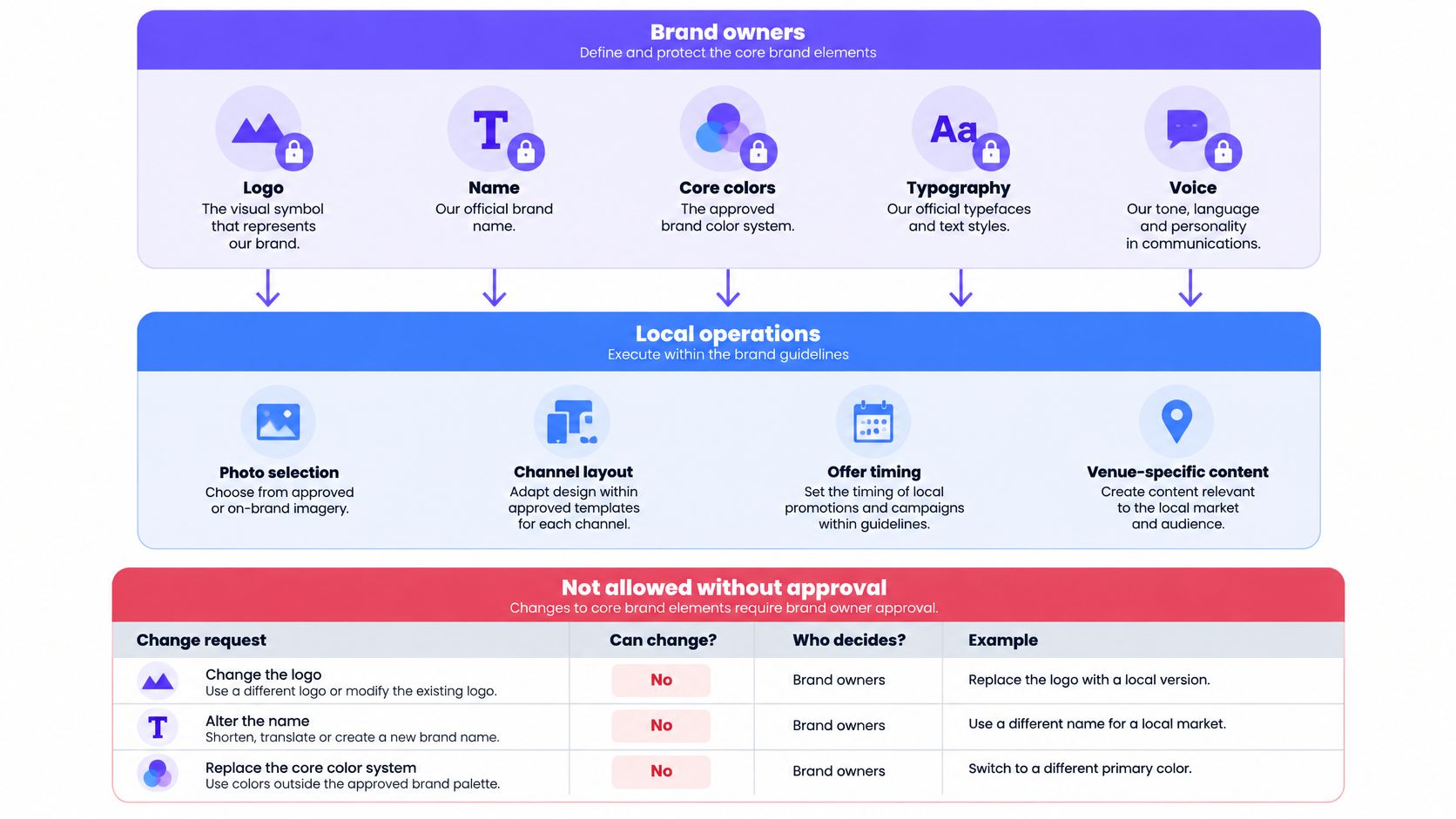
Brand owners lock the logo, the name, the core palette, and prohibited claims. Marketing and compliance own voice invariants, including consent wording. A named approver may change imagery, offer treatment, and calls to action inside the template. Local teams may adapt language and venue examples. They don't invent a second logo.
An exception needs an owner, a written reason, and an end date. A one-off poster without an end date becomes the new standard by accident. The kit should constrain drafts. A person still approves the send, especially for accessibility, cultural meaning, factual offers, and local law.
For several venues, the aim is recognizable consistency with room for place, not pixel-identical sameness. Name the approver for the next exception before it happens.
How the Same Kit Looks Across Venue Channels
Follow one neighborhood group, Harbor & Oak, through three productions that share a kit and don't share a layout.
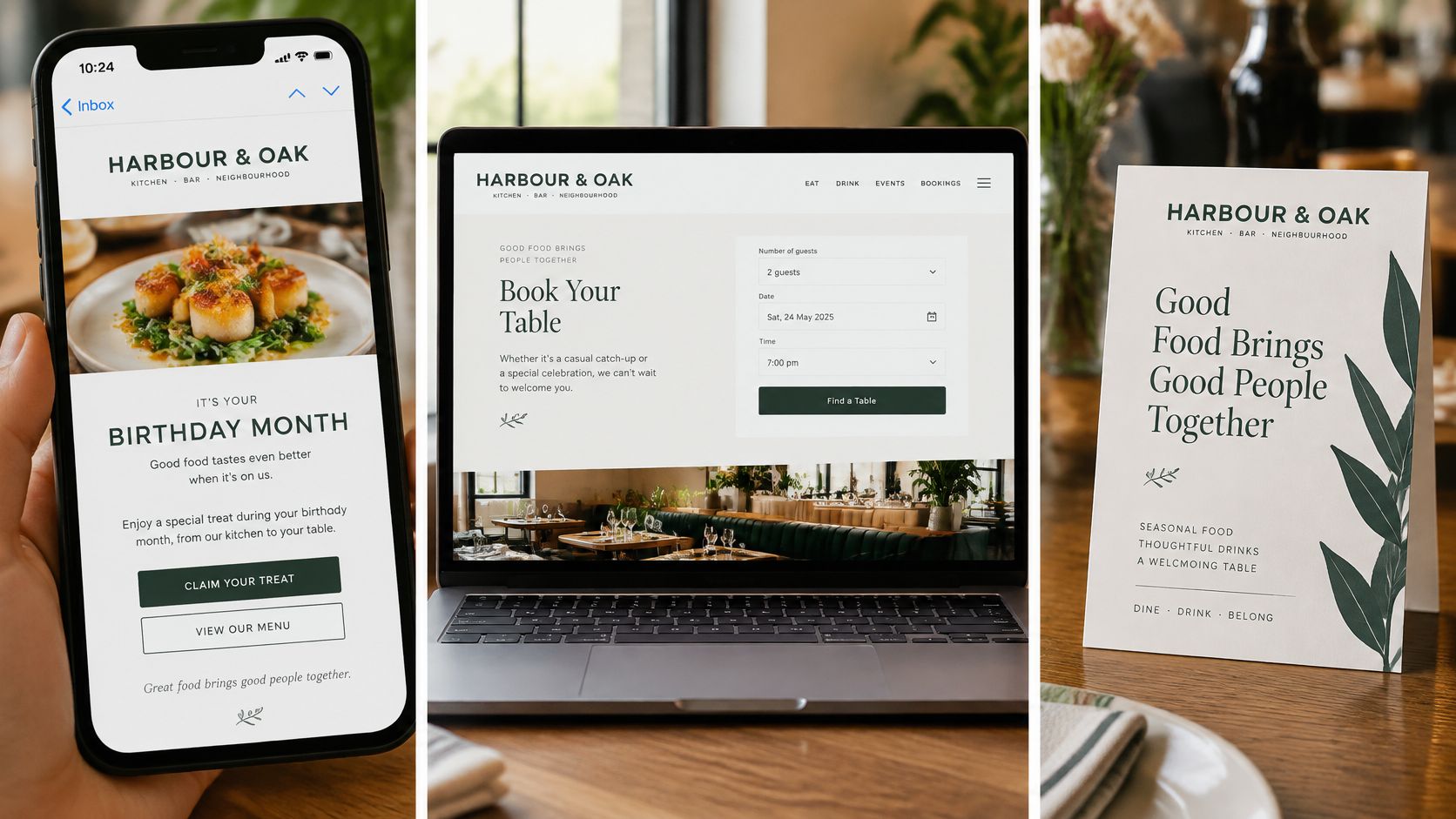
Birthday-month email. The header logo is the locked file. The button uses a tested pair. The photo comes from the approved food style. Offer copy stays off the never-say list. The module that changes is the dish and the date, not the type stack.
Table QR survey. The same logo sits at its minimum size. Form labels use the tested pairing. Questions stay short and in the brand voice, and any image has alt text. The flexible part is the local dish name, not a new color.
Menu board and receipt line. If the screen is dark, use the dark-background logo. Set large text so it can meet the large-text contrast idea where that rule applies. Don't reverse a tiny wordmark that fails in print. The receipt line uses the approved name and the approved offer sentence, not a cashier's shorthand.
The off-brand twin
Now the bad twin of that birthday email. A freelancer swaps the type, lightens the button, and adds a joke the never-say list forbids. The guest still sees the name. The click target and the promise feel like another company.
What stays put across those channels is purpose, naming, and prohibited claims. What can move is language, the imagery crop, and the call to action. Building those productions from one library is what a creative workspace for venue campaigns is for, so the email, the survey, and the screen aren't three private folders.
A short walkthrough of checking a live file against a locked layout helps a new starter see the difference between a module swap and a redesign:
Cover the logo and ask whether the color pair, the type, and the sentence rhythm still identify the venue. If they don't, the kit isn't doing the job yet.
Build the Kit Before the Next Send
Finish this before the next campaign, even if the folder is messy.
- Gather the live files. Logo variants, color tokens in HEX, RGB, and CMYK, type fallbacks, and one text pair already recorded as passing 4.5:1.
- Write the lines nobody rewrites. The never-say list, plus the consent sentences staff must keep.
- Lock three layouts. One email, one offer page, and one QR form, so only the dish, the date, and the local offer can change.
- Name the exception owner. Require a written reason and an end date before anyone waives a rule.
- Match two sites. Ask both for the live logo and primary button color, and replace any file that doesn't match.
Drafts from a duty manager or a writing tool should stay inside those limits. A person still approves the send when the offer, the local wording, or the contrast pair is in doubt. If you want the same files in one library rather than five desktops, start from a venue email campaigns guide and put the five steps in shared folders this week.
Purple Engage can hold those templates, colors, fonts, and the logo so each site doesn't keep a private folder. The brand kit can include a never-say list of up to 100 phrases, and its writing tools don't access guest data. Creative Studio combines photo-led email, offer, survey, and page templates in one library, using the business's colors, fonts, and logo. A one-sentence campaign description can produce drafted email, text, and offer-page content, and a person still signs off the send.
Purple Engage keeps venue marketing on one guest record, with shared templates, colors, fonts, and logo so a birthday email, a QR form, and an in-venue screen don't drift apart. Approval stays with a person, including when a draft comes from a writing tool. See how that kit fits your sites at Purple Engage.