
Automated review-request emails for venues
This guide explains how to build automated review-request emails using verified guest WiFi data to increase your Google rating. It covers the optimal timing, wording, and architecture required to turn foot traffic into a consistent stream of five-star reviews.
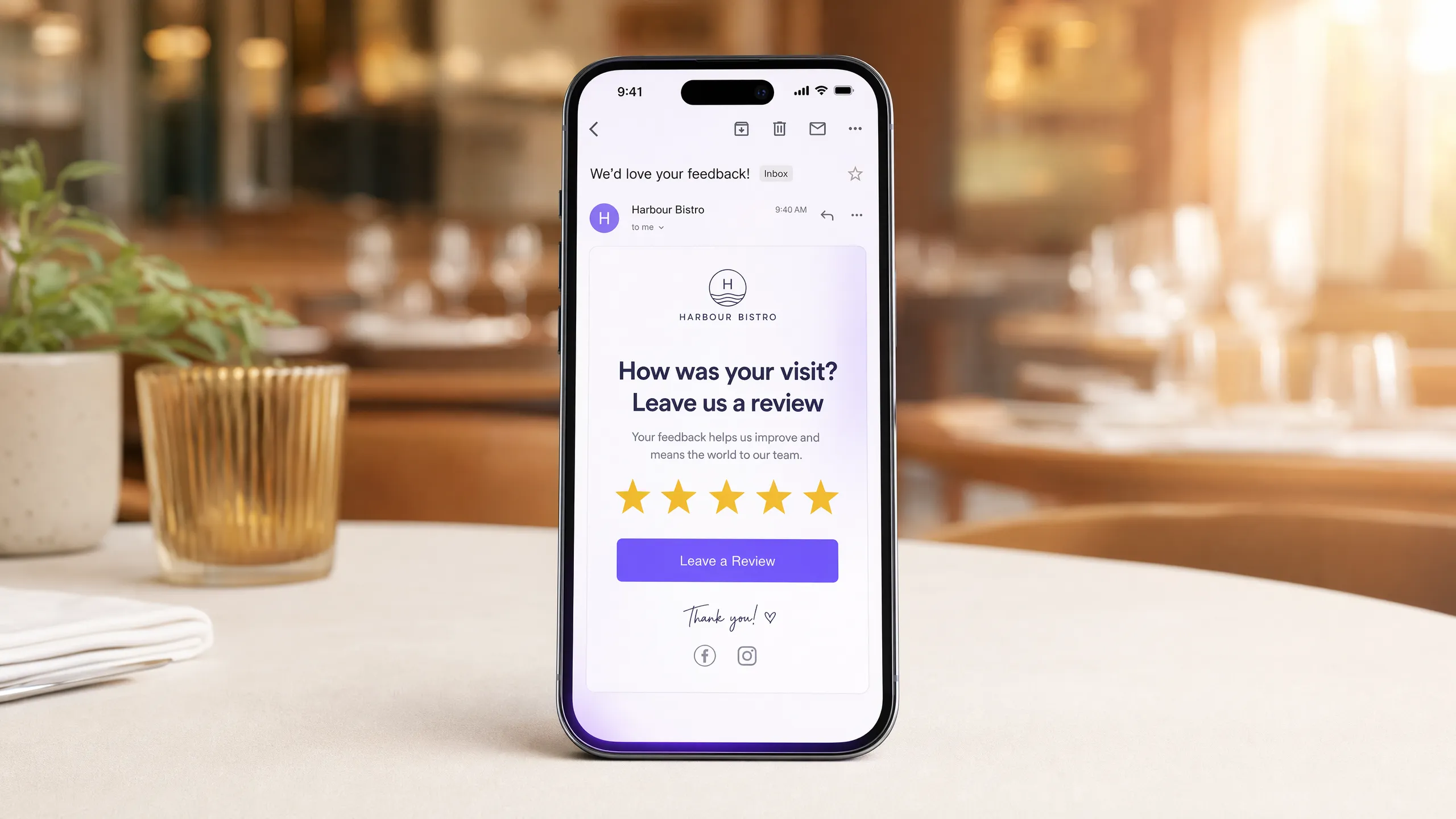
Video overview
Listen to this guide
Read the transcript
Automated review-request emails for venues: timing, wording, and getting it right. A practical briefing for venue operators and marketing managers. Approximately ten minutes. --- SECTION ONE: WHY IT MATTERS - ONE MINUTE Let's start with a number. A one-star improvement in your Google rating drives between five and nine percent more revenue, according to research from Harvard Business School. One star. Not a rebrand, not a new menu, not a refurbishment. Just more reviews, and better ones. The problem most venues have is not that their guests had a bad time. It's that the guests who had a great time went home, opened Netflix, and never thought about leaving a review. The guests who had a frustrating experience? They found the review site in about thirty seconds. That asymmetry is the real issue. And an automated review-request email, timed and worded correctly, is the most direct way to fix it. But here's where most venues go wrong. They either don't send review requests at all, or they send them to the wrong people at the wrong time with the wrong message. This briefing is about how to get all three right. --- SECTION TWO: THE APPROACH - FIVE MINUTES Let's talk about the three variables that determine whether a review-request email works: the list, the timing, and the wording. THE LIST This is where most generic email tools fall short. Mailchimp, Klaviyo, HubSpot - they're excellent at sending emails. But they cannot tell you who actually visited your venue yesterday. They work from whatever list you've manually built, which is usually a mix of people who visited once two years ago, people who signed up for a newsletter online and never set foot in the place, and a handful of duplicates. Purple Engage works differently. When a guest connects to your WiFi, they log in through a branded splash page. That login is a conscious choice - they enter their email address, they see your data policy, and they opt in. Under GDPR, that's a verified, first-party consent. Purple captures the visit timestamp, the venue location, and the contact details in one action. So when you build a review-request automation in Purple Engage, you're not sending to a static list. You're sending to people who were physically in your venue, confirmed by a WiFi session, within the last 24 hours. That's a fundamentally different audience. It's why review-request emails sent through Purple see open rates around 38%, compared to an industry average of around 21% for marketing emails generally. THE TIMING Two to four hours after the visit. That's the window. Send within the first hour and you risk catching the guest while they're still traveling home, or still at the venue. It feels pushy. Send the next morning and the memory has faded. The emotional peak of a good meal, a great hotel stay, or a satisfying shopping trip is highest in the two to four hours after it ends. Purple's automation engine lets you set a delay trigger off the WiFi session end time. Set the dwell time threshold - say, 20 minutes - to confirm it was a genuine visit rather than someone who connected briefly in the parking lot. Then set the email delay to two hours. That's it. The automation runs itself. One more timing rule: cap the frequency. If a guest visits weekly - a regular at your bar, a loyal hotel guest on a business travel program - don't send them a review request every single time. Set a suppression window of 90 days. Ask once, wait three months, then ask again if they've visited again. Guests who feel pestered don't leave reviews. They unsubscribe. THE WORDING Short. Personal. One ask. The subject line should reference the visit, not the brand. "How was your visit on Tuesday?" outperforms "We'd love your feedback!" because it signals that this email is specifically about their experience, not a generic broadcast. Purple's merge tags pull in the visit date automatically. The body copy should be three sentences maximum. Something like: "Thanks for coming in on Tuesday. We hope you enjoyed it. If you have two minutes, a Google review would mean a lot to us - here's the link." That's it. No discount offer, no survey, no three paragraphs about your brand values. The call to action should go directly to your Google Business Profile review page. Not your website, not a landing page, not a survey tool. The fewer clicks between the email and the review box, the higher the conversion rate. One thing to avoid: do not pre-screen. Some venues try to send guests to an internal satisfaction survey first, and only route happy guests to Google. Google's guidelines prohibit this practice. It's called review gating, and it can get your Business Profile suspended. Send everyone to Google. If you get a negative review, respond to it professionally. That response is visible to every future guest who reads your profile. --- SECTION THREE: PRACTICAL STEPS AND PITFALLS - TWO MINUTES Here's a quick implementation checklist. Step one: make sure your WiFi login captures email addresses with explicit opt-in consent. Purple's splash page handles this by default, with CCPA/CPRA-compliant consent language built in. Step two: set a dwell time filter of at least 15 to 20 minutes. This removes accidental connections and ensures you're only emailing people who actually spent time at your venue. Step three: build the automation in Purple Engage. Trigger: WiFi session ends. Delay: two hours. Audience filter: first visit or last review request more than 90 days ago. Step four: write a subject line that references the visit date. Use the merge tag for visit date. Keep the body to three sentences. Link directly to your Google review page. Step five: monitor the results weekly for the first month. Watch open rate, click rate, and your actual Google review count. If open rate is below 25%, test a different subject line. If click rate is below 10%, simplify the email body. The most common pitfall is over-engineering the email. Venues add discount codes, surveys, social media links, and lengthy brand copy. Strip all of that out. The only job of this email is to get the guest to the review page. Everything else is noise. The second pitfall is ignoring the reviews you get. An automated review-request program will generate more reviews, including some negative ones. Respond to every review within 48 hours. Guests and prospective visitors read the responses as much as the reviews themselves. - SECTION FOUR: QUICK Q AND A - ONE MINUTE Question: Can I send review requests by SMS instead of email? Yes, and SMS typically gets a higher open rate. But email is more cost-effective at scale and easier to format with a direct link. Start with email. Add SMS as a second channel once the email program is running. Question: What if we don't have WiFi login data yet? You need to start capturing it. Purple's Capture plan is where this begins. Guests log in through a branded splash page, you collect verified first-party data, and the review automation runs from there. Without verified visit data, you're guessing who to send to. Question: Should we ask for reviews on TripAdvisor as well as Google? For restaurants and hotels, yes - TripAdvisor still drives significant booking decisions. But don't put both links in the same email. Pick the platform where you need the most reviews and focus there. You can rotate platforms across different sends. - SECTION FIVE: SUMMARY AND NEXT STEPS - ONE MINUTE To recap. A one-star improvement in your Google rating can drive up to 9% more revenue. Automated review-request emails are the most direct way to close the gap between the guests who had a great time and the reviews that reflect it. The three things that make the difference: send to verified, recent visitors - not a generic list. Send two to four hours after the visit, not immediately and not the next day. Keep the email short, personal, and with one direct link to your review page. Purple Engage automates all of this from the moment a guest connects to your WiFi. The list builds itself. The timing runs itself. You just need to write three good sentences. If you're ready to set this up, start at purple.ai and take a look at the Capture and Engage plans. The full written guide with worked examples, a timing diagram, and a setup checklist is linked in the show notes. Thanks for listening.
Why this matters for your venue
A one-star improvement in your Google rating correlates to a 5% to 9% increase in revenue. The problem most venues face is not that their guests had a bad experience, but that the guests who had a great experience went home and forgot to leave a review. Conversely, guests who had a disappointing experience will find a review site within 30 seconds.
This asymmetry costs you money. An automated review-request email with the right timing and precise wording is the most direct solution. When you do this correctly, you capture the positive sentiment of your satisfied guests before it fades, increasing your overall rating and, by extension, your revenue.
The Approach
Most generic email tools fail at this because they do not know who actually visited your venue yesterday. They operate on static lists of people who might have signed up for an online newsletter but have never set foot in the venue.
Purple Engage works differently. When a guest connects to your Guest WiFi, they log in via a branded splash page. That login is a conscious decision. They enter their email address, view your data policy, and opt in. Under CCPA/CPRA, this is verified, first-party data. Purple captures the visit time, venue location, and contact details in a single action.
So when you build a review-request automation in Purple Engage, you send it to people who were physically present in your venue, confirmed by a WiFi session in the last 24 hours. This is why review-request emails sent via Purple have an open rate of around 38% (Purple data), compared to an industry average of around 21% for generic marketing emails.
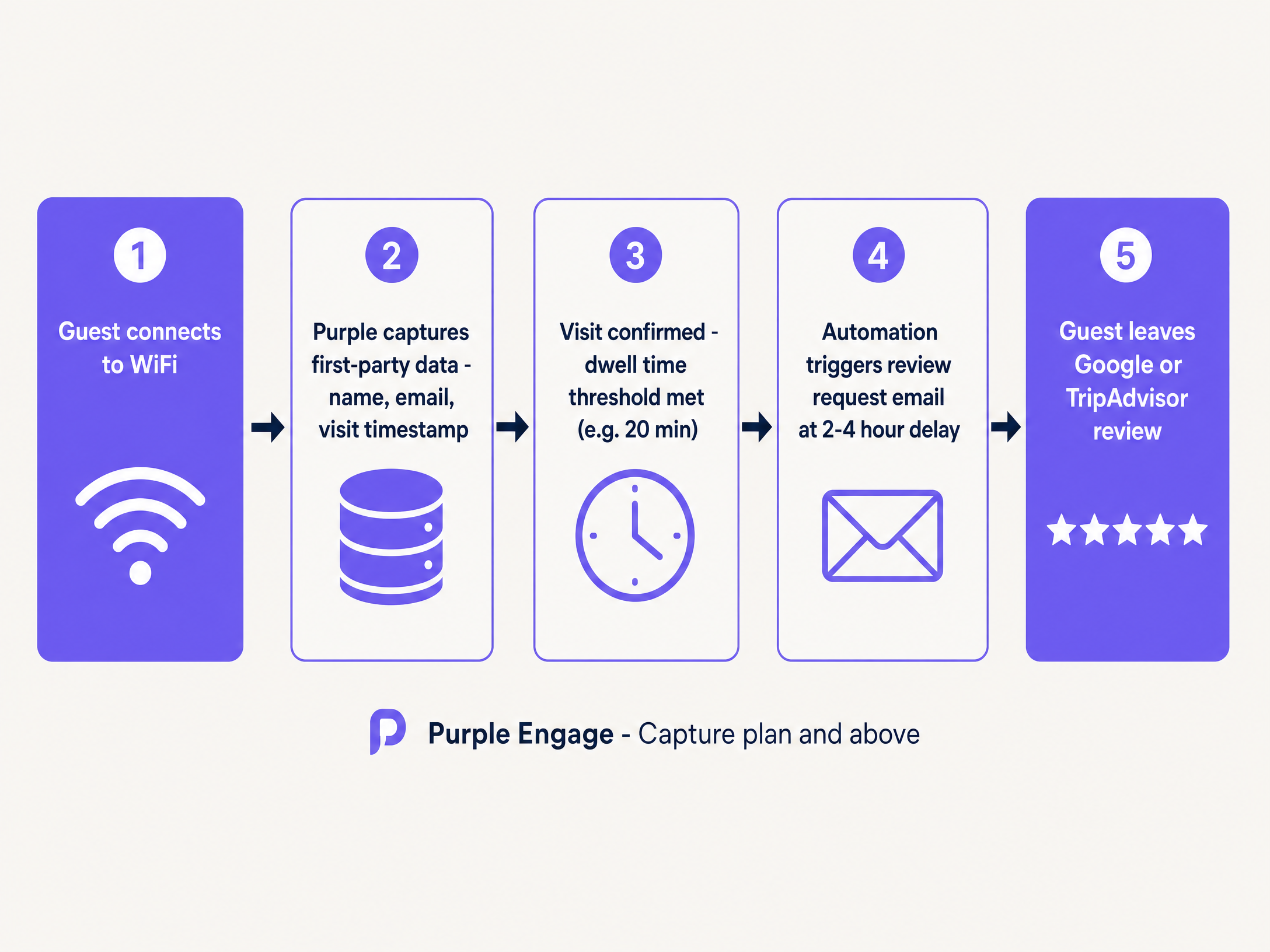
How to do this via your guest WiFi
The architecture is simple. You need a system that captures the visit, verifies the dwell time, and triggers the email.
- The Capture: The guest enters your restaurant, hotel, or retail store and connects to the Guest WiFi.
- The Verification: They authenticate via a captive portal. This is where you obtain CCPA/CPRA-compliant consent.
- The Filter: You set a dwell-time limit. If they are connected for less than 15 minutes, they are likely just passing by. If they stay for 45 minutes, they are a real guest.
- The Trigger: Once the session ends, the automation timer begins.
This requires a Guest WiFi product to capture the initial data, which is fed directly into Purple Engage to run the automation.
What to send and when
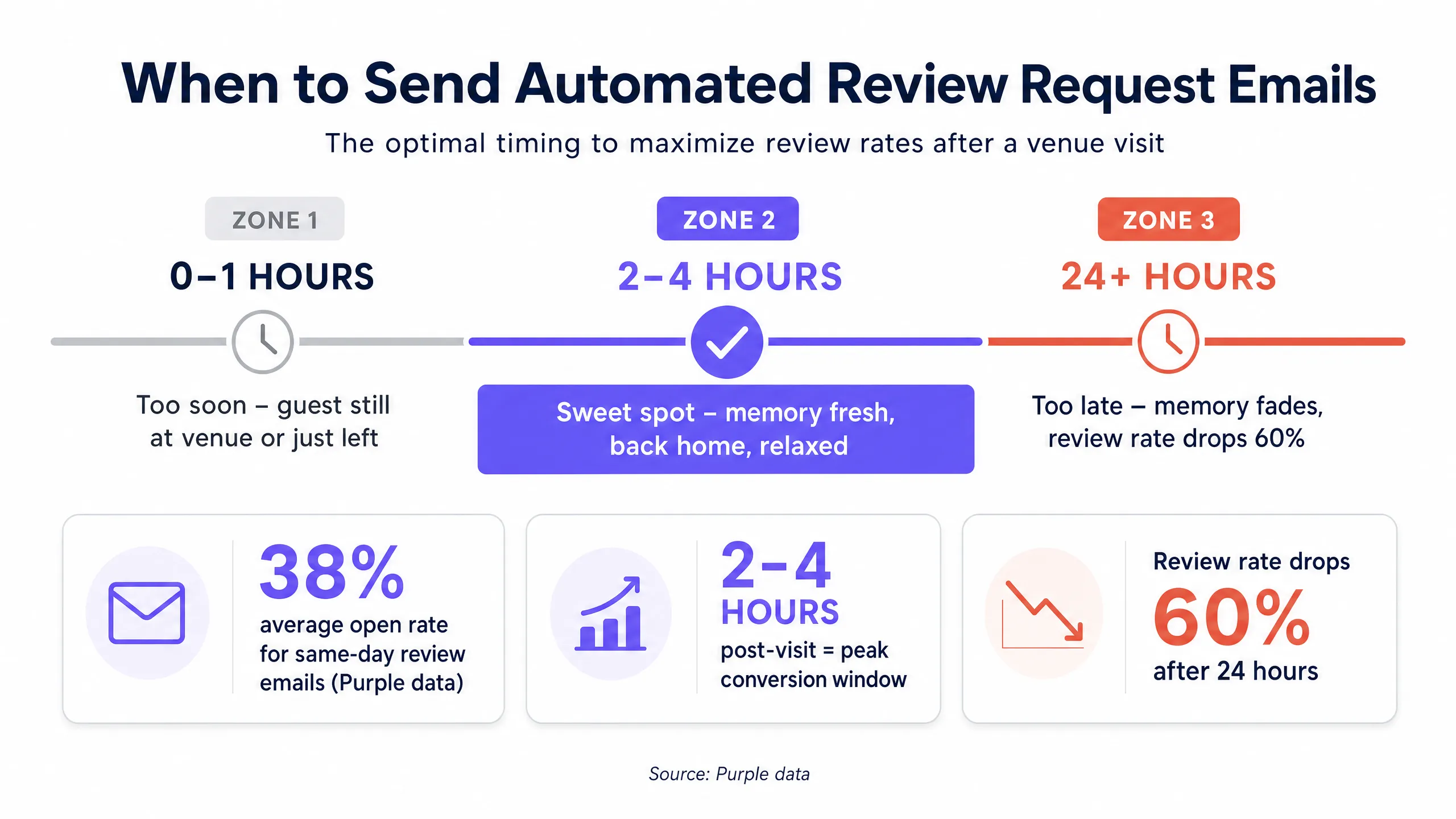
Timing is everything. Sending an email within the first hour risks reaching the guest while they are still traveling home or still at the venue. This can feel intrusive. Sending it the next morning, and the memories have faded.
Two to four hours after the visit is the sweet spot. The emotional high of a great meal, an excellent hotel stay, or a satisfying purchase is at its peak in the immediate hours after it ends.
Wording
Keep it short, personal, and focused on a single request.
The subject line should reference the visit rather than the brand. "How was your visit on Tuesday?" performs much better than "We would love your feedback!" because it shows the email is specifically about their experience. Purple's merge tags automatically insert the visit date.
The body text should be a maximum of three sentences:
Thanks for visiting on Tuesday. We hope you enjoyed it. If you have two minutes, a Google review would mean a lot to us - here is the link.
Do not include a discount offer. Do not include a survey. Do not write three paragraphs about your brand values. The call to action should lead directly to your Google Business Profile review page. The fewer clicks between the email and the review box, the higher the conversion rate.
Measuring what works
Do not just measure open rates. Tie the campaign back to repeat guests and revenue.
Monitor your actual Google review volume weekly. If your open rate is below 25%, test a different subject line. If your click rate is below 10%, simplify the email body. Most importantly, track the lifetime value of guests who leave a review compared to those who do not. A guest who publicly advocates for your venue is significantly more likely to return.
Where to start
Here is your deployment checklist:
- Ensure your WiFi login captures email addresses with clear opt-in consent.
- Set a minimum dwell-time filter of 15 to 20 minutes to filter out accidental connections.
- Create the automation in Purple Engage: trigger when the WiFi session ends, with a two-hour delay.
- Set audience filters: first visit, or ensure the last review request is more than 90 days old.
- Write a subject line referencing the visit date and link directly to your Google review page.
If you are currently deciding how to capture this data, read our guide on QR codes vs WiFi login for collecting customer emails to understand why the network layer provides better verification.