
What is a trigger email? How it works and why it matters
Wondering what is a trigger email? Learn the events that start one, how it differs from scheduled campaigns, and venue examples you can use.
If a guest joins your WiFi, pays at the till and makes a booking, should every action produce an email? Automation makes that possible, but it doesn't make every message useful or appropriate. Understanding what is a trigger email starts with the event, then moves to the rules that decide whether your business should respond.
Table of Contents
- A Trigger Email Explained in Plain Terms
- How a Trigger Email Moves From Event to Inbox
- Trigger Emails Compared With Scheduled Campaigns
- Trigger Email Examples for Venues and Hotels
- Consent Rules That Decide Whether a Trigger Can Send
- Measure Your First Trigger Before Building More
A trigger email Explained in Plain Terms
A trigger email is a message sent automatically when a specific event or condition happens, rather than on a fixed calendar date. The event might be a sign-up, purchase, booking or checkout. The condition might be a guest reaching a defined period without visiting.
Think of a smoke alarm. It stays quiet until it detects something that requires a response. A scheduled newsletter works more like an alarm clock: it goes off at the chosen time, regardless of what the recipient has done.
The event, the condition and the message
Say a guest creates an account to manage a hotel reservation. The system receives the account-creation event, checks whether a welcome message has already been sent, then sends information about accessing the booking.
You can recognise three parts:
- The trigger: The observable event or change that starts the process.
- The condition: A rule that determines eligibility, such as whether this is the guest's first registration.
- The message: The useful response, written for that particular moment.
An order confirmation after payment follows the same pattern. So does a password reset after a request, a welcome email after signing up, or a reminder prompted by a long absence. Triggered doesn't necessarily mean promotional. The message may provide essential information rather than sell anything.
For a hotel, the useful context is often the guest's stay.
Why the moment matters
A guest who has just booked needs different information from someone who hasn't visited recently. The event gives the sender a reason to choose particular content, rather than sending everyone the same announcement.
According to Omnisend data reported by SHNO, automated emails accounted for 2% of email volume but generated 37% of email-attributed sales in 2024. That's an email-automation finding, not a promised result for an individual venue, but it illustrates why well-chosen moments deserve attention.
A trigger email waits for a relevant event or condition. A scheduled campaign waits for a chosen date.
Start by naming an event in your own business that leaves a guest needing something. If you can explain that need clearly, you've found a useful candidate.
How a trigger email moves from event to Inbox
A trigger email needs more than a template and an on switch. Your systems must agree about what happened, who did it and whether the proposed response is appropriate.
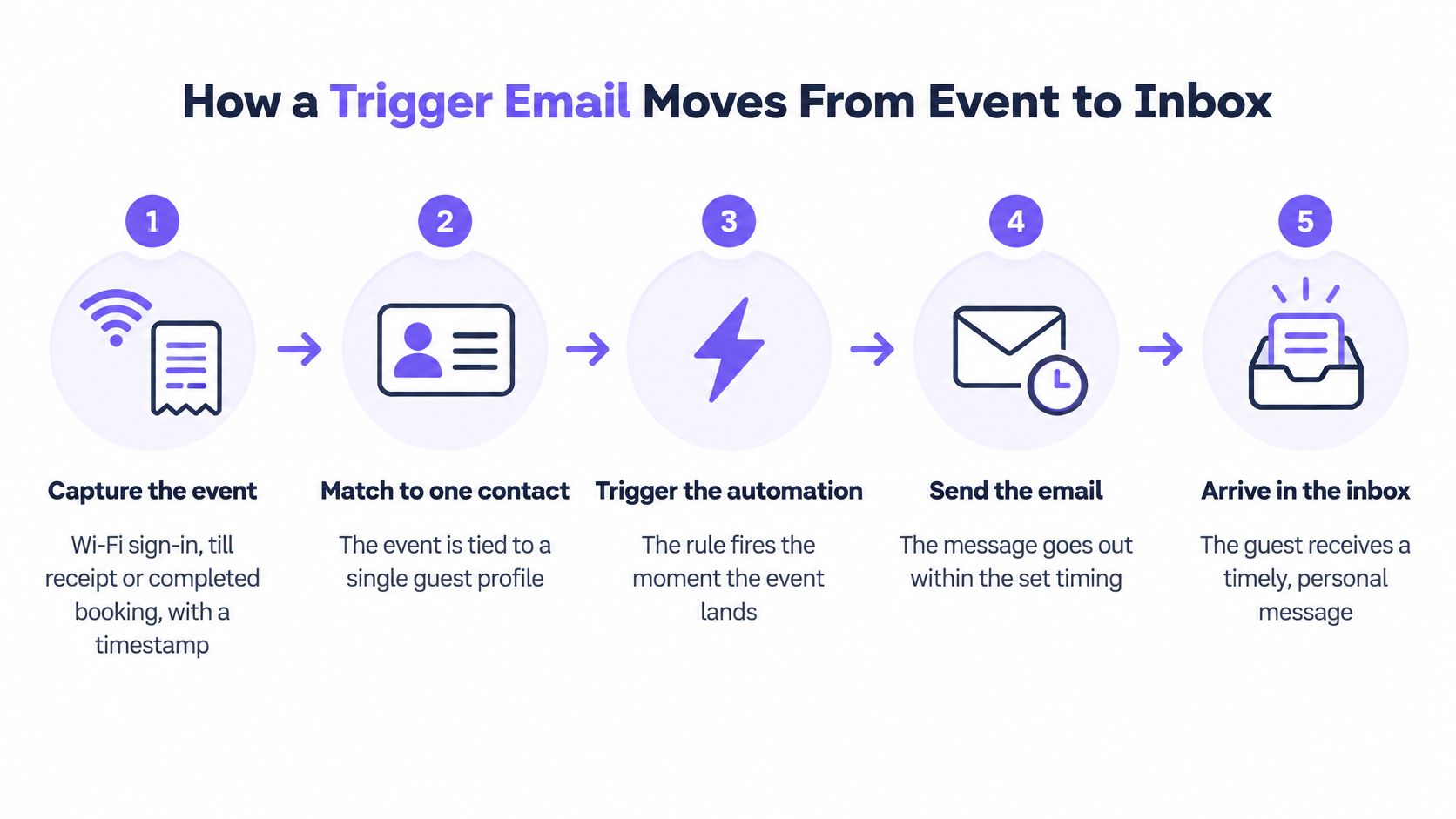
The diagram gives a simplified view of that journey. In practice, the checks between the event and delivery are where much of the work happens.
Follow the event through each check
Capture what happened. Record the WiFi sign-in, completed payment or booking alongside its timestamp and source system. Don't treat a pending reservation as a completed booking, or an imported historical receipt as a new purchase.
Match the event to one contact record, usually through the email address. If the booking and till systems hold separate profiles for the same guest, resolve that match before sending, rather than guessing from a shared surname.
Check eligibility. Apply rules for previous messages, repeat events and competing journeys. Give the original event a unique identifier, called a deduplication key, so a system retry doesn't create another welcome email.
Check whether the proposed message class is allowed for this contact. A common mistake is carrying a marketing permission flag from an old system without preserving what the guest agreed to.
Apply the intended delay. Choose timing that matches the guest's task, and use the venue's time zone. A confirmation shouldn't sit behind a leisurely welcome sequence, while feedback shouldn't arrive before the experience ends.
Build the message using the correct guest and event details, then hand it to the delivery service. Provide fallback wording for missing fields so a blank first name or room detail doesn't produce a broken sentence.
Record the outcome. Log delivery failures, bounces and the resulting guest activity. Check delivery status before retrying, otherwise your recovery process may send a duplicate.
Include information that serves the task
For example, a group-arrival message could direct the organiser to Airport Vans NYC's quote details for 6–14 passenger groups when they need to prepare a transfer enquiry. That's a contextual resource, not a reason to add transport content to every hotel email.
Write your own version of this sequence for a single event. Name the system responsible for each step, including who investigates when the email doesn't arrive.
Trigger emails compared with scheduled campaigns
Trigger emails and scheduled campaigns compared
| Aspect | Trigger email | Scheduled campaign |
|---|---|---|
| What starts it | A customer action or state change | A calendar date or chosen send slot |
| Audience | The individual contact when the event occurs | The whole eligible list or a segment together |
| Timing | Set relative to the event | Set by the marketer in advance |
| Typical content | Confirmation, feedback request or timely offer | Newsletter, sale announcement or product news |
| Consent check | At send time for each contact | At scheduling, then checked again before delivery |
| Main measure | Incremental return visits, bookings or purchases | Opens, clicks and sales from the send, ideally supported by incremental measurement |
A trigger responds to the guest's circumstances. A scheduled campaign follows the marketer's calendar. Both can be useful, and both need an eligible audience, but they answer different communication needs.
A restaurant's new-menu announcement belongs in a campaign because the business has news to share. A booking confirmation belongs in a trigger workflow because a particular guest has completed a particular task. Sending the confirmation to the whole newsletter list would make no sense.
Compare performance without promising results
Omnisend data reported by Data Partners found that automated emails generated approximately 16 times more revenue per send than scheduled campaigns in 2025. The important words are per send: this isn't a claim that replacing your newsletter with automation will multiply total revenue by that amount.
Recipients of triggered messages may already be close to purchasing or actively seeking information. Relevance, timing and recipient intent can contribute to the difference. A broad announcement serves another purpose, including reaching guests who haven't recently taken an action.
Separate automation from message purpose
Transactional describes what a message does, such as confirming an order. Triggered describes what starts it. An order confirmation can therefore be both transactional and triggered, while a behaviour-based offer can be triggered and promotional.
A recurring automation isn't automatically a trigger email. Software can send a newsletter on a repeating schedule without responding to anything a guest does. Conversely, a scheduled system check can identify a newly inactive guest and start a genuine behaviour-based trigger.
Classification test: Would this email still go out if no contact had taken a relevant action or reached a defined condition? If yes, it's probably a scheduled campaign.
Apply that test to your most recent emails. Classify each by both its starting mechanism and its purpose, rather than using automated, transactional and triggered interchangeably.
Trigger email Examples for venues and Hotels
A useful venue trigger starts with something meaningful in the guest's experience. The event identifies the moment, the delay sets the response time, and the purpose guides the content.
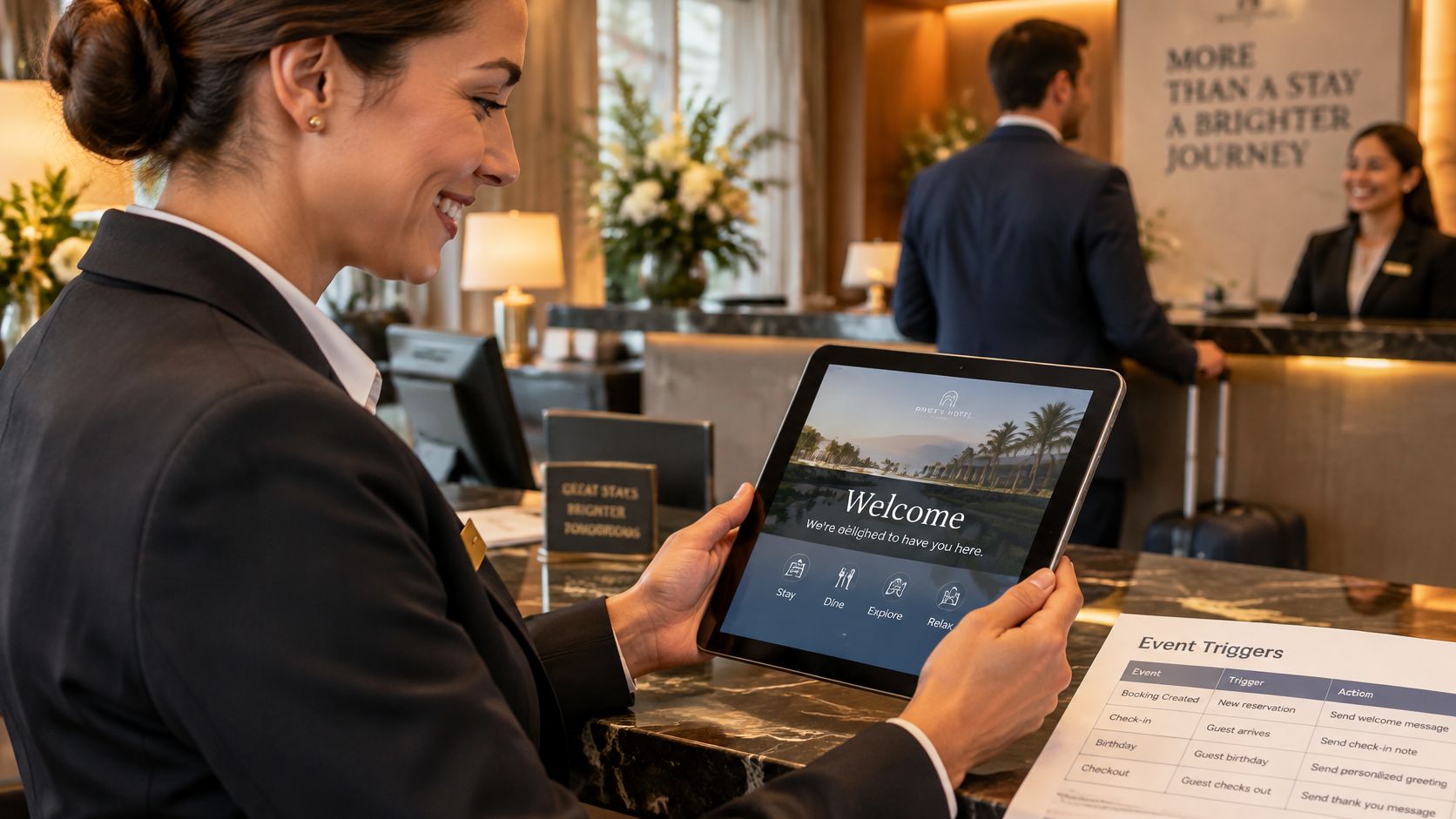
At reception, that might mean connecting an arrival or departure to the right information.
Common venue events and the trigger email each one suits
These are illustrative workflow choices, not universal timing requirements.
| Event | Typical timing | Purpose | Message type |
|---|---|---|---|
| Guest joins venue WiFi | Within hours of the first visit | Welcome and possible second visit | Service if operational, promotional content requires appropriate permission |
| Till payment completed | Straight after confirmed payment | Receipt and payment confirmation | Transactional |
| Booking completed | Confirmation immediately, reminder before arrival | Attendance and booking information | Transactional |
| Hotel checkout | The following morning | Feedback about the stay | Service only if genuinely non-promotional |
| Guest reaches the defined inactivity threshold | When the threshold is reached | Return visit | Promotional, requires appropriate marketing permission |
Read the row as a guest experience
A diner pays at the till and receives the requested receipt after payment is confirmed. The message should make the amount, venue and transaction easy to identify, rather than burying those details beneath an offer.
A hotel guest checks out and later receives a feedback request about the stay. If the message also encourages rebooking with a discount, classify that promotional content appropriately rather than assuming the feedback label settles the question.
For arrival content, Avistar's guide to what to include in guest welcome baskets can help teams coordinate the physical welcome with their email. Keep arrival instructions separate from post-stay requests using a planned pre-stay and post-stay email sequence.
The accompanying video offers another format for exploring the topic.
Handle overlapping events deliberately
If a guest joins WiFi and books during the same visit, prioritise the booking information and suppress any redundant promotional welcome. Don't merge unrelated messages merely because they share an email address.
- Choose meaningful events: Use completed guest actions, not incidental database updates.
- Identify each event: Keep a deduplication key tied to the original transaction or visit.
- Protect imports: Mark historical records so loading a file doesn't accidentally launch live journeys.
Consent rules that decide whether a trigger can send
A guest action is not blanket permission to market to that guest. The event tells you what happened. The consent record tells you which communications you may send, and the message class tells you which rules to apply.
Under the ICO's guidance on electronic and telephone marketing, UK marketing emails and texts generally require valid, specific consent, subject to applicable exceptions such as the soft opt-in. Where you rely on consent, it must identify the organisation and communication type, involve positive action, be recorded and be easy to withdraw.
Preserve permission across systems
A purchase, booking or WiFi registration may justify necessary service communication, but it doesn't automatically authorise a promotional follow-up. Nor does an email marketing permission automatically establish permission for SMS or WhatsApp.
Keep the original consent wording, source and timestamp attached to the guest record. When joining booking, till and WiFi records, preserve withdrawals as carefully as permissions, so a later import can restore an opted-out address.
Check permission immediately before sending, not only when the guest enters the journey. Someone may withdraw consent while an email is waiting in a queue. Use the GDPR-compliant email marketing checklist for venues to turn those checks into a repeatable operational process.
A trigger is permission to evaluate a message, not automatic permission to send it.
Protect the message's original purpose
A confirmation should lead with accurate status, booking or transaction identifiers, relevant timing and support information. Keep it readable and accessible. Any recommendation should be secondary, contextually appropriate and assessed under the relevant marketing rules.
In Experian's analysis of more than 1,800 order, shipping and return confirmations, adding relevant cross-sell items increased transaction rates by 20% on average, yet order confirmations without offers had 7% better transaction rates and shipping confirmations without offers had 11% better transaction rates. Those different findings don't support adding an offer everywhere. They support judging the fit of the content to the customer's immediate task.
Before approving a trigger, answer these questions:
- Purpose: Is this message operational, service-related or promotional?
- Permission: Whose consent or other applicable permission supports this message, organisation and channel?
- Withdrawal: What will the system do if the guest opts out after the event but before delivery?
Measure your first trigger before Building more
An open tells you that someone may have viewed an email. A click tells you that someone followed a link. Neither tells you whether the message caused a guest to return.
Some recipients would have booked or visited without your email. To estimate the extra activity your trigger creates, compare recipients with a similar group who were deliberately not sent the promotional message. That comparison is a holdout test.
Build a test you can interpret
We recommend starting with a We miss you campaign for 30-day lapsed guests as the easiest first automated trigger. We also recommend testing 30 days and 45 days of absence, measuring return visit rates to find the more useful trigger point for your audience.
Choose a single trigger. Define what counts as a visit and which connected systems record it. If some locations don't contribute visit records, don't interpret missing activity as confirmed absence.
Randomly reserve a holdout group from eligible contacts. Choose its size before the test and send that group no win-back message; never withhold essential booking or account information.
Send the trigger to the remaining eligible guests. Keep the offer, audience rules and timing stable during the test. Otherwise, you won't know which change contributed to the result.
Track return visits, bookings or purchases for both groups over the same conversion window, meaning the period in which you count outcomes. Connect each outcome to the guest and qualifying event, rather than counting only bookings made through an email link.
Compare outcome rates before expanding. The gap between the sent and holdout groups estimates incremental impact. A small audience or few returns may leave too much uncertainty to justify a confident decision.
Judge value, not just attention
Keep the comparison fair by noting other campaigns that either group receives. If you're testing different inactivity thresholds, use comparable audiences and a consistent measurement method rather than comparing unrelated campaign totals.
For commercial decisions, connect incremental activity to the costs of the offer and campaign. The guide to marketing ROI helps frame that calculation without treating every attributed purchase as an additional purchase.
This week, choose the single event you'll build first. Write down its delay, consent source, holdout size and outcome window, then assign someone to review the result before another trigger goes live.
Purple Engage brings WiFi, till, booking and stay activity into a shared guest record, with consent controls and holdout-based measurement for venue marketing. Visit Purple Engage to explore how to turn a meaningful guest event into a controlled email journey and measure whether it generates additional visits or bookings.