
What is identity resolution? How venues match guests
What is identity resolution? See how venues match WiFi, POS and reservation records, and where matches fail.
Identity resolution decides whether records from WiFi, POS systems, bookings and email belong to the same real person, then links them into one usable guest record.
You might already have the pieces: a reservation list, receipt emails, WiFi registrations and newsletter subscribers. Yet when a regular stops visiting, your team can't tell whether they're absent or appearing under a different email address. Connecting those records helps, but recognizing someone doesn't automatically give you permission to market to them.
Table of Contents
- What Identity Resolution Means for One Guest
- How Records From WiFi, POS Systems and Bookings Get Joined
- Matching Methods Compared by Evidence Strength
- Where Matches Go Wrong and What Each Error Costs
- Why Venues Gain From One Guest Record
- Check a Joined Record Before You Send
What Identity Resolution Means for One Guest
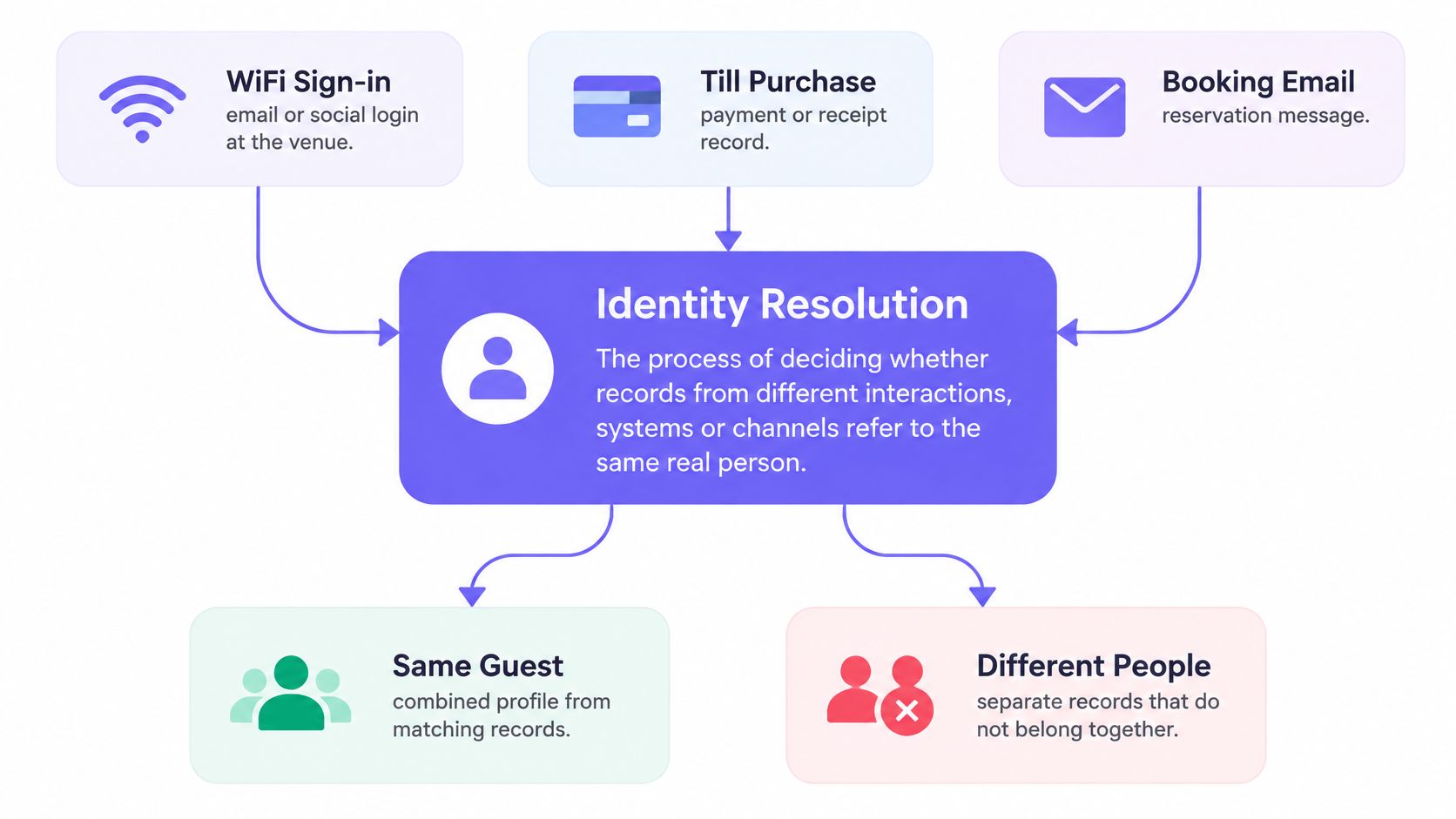
Identity resolution is the process of deciding whether records from different interactions, systems or channels refer to the same real person, then linking them into one usable identity.
Say Sam books a table using her work email, joins the cafe WiFi through a social login, pays at the register by card and subscribes to the newsletter as S. Jones. Your systems hold separate records of those interactions. You, as the reader of this scenario, know they're all Sam. The software needs evidence.
A card transaction alone may not provide that evidence. Unless the purchase includes a usable identifier, such as a receipt email or linked loyalty account, the venue shouldn't assume it knows who paid.
The diagram shows the distinction between records that belong together and records that should stay separate.
A matching name isn't proof
Think of a hotel receptionist checking reservations with slightly different spellings. Similar names justify checking the details, not issuing the same room key.
The NIST Digital Identity Guidelines explain that a digital identity is unique within the context of a particular service, not necessarily across every context. A booking ID identifies a booking record; it isn't a universal identity for the person behind it.
For any candidate pair, the sensible outcomes are:
- Link them when the available evidence meets the matching rule.
- Keep them separate when evidence indicates different people.
- Mark them uncertain when the evidence doesn't justify either conclusion.
Identity verification answers a different question: does a claimed identity correspond to the actual person presenting it? Identity resolution works on relationships between records a business holds. Matching an email across systems doesn't itself establish that the guest controls that email.
For a venue manager asking “what is identity resolution?”, the practical answer is therefore a disciplined way to distinguish one guest's scattered history from several people's activity, without pretending every record can be resolved.
How Records From WiFi, POS Systems and Bookings Get Joined
A useful pipeline keeps collecting, comparing and deciding separate. Moving information into the same database makes comparison possible; it doesn't make every proposed connection correct.
Our guide to first-party data for venues provides context for the information guests share directly. Start by mapping which identifiers each system supplies, rather than assuming every POS receipt or reservation includes an email.
The stages behind a joined profile
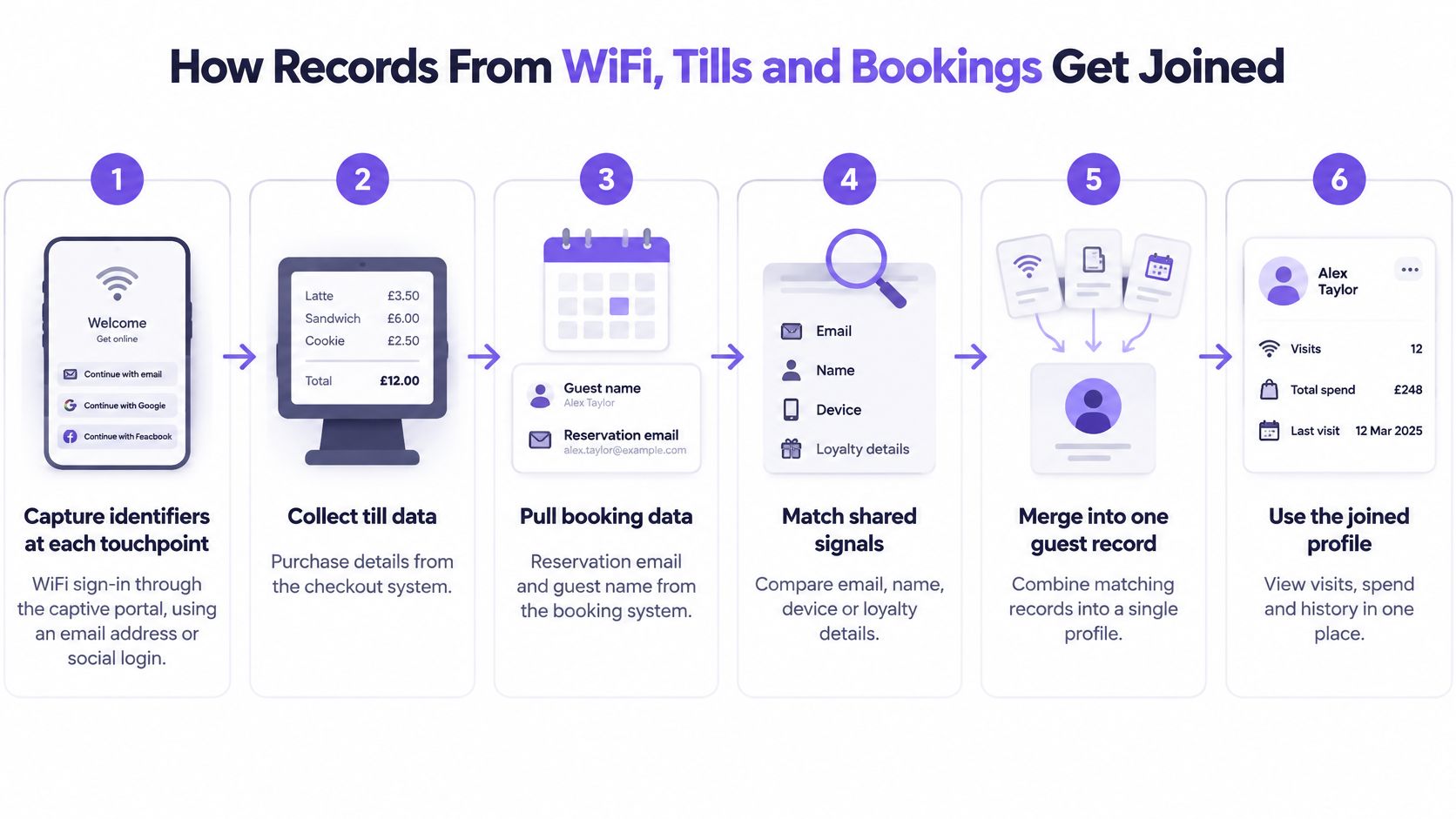
Capture identifiers at each touchpoint. When a guest connects to WiFi, they reach a captive portal and log in using an email address or social profile; we capture that information and store it in a centralized CRM. Other inputs might include a POS receipt email, a booking reference or a survey response address.
Normalize values without rewriting their meaning. Trim stray spaces, apply consistent email casing, standardize phone formats with country context and tidy name capitalization. Preserve original values so a reviewer can distinguish formatting changes from information the guest supplied.
Generate plausible candidates. Compare records sharing useful signals, such as a normalized email or phone suffix, rather than checking every possible combination. A phone suffix can help find candidates, but isn't strong enough to approve a link by itself.
Score the evidence. Exact email agreement can support a match, while conflicting details should reduce confidence or trigger review. Record-linkage research published in Science Advances describes methods for evaluating uncertain links, rather than treating every matching rule as equally reliable.
Classify the pair. Apply documented thresholds to produce a match, non-match or unresolved result. Keep unresolved records in a review queue instead of forcing them into a supposedly complete profile.
Record provenance. Retain the source records, agreeing and conflicting fields, rule used and confidence assigned. This gives staff an explanation for the link and a route to undo it.
The illustration follows the information from venue touchpoints into a usable profile.
Check the handoffs, not just the final screen
Integration work needs clear field mappings, update rules and ownership when imports fail. Wisely's resource on unified systems for smoother business operations is useful context for planning those connections between existing platforms.
To inspect a result, open a joined profile and trace its identifiers back to the original systems. Check which fields agreed, whether contradictory information was ignored and whether the recorded permissions still describe the intended use. A clean-looking timeline isn't enough if nobody can explain how its events got there.
Matching Methods Compared by Evidence Strength
Choose a method according to the reliability of your strongest identifier, not how advanced the method sounds. This comparison highlights what each approach can establish and where a venue needs additional control.
Matching methods compared by how they decide
| Method | How it decides | Strength | Main risk | Best use |
|---|---|---|---|---|
| Deterministic | Exact match on a stable identifier such as a verified email | Simple to audit; few false merges when the identifier is reliable | Shared household emails can cause false merges; typos usually cause missed matches | WiFi sign-ins joined to bookings on a verified email |
| Probabilistic | Weighs partial agreement across fields and scores the pair | Handles typos, abbreviated names and changed phone numbers | Thresholds need tuning; similar strangers can score as matches | POS records with name, zip code and phone variations |
| Review-based | A person checks uncertain pairs before linking them | Direct scrutiny for sensitive records | Slow at volume; reviewers still need evidence | Records behind a complaint, refund or age-restricted offer |
| Hybrid, in order | Runs deterministic rules, then probabilistic scoring, then review | Balances coverage with control | Needs clear thresholds and an owner for the review queue | Multi-site groups joining WiFi, POS and booking data |
Reliability comes from the evidence
Deterministic means rule-based, not infallible. An exact agreement is useful only when the underlying field reliably distinguishes the people in your population.
That principle is contextual uniqueness. An email may distinguish guests adequately within a business, yet represent a shared household elsewhere. NIST's identity-resolution guidance recommends collecting the minimum attributes necessary to resolve an identity, rather than accumulating personal information indiscriminately.
Probabilistic matching is useful when records contain partial agreements: Sam Jones and S. Jones, for example, alongside compatible contact details. A score expresses the strength of that evidence. It doesn't turn a likely connection into a verified fact.
A sensible multi-site workflow uses reliable exact matches first, scores the remaining candidates and reserves human review for unresolved or consequential cases. Reviewers should be allowed to leave a case unresolved; their job isn't to maximize the number of merged profiles.
Practical rule: If an identifier is verified, stable and appropriate to your guest population, use it. Otherwise, evaluate supporting evidence and keep uncertain pairs out of automatic merges.
A reviewer examining an age-restricted offer also needs to distinguish identity evidence from eligibility evidence. Linking a purchase to a profile doesn't establish the guest's age, just as linking a booking doesn't establish who attended.
Where Matches Go Wrong and What Each Error Costs
Every matched profile is a decision, and a decision can be wrong in two directions. Your system can connect records that belong to different people, or it can leave one person's records scattered across several profiles. The first mistake is a false merge. The second is a false split. Each carries a different cost, and fixing one carelessly tends to create the other.
Matching errors, their venue consequences and fixes
| Error | What it looks like | Venue consequence | Fix |
|---|---|---|---|
| False merge | Guests sharing a household email appear with combined spend histories | Wrong offer sent; someone's opt-out is attributed to another guest | Require independent supporting evidence; keep merges reversible |
| False split | A guest has separate WiFi, POS and booking profiles | Duplicate messages; a win-back journey fires after a recent visit | Review near-miss pairs; use a normalized phone as supporting evidence |
| Recycled phone number | A reassigned number connects a new customer to an old profile | Messages reach a stranger | Reassess stale phone-only links; confirm with independent evidence such as email |
| Staff-entered typo | A receipt email contains a misspelled domain | The guest is omitted from a relevant audience or messages fail | Validate email syntax and flag suspicious domains; ask for confirmation rather than silently correcting |
Count consequences, not just matches
A false merge can expose someone's purchase or stay history to the wrong profile. A false split can cause staff to treat a regular as lapsed and spend an offer on a visit that would've happened anyway.
There is a subtler cost hidden in that table, and it concerns permission rather than accuracy. Matching answers one question: do these records describe the same person? Consent answers a different one: may you contact them? A technically correct join can still produce an unlawful message if the guest opted out under an email your system hasn't linked yet, and a false merge can attach one person's refusal to a stranger's profile. Treat every merge as carrying both questions, not just the first.
Don't optimize solely for the proportion of records joined. Test whether joined profiles contain unrelated people, and whether genuine repeat guests remain scattered across profiles. Examine difficult cases as well as clean examples.
Assign an owner to correction requests and deletion workflows. When staff undo a merge, make sure downstream audiences and journey eligibility are recalculated, rather than leaving the original mistake active elsewhere.
Set confidence thresholds according to the consequence of being wrong. Keep changes reversible, and measure campaign impact against a held-back group rather than assuming that every purchase attached to a matched audience resulted from the message.
Why Venues Gain From One Guest Record
Say a regular appears to have stopped visiting, but their latest purchase sits in a receipt system under another email. A booking-only report makes them look lapsed; a correctly joined history gives the marketing team a better basis for deciding whether to contact them.
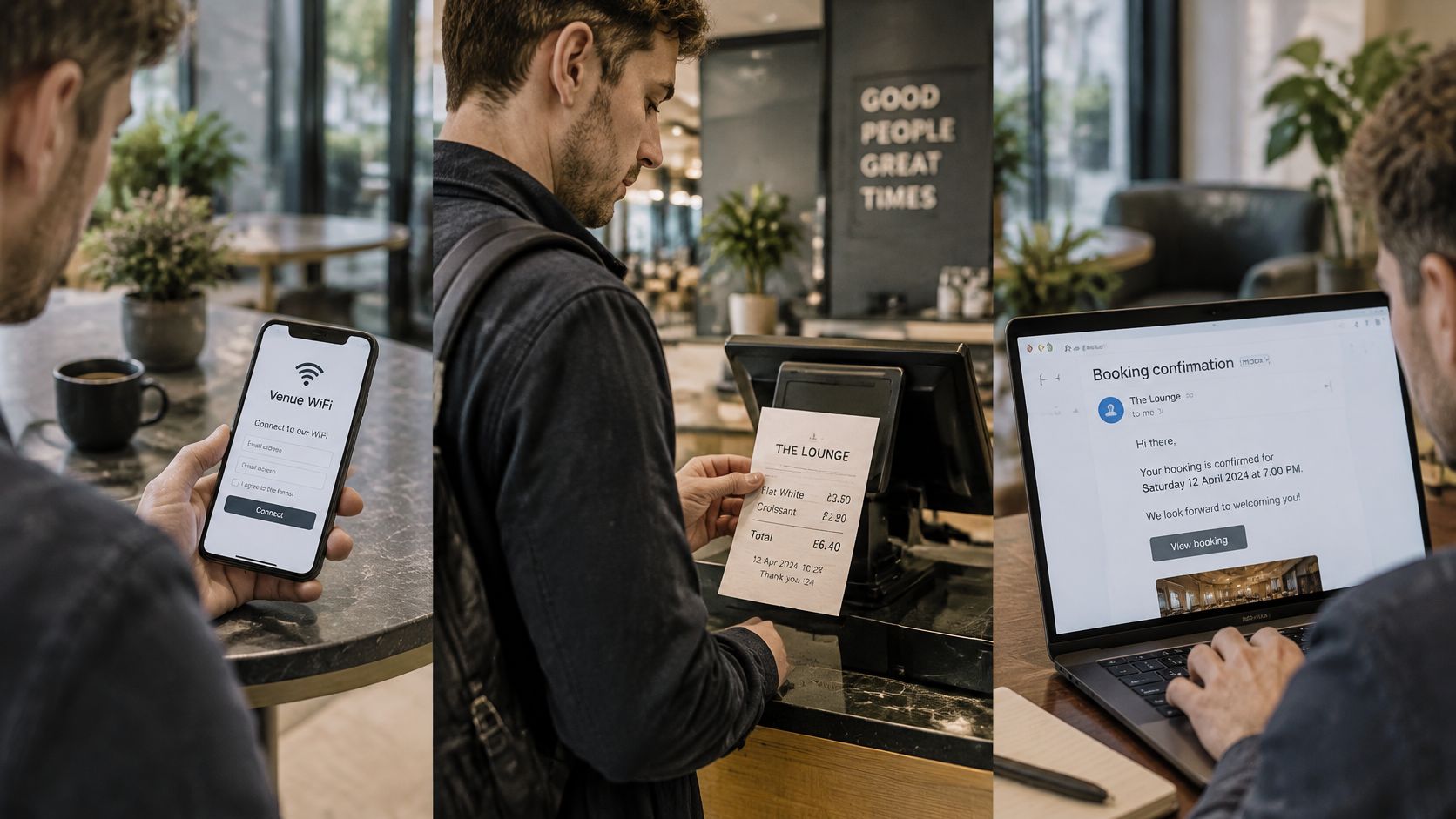
These everyday interactions can represent a connected guest experience rather than unrelated entries.
In 2024, 70% of marketing leaders reported difficulty identifying and reaching audiences across multiple touchpoints, according to Forrester's Q4 Identity Resolution Survey commissioned by TransUnion. The practical value for venues lies in decisions staff can improve, not in achieving a perfect customer portrait.
Better decisions from a connected history
- Better timing. Restaurant groups can base a return-visit audience on recorded activity across sites, instead of mistaking a visit elsewhere in the group for an absence.
- Fewer embarrassing messages. Hotel groups can coordinate communications around stays and bar purchases, while applying the appropriate suppression rules.
- Clearer measurement. Retail chains can compare eligible guests who receive a campaign with a held-back group and examine subsequent recorded purchases.
Our explanation of guest segmentation helps translate that history into useful audience rules. For coordinating email with other touchpoints, the SendX guide to omnichannel email offers further planning context.
The video provides another way to consider connected venue marketing.
Keep the ambition concrete: relevant invitations, fewer unnecessary messages and evidence of additional return visits. More information about a guest isn't an achievement on its own.
Check a Joined Record Before You Send
Matching answers whether records belong to the same person. Permission answers whether you may use them for a particular purpose. A technically correct link can still lead to an unlawful or unwelcome message.
Accepting a booking confirmation doesn't, by itself, establish agreement to advertising, WhatsApp campaigns or audience matching. Define the purpose, establish the appropriate legal basis and check any consent requirements for the channel and jurisdiction. Our practical checklist for CCPA/CPRA-compliant venue email marketing supports that operational review.
The trust implications are substantial: 53% of surveyed US consumers said sharing personal information is worthwhile when it improves their brand experience, yet 93% said mishandling that data would cause them to lose trust, according to PwC's customer experience survey.
A correct identity match isn't a new permission grant.
Run a purpose-specific pre-send check
- Inspect the strongest identifier. Confirm which source established the connection and whether the identifier was verified. Don't confuse an imported value with evidence of control.
- Resolve low-confidence cases. Review links below your acceptance threshold or exclude them from the campaign. A send deadline isn't a reason to relax an identity rule.
- Check the intended channel and purpose. Read the actual permission record, including how it was collected. Email eligibility doesn't automatically establish WhatsApp eligibility.
- Apply opt-outs across the relevant records. Confirm that connected sources and sending tools honor the current preference. An older import mustn't restore a withdrawn permission.
- Set aside a control group. Choose eligible guests to hold back before sending, then compare the intended business outcome. Keep identity quality separate from campaign effectiveness.
Keep permission visible at the decision point
In Purple Engage, consent sits in one ledger, checked at approval and again before every message; imports can't reverse opt-outs. Each send displays exact recipient numbers by exclusion reason before it goes out. We combine email-matched guest records while working alongside your booking, loyalty and payment tools and existing consent tool, rather than replacing those systems.
Before approving a campaign, the person responsible should be able to answer: Which source established this identity? What permission covers this channel? Has the opt-out reached every relevant linked record? Would aggregate analysis do the job without identifying anyone?
That final question matters when you're assessing venue trends rather than inviting particular guests back. Individual identification may add risk without helping the decision.
This week, audit a site's guest records, count the profiles that look duplicated and identify the most frequent causes. Fix the leading errors before the next campaign, then check that both audience eligibility and recorded permissions still make sense.
Purple Engage brings email-matched guest histories, shared consent controls and campaign measurement into one venue marketing workflow. Visit Purple Engage to explore how your team can use connected guest records while keeping permissions, exclusions and human approval visible before sending.