
WhatsApp business API cost in 2026: A venue guide
WhatsApp Business API cost for venues: Meta message categories, Twilio fees, the 24-hour window and a formula to budget every campaign in 2026.
Most pricing pages tell you to find the cheapest per-message rate and multiply it by your audience size. That advice fails for venue groups, because WhatsApp Business API cost isn't one rate. It's a stack of charges set by different companies, triggered by different events, and priced by the guest's market rather than your venue's location.
A venue that budgets only the software subscription will understate the bill. A venue that budgets only outbound campaigns will miss inbound replies, service conversations that cross a monthly allowance, and transactional messages sent outside a support window. The practical approach is less tidy and more accurate. Forecast Meta's charge, your provider's charge, and your campaign credits as separate lines, then reconcile each one against its own invoice.
That separation also changes your decisions. Cutting a duplicate send saves money in more than one layer. Misclassifying a promotion as a transactional update doesn't create a small rounding error, it moves the whole send into a different pricing category. For restaurants, hotels, and retail venues running campaigns across several locations and markets, those distinctions matter more than a headline rate.
Table of Contents
- What One WhatsApp Message Really Costs
- Meta Message Categories and What They Cost
- How the 24-Hour Window Changes Your Bill
- Twilio Fees and Levers That Cut Billable Volume
- How to Estimate a Venue Campaign Budget
- Confirm Your Plan Before You Launch
What one WhatsApp message Really costs
One WhatsApp campaign message can carry up to four separate costs, and they rarely arrive on one invoice. Meta charges for the delivered template, Twilio charges for carrying the message, your campaign platform consumes a credit, and your plan determines how many credits you've bought for the month. Treating any one of those as the total WhatsApp Business API cost leaves the rest unbudgeted.
| Cost layer | What it covers | Who bills it | How to forecast it |
|---|---|---|---|
| Meta message fee | Per delivered template, set by message category and recipient market | Meta, through the organization's messaging account | Delivered messages × Meta rate for each market and category |
| Provider fee | Per message sent or received through Twilio | Twilio, on the organization's own account | Provider messages × Twilio per-message fee |
| Purple Engage credit | One credit per WhatsApp message sent | Purple Engage plan | Messages × 1 credit, matched to plan size |
| Plan fee | Monthly credit bundle | Monthly plan | Smallest plan whose monthly credits cover the estimate |
The shift that broke older budgets
Older forecasts often assumed one charge could cover a conversation. That logic no longer fits campaign planning. In 2025, the Zoho WhatsApp pricing education guide reported that businesses transitioning to WhatsApp's per-message pricing are charged for delivered template messages rather than 24-hour conversation sessions.
Say you're sending a promotional campaign to 10,000 opted-in guests. You should model 10,000 potentially billable deliveries, split by recipient market, not 10,000 conversations with an assumed bundled price. Follow-up messages can add further charges instead of disappearing inside the original estimate.
Our credit sits alongside those external charges rather than replacing them. A WhatsApp message uses one credit, like an email, and Twilio also bills the message on your own Twilio account at Twilio's price, with no markup from us. The plan fee is therefore the software layer, not a prepaid bundle of Meta and Twilio delivery.
Forecasting rule: price Meta, Twilio, and credits separately. A low monthly plan can still sit on top of a large delivery bill if the campaign volume or destination mix is expensive.
Hospitality groups often approve the software line first because it's fixed and visible. For a large marketing send, it may be the smallest layer. Finance gets a clearer picture when each campaign estimate shows the fixed plan allocation and the variable delivery costs side by side.
Meta message categories and what they cost
Every WhatsApp template is filed under one Meta category, and the category sets the price more than message length does. A short promotion and a longer promotion can cost the same at Meta level if both are delivered as one marketing template. A seemingly similar booking message can cost differently if it's transactional.
The diagram below sets out the four categories you'll use when tagging venue templates.
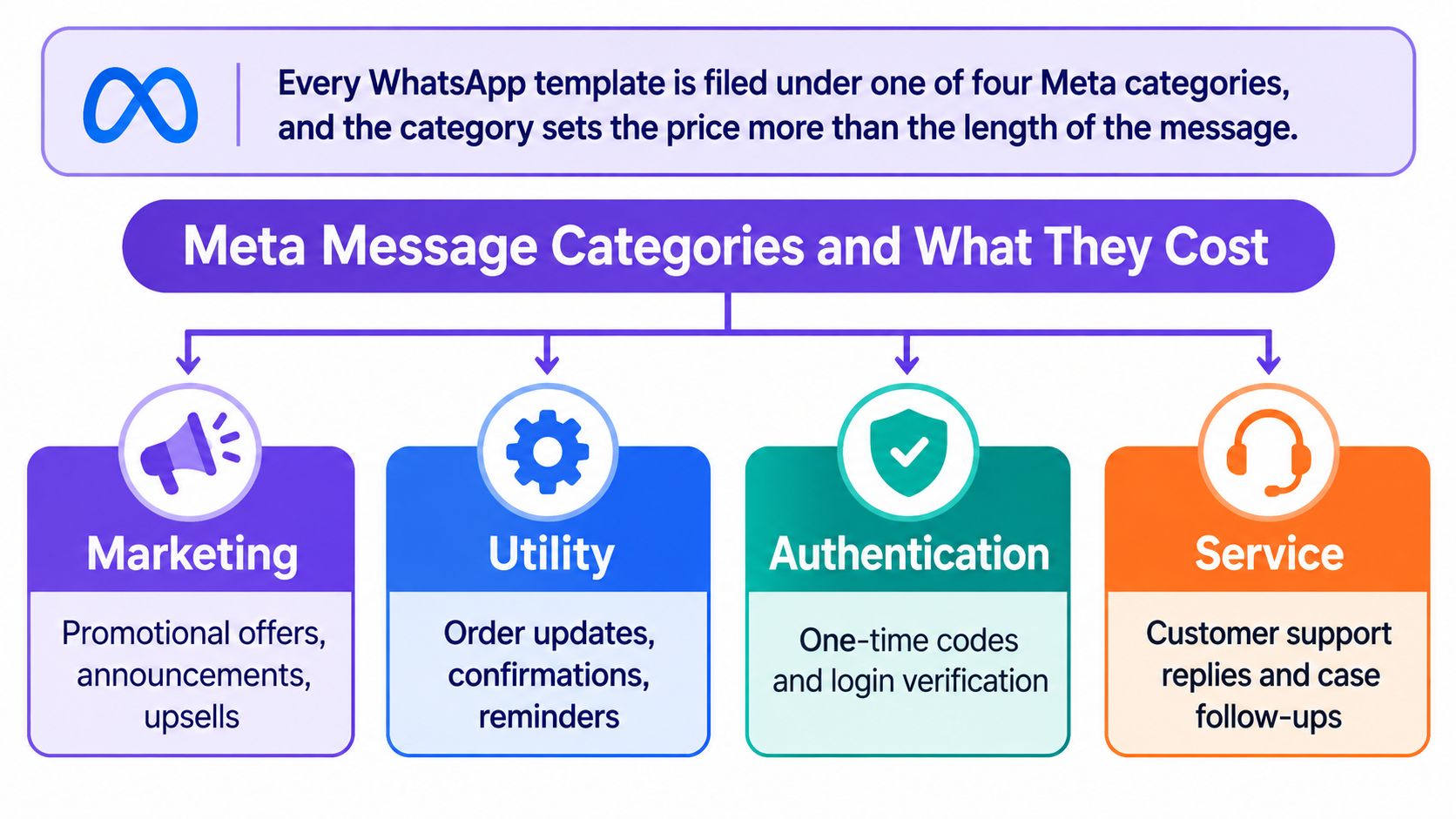
| Category | Typical venue use | Billing basis |
|---|---|---|
| Marketing | Promotions, offers, win-back and retargeting messages | Priced per delivered message by recipient market |
| Utility | Booking confirmations, order updates, reservation changes | Priced per delivered template when sent outside the 24-hour window, not charged for replies inside the window |
| Authentication | One-time verification codes for guest accounts or logins | Priced per delivered message by recipient market |
| Service | Support replies a guest starts | Free inside the 24-hour window up to 1,000 per business phone number a month, chargeable above that starting October 1, 2026 |
What Meta actually bills
Meta's model is usage based rather than a simple subscription. According to Meta's WhatsApp pricing documentation, Meta charges businesses per delivered business-to-user message, with the price determined by the message category, marketing, utility, authentication, or service, and the recipient's country calling-code market. Meta doesn't charge for messages sent by users to businesses, and undelivered outbound messages aren't billed.
That distinction changes campaign arithmetic. Don't multiply API submissions by a rate and call it the Meta forecast. Estimate delivered volume first, then apply the market and category rate to that smaller, more realistic number. Messages sent during Meta-defined free-entry-point windows can also avoid Meta charges, but you should validate template and policy eligibility before building savings into a budget.
Misclassification is a budget risk
The risky case isn't an obvious promotion. It's a mixed message. A post-stay note that thanks a guest might look transactional, but adding a discount, upsell, or win-back offer can push the content toward marketing. If a utility template is reclassified, the same audience can be billed at the marketing rate for that market.
Keep transactional templates narrow. Put the booking reference, changed time, or order status in the utility message, and send the promotional offer separately if it is needed. That creates another message, but it prevents the entire journey from being priced under the wrong assumption.
Market rules add another check. In the US, texting is in pilot and WhatsApp marketing to US numbers is off by default, so a global campaign can't assume every market accepts the same journey. If you're weighing channel choice by destination, our guide to WhatsApp versus SMS for restaurant marketing helps you decide where each channel fits.
Tag every template with its category before submission. Then forecast by category and market, not audience size alone.
How the 24-Hour window changes your bill
Many venue teams assume that once a guest messages first, every reply is free. That's the most persistent budgeting error in WhatsApp planning. The guest's message opens a time-limited support context, it doesn't turn WhatsApp into an unlimited free channel for the rest of the relationship.
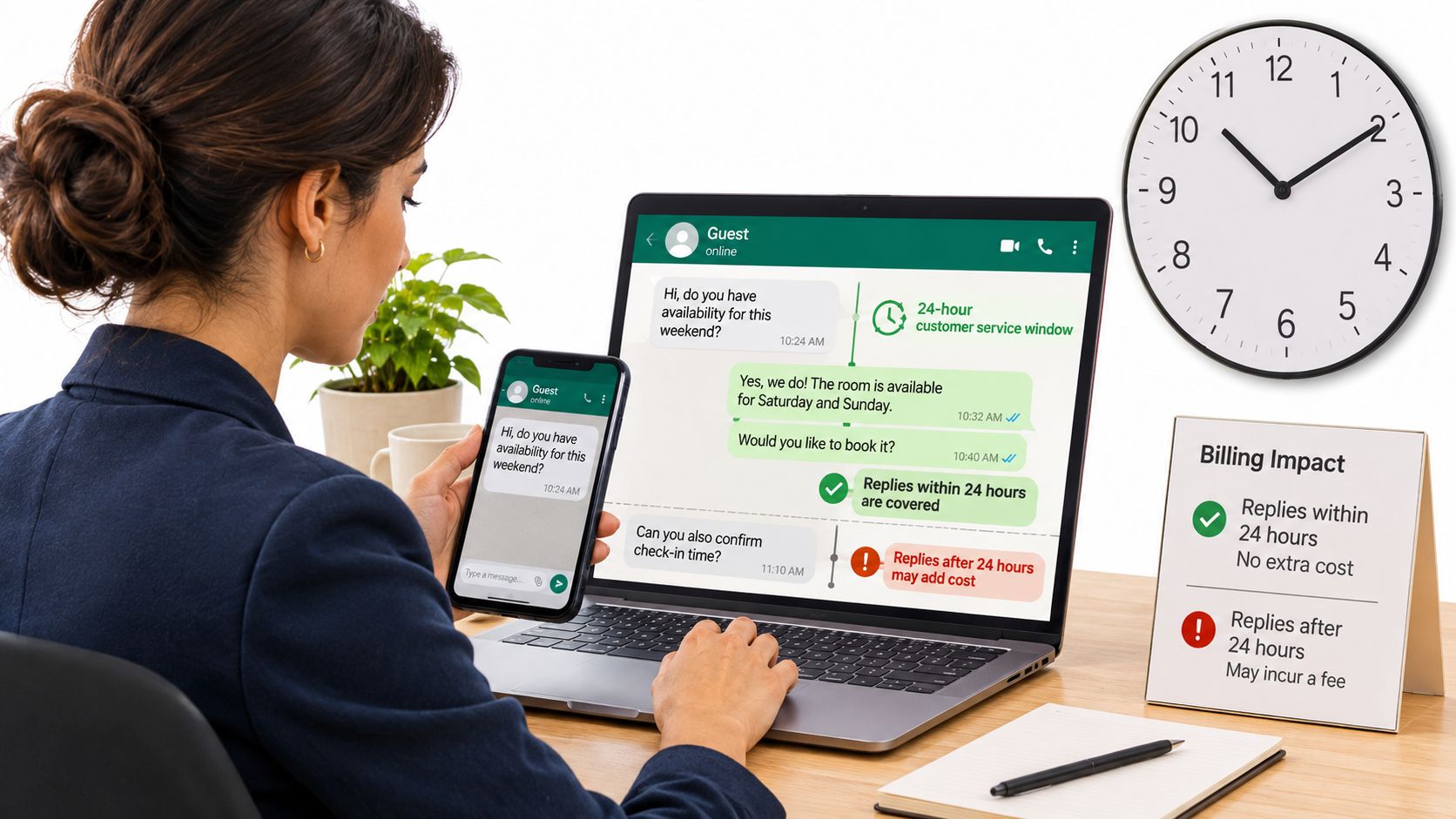
The image below reflects the operational reality. Staff need to know when a window opened, which number received the message, and what kind of reply they're sending.
What the window covers
The 24-hour customer-service window opens when a guest messages the business. Replies sent within that period can receive different treatment from proactive templates sent later. The category still matters, because a support answer, a reservation update, and a promotional offer aren't interchangeable just because they reach the same guest on the same day.
The YCloud WhatsApp pricing documentation notes that service or utility replies within the 24-hour customer-service window are not charged under the current rules, while marketing messages remain category-priced, and utility templates sent outside the window are also chargeable. It also states that from October 1, 2026, service messages become chargeable after the first 1,000 free service messages per business phone number each month.
Those rules reconcile into one planning statement. Service replies inside the window are free only up to the first 1,000 per business cell phone number each month. From October 1, 2026, each service message above that allowance is billed. A marketing message doesn't become free because it happens to land inside the window.
A restaurant example
Say a guest messages a restaurant at 9am to ask whether a table for six is available. A staff reply confirming the options is a service response inside the window and counts toward that business cell phone number's monthly free service allowance. If the restaurant sends the same guest a general weekend promotion at 6pm, that message is marketing and is priced as marketing.
Now assume the restaurant group uses three business phone numbers across its locations. The 1,000-message allowance is per business phone number, not automatically a shared pool for the whole group or one allowance per venue. If one central reservations number handles most guest queries, it can cross the allowance while quieter numbers remain below it. You need traffic by number before you can forecast the chargeable remainder.
The short video below is useful background when training front-of-house and reservations teams on response timing.
Three checks before you rely on free replies
- Map window openers: identify which guest actions start a support interaction and which automated messages might arrive after the window closes.
- Count service volume by number: track monthly service messages for each business phone number rather than reporting one group total.
- Forecast categories separately: keep service, utility, and marketing lines apart even when they belong to the same guest journey.
A unified guest record improves targeting, but it doesn't remove these billing boundaries. Category governance, suppression rules, and number level reporting do the cost control work.
Twilio fees and levers that Cut billable volume
Use one formula for every WhatsApp Business API cost estimate. Delivered outbound messages × Meta category and market rate, plus provider messages × provider fee. If a forecast contains only the first half, it isn't a full delivery cost.
According to Twilio's WhatsApp pricing page, Twilio's WhatsApp pricing includes a $0.005 fee per message, inbound or outbound, plus Meta's applicable template-message fee. A 10,000-message campaign sent through Twilio therefore incurs at least $50 in Twilio message fees before Meta's market-specific charge, taxes, or other account costs.
Inbound messages change the provider line. Say a campaign sends 10,000 outbound messages and guests send 2,000 replies. That's 12,000 provider-billed messages, or $60 in Twilio fees, before any Meta charge. A two-way reservation conversation will therefore cost more at provider level than a one-way announcement with the same outbound audience.
Our sending model keeps that account relationship visible. SMS and WhatsApp use the same template and are sent through your own Twilio account at Twilio's price without a markup from us. You can review the connection in our Twilio integration details and reconcile the provider invoice directly against message volume. Contacts are also unlimited on every plan, including the free one, and we charge for what you send, not for stored contacts, so audience storage doesn't distort the delivery calculation.
Build a country rate matrix
Don't use one blended international rate for a group with guests in several markets. A blended figure hides the destinations that drive the bill and makes variance hard to explain when the guest mix changes. Build a matrix with recipient market across one axis and Meta category across the other, then enter expected delivered volume for each journey.
That structure reveals uncomfortable but useful facts. A small audience in a high-rate market may cost more than a larger local audience. A utility journey sent at scale outside support windows may need its own budget owner. Marketing pauses in selected markets become financial decisions you can quantify rather than blunt campaign cuts.
Seven levers that reduce billable volume
- Batch content into one approved template: combine related offers or updates where the guest still gets a clear message, so one billable send replaces several fragmented sends.
- Check consent and eligibility before sending: deduplicate guests who appear at two sites and suppress anyone who has opted out, already booked, or already received the journey step.
- Separate utility from marketing: keep reservation changes and order updates free of promotional copy, reducing the risk that transactional traffic is repriced as marketing.
- Capture inbound conversations: route eligible replies through permitted free entry point or service contexts after validating template eligibility, rather than starting every interaction with a proactive paid template.
- Limit high-rate market sends: pause or narrow lower value campaigns in markets where the delivered cost outweighs expected incremental visits or bookings.
- Cap frequency per guest: for example, set one marketing message a week in your campaign rules and stop win-back sends to guests who've visited or booked again.
- Measure against a holdout: keep a control group that doesn't receive the campaign, then compare visits, bookings, or purchases rather than judging success from replies alone.
A saving counts only if the holdout shows you didn't give up the same visits or purchases to achieve it.
The strongest lever is usually suppression. A guest who shouldn't receive a message creates Meta cost, Twilio cost, and credit consumption while adding consent and relevance risk. Batching helps, but it shouldn't become an excuse to stuff unrelated offers into one template. Guests ignore crowded messages, and mixed content raises classification problems.
Review journey design monthly. Look for reminders sent after check-in, post-stay requests sent to guests already rebooked, and win-back campaigns still running after a visit. Those operational leaks are easier to fix than negotiating around a rate card you don't control.
How to estimate a venue campaign budget
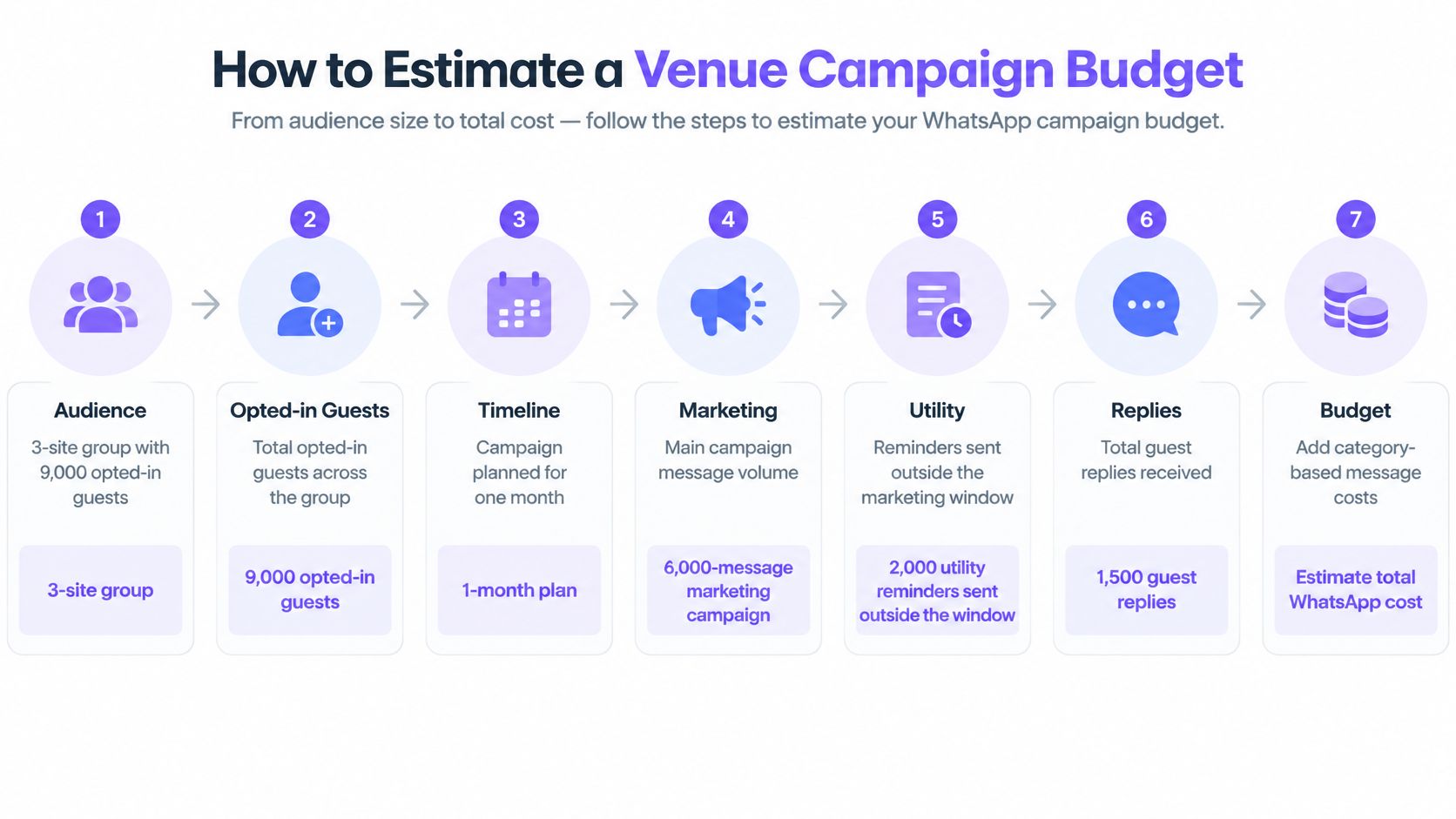
Use a concrete operating case. A three-location group has 9,000 opted-in guests and plans one month containing a 6,000-message marketing campaign, 2,000 utility reminders sent outside the window, and 1,500 guest replies. The example treats all 8,000 outbound sends as delivered so every step remains traceable.
The flow below follows that same case from audience through campaign and reply volume.
Run the estimate in eight steps
- Count opted-in guests by venue: start with 9,000, then remove duplicates shared across the three sites and anyone ineligible for the planned journeys.
- Estimate delivered messages: apply your own delivery failure history. If that history shows undelivered messages, reduce the Meta lines to delivered volume because undelivered messages aren't billed.
- Assign every template to a category: this case has 6,000 marketing messages and 2,000 utility messages. Don't leave mixed templates in an unpriced general bucket.
- Apply the market rate card: multiply each category by the Meta rate for each recipient market. A US guest and an overseas guest belong on separate calculation lines.
- Add Twilio volume: billable provider messages total 9,500, made up of 8,000 outbound plus 1,500 inbound replies. At $0.005 each, the Twilio fee is $47.50.
- Convert outbound sends to credits: at one credit per WhatsApp message, the campaign uses 8,000 credits before email, text, and survey sends.
- Choose plan capacity with headroom: count the emails and WhatsApp messages you send in a month, add one credit per text segment, and pick the plan that covers the total.
- Set a spending cap: check the message-part counter and estimated cost against the cap before approval, then repeat the check if audience or market mix changes.
| Budget line | Unit rate |
|---|---|
| Marketing templates (Meta) | Rate card price per delivered message for the recipient market |
| Utility reminders (Meta) | Rate card price per delivered message for the recipient market |
| Twilio fee | $0.005 each |
| Purple Engage credits | 1 credit each |
The Meta rows deliberately stay as rate card calculations rather than invented totals. Your country mix determines those figures, and a single example price would make the budget look more certain than it is. Finance should see one Meta figure per market and category, one Twilio figure from total provider messages, and one credit total for plan sizing.
What a sound estimate looks like
A sound estimate fits on one worksheet and reconciles to invoices. It shows audience after deduplication, expected delivered volume, template category, destination market, Meta rate, provider volume, and credits. It also states assumptions in plain language, especially the treatment of undelivered messages and guest replies.
If actual spend differs, you can isolate the cause. Delivery may have exceeded the forecast, replies may have increased Twilio volume, or the campaign may have reached more guests in a higher rate market. Without separate lines, all three problems look like one unexplained overrun.
Confirm your plan before you launch
Pick the smallest plan whose monthly credits cover your estimate with headroom. Don't choose by contact count. Your campaign volume, automations, surveys, emails, and text segments determine whether the plan is large enough.
| Plan | Monthly credits | Price as listed | Notes |
|---|---|---|---|
| Free plan | 500 | Free, no card required | Sending pauses at 500 credits until next month or an upgrade |
| Entry paid plan | 5,000 | $16 a month | Contacts unlimited on every plan |
| Mid plan | 15,000 | $35 a month, or $380 paid annually | 10% savings on annual billing |
| Larger plan | 50,000 | $75 a month, or $845 paid annually | Annual billing option |
| Top published plan | 2,000,000 | $1,280 a month | Above 2,000,000 credits is custom-quoted |
Confirm the currency on the live pricing page before you publish or approve a budget, because the listed plan prices above mix dollar and pound amounts. Check that every price in your internal forecast matches the listed rate rather than converting informally. Listed prices include sales tax where it applies.
Every plan includes email, texts, WhatsApp, automations, offers, surveys, forms, segments, the guest record, the AI marketing team, integrations, API and webhooks. That keeps plan selection focused on credits rather than feature gates. The worked example uses 8,000 WhatsApp credits, so it fits inside the 15,000-credit plan with room for email and survey sends, provided the combined monthly total stays below the allowance.
We track Meta-approved WhatsApp templates and display a message-part counter and estimated cost against the spending cap. Before launch, confirm template categories, run the market level estimate, set the cap, and check your setup against the WhatsApp marketing setup checklist for hotels. After launch, compare Meta and Twilio invoices against each forecast line every month and adjust suppression, market coverage, or frequency where the variance appears.
Build your next WhatsApp budget from delivered volume, Meta category, recipient market, Twilio messages, and credits rather than from a single headline rate. With Purple Engage, you can send through your own Twilio account with no markup from us, track approved templates, and check estimated cost against a spending cap before a campaign goes live. Start by sizing your monthly credits against a real campaign estimate, then launch with costs finance can reconcile line by line.