
The best email marketing software for restaurants, compared
This guide compares send-only email tools like Mailchimp and Klaviyo against build-and-send platforms like Purple Engage.
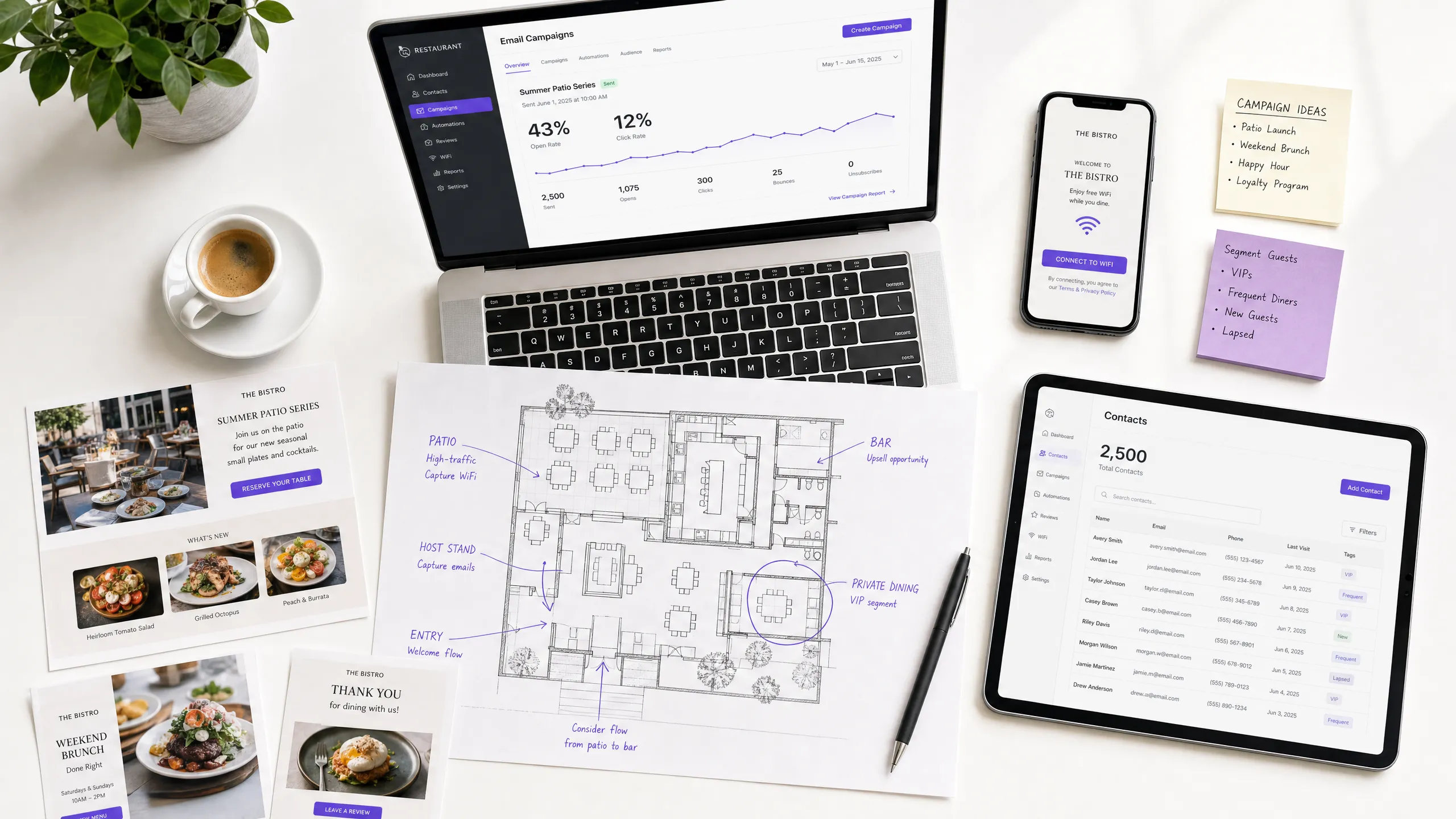
Video overview
Listen to this guide
Read the transcript
The best email marketing software for restaurants, compared. A Purple Engage marketing briefing. Hello, and welcome. I'm going to spend the next ten minutes giving you a straight, practical briefing on email marketing software for restaurants - what works, what doesn't, and where most venues are losing money without realizing it. This is aimed at marketing directors, CRM managers, and owner-operators who are either evaluating tools right now or wondering why their current setup isn't delivering the return visits they expected. Let's get into it. --- SECTION ONE: WHY THIS MATTERS - AND WHY MOST VENUES GET IT WRONG Here's the core problem. Most restaurants and hospitality venues spend time and money on email marketing, but they never stop to ask the most important question: where does the list actually come from? Think about it. You sign up for Mailchimp, or Klaviyo, or HubSpot. You get a beautifully designed email template. You set up an automation. And then you realize - you have no list. Or worse, you have a list of three hundred people who signed up on your website two years ago, half of whom have never actually visited. The tool is ready. The list isn't. This is the fundamental gap in how most venues approach email marketing. They evaluate tools based on features - drag-and-drop builders, A/B testing, segmentation options - but they never address the upstream problem: how do you build a list of people who have actually walked through your door? Email marketing for restaurants delivers approximately forty-two dollars for every dollar spent, according to industry data. That's one of the highest ROI channels in marketing. But that number assumes you're sending to people who know you, who've visited you, and who have a reason to come back. If your list is thin, stale, or full of people who've never set foot in your venue, that ROI collapses. So the question isn't just "which email tool should I use?" The question is "which tool helps me build the list as well as send to it?" --- SECTION TWO: THE TWO TYPES OF EMAIL TOOL Let me draw a clear line here, because this is the most useful framework I can give you. There are two types of email marketing tool for restaurants. The first type - and this covers the vast majority of the market - are send-only tools. Mailchimp, Klaviyo, HubSpot, ActiveCampaign, Brevo. These are excellent tools for sending campaigns. They have sophisticated automation, beautiful templates, strong deliverability, and good analytics. But they do not build your list. You bring the contacts. They send the emails. The second type are build-and-send tools. These capture guest data at the point of visit - typically through a Guest WiFi login - and feed those contacts directly into a CRM and email automation system. The list builds itself, every day, from every guest who connects to your WiFi. Purple Engage sits in the second category. It's the only platform that combines Guest WiFi data capture with email marketing automation specifically built for physical venues. Now, I want to be fair to the send-only tools. If you already have a large, high-quality list - say, you've been running a loyalty program for years and you have fifty thousand verified guest contacts - then Mailchimp or Klaviyo might be exactly what you need. They're mature, well-supported platforms with deep feature sets. But if you're starting from scratch, or if your list is small and you're not sure how to grow it, or if you're opening new locations and need to build a local audience fast - that's where the build-and-send model changes everything. --- SECTION THREE: HOW THE LIST BUILDS ITSELF Let me walk you through exactly how this works with Purple Engage, because the mechanism matters. A guest arrives at your restaurant. They want to connect to the WiFi - and the data is clear that the majority of diners do want free WiFi, particularly for longer visits. They open the network on their cell phone and they're presented with a branded splash page. Your logo, your colors, your offer if you choose to show one. On that splash page, there's a clear, simple opt-in. The guest enters their email address and checks a box to confirm they're happy to receive marketing emails from you. This is a conscious-choice opt-in. They're not buried in terms and conditions. They're not tricked. They actively choose to hear from you. This is fully compliant with the TCPA and CAN-SPAM, which requires freely given, specific, informed, and unambiguous consent for marketing communications. Once they connect, their profile is created in Purple Engage. We know when they visited, how long they stayed, whether they've been before, and what time of day they tend to come in. That context is gold for personalization. Within minutes, an automated welcome email goes out. Within twenty-four hours, a review request. On day twenty-one, a return-visit nudge with an offer if you choose to include one. The whole sequence runs automatically for every guest who opts in. You set it up once. A venue with two hundred daily visitors and a fifty percent WiFi capture rate - which is a conservative estimate, the real range is thirty to sixty percent - builds a list of thirty-six thousand five hundred opted-in guest contacts in a year. That's from one location. If you're running five locations, you're looking at over one hundred and eighty thousand contacts annually, all of them verified visitors. Compare that to a website popup, which converts at one to three percent of visitors and captures people who may never have set foot in your venue. Or a register-side sign-up, which gets maybe half a percent of transactions. The WiFi capture rate is ten to one hundred times higher than any other method, and the quality of the contact is categorically different - these are people who have physically been in your restaurant. --- SECTION FOUR: THE SEND-ONLY TOOLS IN DETAIL Let me give you a fair assessment of the main send-only tools, because you'll likely be comparing them. Mailchimp is the most widely used email platform in the world. It's easy to set up, has a generous free tier, and the template builder is genuinely good. For an independent restaurant that already has a decent list and wants to send a weekly newsletter or a monthly promotion, Mailchimp does the job. The limitation is that it doesn't help you build the list, and its segmentation is based on email behavior - opens, clicks - rather than actual visit behavior. Klaviyo is more powerful and is particularly strong for restaurants with online ordering or delivery, because it integrates well with e-commerce data. It has predictive analytics, deep segmentation, and strong revenue attribution for online transactions. The gap for physical venues is the same as Mailchimp - it can't tell you whether a guest came back to your restaurant after receiving an email, because it has no visibility of in-venue behavior. HubSpot is a full CRM platform, not just an email tool. It's excellent for multi-location restaurant groups that need to manage sales pipelines, marketing automation, and customer service in one place. The cost scales quickly, though - the Professional tier starts at eight hundred dollars a month, which is hard to justify for a single-site operator. And again, it doesn't capture guest data at the point of visit. ActiveCampaign sits between Mailchimp and HubSpot in terms of sophistication. It has strong automation and guest scoring, which is useful for identifying your highest-value regulars. Brevo is worth a mention for growing groups because it prices by sends rather than contacts, which is cost-effective when your list is large. The common thread across all of these: they are excellent at sending. They are not designed to capture first-party data from physical venue visits. You need to bring the list to them. --- SECTION FIVE: REAL-WORLD RESULTS Let me give you two concrete examples of what this looks like in practice. McDonald's Belgium partnered with Purple across over eighty restaurant locations. In the first two years, they captured two point five million unique visitor records in their CRM system. That's two point five million opted-in guest profiles, built automatically from WiFi logins, with no manual data entry. They used that data to run targeted campaigns promoting app downloads and specific menu offers. The result was a sharp increase in app downloads linked directly to campaign activity. Pizza Express UAE had a different starting point. Before Purple, they had an outdated database of around thirty thousand email addresses. Within a few weeks of deploying Purple, they added ten thousand new, active guest contacts. The first campaign - a free pizza voucher with a short expiration date - drove over one hundred redemptions in a single weekend, generating incremental sales of drinks, appetizers, and desserts. A subsequent buy-one-get-one-free campaign generated over three hundred additional covers. One batch of outbound emails increased a single day's sales by up to four thousand Dirham. These aren't edge cases. They're what happens when the list is built from real, verified visitors rather than scraped together from website forms and loyalty card sign-ups. --- SECTION SIX: PRACTICAL STEPS AND COMMON PITFALLS Let me give you the practical steps to get this right, and flag the mistakes I see most often. Step one: audit your current list. How many contacts do you have? When did they last visit? What percentage have opened an email in the last ninety days? If the answer is "I'm not sure" or "the list is quite old," that's your starting point. Step two: decide whether you need to build or send. If you have a healthy, growing list of verified guests, a send-only tool may be all you need. If your list is thin or stale, you need a build-and-send approach. Step three: if you're going with Guest WiFi data capture, get the splash page right. The opt-in must be clear and separate from the WiFi access. Don't bundle consent into the terms of service. Under CCPA/CPRA, consent for marketing must be freely given and specific. A pre-checked box doesn't count. Step four: set up the three-email automation before you launch. Welcome email within five minutes of connection. Review request at twenty-four hours. Return-visit nudge at day twenty-one. These three emails alone, running automatically, will generate more value than most manual campaigns. Step five: segment from day one. Don't wait until you have a large list to start segmenting. Tag first-time visitors differently from regulars. Track visit frequency. Know who your VIPs are. The most common pitfall I see is treating email marketing as a broadcast channel - sending the same message to everyone on the list, regardless of their visit history. A guest who visited once six months ago needs a very different message from a guest who visits every week. The data to make that distinction is sitting in your WiFi logs. Use it. The second pitfall is measuring success by opens and clicks alone. Opens tell you about subject lines. Clicks tell you about content. But neither tells you whether the guest actually came back to your restaurant. Return visits and incremental revenue per send are the metrics that matter. Purple Engage tracks return visits by detecting when a guest reconnects to your WiFi after receiving a campaign - closing the attribution loop that send-only tools can't close. --- SECTION SEVEN: QUICK QUESTIONS I want to address three questions that come up frequently. First: "Can I use Purple Engage alongside Mailchimp or Klaviyo?" Yes. Purple Engage integrates with most major email platforms via API. You can use Purple to capture and segment the list, then push contacts to Mailchimp or Klaviyo for sending. Some operators do this during a transition period. The full value comes when you use Purple Engage end-to-end, because that's when the return-visit attribution works. Second: "What about CCPA/CPRA - is WiFi data capture compliant?" Yes, when done correctly. The key requirements are: explicit opt-in, separate consent for marketing, easy unsubscribe, and a clear data retention policy. Purple Engage handles all of this by design. The consent is captured at the splash page, stored with a timestamp, and every email includes a one-click unsubscribe. Purple is ISO 27001 certified, GDPR compliant, and B Corp certified. Third: "We're a small independent restaurant with one site - is this overkill?" No. The economics work at any scale. A single site with one hundred daily visitors and a forty percent capture rate adds fourteen thousand six hundred opted-in guest contacts per year. At a conservative five percent return-visit conversion from the day-twenty-one nudge, that's seven hundred and thirty additional covers annually. At an average spend of twenty-five dollars, that's over eighteen thousand dollars in incremental revenue from one automated email sequence. --- SECTION EIGHT: SUMMARY AND NEXT STEPS Let me bring this together. The best email marketing software for restaurants is not a single answer - it depends on whether you need to build the list, send to the list, or both. If you already have a large, high-quality list of verified guests, Mailchimp, Klaviyo, or HubSpot will serve you well. Choose based on your budget, technical sophistication, and whether you need e-commerce integration. If you need to build the list from your actual guest base - and most physical venues do - then Guest WiFi data capture is the highest-ROI method available. Purple Engage is the platform that combines that capture with email automation and return-visit attribution in a single system. The three things to take away from this briefing: One: the list is the asset. A small list of verified visitors outperforms a large list of cold contacts every time. Two: consent matters. CCPA/CPRA-compliant, conscious-choice opt-ins at the WiFi login protect you legally and produce better engagement because the guest actually wants to hear from you. Three: measure return visits, not just opens. If your email tool can't tell you whether a guest came back to your venue after a campaign, you're flying blind on the metric that actually drives revenue. If you want to see how Purple Engage works in practice, visit purple.ai and book a demo. The team will show you the data capture, the automation, and the attribution reporting in your specific venue context. Thanks for listening. I'll see you in the next one.
Listen to the audio briefing:
Why this matters for your venue
Most restaurants invest time and money in email marketing, but they fail to ask the most critical question: where does the list actually come from? You can sign up for Mailchimp, Klaviyo, or HubSpot, design a beautiful template, and configure an automation sequence. But if your list contains 300 people who signed up on your website two years ago - half of whom have never actually visited your restaurant - your return on investment collapses. The tool is ready, but the list isn't.
According to industry data, restaurant email marketing returns approximately $42 for every dollar spent [1]. That makes it one of the highest-ROI channels in hospitality marketing. However, that figure assumes you are sending campaigns to people who know your brand, have visited your venue, and have a reason to come back. If your list is thin, stale, or full of people who have never set foot in your restaurant, that ROI evaporates. The core problem is that most venues evaluate tools based on features like drag-and-drop builders or A/B testing, but they never address the upstream challenge of building a list of verified guests.
So the question isn't just "which email tool should I use?" but "which tool helps me build the list as well as send to it?"
The solution
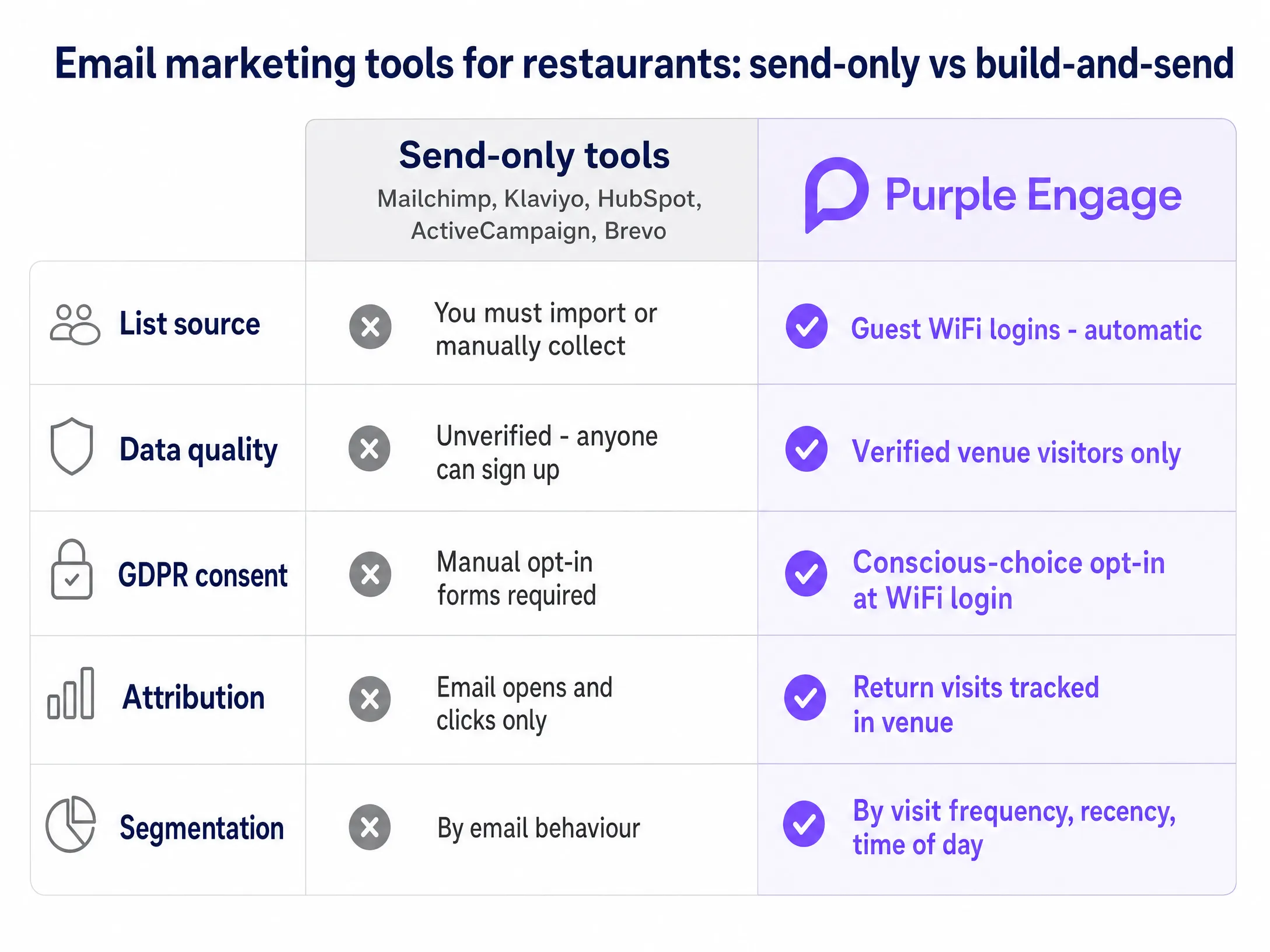
There are two distinct types of email marketing tool for restaurants: send-only tools and build-and-send tools.
Send-only tools - such as Mailchimp, Klaviyo, HubSpot, ActiveCampaign, and Brevo - make up the vast majority of the market. These platforms are excellent at sending campaigns. They offer sophisticated automation, strong deliverability, and detailed analytics. However, they won't build your list for you. You have to import contacts manually, or rely on website popups and POS-side sign-ups. If you already have a large, high-quality list of verified guests, these tools perform well. But if you are starting from zero, or your list is small, a send-only tool gives you a powerful engine with no fuel.
Build-and-send tools capture guest data at the moment guests arrive at your venue - typically via a Guest WiFi login - and feed those contacts directly into a CRM and email automation system. The list builds itself automatically, every day, from every guest who connects to your WiFi. Purple Engage falls into this category. It combines Guest WiFi data capture with email marketing automation built specifically for physical venues.
How to achieve this with your Guest WiFi
The mechanics of list building matter. A guest arrives at your restaurant and connects to the WiFi. They see a branded splash page carrying your logo and colors. On that splash page is a clear, simple opt-in. The guest enters their email address and checks a box confirming they are happy to receive marketing emails from you. This is a conscious-choice opt-in. They actively choose to receive your messages, which fully satisfies CCPA/CPRA requirements for freely given, specific, informed, and unambiguous consent.
Once they connect, their profile is created in Purple Engage. The platform records when they visited, how long they stayed, whether they have been before, and what time of day they tend to visit. This context lays the foundation for effective personalization.
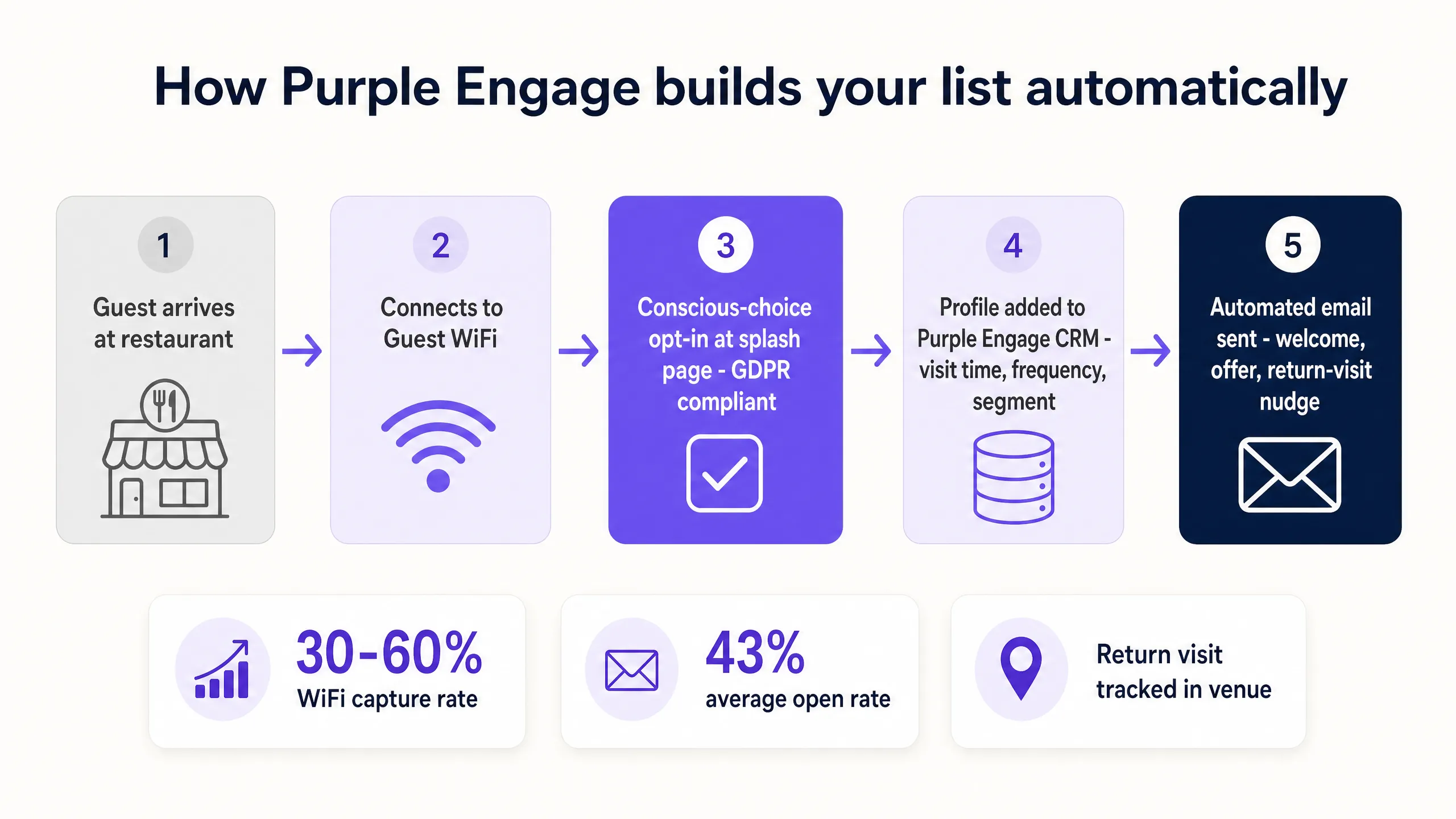
A venue with 200 visitors a day and a 50% WiFi capture rate builds a list of 36,500 opted-in guest contacts in a single year. Real-world capture rates typically range between 30% and 60%. If you operate five sites, you will capture more than 180,000 verified visitor contacts per year. By comparison, website popups convert just 1% to 3% of visitors, and the people they capture may never have visited your venue. WiFi capture rates are 10 to 100 times higher than any other method, and the quality of the contacts is fundamentally different, because they are verified, in-venue guests.
What to send, and when
Once a guest profile is created, automated sequences drive engagement without any manual effort. Within minutes of connecting, an automated welcome email goes out. Within 24 hours, the system sends a review request. On day 21, it sends a return-visit nudge, typically including an offer. The sequence runs automatically for every guest who opts in.
Beyond automated sequences, segmentation is essential. Don't treat email marketing as a broadcast channel. Sending the same message to everyone on your list, regardless of their visit history, depresses engagement. A guest who visited once six months ago needs a very different message from a guest who visits every week. You can segment your list by visit frequency, recency, and time of day. Morning visitors receive a coffee offer, for example, while evening visitors receive a dinner special. The data to make these distinctions is captured automatically in your WiFi logs.
Measuring what works
The most common trap in restaurant email marketing is measuring success by open rates and click rates alone. Open rates tell you how effective your subject lines are. Click rates tell you how relevant your content is. But neither metric tells you whether the guest actually came back to your restaurant.
Return-visit rate and incremental revenue per send are the metrics that truly matter. Purple Engage tracks return visits by detecting when a guest reconnects to your WiFi after receiving a campaign. This delivers closed-loop attribution, something send-only tools simply cannot do. You can see exactly how many guests returned to your venue as a direct result of an email campaign.
To see how this compares with generic tools, read our related guides: Mailchimp for hotels: where it falls short for venues and Mailchimp for hotels: where it falls short for venues (Spanish).
How to get started
- Audit your current list. Establish how many contacts you have, when they last visited, and what proportion have opened an email in the past 90 days.
- Choose your approach. Decide whether you need a send-only tool for an existing high-quality list, or a build-and-send tool to grow a list of verified guests.
- Configure your splash page. Make sure your Guest WiFi opt-in is clear, separate from the WiFi access terms, and fully CCPA/CPRA-compliant via a conscious-choice checkbox.
- Deploy the automation. Set up the three-email sequence: a welcome email, a review request after 24 hours, and a return-visit nudge after 21 days.
- Segment from day one. Tag first-time visitors and regulars differently, track visit frequency, and identify your VIP guests so you can send targeted, highly relevant campaigns.
References
[1] Stripo. "Restaurant email marketing statistics: how emails drive reservations, loyalty, and revenue." https://stripo.email/blog/restaurant-email-marketing-statistics-how-emails-drive-reservations-loyalty-and-revenue/