
Customer journey automation for gyms and fitness centers: an implementation guide
Use this guide to turn a new member's first 90 days into timed email and SMS steps, triggered by guest WiFi visits and consented opt-ins. You will be able to set triggers, separate service messages from marketing, and segment members from day-pass visitors.
Video overview
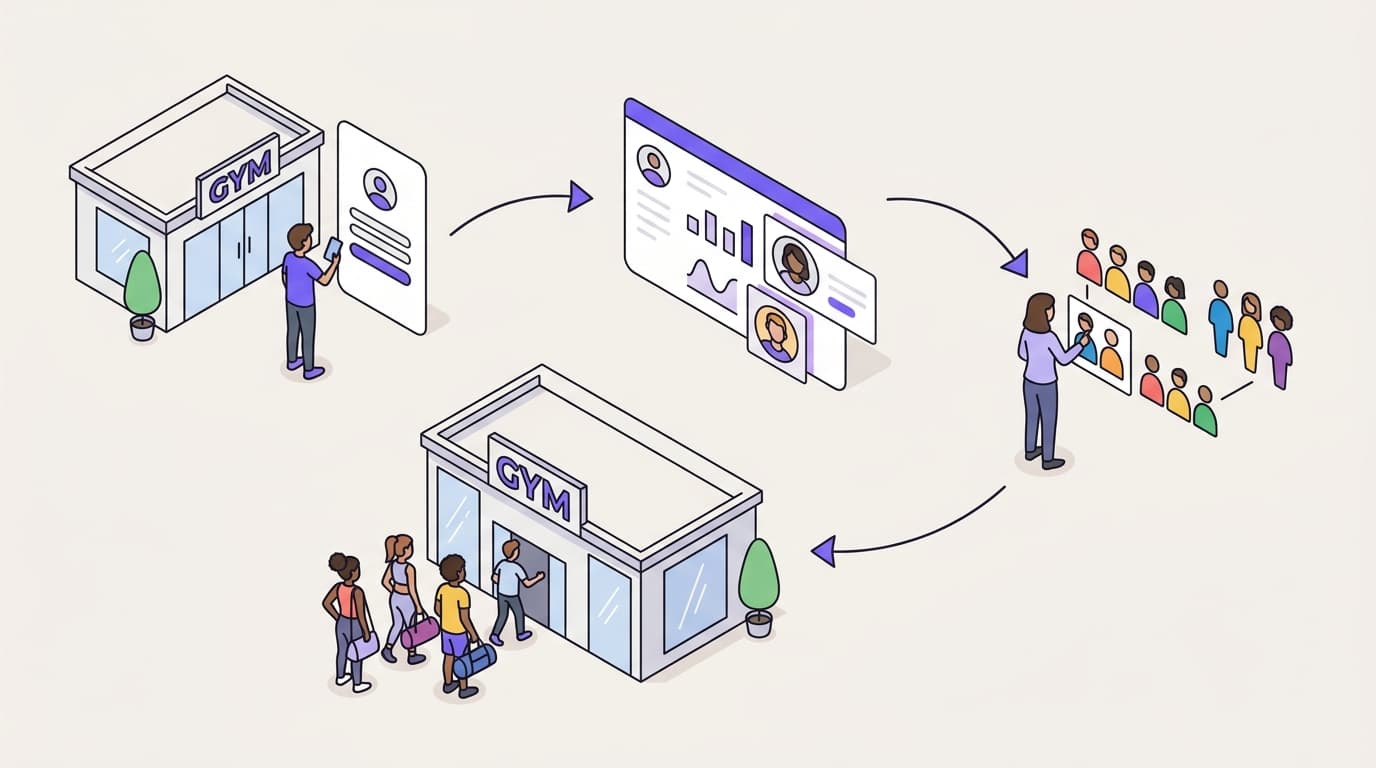
Cut early cancellations by turning a new member's first 90 days into timed email and SMS steps. In week one, welcome them and book an orientation. Weeks two to four build a visit habit. By day 60, introduce classes or personal training. Before day 90, check renewal intent. Trigger each step from guest WiFi visits and CCPA/CPRA-compliant consent.
What does 90-day automation do for your gym or fitness center?
An early cancellation costs you twice. You lose the acquisition spend, and you lose the months of fees that would have repaid it. The first 90 days decide whether a new member builds a habit or quietly stops coming.
Customer journey automation for gyms turns that window into a sequence of timed, triggered messages. Each step answers the question a new member has at that moment. How do I book my orientation? What should I do on my second visit? Which class suits me? Has anyone noticed I have stopped coming?
Aim for four concrete outcomes:
- A lower 90-day cancellation rate, measured against the cohorts that joined before you launched.
- More visits per member in the first 30 days, your earliest signal that the program is working.
- A higher opt-in rate at WiFi login, so more members can receive marketing as well as service messages.
- Revenue per send from classes, personal training, the cafe and guest passes.
Why the list matters more than the email tool
Mailchimp, Klaviyo and HubSpot send campaigns to the contacts you give them. They do not build the list, and they do not know when a member last walked through your door.
Purple Engage starts from your Guest WiFi. When a member, day-pass visitor or class guest logs in, Purple records the visit and the opt-ins they chose. The list builds itself from consented, first-party data, and every return visit refreshes it.
That data foundation already runs at scale. Purple's own figures show 80,000+ live venues and 440 million logins in 2024. Purple is ISO 27001 certified, GDPR compliant and a certified B Corp.
What do you need before you automate a member's first 90 days?
Do the groundwork before you write a single email. Six things decide whether the program works.
- Guest WiFi running through Purple. Purple is hardware-agnostic and runs as a cloud overlay on Cisco Meraki, HPE Aruba, Ruckus, Juniper Mist, Ubiquiti UniFi, Cambium, Extreme and Fortinet. You keep the access points you already own.
- Purple Engage for the email and SMS automation. The Product overview covers what it includes.
- Consent wording your data protection lead has signed off. Use separate email and SMS opt-ins, unchecked by default, in plain English.
- A rule for telling members apart from everyone else. Day-pass visitors, swim-session guests and hotel residents should never receive a new-member sequence.
- A baseline. Pull your 30, 60 and 90-day cancellation rates for your last three join cohorts from your membership system. Without a baseline, you cannot prove the program made a difference.
- An owner and a briefed front desk. If a message promises an onboarding call, staff need to expect the bookings.
Which data source answers which question?
Your WiFi data and your membership system answer different questions. Plan to use both.
| Data source | Who it covers | What it tells you | Marketing consent | Main gap |
|---|---|---|---|---|
| Guest WiFi logins through Purple | Members, day-pass visitors and guests who connect | Visit dates, visit frequency, time of day, contact details | Captured at login as conscious-choice opt-ins | Misses visits where the member does not connect |
| Membership or club management system | Every paying member | Join date, plan, billing status, freeze and cancellation dates | Only what you recorded at sign-up | Holds no record of day-pass visitors who never join |
| Door access or turnstile records | Every member who scans in | Exact attendance | Not a consent record | Rarely connected to your messaging |
Purple Engage runs the messaging from the WiFi side. Your membership system stays the record of who has paid, frozen or canceled. Agree now who updates suppressions when a member cancels, and how often.
How do you set up member automation with your guest WiFi data?
The steps below cover the decisions, not the clicks. For current triggers and configuration, use the Purple Engage Product overview and Purple's support documentation.
Step 1: Make consent explicit at the WiFi login
CCPA/CPRA requires you to demonstrate that consent was given. It also makes withdrawing consent as easy as giving it. Purple's conscious-choice opt-ins handle this at the login screen: the member actively chooses email, text message, both or neither.
Keep marketing consent separate from WiFi access. CCPA/CPRA treats consent bundled into a service that does not need it as unlikely to be freely given.
Step 2: Separate service messages from marketing
The FTC and state attorneys general distinguish genuine service messages from direct marketing. An onboarding reminder for a member who has just joined is a service message. A personal training offer is marketing.
Marketing by email or text message falls under the TCPA and CAN-SPAM. It needs either consent or the "soft opt-in". The soft opt-in applies only when you collected the details during a sale, you market similar services, and you offer an opt-out at collection and in every message. Label each step as service or marketing before you build it, and ask your data protection lead to confirm the split.
Step 3: Segment members from other visitors
Build at least three segments:
- New members, joined in the last 90 days.
- Established members, beyond day 90.
- Non-members, such as day-pass visitors, class guests and hotel residents.
You can separate them with a member question on the login form, or by matching against your membership records. Pick one method and apply it at every site.
Step 4: Define the triggers
Three triggers carry most of the program:
- Join date starts the 90-day clock.
- Visit count shows whether the habit is forming. Set a target, such as two visits a week, from your own retention data.
- Days since last visit starts the lapse branch. A 10-day gap is a sensible first threshold for a member who has been visiting weekly. Adjust it once you have data.
Step 5: Build a main path and a lapse branch
Every new member enters the main path, timed from their join date. The lapse branch fires when the visit gap passes your threshold. While a member sits in the lapse branch, pause main-path marketing so the messages do not stack. Return them to the main path when they next log in.
Step 6: Add suppression and quiet hours
Suppress canceled members, frozen members and staff. Set SMS quiet hours, for example 9am to 8pm, and cap SMS at four or five across the 90 days. A gym that texts every other day trains members to opt out.
Step 7: Test with staff profiles first
Run five staff profiles through the full sequence on a compressed timeline. Check timing, links, personalization fallbacks and the opt-out. Fix everything before a single member enters.
What should you send a new member, and when?
The table below is a starting map. Adjust timings to your own cancellation data, and label every row as service or marketing.
| When | Trigger | Channel | Message | Goal | Type |
|---|---|---|---|---|---|
| Day 0 | Join and first WiFi login | Welcome, what to expect, induction booking link | Induction booked within seven days | Service | |
| Day 2 | No induction booked | SMS | One line with the booking link | Induction booked | Service |
| Day 5-7 | After first visit | Second-visit plan and beginner class schedule | Second visit | Service | |
| Day 10-12 | Online joiners in cooling-off window | Named staff contact and what the membership includes | Fewer cooling-off cancellations | Service | |
| Day 14-30 | Visits below target | SMS | Nudge naming a class at their usual visit time | Weekly visit habit | Marketing |
| Day 21-30 | Visit target reached | Milestone recognition | Reinforce the habit | Marketing | |
| Day 46-60 | Visits steady | Class pack or personal training taster | A second reason to stay | Marketing | |
| Any day | No visit for 10 days | SMS, then email after three days | Check-in and a free coach session | Reactivation | Marketing |
| Day 60 | Active member | Bring-a-friend guest pass | Social tie and referral | Marketing | |
| Day 80 | All new members | One-question survey | Spot cancellation risk | Service | |
| Day 90 | Active member | 90-day milestone and next goal | Renewal intent | Marketing |
Days 0 to 14: orientation and the cooling-off window
If members join online, consumer protection regulations give them a 14-day right to cancel. That makes the first two weeks your most exposed period.
Every message here should remove friction. Book the orientation, explain what the second visit looks like and give the member a named person to ask. Do not sell yet.
Days 15 to 45: build the habit
Switch from information to momentum. Use visit count to decide who gets a nudge and who gets recognition. WiFi login times show when each member tends to visit, so suggest a class at the hour they already come in.
Days 46 to 75: add a second reason to stay
A member who attends a class, books a coach or meets a friend at the cafe has more than one reason to renew. Offer added value rather than discounts: a free coaching session or a guest pass protects your price.
The same logic applies in food and beverage. Discounts vs added-value offers for restaurants: protecting your margin sets out the trade-off in detail.
Days 76 to 90: check intent before the decision point
Send one question: "How likely are you to keep your membership after this month?" Route low scores to the front desk for a personal call within two business days. Software should start the conversation, and staff should finish it.
When to use email and when to use SMS
Use SMS for short, time-sensitive prompts: a booking link, a lapse check-in, a class starting tomorrow. Use email for anything that needs a schedule, an explanation or an image. If a message needs more than two sentences, it belongs in email.
What does this look like in practice?
The two scenarios below are worked examples. The figures are illustrative, chosen to show the method and the arithmetic. They are not results from a named venue.
Scenario 1: a city-run community center with a January spike
The situation. A public-sector community center has 3,000 members across a gym, a pool and a studio. It signs 450 new members in January. Its membership system shows that 25% of last January's joiners canceled within 90 days.
What it did. The center put Purple guest WiFi login consent at reception, in the cafe and poolside. It built the 11-step map above, with a lapse branch at 10 days. It held back 10% of joiners, 45 people, from the marketing steps only, as a control group.
The measurable outcome. At day 90, the illustrative cancellation rate is 19% for the 405 members who received the full program. The holdout group shows 24%. A five-point gap on 405 members keeps about 20 members who would otherwise have left. At $30 a month over the next nine months, that is $270 per member, or $5,400 from one January cohort.
The holdout is what makes this credible. Without it, you cannot separate the program's effect from a milder winter or a new class timetable.
Scenario 2: a 150-room hotel with a members' leisure club
The situation. A hotel runs a leisure club with 600 local members. Hotel guests use the same gym and the same WiFi. Before segmentation, hotel guests received member messages and complained.
What it did. The hotel added a member question to the WiFi login and excluded residents from the 90-day sequence. In days 46 to 75, members received an added-value restaurant offer rather than a gym discount.
The measurable outcome. Illustratively, the restaurant offer goes to 1,200 members across a quarter. It drives 66 redemptions at an average spend of $42, or $2,772 in revenue. That is $2.31 revenue per send. Complaints from hotel guests stop because they no longer receive member messages.
How do you know your 90-day program is working?
Judge the program on visits and cancellations, not opens. Apple's Mail Privacy Protection preloads email content, so open rates overstate real engagement for members on Apple Mail.
| Metric | What it shows | Where the data lives | Review |
|---|---|---|---|
| 90-day cancellation rate by join cohort | Whether the program retains members | Membership system | Monthly |
| Visits in the first 30 days | Whether the habit is forming | Purple WiFi visit data | Weekly |
| Induction booked within seven days | Whether onboarding removes friction | Booking system | Weekly |
| Opt-in rate at WiFi login | Size of your marketable list | Purple | Monthly |
| Lapse branch reactivation rate | Whether lapse messages bring members back | Purple WiFi visit data | Monthly |
| Revenue per send | Commercial return on marketing steps | POS, booking and redemption data | Monthly |
| Holdout gap | Lift you can attribute to the program | Membership system and Purple | Per cohort |
Run a holdout from the first cohort
Hold back 10% of each join cohort from the marketing steps. Keep sending them service messages, because induction reminders are part of the membership. Compare cancellation rates at day 30, 60 and 90. If you cannot show a gap after two cohorts, change the content before you add more steps.
Attribute revenue to the step, not the channel
Give every offer its own code or redemption method, so you know which step drove the class booking or the cafe visit. Digital vouchers and offers for pubs: redemption tracking and ROI shows how to set up redemption measurement that carries across to a gym cafe or spa.
What goes wrong, and how do you avoid it?
Sending marketing without the right consent
The most expensive mistake is treating every contact as marketable. A member who connected to WiFi without opting in can still receive service messages. They should not receive a personal training offer. Label every step, and let your data protection lead review the plan before launch.
Treating WiFi visits as complete attendance
Some members never connect to the WiFi, and some connect only occasionally. Do not send "we miss you" to a member who scans in daily but leaves their cell phone in a locker. Where you can, cross-check lapse lists against door access records before the SMS goes out.
Over-messaging in the first two weeks
New members are already absorbing a lot: the app, the schedule, the locker rooms. Keep the first 14 days to four or five messages, all of them useful. Cut anything that does not help the member book, visit or ask a question.
Leading with discounts
A retention discount in month two teaches members that threatening to leave pays. Offer added value instead: a coaching session, a class pass or a guest pass. Each one also deepens the member's tie to your venue.
Forgetting canceled and frozen members
A "great progress" email to someone who canceled yesterday damages trust fast. Agree a weekly suppression update from your membership system, and test that it reaches Purple Engage before launch.
Building it once and walking away
Review the sequence every quarter. Retire steps that do not move visits or cancellations. Rewrite the weakest message each month, and compare it against the previous version using the holdout method.
Frequently asked questions
Does Purple Engage work with the WiFi access points we already have?
Yes. Purple is hardware-agnostic and runs as a cloud overlay on Cisco Meraki, HPE Aruba, Ruckus, Juniper Mist, Ubiquiti UniFi, Cambium, Extreme and Fortinet. You keep your existing access points and add Purple's guest WiFi login on top. The visit and consent data from those logins then feeds Purple Engage, so your gym or fitness center can start building its list without replacing network hardware.
How is Purple Engage different from Mailchimp or Klaviyo for a gym?
The difference is where the list comes from. Mailchimp and Klaviyo send campaigns to contacts you import or collect elsewhere. Purple Engage builds the list from guest WiFi logins, capturing consented, first-party data every time a member, day-pass visitor or class guest connects. Because each login also records a visit, you can trigger messages from real attendance patterns, such as a 10-day gap, rather than from email opens alone.
Do we have to switch off Mailchimp before we start?
No. You can run Purple Engage alongside Mailchimp while your WiFi-built list grows and your 90-day program proves itself against a holdout group. Many teams start with the new-member sequence in Purple Engage and keep existing newsletters where they are. Once you can compare cancellation rates by cohort, you have the evidence to decide where each program belongs.
Is marketing to members from WiFi data compliant with CCPA/CPRA?
Yes, when consent is captured properly. Purple's conscious-choice opt-ins ask each person to actively choose email, SMS, both or neither at login, which supports compliance requirements to demonstrate consent. In the US, the TCPA and CAN-SPAM also govern email and text marketing. Separate service messages, such as onboarding reminders, from marketing messages, and have your data privacy lead confirm the split before launch.
Does Purple Engage replace our membership or club management software?
No. Purple Engage does not handle billing, contracts or class bookings. Your membership system stays the record of who has paid, frozen or canceled. Purple Engage adds the consented contact data and visit signals from guest WiFi, and runs the email and text automation. Agree on a regular suppression update between the two, so canceled or frozen members never receive onboarding messages.
What happens with members who never connect to the WiFi?
They will not appear in WiFi visit data, so visit-based triggers will not fire for them. Purple Engage can still reach any member who opted in, with messages timed from their join date rather than their visits. To widen coverage, promote the WiFi at reception, in studios and in the cafe. Before any lapse message, cross-check against door access records where you hold them.
How much effort does the 90-day build take?
Most of the effort is content and decisions, not technology. If Purple guest WiFi is already live, the work is writing 10 to 12 messages, agreeing consent wording, defining your member segment and setting suppression rules. Testing with staff profiles on a compressed timeline catches errors before members see them. Plan for a front desk briefing too, because onboarding and lapse messages generate calls.