
Social login vs email login on a captive portal: which gives better marketing data
You will be able to choose between social login and branded email login on your captive portal, scored on eight marketing criteria. You will also know what each route costs to run and how to move from social to email login.
Part of the guide topicWiFi email capture: the guide for venues
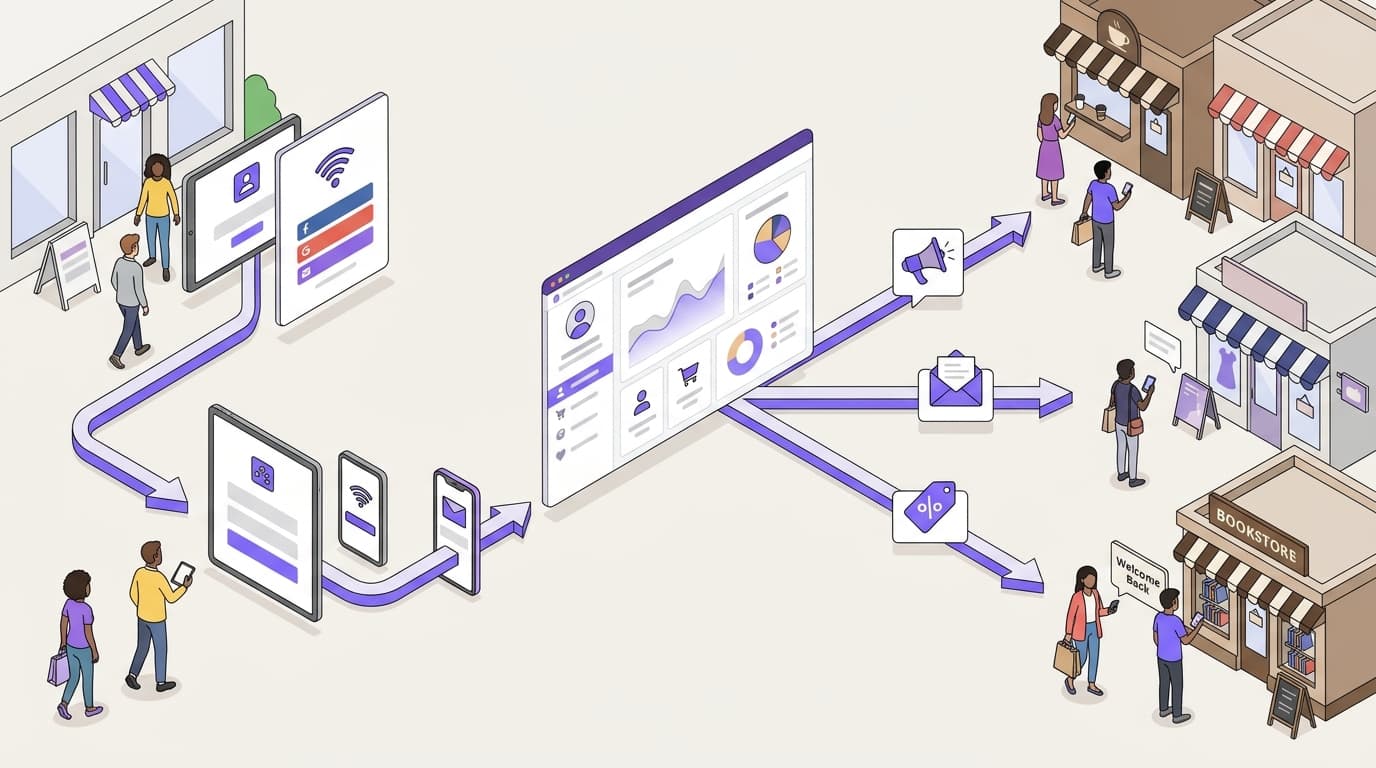
Choose email login if you want a consented list you own, and choose social login if one-tap speed matters more than list growth. A branded email form with a conscious-choice opt-in turns each consenting guest into a CCPA/CPRA-ready contact. Purple's own data shows opt-in rates around 50% higher on branded login pages.
Social login or email login: the short answer
For marketing data, email login wins on the numbers you report: opt-in rate, list growth, revenue per send and repeat visits. Social login wins on speed at the door. Neither wins everywhere, so the useful question is where the answer flips.
It flips on one axis. Is your WiFi login the start of a guest relationship, or a gate to get through? If you judge success on repeat visits and email revenue, the login starts a relationship. That relationship needs an address, a consent record and a page you control. Some venues see few returning faces, such as an airport concourse or a one-off event. There, a fast connection can outrank list growth.
The button matters less than what builds the list. A list only grows if something builds it. Campaign platforms such as Mailchimp, Klaviyo and HubSpot send to the list you give them. They do not build that list from the people who walk through your door. Purple Engage does. Each guest WiFi login can become a consented, first-party contact, ready for your first campaign.
{"items":[{"value":"80,000+","label":"live venues on Purple","note":"In 90 countries"},{"value":"500 million","label":"logins a year","note":"Purple's own data"},{"value":"~50%","label":"higher opt-in on branded login pages","note":"Purple's own data"}]}
Which criteria decide social login vs email login?
The captive portal is the login page a guest sees before the WiFi connects. When you weigh social login vs email login for captive portal marketing, eight criteria decide the outcome. We chose them because each one moves a number on your marketing report.
We scored social login only on what the providers publish. Meta's Facebook Login documentation and Google's OAuth 2.0 documentation describe which fields an app can request. They also describe how a person grants or declines each permission. We scored email login on what you control on your own branded page.
- Marketing consent. Can you show an opt-in that is freely given, specific, informed and unambiguous? That is how privacy standards such as CCPA/CPRA define compliance - along with proving consent when required.
- Email address returned. Does a completed sign-in give you an address you can send to?
- Data accuracy. How often does the address arrive wrong?
- Sign-in friction. How much effort does a guest spend getting online?
- Data ownership. Whose terms govern the data once you hold it?
- Platform dependence. Can a third party change what you receive?
- Guest coverage. Which guests can use the route at all?
- Brand control. Does the page look and read like your venue?
Consent, address and accuracy decide whether a contact is mailable. Friction decides how many guests sign in at all. Ownership, dependence, coverage and brand control decide whether the list still grows next year. CCPA/CPRA regulations also state withdrawing consent must be as easy as giving it, so build an unsubscribe link into every send.
How do social and email login compare on each criterion?
{"caption":"Social login vs email login on a captive portal: eight marketing criteria","asOf":"2026-06-10","columns":[{"key":"c","label":"Criterion"},{"key":"e","label":"Branded email login (Purple Engage)","highlight":true},{"key":"s","label":"Social login (Facebook, Google)"}],"rows":[["Marketing consent","Conscious-choice opt-in on your page, in your words, recorded for CCPA/CPRA compliance","Sign-in shares profile data only; marketing consent needs the same separate opt-in"],["Email address returned","Every completed sign-in, typed by the guest","Only if the account holds one and the guest grants the email permission"],["Data accuracy","Typing errors possible; a short form keeps them down","No typing errors; the address comes from the account"],["Sign-in friction","Type one address and choose whether to opt in","One tap plus a permission screen when already signed in to the provider"],["Data ownership","First-party data collected under your privacy notice","First-party once received; the provider's platform terms also apply"],["Platform dependence","Depends only on your WiFi platform","Provider can change permissions, review rules or the login product"],["Guest coverage","Any guest with an email address","Only guests with that account who will connect it"],["Brand control","Fully branded page; Purple sees opt-ins around 50% higher on branded pages","Provider button and permission dialog sit inside your flow"]],"footnote":"Social login scored from Meta and Google developer documentation. The opt-in figure is Purple's own data.","download":{"filename":"social-vs-email-login-criteria.csv"}}
Email login takes five rows outright: address returned, ownership, platform dependence, coverage and brand control. Social login takes two: accuracy and friction. Consent is level only when you add the same separate opt-in to the social route. A venue that runs social login without one holds WiFi sessions, not a marketing list.
The structural difference is the number of parties in the data flow. On the email route, the only parties are the guest, your branded page and Purple Engage. On the social route, a provider sits between your guest and your list. That provider decides which fields reach you.
{"kind":"lanes","direction":"lr","caption":"Email login keeps the data flow between guest, venue and Purple Engage; social login adds a provider","alt":"Two routes from a guest joining venue WiFi to a consented contact in Purple Engage, with the social route passing through a third-party provider's permission dialog.","lanes":[{"id":"g","label":"Guest"},{"id":"p","label":"Your branded login page"},{"id":"s","label":"Social provider"},{"id":"e","label":"Purple Engage"}],"nodes":[{"id":"a","label":"Guest joins venue WiFi","sub":"Captive portal opens on the phone","lane":"g","tone":"neutral"},{"id":"b","label":"Email field","sub":"Guest types one address","lane":"p","tone":"brand"},{"id":"c","label":"Social button","sub":"Guest taps a provider they use","lane":"p","tone":"neutral"},{"id":"d","label":"Permission dialog","sub":"Guest grants or declines each field, including email","lane":"s","tone":"danger"},{"id":"f","label":"Conscious-choice opt-in","sub":"Separate, un-checked, recorded for CCPA/CPRA","lane":"p","tone":"brand"},{"id":"h","label":"Consented first-party contact","sub":"Address, opt-in and visit history in one record","lane":"e","tone":"success"},{"id":"i","label":"Repeat-visit campaigns","sub":"Sends reach only guests who agreed","lane":"e","tone":"success"}],"edges":[{"from":"a","to":"b","label":"Email route"},{"from":"a","to":"c","label":"Social route"},{"from":"c","to":"d","label":"Hands off to provider"},{"from":"d","to":"f","label":"Returns granted fields","style":"dashed"},{"from":"b","to":"f"},{"from":"f","to":"h","label":"Guest opts in"},{"from":"h","to":"i"}]}
Where email login wins
Every guest with an inbox can sign in
Email login works for any guest with an address. Social login works only for guests who hold that account and will connect it to your WiFi. Some guests will not link a personal profile to a bar or hotel network. The email route keeps those guests online and on your list, not drifting back to cellular data.
Consent sits on one page you control
CCPA/CPRA expects you to show what a guest agreed to, and in what words. On email login, the opt-in sits beside the email field, in your brand voice, in a single step. Purple presents it as a conscious-choice opt-in, never a pre-checked box. This matters because privacy regulations state that pre-checked boxes do not constitute consent.
Your list does not depend on another platform's rules
Social providers decide which fields an app may request, and they review and revise those rules. When the rules change, the data your login returns can change too. Email login depends on one relationship: the one with your WiFi platform.
For a multi-site group, one branded email page also gives every venue the same fields and consent wording. Reports then compare like with like across sites.
Branded pages earn more opt-ins
Purple's own data shows opt-in rates around 50% higher on branded login pages. That gain compounds. More consented contacts mean more sends that reach a real guest. More sends that land mean more chances to bring a diner back on a quiet Tuesday.
Keep the form short. Our guide to how many WiFi login form fields to ask for covers that trade-off.
{"tone":"proof","title":"Proven at venue scale","text":"Sweetgreen, Under Armour and Chase run guest WiFi on Purple, alongside 80,000+ venues in 90 countries. Together they generate 500 million logins a year, each a chance to add a consented contact."}
Where social login wins
Speed at the door
A guest already signed in to a provider can connect with one tap and a permission screen. Where dwell time is short, such as a coffee counter or a station concourse, that speed matters. It cuts the number of shoppers or passengers who give up and stay on cellular data.
Addresses arrive without typos
Typed addresses carry mistakes: a missing letter, a misspelled domain. Social login returns the address held on the account, so there is nothing to mistype. The catch is availability. The provider returns an email only if the account holds one and the guest grants that permission. Meta's documentation confirms that people can decline individual permissions.
A name without asking for it
Basic profile data from Facebook Login and Google includes the guest's name. That saves a form field and gives your first email a personal greeting. Anything beyond basic profile data needs extra permissions, and the provider decides whether your app may request them.
A second route for guests who skip forms
If your login reports show guests abandoning the email form, a social button gives them another way in. Treat it as a second option, not the first. If you are weighing Facebook WiFi login in particular, check Meta's current documentation for the product's status before you plan around it.
Social login wins the moment of connection. On its own, it does not win the relationship, because it supplies identity data, not marketing consent.
{"tone":"tip","title":"Make social login earn its place","text":"Show the same un-checked marketing opt-in after the provider sign-in. Without it, a social login adds a WiFi session to your reports but no contact you can email."}
What each login option costs to run
We do not quote other vendors' prices, and you do not need them to make this call. Structure is what changes your bill, and three cost lines move with the login choice.
Your WiFi platform. On Purple, email and social login are both options on the captive portal you already run. Purple is hardware-agnostic and works as a cloud overlay, so neither choice means new access points. Purple's plans are Connect, Capture and Engage.
Downstream sending. Campaign platforms bill on list size. Mailchimp prices by contact count, Klaviyo by active profiles, and HubSpot Marketing Hub by marketing contacts. Every contact you sync without an address or an opt-in can add cost and return no revenue.
Hidden labor. Email login needs a well-written form and a check for typed errors. Social login needs re-testing whenever a provider changes its permissions or review rules. Both need someone to keep the privacy notice current.
{"caption":"What each login route costs to run: structure, not amounts","asOf":"2026-06-10","columns":[{"key":"c","label":"Cost line"},{"key":"e","label":"Email login"},{"key":"s","label":"Social login"}],"rows":[["Login page set-up","Design one branded form and opt-in","Configure each provider button plus a separate opt-in step"],["Ongoing maintenance","Review wording when your privacy notice changes","Re-test whenever a provider changes permissions or review rules"],["Data quality work","Catch typed errors before contacts reach campaigns","Fill gaps where guests declined the email permission"],["Downstream sending cost","Sync only consented, mailable contacts","Synced profiles without an address or opt-in still count toward list-based billing"],["Consent evidence","One record from one page","Join the provider sign-in to a separate opt-in record"],["Rebuild risk","Low: you own the form","Higher: a provider change can alter the fields you receive"]],"footnote":"Mailchimp prices by contact count, Klaviyo by active profiles, and HubSpot Marketing Hub by marketing contacts, per each vendor's public pricing page.","download":{"filename":"login-route-cost-structure.csv"}}
The pattern holds across every row. Email login front-loads a small design effort and then runs quietly. Social login is quick to switch on, but it carries a maintenance and rebuild risk you do not control.
What moving from social to email login involves
Most venues do not switch outright. They reorder the login page and clean up what they already hold. Six steps cover the move.
- Audit your existing contacts. Split social-sourced records into those with a recorded marketing opt-in and those without.
- Keep only consented contacts in campaigns. A login route does not cancel consent a guest gave. It also cannot create consent they never gave.
- Rebuild the login page. Put the branded email field first, with the conscious-choice opt-in beside it. Keep social login as a second button if your data supports it.
- Match your consent wording. Use the same opt-in text on both routes, so every consent record reads the same.
- Update your privacy notice. Describe the data each route collects and why you collect it.
- Run both routes for at least four weeks. Compare opt-in rate, new contacts per venue, and repeat visits before you settle social login's place.
The login change needs no new hardware, because Purple works as a cloud overlay on the access points you already own. Our guide to email capture on Cisco Meraki, Ruckus, Cambium and Ubiquiti UniFi WiFi covers vendor-specific setup.
{"tone":"warning","title":"Do not email to ask for consent","text":"Social-sourced contacts without a recorded opt-in cannot receive campaigns. An email asking them to opt in is itself marketing, and the FTC and state attorneys general penalize companies for exactly that."}
Moving the other way, from email alone to email plus social, takes less work. Add the provider button and show the same unchecked opt-in after the provider sign-in. Then test the flow on several cell phones before launch.
How to decide between social and email login
Use one rule. If repeat visits or email revenue sit in your targets, lead with branded email login and add social as a second button. If neither does and connection speed is your only goal, social login alone is a defensible choice.
{"title":"Which login route fits your venue","options":[{"name":"Branded email login","fitsWhen":["Repeat visits or email revenue sit in your targets","You want one consent record per guest from one page","You run several sites and need matching data at each"],"notWhen":["Guests stay minutes and rarely return"]},{"name":"Social login","fitsWhen":["Connection speed matters more than list growth","Your sign-in data shows guests abandoning the email form"],"notWhen":["You need a mailable contact from each sign-in","You cannot show a separate marketing opt-in after the provider step"]},{"name":"Email first, social second","fitsWhen":["You want the widest choice at sign-in","You can show the same opt-in on both routes"],"notWhen":["Nobody on your team can re-test the social route after provider changes"]}],"recommendation":"Lead with branded email login and a conscious-choice opt-in, and add social login as a second button only where your sign-in data shows guests need it."}
Your next step is to measure where you stand. Pull last month's sign-ins by login method, with the opt-in rate and new mailable contacts per venue. Then score those figures against the eight criteria above.
For the full picture of building a list from WiFi sign-ins, read WiFi email capture: the guide for venues. To see how consented contacts land in your CRM, explore Purple Engage guest data. For the wider strategy behind WiFi-led marketing, see the WiFi marketing guide.
Frequently asked questions
Does social login give you consent to send marketing emails?
No. A social sign-in shares profile data with your WiFi platform, but it does not record agreement to marketing. CCPA/CPRA defines consent as freely given, specific, informed and unambiguous, and regulations rule out pre-ticked boxes. Add the same conscious-choice opt-in you use on email login, and send campaigns only to guests who choose it. Keep that opt-in record with the contact, so you can demonstrate consent as compliance requires.
Will email login work with the WiFi hardware we already have?
Yes, on the hardware Purple supports. Purple is hardware-agnostic and runs as a cloud overlay on Cisco Meraki, HPE Aruba, Ruckus, Juniper Mist, Ubiquiti UniFi, Cambium, Extreme and Fortinet. Changing the login method is a captive portal change, not a hardware project. Our guide to email capture on Cisco Meraki, Ruckus, Cambium and Ubiquiti UniFi WiFi covers setup for each vendor.
How is Purple Engage priced compared with Mailchimp, Klaviyo or HubSpot?
They are priced on different things. Mailchimp prices by contact count, Klaviyo by active profiles and HubSpot Marketing Hub by marketing contacts, each on its public pricing page. Purple's plans are Connect, Capture and Engage. Purple Engage also does the job those platforms leave to you: building the list from guest WiFi logins, with consent attached. Ask Purple for a quote against your venue count.
Should we keep Facebook WiFi login as an option?
Keep it only if your sign-in data shows guests use it and you can add a separate opt-in. Check Meta's current documentation for the product's status and permissions first, because the provider sets the rules. Put email login first on the page and social login second. Every guest can then join, while your consented list grows from the email route.
How many fields should the email login form ask for?
Ask for as few as your first campaign needs. Start with an email address and a marketing opt-in, and add a first name only if your first email will use it. Each extra field gives a guest another reason to abandon the page and stay on cellular data. Our guide to WiFi login form fields sets out which fields earn their place.
Can we keep the contacts we collected through social login?
Yes, for contacts with a recorded marketing opt-in. Those guests agreed to hear from you, and changing your login route does not undo that. Contacts without an opt-in should not receive campaigns. Do not email them to ask for consent either, because the FTC and state attorneys general treat that request as marketing in its own right.
How long does it take to move from social to email login?
The login change itself is quick, because it is a configuration change on the captive portal with no new hardware. Plan more time for the work around it. That means auditing consent on existing contacts and updating your privacy notice. It also means running both routes for at least four weeks to compare opt-in rates and repeat visits.