
POS and EPOS explained: Functions, differences and uses
POS and EPOS compared: what each system does, where it fits in a venue, and how register sales data can power guest marketing.
Two venues can run identical register software, take the same number of card payments, and end up with wildly different amounts of usable guest data. One can tell you who visited 45 days ago, what they spent and whether they've opted in to hear from you. The other can tell you today's receipts and nothing more. So what separates them, a POS or an EPOS?
Neither label answers that. Vendors apply both names to the same products, and the acronyms describe a function rather than a capability. What separates the two venues is ownership: which system holds the product record, the sale, the guest identity and the consent, and whether anyone wrote down the rules for reconciling them when they disagree. Settle that and the label stops mattering. Skip it and you'll buy a POS that behaves like a cash register with a subscription.
Table of Contents
- POS and EPOS at a Glance
- Why an EPOS Widens Your Security Scope
- Mobile and Cloud EPOS Trade-offs Beyond the Label
- Matching the Setup to Each Venue Type
- Who Owns the Customer Record
- Turning Register Sales Into Venue Marketing Signals
- Confirm Your Data Path Before You Connect Marketing
POS and EPOS at a glance
POS means point of sale: the place, and the moment, where a sale is recorded and paid. EPOS means electronic point of sale, the same checkout function extended into a networked system that also carries the product catalog, stock levels, staff permissions, reporting and integrations. A POS is the counter; an EPOS is everything standing behind it.
POS and EPOS compared on core criteria
| Aspect | POS | EPOS |
|---|---|---|
| Core job | Records a sale and takes payment | Runs sales plus inventory, catalog, staff and reporting |
| Typical scope | One register or terminal | Multiple terminals, sites and back-office tools |
| Data captured | Transaction, date, time, items, total | Adds stock levels, employee actions and customer references where permitted |
| Integrations | Often limited to payments | Connects bookings, accounting, loyalty and marketing tools |
| PCI scope | Payment device and its data path | Wider environment including apps, permissions, reporting and integrations |
| Typical venues | Single café, kiosk or market stall | Restaurant groups, bars with table service, retail chains and hotels |
Most vendor pages stop at that table and call it a day. The rows only matter because of what sits underneath them. IBM's history of the point of sale traces the turning point to 1973, when the company introduced its 3660 Supermarket System, using the emerging Universal Product Code and a laser scanner to identify products, retrieve prices and record sales electronically. Early installations included Pathmark in New Jersey and Steinberg's in Quebec. The milestone wasn't faster checkout. It was that a payment became a record.
Standardizing that record took another decade. A Digimarc history of the barcode notes that the first retail UPC scan happened on June 26, 1974, on a 10-pack of Wrigley's chewing gum at a Marsh Supermarket in Troy, Ohio. Only about 50 stores were scanning by 1976, yet roughly 8,000 US stores were doing it by 1980. The payoff is scale: GS1 US later reported that barcodes identified more than 1 billion products and were scanned over 10 billion times per day worldwide.
A barcode doesn't identify a person. It identifies a product in a way every system can read, which is why two sites can consolidate sales records at all. The human side is the harder half.
Rule of thumb: if the register has to share inventory, staff and guest data across sites, the EPOS features matter far more than the hardware sitting on the counter.
Why a POS Widens your security scope
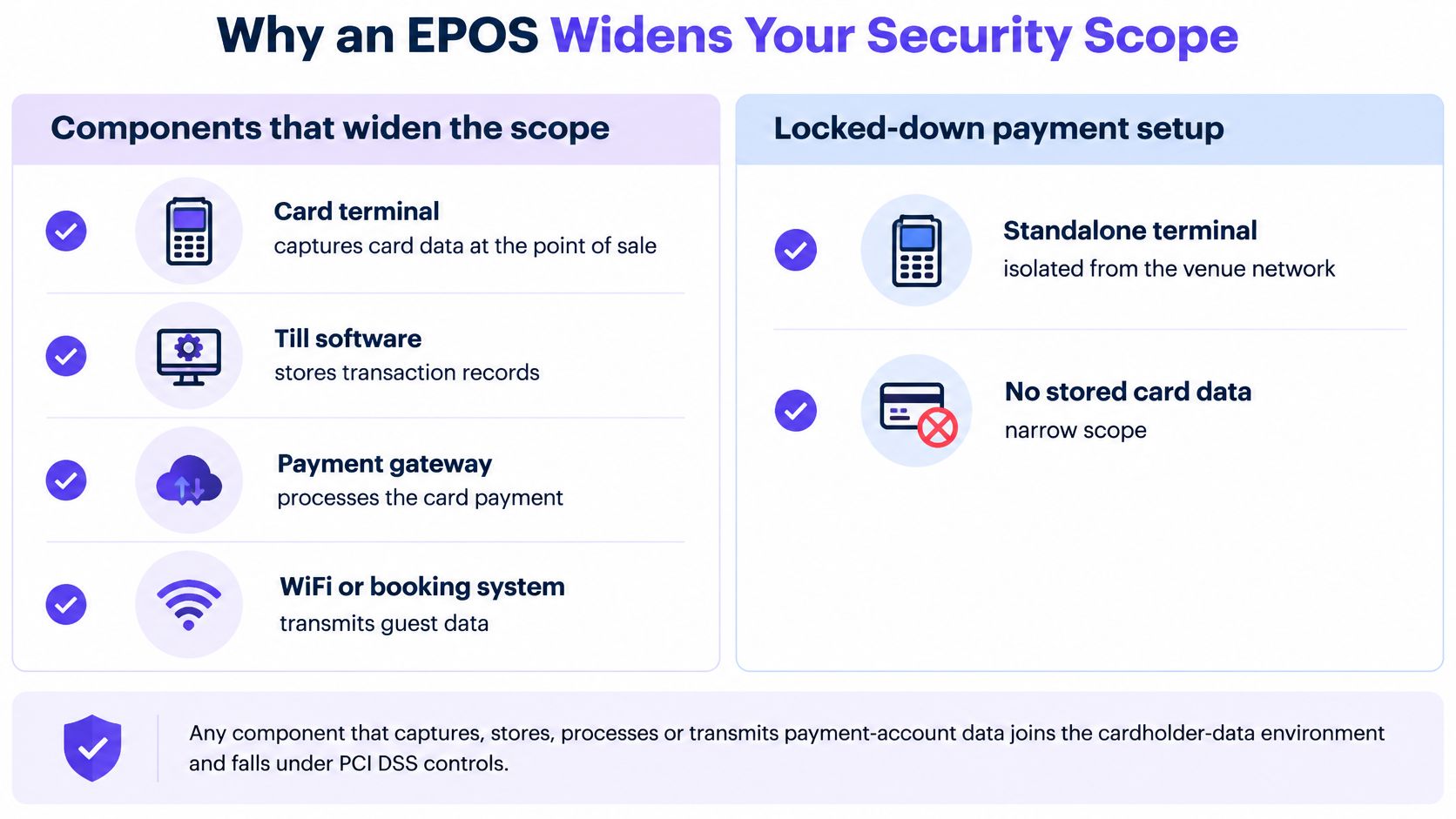
A card terminal and a POS system can accept the same payment, but they don't sit inside the same security boundary. The PCI Security Standards Council's guidance on point of sale scope is direct about why: any component that captures, stores, processes or transmits payment-account data becomes part of the merchant's cardholder-data environment and falls within applicable PCI DSS controls.
A POS usually adds several of those components at once. Catalog management, inventory, employee permissions, reporting and integrations all touch payment data or sit directly beside it, so a POS deployment carries a materially broader scope than a locked-down terminal. The same guidance notes that a complex POS with multiple applications and configuration options needs more controls than a simple secured terminal.
The visual below shows which parts of a typical venue stack pull the payment boundary wider.
None of that is an argument against buying a POS. It's an argument for mapping the data path before you accept a quote.
The checks a wider scope demands
Inventory every terminal and application. Write down each register, tablet, back-office tool and plugin that touches a sale. You can't protect a device nobody remembered to list.
Verify vendor support and patch status. Ask which operating system versions are supported and how updates are delivered. A device that has stopped receiving fixes stays vulnerable for as long as it's on your network.
Replace default credentials. Default administrative logins are published in public manuals. Change them at installation and store them somewhere better than a shared notes app.
Protect stored data, and question why you hold it. If a field isn't needed for refunds, disputes or accounting, don't keep it.
Encrypt account data before transmission. Encryption protects the journey between register, gateway and back office, which is where misconfigured integrations leak.
Enforce multi-factor authentication on remote access. Vendor support sessions and managers working from home are the two doors attackers look for first.
Inspect devices for tampering or substitution. A swapped terminal or a fitted skimmer looks ordinary at a glance, so check serial numbers against your inventory and look at the seals.
The trap is assuming a compliant payment terminal makes the wider EPOS compliant. It doesn't, and it doesn't remove the merchant's assessment obligations either. Assess the whole path, from the device at the bar to the back office and into every integration that receives a sale record, because that path is what you can defend in an audit.
Mobile and Cloud POS trade-offs Beyond the label
The architecture decision decides which component fails, who can still take payment, and which record owns the truth while systems are apart. The POS versus EPOS label matters less than the custody of each field: product, price, sale, guest identity and consent.
POS architectures and their trade-offs
| Setup | Offline behavior | Security focus | Best fit |
|---|---|---|---|
| On-premise POS | Processing continues locally during outages | Local network, physical access and patching | Transaction-heavy sites with unreliable internet |
| Cloud POS | Set by the vendor's cached mode, so confirm what queues and for how long | Vendor access, credentials and integration permissions | Multi-site groups needing central reporting |
| Mobile POS on a phone or tablet | Set by the app's offline mode and its queued-transaction limit | Validated payment architecture under CPoC or MPoC | Pop-ups, tableside service and distributed venues |
On-premise systems keep their following for a reason. A market analysis of the POS software market notes that on-premise POS remains favored by transaction-intensive businesses and locations with unreliable internet because it supports offline processing and continuity, and cites a 2025 enterprise survey in which hospitality decision-makers named data privacy and security as the leading challenge for payment systems and POS solutions, cited by 48% and 47% respectively. If your site loses connectivity every time it rains, a register that keeps taking orders is practical rather than old-fashioned.
Mobile acceptance has its own rules. The PCI Security Standards Council's published standards describe Contactless Payments on COTS, which lets a commercial off-the-shelf phone or tablet accept contactless payments through its native NFC without an external reader, while MPoC extends the model to scenarios involving PIN entry. That removes dedicated hardware from pop-ups, tableside service and distributed sites. It does not remove the engineering: the specifications call for strong cryptographic implementation, validated random-number-generation algorithms and libraries, and tightly restricted access to device resources.
Treat offline mode like a spare power cable. It keeps service moving, but anything done while unplugged has to be reconciled cleanly when the connection returns.
Before you sign, get five answers in writing:
- Which transactions queue offline, and how long the register keeps accepting them before it stops.
- How duplicate payments are prevented when a queued authorization finally reaches the processor.
- How prices and menus are cached, and who can change them while a site is disconnected.
- How reconnection reconciliation works, including which record wins when the offline price differs from the live one.
- Which functions fail closed, so a connectivity problem cannot be turned into an open tab or an unapproved discount.
The trade-off in one sentence: centralizing payment, guest and operational data gives you visibility and, in the same move, makes an outage, a stolen credential or a misconfigured integration travel much further than it used to.
A shopper choosing among the top platforms for buying Australian wine sees range and checkout ease. The operator underneath still has to decide where the order, payment, guest and consent fields sit when the connection drops, because convenience on the guest's screen rests on ownership and reconciliation behind it.
Matching the Setup to each venue Type
A café with one counter and a bar with a patio are both single-site businesses, yet they need different things from a register. Six setups follow, each with the one check that catches most of the trouble. Every check asks the same underlying question in a different setting: which system owns the record, and what happens when something goes wrong.

An independent cafe with one counter. A POS with clean daily reporting and a single card terminal covers it. Verify that end-of-day totals export without a support ticket, because that export is what you reconcile against the bank.
A bar with table service. Staff taking orders at the table need a mobile EPOS with a documented offline mode and tight staff permissions. Verify what a server account can still do after a shift ends, since shared logins are how comped drinks go unnoticed.
A restaurant group with twelve sites. This is EPOS territory: one shared catalog, central reporting, price changes pushed from a single place. Verify that a price change reaches every site within the same reporting period, or your margin comparisons are fiction.
A short walkthrough helps before you sit down with a vendor.
A hotel with a restaurant, bar and spa. You need an EPOS that links bookings and room charges to one guest identity. Verify that a charge posted to a room appears once in that guest's history, not once per outlet.
A shopping center offering guest WiFi. Here the register has to match sales to consented WiFi sign-ins by email. Verify the duplicate rule before your first campaign, because one shopper holding two email addresses is the normal case.
A pop-up. Mobile payments cut the hardware you carry and the cabling you need. Verify that the payment app is a validated architecture under CPoC or MPoC rather than a consumer app with a reader attached.
Consolidation on the POS side is real. RestaurantData's 2025 count of POS installations put Aloha/NCR at 65,079 restaurant locations, 22.68% of the locations it surveyed. Concentration at that scale has a practical upside for a buyer: widely installed systems tend to come with a deeper pool of trained staff and compatible hardware, which is worth weighing alongside the headline fee.
Where the label stops helping
Read back through the six setups and the pattern shows itself. Each scenario comes down to two decisions: which system holds each record, and who signs off its use. Neither decision appears on a feature comparison page, and neither depends on whether the vendor's brochure says POS or EPOS.
The label matters less than which system owns the customer record and who approves its use.
Who owns the customer record
Four fields carry almost all the risk when register data moves anywhere near marketing. For each one, name a single system of record in writing before you sign a contract.
- Product, price and stock. The POS catalog owns these. Change a menu or a price anywhere else and one site will sell at the old figure while your margin report disagrees with your bank.
- The transaction itself. The register owns the sale: date, time, location, items, discounts, refunds and total. Marketing tools read that record; they don't correct it.
- Guest identity. Whichever system the guest first used to identify themselves, usually a WiFi sign-in, a booking or a hotel stay, owns the identity. Matching runs on email, with a written rule for two addresses that belong to one person.
- Consent. The consent record owns permission to send anything, and no import from any other system may override an opt-out.
One guest, three records
Say a guest pays at the bar by card, signs into the venue WiFi with the same email address, and books a table for four two weeks later. Three systems now hold a fragment of one person. The register owns the spend, the WiFi platform owns the sign-in, the booking tool owns the reservation, and the merged profile has to show which record won where the three disagree about a name, a cell phone number or a marketing preference.
Duplicates are the routine case, not the exception. A shopper using a work address and a personal address looks like two guests unless someone defines the rule, which is the job identity resolution across a venue's systems exists to do: deciding which attributes survive a merge and which are kept as history.
Write the ownership map first, then choose the platform. An integration list tells you what can be connected. It says nothing about who wins a conflict, and that's the question your first badly matched campaign will ask.
Turning register sales into venue marketing Signals
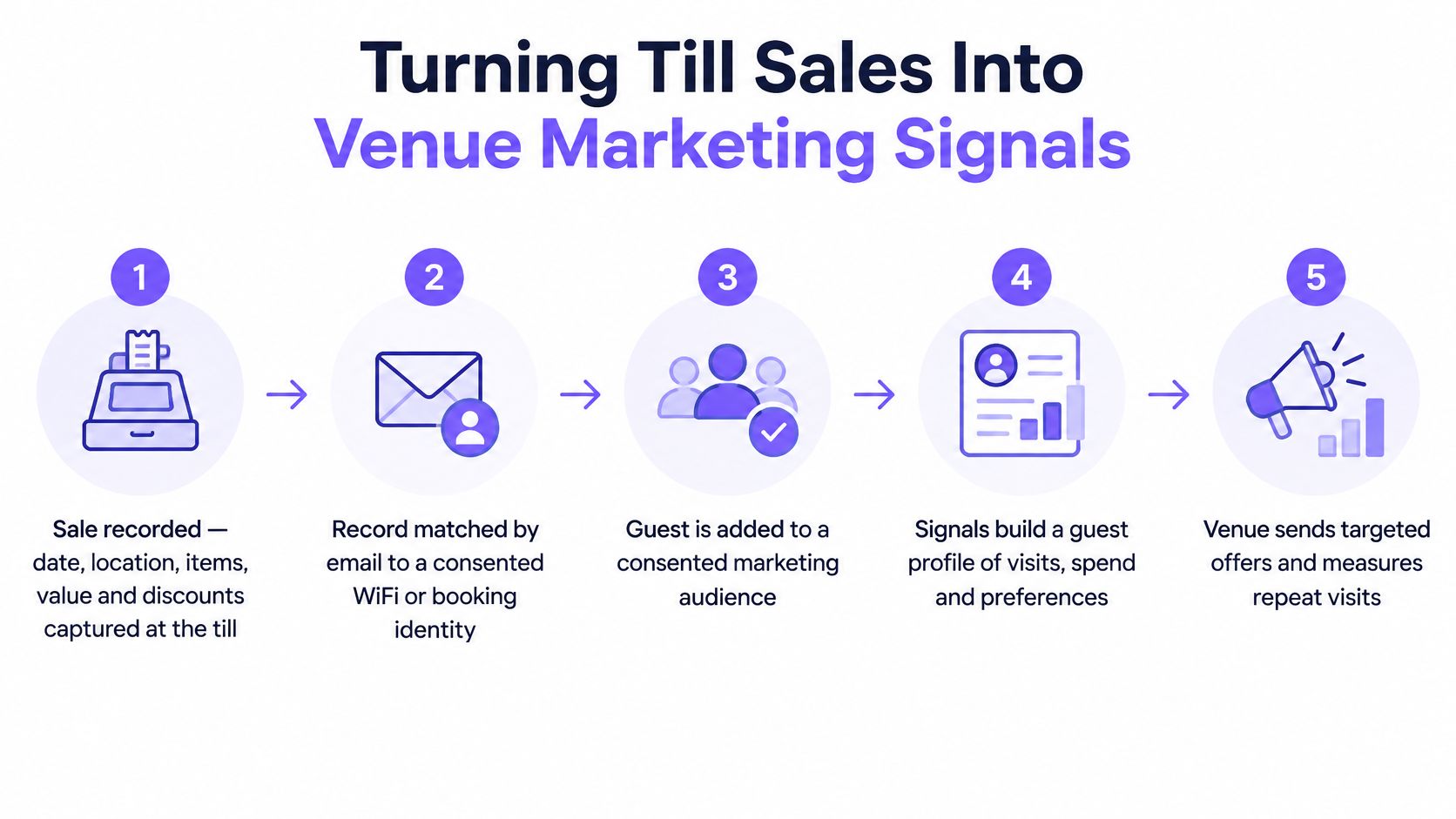
With ownership settled, a register becomes a marketing instrument through five stages, none of them optional.
- The sale is recorded with date, location, items, value and discounts.
- The record is matched by email to an identity that already exists, usually a consented WiFi sign-in or a booking.
- The guest lands in segments built from visit frequency, spend and recency, such as no visit in 45 days.
- A journey sends a message only to contacts whose consent permits it.
- A held-back control group measures whether extra visits or purchases happened.
Testing whether the connection holds
An integration can exist and still produce unreliable audiences. A 2025 survey report on retail data integration found that 73% of retail leaders had experienced data inconsistency because of fragmented or missing integrations, while only 27% had a single solution connecting POS, inventory and finance. Restaurant technology coverage cited in the same report found that 85% of operators considered integration a top POS-purchase feature, yet 44% ranked integration with legacy systems as their leading operational challenge.
That gap is the practical risk. Probe a sample of transactions before you trust any segment:
- Duplicates. Look for one purchase counted twice when a queued offline sale syncs.
- Timestamps. Check whether a sale at 23:50 on Saturday lands on Saturday or Sunday, because a 45-day recency audience depends on it.
- Refunds and voids. Confirm they subtract from spend rather than sitting beside it.
- Historical backfill. Ask how far back the import reaches and what happens to the gap before it.
- Failed syncs. Find the queue, and find out who gets told when it fills.
Then reconcile. Add up a week of register totals and compare them with the spend figures sitting in your marketing audience. If those disagree, the segment is wrong no matter how the integration marketplace describes it.
The final step is the one most often skipped. A transaction can be perfectly valid operationally and still unusable for communications if the consent record behind it is missing or ambiguous. At scale, register data is only usable when there's a documented route from transaction to consented guest, which is where connecting POS data to a guest profile begins.
Confirm your data path before you connect marketing
The verdict is short. A single-site venue with no guest identity, and no plan to build one, can run a POS and skip marketing integration entirely, because the data has nowhere useful to go. A multi-site group with WiFi, bookings or hotel stays should connect register sales to marketing only once the data path is confirmed.
| Check | What a pass looks like |
|---|---|
| Integration is live | Sales arrive from your sites in production, not from a pilot venue |
| Duplicates and refunds | A sample of transactions matches register totals after refunds, voids and offline sales |
| Consent is enforced | A message can't reach an opted-out guest, and no import reverses an opt-out |
| Holdout is set | A held-back group exists before the first campaign runs |
On the first check, establish whether you're consuming a webhook that pushes events or an API you poll, since that decides how fast a sale appears and who owns the retry. The comparison of webhooks and APIs for guest data sets out the difference in plain terms.
Whichever platform you choose, the same four checks apply. Where that platform is Purple Engage, the guest record is built by matching WiFi sign-ins, register sales, bookings, forms, files, messages and survey answers on email, and it captures data from Purple WiFi, Juniper Mist, Square, Epos Now and Loyverse, with Cisco Spaces, Cisco Meraki, Lightspeed X-Series, Oracle Simphony, ResDiary, Mews and apaleo in pilot. Consent is checked twice, opt-out imports can't be undone and erasure stays erased, which is exactly the behavior the third check is testing for.
Run the whole checklist on one site first. A venue that reconciles cleanly for four weeks tells you more about the rest of the group than any vendor demonstration.
Purple Engage pulls WiFi sign-ins, register sales, bookings and hotel stays into one guest record matched on email, so a venue can see who came back rather than who opened an email. If you're connecting a register to marketing this quarter, it holds those sources against one consent ledger and measures campaigns against a held-back group, reporting incremental visits with a range. Visit Purple Engage to see how the path from register to guest record is handled before you commit.